
Last updated on
Nov 9, 2026
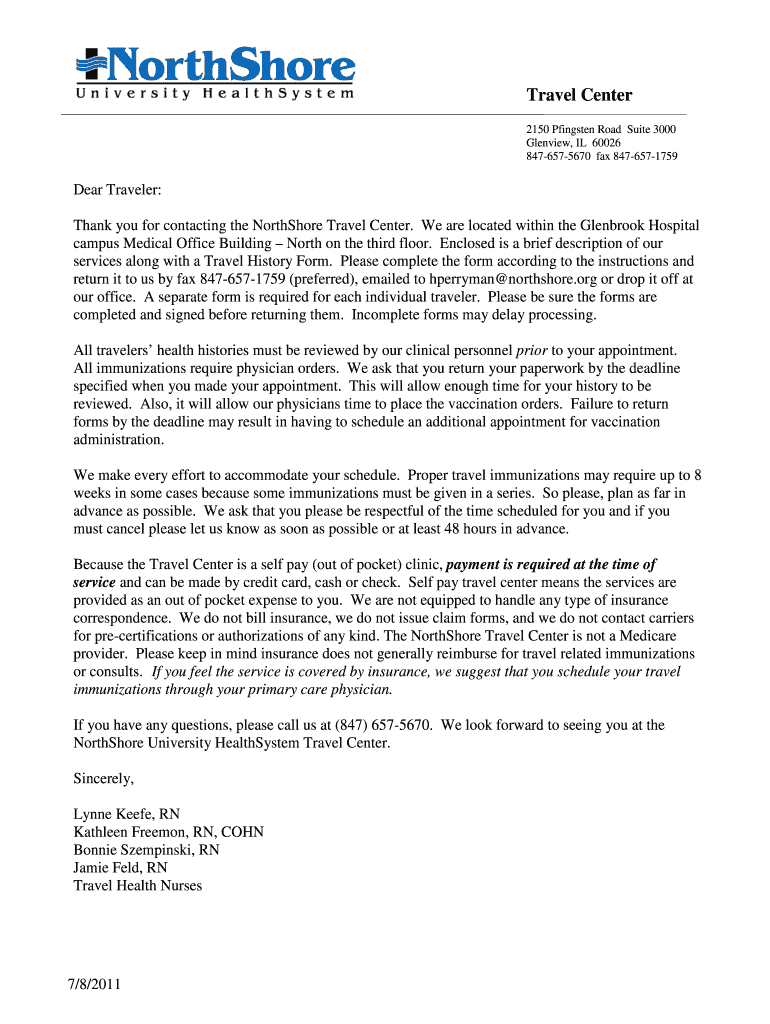
NorthShore University HealthSystem Travel Health History 2011 free printable template
pdfFiller is not affiliated with any government organization

Fill out
Complete the form online in a simple drag-and-drop editor.

eSign
Add your legally binding signature or send the form for signing.

Share
Share the form via a link, letting anyone fill it out from any device.

Export
Download, print, email, or move the form to your cloud storage.
Why pdfFiller is the best tool for your documents and forms


End-to-end document management
From editing and signing to collaboration and tracking, pdfFiller has everything you need to get your documents done quickly and efficiently.
Accessible from anywhere
pdfFiller is fully cloud-based. This means you can edit, sign, and share documents from anywhere using your computer, smartphone, or tablet.
Secure and compliant
pdfFiller lets you securely manage documents following global laws like ESIGN, CCPA, and GDPR. It's also HIPAA and SOC 2 compliant.
What is NorthShore University HealthSystem Travel Health History
The Travel Health History Form is a medical history document used by travelers to provide their health background and immunization records to the NorthShore Travel Center.
pdfFiller scores top ratings on review platforms




Who needs NorthShore University HealthSystem Travel Health History?
Explore how professionals across industries use pdfFiller.

NorthShore University HealthSystem Travel Health History is needed by:
-
Travelers planning international trips
-
Individuals seeking immunizations for travel
-
Residents of Illinois using the NorthShore Travel Center
-
Patients requiring medical history documentation
-
Healthcare providers coordinating travel health services
-
Families preparing for group travel
Comprehensive Guide to NorthShore University HealthSystem Travel Health History
What is the Travel Health History Form?
The Travel Health History Form is a critical document used by travelers to provide their health history and immunization records to the NorthShore Travel Center. This form plays a significant role in facilitating health recommendations tailored to individual travelers, ensuring they receive appropriate medical advice and immunizations. Key components include personal information like name and contact details, as well as comprehensive medical history sections that detail any pre-existing conditions and current medications.
By accurately documenting this information, travelers assist healthcare providers in making informed recommendations to ensure safe travel experiences.
Why You Need the Travel Health History Form
Submitting accurate health information before traveling is crucial for a safe journey. The Travel Health History Form not only informs healthcare providers of your medical background but also allows them to tailor immunization plans and health advice specific to your needs. Failure to provide necessary medical history can result in inadequate health preparations, exposing travelers to potential health risks.
Key Features of the Travel Health History Form
-
Sections for itinerary details, accommodations, and prescribed medications.
-
Compliance with healthcare regulations to protect patient information.
-
Accessible PDF options for easy downloading and filling.
The Travel Health History Form ensures that users can easily navigate its contents while meeting regulatory requirements, enhancing the overall user experience.
Who Needs to Complete the Travel Health History Form?
This form is particularly important for travelers planning international trips. Specific groups that may require completion include families traveling with children, business travelers needing quick health assessments, and individuals with pre-existing health conditions who must disclose their medical history. Eligibility criteria may vary based on the clinic's requirements, targeting various demographics to ensure a comprehensive health evaluation.
How to Fill Out the Travel Health History Form Online
To complete the Travel Health History Form online, follow these steps:
-
Access the form using pdfFiller.
-
Fill out personal details in the designated fields.
-
Provide information about your travel itinerary and accommodations.
-
Enter your current medications and any relevant medical history.
-
Review for accuracy before submitting.
Ensuring completeness in all sections is critical, especially where sensitive health information is required.
Review and Validation Checklist for Your Travel Health History Form
Before submitting your Travel Health History Form, consider the following checklist to avoid common errors:
-
Ensure all mandatory fields are filled out correctly.
-
Check for missing signatures or incomplete sections.
-
Validate that all required information is provided before submission.
This careful review process reduces the likelihood of delays in your health recommendations.
Submission Methods and What Happens After You Submit the Form
The process for submitting the Travel Health History Form to the NorthShore Travel Center is straightforward. After submission, travelers can expect prompt feedback regarding their health recommendations. To ensure the security of sensitive health information, robust measures are in place when using pdfFiller to handle your documents.
How to Correct or Amend the Travel Health History Form
If mistakes occur on the Travel Health History Form, users can easily amend their entries using pdfFiller. It is crucial to keep health information up to date prior to travel to guarantee accurate health assessments during your trip. Making corrections in a digital format simplifies this process.
Experience the Ease of Using pdfFiller for Your Travel Health History Form
pdfFiller enhances your experience with the Travel Health History Form by offering capabilities to create, edit, and securely submit your document. Features like eSigning, annotation, and comprehensive document management solutions empower users to complete their forms confidently while ensuring that their information remains secure throughout.
How to fill out the NorthShore University HealthSystem Travel Health History
-
1.Access the Travel Health History Form by visiting pdfFiller and searching for the form name.
-
2.Open the form in pdfFiller's interface, which allows for easy editing of PDF documents.
-
3.Before starting, gather your personal information, trip details, and health records such as past immunizations.
-
4.Navigate through the form and fill in the required fields, including your name, planned itinerary, purpose of travel, and medications.
-
5.Use the checkboxes for questions regarding accommodations and prior immunizations to indicate your options clearly.
-
6.Review each section to ensure all fields are completed accurately while following the instructions provided within the form.
-
7.Once you finish filling in the form, check for any missing information or errors.
-
8.Save your completed form to your account or download it securely to your device for submission.
-
9.If necessary, submit the form by following the specified procedures upon your appointment at the NorthShore Travel Center.

Who should fill out the Travel Health History Form?
The Travel Health History Form should be completed by any traveler planning to visit the NorthShore Travel Center for immunization or health advice related to travel. This includes both individual travelers and families.
Is there a deadline for submitting the form?
Yes, the Travel Health History Form must be completed and returned before your scheduled appointment. This allows for sufficient review and preparation for any necessary vaccinations.
What information do I need to complete the form?
To complete the Travel Health History Form, gather your personal identification details, medical history, current medications, and records of prior immunizations. Being prepared will make the process smoother.
How do I submit the completed form?
You can submit the completed Travel Health History Form by bringing it to your appointment at the NorthShore Travel Center, along with any required payment for services at the time of your visit.
What are common mistakes to avoid when filling out this form?
Common mistakes include omitting personal details, forgetting to sign the form, or providing incomplete medical history. Ensure all sections are filled out thoroughly and accurately.
What happens after I submit the form?
After you submit the Travel Health History Form, the staff at the NorthShore Travel Center will review your information to provide tailored health recommendations and schedule any necessary vaccinations.
Is there a fee associated with the Travel Health History Form?
Yes, the NorthShore Travel Center is a self-pay clinic, which means you are required to pay for services rendered, including any vaccinations, at the time of your appointment.
NorthShore University HealthSystem Travel Health History Form Versions
Related Content
Related Forms



Get the latest insights from our blog


If you believe that this page should be taken down, please follow our DMCA take down process
here
.
This form may include fields for payment information. Data entered in these fields is not covered by PCI DSS compliance.