
Last updated on
Nov 7, 2026
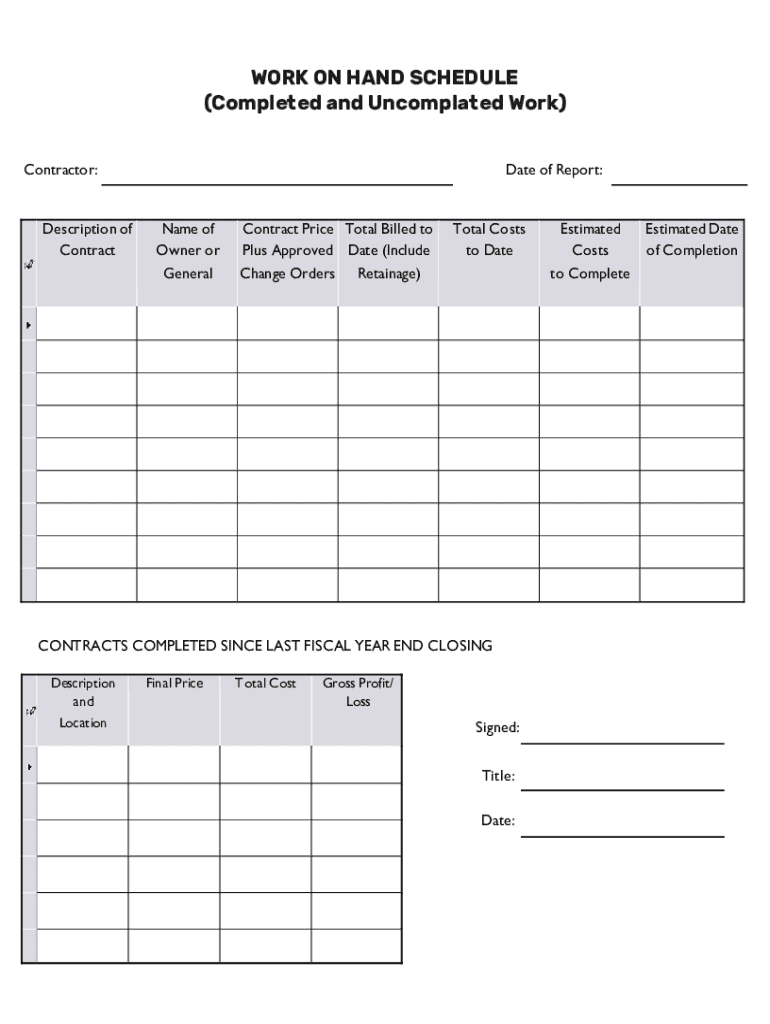
Surety Bond Brokers Work on Hand Schedule (Completed and Uncompleted Work) 2019-2026 free printa...
pdfFiller is not affiliated with any government organization

Fill out
Complete the form online in a simple drag-and-drop editor.

eSign
Add your legally binding signature or send the form for signing.

Share
Share the form via a link, letting anyone fill it out from any device.

Export
Download, print, email, or move the form to your cloud storage.
Why pdfFiller is the best tool for your documents and forms


End-to-end document management
From editing and signing to collaboration and tracking, pdfFiller has everything you need to get your documents done quickly and efficiently.
Accessible from anywhere
pdfFiller is fully cloud-based. This means you can edit, sign, and share documents from anywhere using your computer, smartphone, or tablet.
Secure and compliant
pdfFiller lets you securely manage documents following global laws like ESIGN, CCPA, and GDPR. It's also HIPAA and SOC 2 compliant.
What is Surety Bond Brokers Work on Hand Schedule (Completed and Uncompleted Work)
The Work on Hand Schedule is a financial report used by contractors to track and report the status of their contracts.
pdfFiller scores top ratings on review platforms




found it hard to find the doc I wanted but was easy to use once I got that up and running
It was easy to get started with PDFfiller. Importing the file was easy. Adding text or signatures was very intuitive. It does the job quickly and efficiently.
Who needs Surety Bond Brokers Work on Hand Schedule (Completed and Uncompleted Work)?
Explore how professionals across industries use pdfFiller.

Surety Bond Brokers Work on Hand Schedule (Completed and Uncompleted Work) is needed by:
-
Contractors managing multiple projects
-
Construction project managers overseeing progress
-
Financial analysts tracking contractor expenses
-
Business owners evaluating project profitability
-
Accountants compiling contractor financial statements
Comprehensive Guide to Surety Bond Brokers Work on Hand Schedule (Completed and Uncompleted Work)
What is the Work on Hand Schedule?
The Work on Hand Schedule serves as a crucial financial report for contractors, capturing essential details about ongoing contracts. This document includes information such as contract descriptions, prices, costs, and estimated completion dates. By utilizing the Work on Hand Schedule, contractors can effectively monitor project status, which is vital for accurately calculating gross profit or loss.
Purpose and Benefits of Using the Work on Hand Schedule
Utilizing the Work on Hand Schedule enhances project management efficiency and accuracy. It aids in tracking both ongoing and completed projects, ensuring that contractors stay informed about their overall progress. Additionally, this schedule streamlines financial reporting and improves contract management accuracy, fostering better transparency and communication with stakeholders.
Key Features of the Work on Hand Schedule
This financial reporting tool boasts several user-friendly features designed to simplify the input process. It includes fillable fields and structured tables, allowing users to input vital information quickly. The form also offers clear instructions for completion and is compatible with various digital tools, enabling easy editing and secure storage.
Who Needs the Work on Hand Schedule?
The Work on Hand Schedule is primarily designed for contractors, project managers, and financial analysts. It is especially beneficial for scenarios that require diligent tracking of project statuses. Small businesses can significantly improve their project management practices using this tool, offering benefits that can also scale up for larger enterprises.
How to Fill Out the Work on Hand Schedule Online (Step-by-Step)
Filling out the Work on Hand Schedule requires gathering specific information beforehand. Utilize the following steps to complete the form accurately:
-
Collect necessary details, including contractor information and project specifics.
-
Fill in the 'Date of Report' to indicate when the schedule is being submitted.
-
Provide a detailed 'Description of Contract' for clarity and record-keeping.
-
Double-check each field for accuracy before submission to ensure consistency.
-
Save your work periodically to prevent data loss during the session.
Common Errors and How to Avoid Them When Using the Work on Hand Schedule
Users often encounter common pitfalls while filling out financial reports. Frequent errors include inaccurate data entry and overlooked fields. To minimize errors, consider these best practices:
-
Regularly double-check all entries before finalizing the document.
-
Use digital tools that can help identify discrepancies in the data.
-
Training staff on the correct usage of the Work on Hand Schedule to enhance accuracy.
How to Submit and Track Your Work on Hand Schedule
Submitting your completed Work on Hand Schedule can be done through various methods, including online platforms or email submissions. Users should also be aware of any fees that may apply during the submission process. After filing, tracking your submission provides peace of mind and ensures that you remain informed on its status.
Security and Privacy When Using the Work on Hand Schedule
When handling sensitive data, reassuring security measures are paramount. The Work on Hand Schedule is protected by 256-bit encryption and adheres to compliance standards like SOC 2 Type II, HIPAA, and GDPR. Users are encouraged to implement additional security steps to safeguard their personal and financial information during the completion process.
Enhance Your Workflow with pdfFiller
pdfFiller significantly streamlines the process of managing your Work on Hand Schedule. Core features like editing, eSigning, and sharing enhance your experience with form management. Users have reported increased efficiency and ease of use, making pdfFiller an ideal choice for modern document management needs.
Example of a Completed Work on Hand Schedule
To assist users in understanding the filling process, a visual reference of a filled-out Work on Hand Schedule is invaluable. This example showcases typical entries and highlights the significance of each section, offering context for why specific details matter when completing your own schedule.
How to fill out the Surety Bond Brokers Work on Hand Schedule (Completed and Uncompleted Work)
-
1.To access the Work on Hand Schedule on pdfFiller, navigate to the pdfFiller website and search for the form using its name in the search bar.
-
2.Once located, click on the form to open it in the online editor.
-
3.Begin by reading the introductory instructions provided to familiarize yourself with the form requirements.
-
4.Gather necessary information before starting such as contract details, description, contract owner’s name, prices, costs, and estimated completion dates.
-
5.Using the editing tools available in pdfFiller, click on each blank field to enter the required information.
-
6.Make sure to carefully review each entry for accuracy, ensuring that all necessary fields are filled out completely.
-
7.After completing all sections of the form, take advantage of the review feature to double-check for any errors or omissions.
-
8.Once you are satisfied with the completed form, you can save your work by clicking on the save option.
-
9.Select the download option if you need a copy for your records or to print it out.
-
10.If submission is required, follow the provided instructions on pdfFiller to submit directly via the platform or download for manual submission as needed.

Who can use the Work on Hand Schedule?
The Work on Hand Schedule is designed for contractors, project managers, and financial analysts who need to track the financial status of contracts and projects.
Are there deadlines for submitting the Work on Hand Schedule?
While there are no specific deadlines for the Work on Hand Schedule itself, it is advisable to complete and submit it regularly to maintain accurate financial tracking throughout the duration of your projects.
How do I submit the completed form?
You can submit the completed Work on Hand Schedule either directly through pdfFiller, if applicable, or by downloading it for manual submission via email or traditional mail methods.
What supporting documents do I need when filling out this form?
Before starting, gather any related contract documentation, financial statements, and previous project reports to ensure accurate data input in the Work on Hand Schedule.
What are common mistakes to avoid when using this form?
Common mistakes include failing to fill in all required fields, miscalculating expenses, or not updating project statuses regularly. Double-checking entries during the review phase can help minimize errors.
How long does it take to process the Work on Hand Schedule?
Processing times for financial reports like the Work on Hand Schedule vary based on internal reviews but are typically immediate once submitted if done through electronic platforms.
Can I edit the Work on Hand Schedule after saving it?
Yes, you can reopen the Work on Hand Schedule in pdfFiller to make edits as needed before your final submission.
Surety Bond Brokers Work on Hand Schedule (Completed and Uncompleted Work) Form Versions
Related Forms




Get the latest insights from our blog


If you believe that this page should be taken down, please follow our DMCA take down process
here
.
This form may include fields for payment information. Data entered in these fields is not covered by PCI DSS compliance.