
Last updated on
Nov 9, 2026

NC Cowee Baptist Church Purchase Expense/Reimbursement Form 2009-2026 free printable template
pdfFiller is not affiliated with any government organization

Fill out
Complete the form online in a simple drag-and-drop editor.

eSign
Add your legally binding signature or send the form for signing.

Share
Share the form via a link, letting anyone fill it out from any device.

Export
Download, print, email, or move the form to your cloud storage.
Why pdfFiller is the best tool for your documents and forms


End-to-end document management
From editing and signing to collaboration and tracking, pdfFiller has everything you need to get your documents done quickly and efficiently.
Accessible from anywhere
pdfFiller is fully cloud-based. This means you can edit, sign, and share documents from anywhere using your computer, smartphone, or tablet.
Secure and compliant
pdfFiller lets you securely manage documents following global laws like ESIGN, CCPA, and GDPR. It's also HIPAA and SOC 2 compliant.
What is NC Cowee Baptist Church Purchase Expense/Reimbursement Form
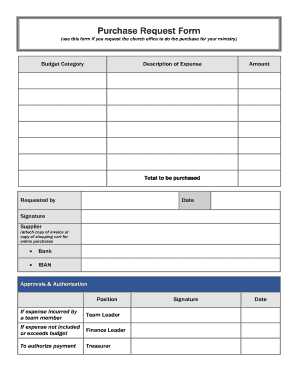
The Purchase Expense/Reimbursement Form is a financial document used by Cowee Baptist Church to facilitate reimbursement requests for out-of-pocket expenses incurred by employees or volunteers.
pdfFiller scores top ratings on review platforms




Who needs NC Cowee Baptist Church Purchase Expense/Reimbursement Form?
Explore how professionals across industries use pdfFiller.

NC Cowee Baptist Church Purchase Expense/Reimbursement Form is needed by:
-
Department/Ministry Heads requiring approvals
-
Employees seeking reimbursement for expenses
-
Volunteers who need to charge costs to the church
-
Financial staff processing reimbursements
-
Budget managers tracking expenses
-
Anyone involved in church financial planning
Comprehensive Guide to NC Cowee Baptist Church Purchase Expense/Reimbursement Form
What is the Purchase Expense/Reimbursement Form?
The Purchase Expense/Reimbursement Form is a vital financial document utilized by Cowee Baptist Church. This form allows employees and volunteers to request reimbursement for out-of-pocket expenses or charge costs directly to the church. By providing a clear layout for expense detail, it plays a crucial role in ensuring the church's financial processes remain organized and efficient. Proper use of this church financial form is essential for maintaining transparency and accountability in the church’s budget management.
Purpose and Benefits of the Purchase Expense/Reimbursement Form
The Purchase Expense/Reimbursement Form streamlines the reimbursement process for all users, making it easier for employees and volunteers to manage their finances. This essential document supports financial tracking and budgeting within the church, ensuring diligent record-keeping for all expenditures. Not only does it provide a structured approach to submitting expenses, but it also guarantees proper documentation for each request. The use of this church expense reimbursement form ultimately enhances financial accuracy and compliance.
Who Needs the Purchase Expense/Reimbursement Form?
Various roles within Cowee Baptist Church are required to complete the Purchase Expense/Reimbursement Form. Primarily, this includes the Department or Ministry Head, who provides approval for the requested expenses. Additionally, any individual making a reimbursement request must fill out this form, especially in scenarios involving out-of-pocket costs or expenses charged to the church. Utilizing a purchase expense form template ensures all necessary details are captured for a smooth reimbursement process.
How to Fill Out the Purchase Expense/Reimbursement Form Online
To effectively complete the Purchase Expense/Reimbursement Form using pdfFiller, follow these simple steps:
-
Access the form on pdfFiller’s platform.
-
Fill in all required fields including receipts and department details.
-
Double-check for accuracy and completeness before submission.
This online ministry expense form is user-friendly and designed to guide users through the process of documenting their expenses accurately.
Field-by-Field Instructions for the Form
Accurate completion of the Purchase Expense/Reimbursement Form depends on understanding each field. Key fields include:
-
Date and amount of the expense
-
Description of the expense being reported
-
Approval section for required signatures
Users should be mindful of common errors to avoid in each section, ensuring their submission is correct and comprehensive. Utilizing this church financial form helps maintain organized records.
Review and Validation Checklist
Before submitting the Purchase Expense/Reimbursement Form, it's essential to review the following key elements:
-
Ensure all signatures are present
-
Check the form’s completeness and accuracy
-
Verify that all required documents, such as receipts and invoices, are attached
This review process is crucial for successful reimbursement and helps prevent delays in processing the request.
Submission Methods and Delivery
Users have several options for submitting the completed Purchase Expense/Reimbursement Form. They can choose between electronic submission through pdfFiller or submitting a paper copy. It’s crucial to know where to send the form and whom to contact for any follow-up inquiries or concerns regarding the submission.
What Happens After You Submit the Form?
Once the Purchase Expense/Reimbursement Form is submitted, users can expect a structured post-submission process. This includes:
-
Notification of approval or rejection within designated timelines
-
Information on how to track the status of the submission
Understanding these next steps can help users manage their expectations for reimbursement timelines effectively.
Security and Compliance Considerations
When submitting the Purchase Expense/Reimbursement Form, users can be assured of the safety of their sensitive information. pdfFiller implements robust security measures, including encryption and compliance with regulations such as HIPAA and GDPR. Maintaining data privacy during the financial documentation process is critical for protecting sensitive church-related information.
Realizing the Importance of Accurate Financial Documentation
Using the Purchase Expense/Reimbursement Form correctly is essential for accurate financial documentation within Cowee Baptist Church. By following the outlined procedures for expense reimbursement, users can ensure better financial accountability. Utilizing tools like pdfFiller facilitates a seamless experience for form filling, editing, and digital signing, enhancing overall efficiency in financial operations.
How to fill out the NC Cowee Baptist Church Purchase Expense/Reimbursement Form
-
1.To begin, access pdfFiller in your web browser and locate the Purchase Expense/Reimbursement Form by searching its name in the search bar.
-
2.Once found, click on the form to open it in the pdfFiller interface, which should provide you an editable version of the document.
-
3.Before filling out the form, gather all necessary information including receipts, invoices, and details about the expense such as the department being charged and the associated budget line item.
-
4.Navigate through the form fields, and fill them out by clicking on each field and typing in the required information. Use checkboxes for any options provided.
-
5.Make sure to include all mandatory details such as dates, descriptions of expenses, and amounts to ensure completeness.
-
6.Review your entries carefully to confirm accuracy and completeness before finalizing the form; check for any missing fields or errors that may need correction.
-
7.Once satisfied with your filled form, proceed to save your document within pdfFiller. You can download it as a PDF or save it directly to your cloud service for easy access.
-
8.If required, choose to submit the form electronically after saving, or print it out for physical submission as per your organization's process.

What are the eligibility requirements for submitting this form?
The Purchase Expense/Reimbursement Form is intended for employees and volunteers of Cowee Baptist Church who have incurred out-of-pocket expenses. Make sure you have valid receipts to support your request.
Is there a deadline for submitting this form?
While specific deadlines may vary by department, it is advisable to submit the Purchase Expense/Reimbursement Form as soon as possible after incurring the expense for prompt processing.
What is the submission method for the form?
You can submit the Purchase Expense/Reimbursement Form either electronically via pdfFiller after filling it out or by printing it and submitting a physical copy to your department head.
What supporting documents are required with this form?
You must attach valid receipts or invoices for all expenses claimed on the Purchase Expense/Reimbursement Form to ensure your request is processed efficiently.
What are common mistakes to avoid when filling out this form?
Common mistakes include missing mandatory fields, failing to attach supporting documents, and submitting incomplete forms. Double-check all entries and ensure you have accurate receipts before submission.
How long does it take to process this reimbursement form?
Processing times can vary based on department workload, but typically you should expect a response within 1-2 weeks if all documents are submitted correctly and promptly.
What should I do if I encounter issues while filling this form on pdfFiller?
If you experience technical issues while using pdfFiller, check their help section for troubleshooting tips, or contact their customer support for immediate assistance.
Related Forms

Related Catalogs
Get the latest insights from our blog


If you believe that this page should be taken down, please follow our DMCA take down process
here
.
This form may include fields for payment information. Data entered in these fields is not covered by PCI DSS compliance.