
Last updated on
Nov 9, 2026

PA LS-1 2020 free printable template
pdfFiller is not affiliated with any government organization

Fill out
Complete the form online in a simple drag-and-drop editor.

eSign
Add your legally binding signature or send the form for signing.

Share
Share the form via a link, letting anyone fill it out from any device.

Export
Download, print, email, or move the form to your cloud storage.
Why pdfFiller is the best tool for your documents and forms


End-to-end document management
From editing and signing to collaboration and tracking, pdfFiller has everything you need to get your documents done quickly and efficiently.
Accessible from anywhere
pdfFiller is fully cloud-based. This means you can edit, sign, and share documents from anywhere using your computer, smartphone, or tablet.
Secure and compliant
pdfFiller lets you securely manage documents following global laws like ESIGN, CCPA, and GDPR. It's also HIPAA and SOC 2 compliant.
What is PA LS-1
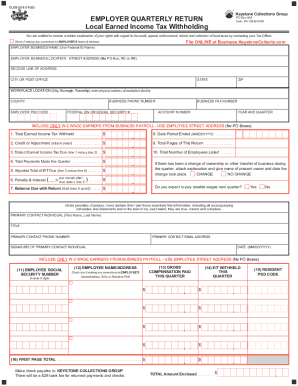
The Pittsburgh Local Services Tax Quarterly Form is a tax return document used by employers and self-employed individuals in Pittsburgh to report and pay the Local Services Tax.
pdfFiller scores top ratings on review platforms




Who needs PA LS-1?
Explore how professionals across industries use pdfFiller.

PA LS-1 is needed by:
-
Employers operating within Pittsburgh
-
Self-employed individuals in Pittsburgh
-
Businesses with employees subject to Local Services Tax
-
Local accountants or tax preparers
-
Payroll service providers in Pennsylvania
-
Tax compliance officers
Comprehensive Guide to PA LS-1
What is the Pittsburgh Local Services Tax Quarterly Form?
The Pittsburgh Local Services Tax Quarterly Form, known as the LS-1 form, is a crucial document for reporting and paying the Local Services Tax in Pittsburgh. This form serves to collect taxes from individuals who work in the city, regardless of where they live, and plays an essential role in supporting local services and infrastructure. Employers and self-employed individuals are required to fill out this form, ensuring compliance with local tax regulations.
Purpose and Benefits of the Pittsburgh Local Services Tax Quarterly Form
Filing the LS-1 form on time offers significant benefits for the community, such as funding local services like public safety, road maintenance, and recreation. Accurate reporting is vital to adhere to Pittsburgh's tax laws, preventing any legal ramifications. Failing to submit the form or making incorrect entries can lead to penalties, which emphasize the importance of timely and precise filing.
Who Needs the Pittsburgh Local Services Tax Quarterly Form?
The LS-1 form is specifically designed for employers and self-employed individuals operating in Pittsburgh. To be subject to the Local Services Tax, one must meet specific income criteria set by the city. Certain groups may be exempt from this tax, such as members of certain organizations or those earning below a specified threshold.
How to Fill Out the Pittsburgh Local Services Tax Quarterly Form Online (Step-by-Step)
Completing the LS-1 form online is straightforward if you follow these steps:
-
Visit the official online portal for tax forms.
-
Input the number of employees you have.
-
Provide the amounts due, including any penalties or interest.
-
Ensure all required fields are filled out, including signatures.
-
Review your entries for accuracy before submission.
Be sure to save your progress and check for common issues that may arise during the process.
Common Errors and How to Avoid Them When Filling Out the Form
Many individuals make frequent mistakes while completing the LS-1 form. Some common errors include:
-
Incorrect employee counts which directly affect tax calculations.
-
Missing signatures or dates that can delay processing.
-
Inputting incorrect amounts due.
To enhance accuracy, create a validation checklist that includes all fields of the form, so you can cross-check complete information before your final submission.
Submission Methods and Delivery for the Pittsburgh Local Services Tax Quarterly Form
There are several methods to submit the LS-1 form:
-
Online submission through the tax portal.
-
Mailing the completed form to the designated tax office.
-
In-person delivery to local tax authorities.
Each quarter has specific deadlines, making timely submission critical to avoid penalties. It’s also advisable to track submissions and obtain a confirmation of receipt for your records.
What Happens After You Submit the Pittsburgh Local Services Tax Quarterly Form?
After submitting the LS-1 form, the tax office will review your submissions for accuracy and completeness. You can expect a processing time of several weeks, depending on the volume of submissions. If corrections are needed, procedures to amend the form will be provided, ensuring compliance with local tax laws.
How pdfFiller Can Help You with the Pittsburgh Local Services Tax Quarterly Form
pdfFiller offers a seamless experience for filling out the LS-1 form. With capabilities for editing, eSigning, and securely managing sensitive tax documents, pdfFiller ensures your filings are accurate and secure. Benefit from enhanced security measures, including 256-bit encryption and compliance with regulations like HIPAA and GDPR.
Sample or Example of a Completed Pittsburgh Local Services Tax Quarterly Form
Providing a visual example of a filled-out LS-1 form can help users grasp its structure. Each section of the completed form includes vital details, such as the number of employees and total amounts due. Highlighting common pitfalls, such as improper documentation or lacking signatures, can guide users toward accurate submissions.
How to fill out the PA LS-1
-
1.To access the Pittsburgh Local Services Tax Quarterly Form on pdfFiller, visit their homepage and use the search bar to enter 'Pittsburgh Local Services Tax Quarterly Form'. Click on the appropriate result to open the form.
-
2.Once the form is open, use the pdfFiller interface to navigate through the document. Click on fields that are marked for input and type in the required information.
-
3.Before starting, gather essential information such as the number of employees, total tax amount due, and any exemptions that need to be reported. Having these details on hand will simplify the process.
-
4.Fill in each section of the form correctly, ensuring that all fields are complete. Utilize pdfFiller’s tools such as checkboxes and signature fields.
-
5.After completing the form, thoroughly review all information entered to avoid mistakes. Use the 'Preview' feature to see the entire document as it will appear once printed.
-
6.Once satisfied with the filled form, you can save your progress. Click on 'Save' to maintain your work, and consider downloading a copy for your records.
-
7.To submit the form, use the 'Submit' option provided by pdfFiller. This may involve printing the form for mailing or electronically submitting it to the appropriate tax authority, depending on the submission requirements.

Who is required to file the Pittsburgh Local Services Tax Quarterly Form?
Employers and self-employed individuals conducting business in Pittsburgh are required to file the Pittsburgh Local Services Tax Quarterly Form to report and pay the Local Services Tax.
What are the due dates for submitting the form?
The Pittsburgh Local Services Tax Quarterly Form must be submitted quarterly. Check the City of Pittsburgh's official website for specific due dates for each quarter to ensure timely filing.
How can I submit the Pittsburgh Local Services Tax Quarterly Form?
You can submit the form electronically through pdfFiller or print it out to mail to the appropriate tax authority. Ensure you follow the submission guidelines provided.
What supporting documents are needed when filing this form?
Typically, you will need the total number of employees, tax amount due, and any supporting exemption documentation. Ensure all information is complete before submission.
What are common mistakes to avoid when filling out this form?
Common mistakes include omitting required fields, incorrect payment amounts, and failing to sign the form. Double-check all entries before submission to avoid delays.
How long does it take for my form to be processed?
Processing times can vary depending on the tax authority's workload. It is typically processed within a few weeks. Ensure timely submission to avoid late fees.
What penalties may apply if the form is not submitted on time?
Failure to submit the Pittsburgh Local Services Tax Quarterly Form on time may result in penalties and interest on unpaid taxes. Always adhere to deadlines to avoid added costs.
PA LS-1 Form Versions
Related Content
Related Forms



Related Catalogs
Get the latest insights from our blog


If you believe that this page should be taken down, please follow our DMCA take down process
here
.
This form may include fields for payment information. Data entered in these fields is not covered by PCI DSS compliance.