
Last updated on
Nov 9, 2026

Associated Scaffolding Inspection Form - Lanyard free printable template
We are not affiliated with any brand or entity on this form

Fill out
Complete the form online in a simple drag-and-drop editor.

eSign
Add your legally binding signature or send the form for signing.

Share
Share the form via a link, letting anyone fill it out from any device.

Export
Download, print, email, or move the form to your cloud storage.
Why pdfFiller is the best tool for your documents and forms


End-to-end document management
From editing and signing to collaboration and tracking, pdfFiller has everything you need to get your documents done quickly and efficiently.
Accessible from anywhere
pdfFiller is fully cloud-based. This means you can edit, sign, and share documents from anywhere using your computer, smartphone, or tablet.
Secure and compliant
pdfFiller lets you securely manage documents following global laws like ESIGN, CCPA, and GDPR. It's also HIPAA and SOC 2 compliant.
What is Associated Scaffolding Inspection Form - Lanyard
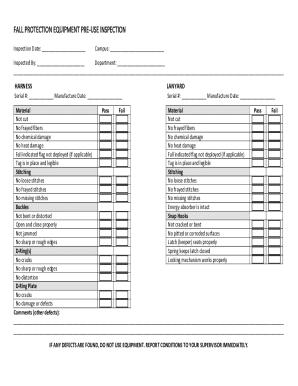
The Lanyard Inspection Form is a safety document used by competent inspectors to assess and record the condition of safety lanyards for fall protection.
pdfFiller scores top ratings on review platforms




Who needs Associated Scaffolding Inspection Form - Lanyard?
Explore how professionals across industries use pdfFiller.

Associated Scaffolding Inspection Form - Lanyard is needed by:
-
Safety inspectors assessing fall protection equipment
-
Construction site managers ensuring compliance
-
Safety officers maintaining workplace safety standards
-
Employers wanting to document equipment inspections
-
Training personnel involved in safety equipment checks
Comprehensive Guide to Associated Scaffolding Inspection Form - Lanyard
What is the Lanyard Inspection Form?
The Lanyard Inspection Form is a critical document used to assess and record the condition of safety lanyards. This form plays a vital role in workplace safety by ensuring that all safety lanyards are regularly inspected. Each form requires a competent inspector's signature, which validates the inspection process and ensures accountability.
Purpose and Benefits of the Lanyard Inspection Form
Regular inspections of safety lanyards are essential for effective fall protection. The Lanyard Inspection Form not only documents the inspection but also aids in compliance with safety regulations and audits. Furthermore, this form helps identify potential hazards, fostering a safer working environment.
-
Supports compliance with safety standards
-
Documents lanyard condition for audits
-
Identifies risks before they result in accidents
Key Features of the Lanyard Inspection Form
This form includes several critical fields to ensure a comprehensive inspection. Users will find sections for the model, serial number, and date of manufacture, along with specified inspection criteria including webbing, connectors, shock pack, and labels. The design features fillable fields and checkboxes that enhance usability.
-
Model and serial number for identification
-
Inspection criteria encompassing key lanyard components
-
Fillable fields to streamline the inspection process
Who Needs the Lanyard Inspection Form?
Various professionals including safety managers, inspectors, and maintenance staff should utilize the Lanyard Inspection Form. It is especially important for employers to maintain safe working conditions while conducting safety compliance checks to protect workers.
-
Safety managers responsible for oversight
-
Inspectors verifying lanyard conditions
-
Maintenance staff ensuring equipment integrity
How to Fill Out the Lanyard Inspection Form Online
To complete the Lanyard Inspection Form online, follow these detailed steps. First, access the form through the relevant platform. Next, provide accurate information in each section, paying close attention to crucial criteria. Finally, verify the information for accuracy before submission to minimize errors.
-
Access the form from the appropriate website.
-
Fill in the required fields with precise details.
-
Check all sections carefully to ensure accuracy.
Submission Methods and Delivery of the Lanyard Inspection Form
After completing the Lanyard Inspection Form, various submission methods are available. Users can submit the form online or via email. It is advisable to save and print the form for record-keeping purposes, and track the submission status to ensure confirmation of receipt.
-
Submit online through the designated platform
-
Email the completed form to the relevant authority
-
Maintain a copy for your records after submission
Security and Compliance Considerations for the Lanyard Inspection Form
When using the Lanyard Inspection Form, security and compliance are paramount. The platform offers multiple security features, including 256-bit encryption and full compliance with HIPAA and GDPR regulations. It is essential to maintain confidentiality and data integrity throughout the inspection process.
-
256-bit encryption for document security
-
Compliance with privacy regulations
-
Best practices for safe cloud document management
How pdfFiller Can Help You with the Lanyard Inspection Form
pdfFiller streamlines the process of filling out the Lanyard Inspection Form with its user-friendly interface. Key features such as eSigning and robust editing options make it accessible across devices. Leveraging pdfFiller enhances document management and enables secure submission effortlessly.
-
Accessible from any device or browser
-
Offers eSigning and editing capabilities
-
Facilitates efficient document organization and sharing
Sample Completed Lanyard Inspection Form
To assist users in completing the form accurately, a visual example of a filled-out Lanyard Inspection Form is available for reference. Notable points within the example can guide users in avoiding common errors, demonstrating how practical examples can simplify the filing process.
-
Visual reference for properly filled forms
-
Important notes for avoiding mistakes
-
Illustrates practical application of the form
How to fill out the Associated Scaffolding Inspection Form - Lanyard
-
1.Access the Lanyard Inspection Form on pdfFiller by visiting the url where the form is hosted and signing in or creating an account if you don’t have one.
-
2.Once you have the form open, familiarize yourself with the interface. Use the navigation toolbar to zoom in or out for better visibility.
-
3.Gather necessary information before filling out the form. This includes the lanyard's model and serial number, date of manufacture, and specific inspection criteria.
-
4.Click on each fillable field and input the required data. This includes entering the type of lanyard, and checking the condition of webbing, connectors, shock pack, and labels using the provided checkboxes.
-
5.Take your time to ensure all information is accurate. Double-check your inputs to avoid any mistakes that could violate safety regulations.
-
6.After completing all the fields, review the entire form to make sure all sections are filled properly and the competent inspector's name and signature are included.
-
7.Once you confirm everything is correct, save the completed form. Use the 'Download' option to save it to your device or the 'Submit' option to send it directly if required.

Who is eligible to fill out the Lanyard Inspection Form?
Only competent inspectors are eligible to complete the Lanyard Inspection Form, as their signature ensures that the inspection meets safety compliance requirements.
What information do I need to complete the form?
To complete the Lanyard Inspection Form, you need details like the lanyard's model and serial number, manufacture date, type of lanyard, and specific inspection criteria.
How can I submit the completed form?
You can submit the completed Lanyard Inspection Form by using pdfFiller's submission feature or by downloading the form and sending it via email or physical mail as required.
Are there common mistakes to avoid when filling this form?
Ensure that all fields are filled accurately and completely. Common mistakes include overlooking mandatory fields, incorrect serial numbers, or failing to sign the document.
Is notarization required for this form?
No, the Lanyard Inspection Form does not require notarization, but it must be signed by a competent inspector to ensure its validity.
How long does it take to complete the form?
Completing the Lanyard Inspection Form typically takes approximately 15 to 30 minutes, depending on the number of lanyards being inspected and the thoroughness of the assessment.
What happens if the lanyard fails inspection?
If the lanyard fails inspection, it should be removed from service and replaced. It's crucial to note any failure details in the inspection report for accountability.
Related Forms




Related Catalogs
Get the latest insights from our blog


If you believe that this page should be taken down, please follow our DMCA take down process
here
.
This form may include fields for payment information. Data entered in these fields is not covered by PCI DSS compliance.