
Last updated on
Oct 31, 2026
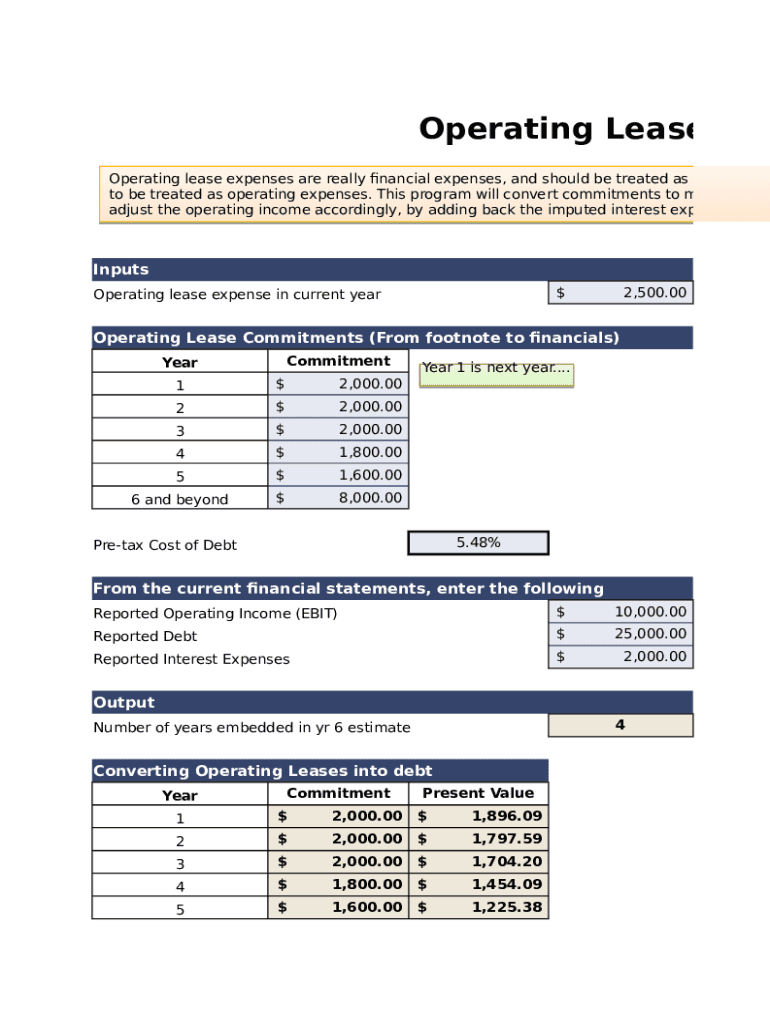
Operating Lease Converter free printable template
We are not affiliated with any brand or entity on this form

Fill out
Complete the form online in a simple drag-and-drop editor.

eSign
Add your legally binding signature or send the form for signing.

Share
Share the form via a link, letting anyone fill it out from any device.

Export
Download, print, email, or move the form to your cloud storage.
Why pdfFiller is the best tool for your documents and forms


End-to-end document management
From editing and signing to collaboration and tracking, pdfFiller has everything you need to get your documents done quickly and efficiently.
Accessible from anywhere
pdfFiller is fully cloud-based. This means you can edit, sign, and share documents from anywhere using your computer, smartphone, or tablet.
Secure and compliant
pdfFiller lets you securely manage documents following global laws like ESIGN, CCPA, and GDPR. It's also HIPAA and SOC 2 compliant.
What is Operating Lease Converter
The Operating Lease Converter is a financial tool used by businesses to transform operating lease commitments into debt and adjust operating income appropriately.
pdfFiller scores top ratings on review platforms




Who needs Operating Lease Converter?
Explore how professionals across industries use pdfFiller.

Operating Lease Converter is needed by:
-
Financial Analysts requiring accurate lease accounting
-
Accountants preparing financial statements
-
Business owners evaluating lease vs. debt options
-
CFOs managing company financial health
-
Investors assessing debt implications
-
Auditors reviewing lease arrangements
Comprehensive Guide to Operating Lease Converter
What is the Operating Lease Converter?
The Operating Lease Converter is a financial tool designed for adjusting lease commitments into debt, thereby enhancing the accuracy of financial reporting. This tool effectively reclassifies operating leases to ensure that financial statements reflect a more precise picture of obligations and financial standing. As a valuable financial reporting tool, the Operating Lease Converter enables organizations to present their financial data more transparently.
Purpose and Benefits of the Operating Lease Converter
Using the Operating Lease Converter provides significant advantages for financial reporting, particularly in how it impacts EBIT—earnings before interest and taxes. This adjustment tool aids in illustrating a clearer picture of an organization’s financial health. By enabling more accurate balance sheets and adjustments to operating income, users can better assess profitability and liabilities.
Key Features of the Operating Lease Converter
The Operating Lease Converter offers several essential features to streamline financial analysis. Users are required to enter specific inputs, including operating lease expenses, lease commitments, and the cost of debt. Once these inputs are provided, the tool can calculate present value and help restate financial statements effectively.
-
Lease expense calculator for determining annual lease obligations
-
Financial statement template for streamlined reporting
Who Needs the Operating Lease Converter?
This tool is particularly beneficial for accountants, CFOs, and financial analysts who manage or analyze an organization’s financial commitments. Industries notably impacted by operating leases, such as retail, real estate, and transportation, will find the Operating Lease Converter essential for accurate lease commitment analysis.
-
Target user groups include accountants and financial strategists
-
Industries heavily reliant on operational leases
How to Use the Operating Lease Converter Online
To ensure effective use of the Operating Lease Converter, follow these steps for data entry:
-
Enter your operating lease expenses accurately into the designated field.
-
Input the pre-tax cost of debt, ensuring correct formatting.
-
Validate all information before final submission to minimize errors.
Common Errors and How to Avoid Them with the Operating Lease Converter
Users often encounter frequent data entry mistakes that can lead to inaccuracies in financial reporting. Common errors include miscalculating lease commitments or failing to provide complete information.
-
Double-check numerical entries to avoid misreporting
-
Review all fields for completeness before submission
Security and Compliance in Using the Operating Lease Converter
Security is paramount when handling sensitive financial documents. The Operating Lease Converter is designed with robust security features, including 256-bit encryption and adherence to SOC 2 Type II compliance standards, as well as GDPR regulations. These measures ensure that user data is protected throughout the process, addressing concerns about privacy and data protection.
How to Save and Share Your Completed Operating Lease Converter
Once completed, users have various options to download or share their Operating Lease Converter results. The document can be saved in multiple formats, such as PDF or DOCX, making it versatile for different use cases.
-
Instructions for downloading the completed document
-
Options available for sharing via email or cloud services
What Happens After You Submit the Operating Lease Converter?
After submission, users can monitor their application status to track progress. Understanding the common outcomes will prepare users for any necessary corrections or amendments to enhance the fidelity of their financial reporting.
-
Details on how to track submission status
-
Common reasons for application rejection and steps for rectification
Experience the Ease of Using the Operating Lease Converter with pdfFiller
Leveraging pdfFiller’s features facilitates seamless use of the Operating Lease Converter. The platform offers user-friendly tools for completing forms, ensuring that users can manage and sign documents securely and efficiently.
How to fill out the Operating Lease Converter
-
1.Access the Operating Lease Converter form on pdfFiller by searching for the form name in the search bar.
-
2.Once the form is open, familiarize yourself with the layout and available input fields.
-
3.Gather necessary information before starting. Collect your operating lease expenses, lease commitments, pre-tax cost of debt, reported operating income, reported debt, and reported interest expenses.
-
4.Begin by entering the 'Operating lease expense in current year' in the designated field, ensuring accuracy.
-
5.Next, input your 'Operating Lease Commitments' to reflect the total commitment amount.
-
6.Proceed by entering the 'Pre-tax cost of debt' accurately to compute the present value.
-
7.Fill in the 'Reported operating income', ensuring consistency with your financial reports.
-
8.Include 'Reported debt' and 'Reported interest expenses', which are vital for handling debt classification.
-
9.Review all entered data by cross-checking your figures against your records.
-
10.Finalize your form by ensuring clarity in all fields to avoid miscalculations.
-
11.Once completed, save your work on pdfFiller by selecting 'Save' in the toolbar.
-
12.Download the filled form by clicking on the 'Download' button, making sure to choose your preferred file format.
-
13.If required, submit the form directly through pdfFiller using the provided submission options available on the platform.

Who should use the Operating Lease Converter?
The Operating Lease Converter is designed for financial analysts, accountants, business owners, and CFOs who need to accurately convert operating lease commitments into debt for better financial reporting.
What information do I need to fill out the form?
To complete the form, gather your operating lease expenses, lease commitments, pre-tax cost of debt, reported operating income, reported debt, and reported interest expenses before starting.
How can I ensure that my calculations are accurate?
Double-check your figures against financial records, ensuring consistent reporting for all input fields to avoid miscalculations when converting lease commitments into debt.
Can I save my progress on the form?
Yes, pdfFiller allows you to save your progress anytime. Simply click the 'Save' button to store your inputs and return to complete it later.
What are the submission methods available for this form?
You can submit the filled form directly through pdfFiller or download it to submit via email or physical delivery, depending on your requirements.
What common mistakes should I avoid when filling the form?
Avoid entering incorrect figures, omitting necessary information, and failing to review the completed form, as these mistakes can lead to financial inaccuracies.
How can I download the completed form?
After finishing the form, simply click on the 'Download' button on pdfFiller, selecting your preferred format, such as PDF or Word document.
Related Forms

Get the latest insights from our blog



If you believe that this page should be taken down, please follow our DMCA take down process
here
.
This form may include fields for payment information. Data entered in these fields is not covered by PCI DSS compliance.