
Last updated on
Oct 31, 2026
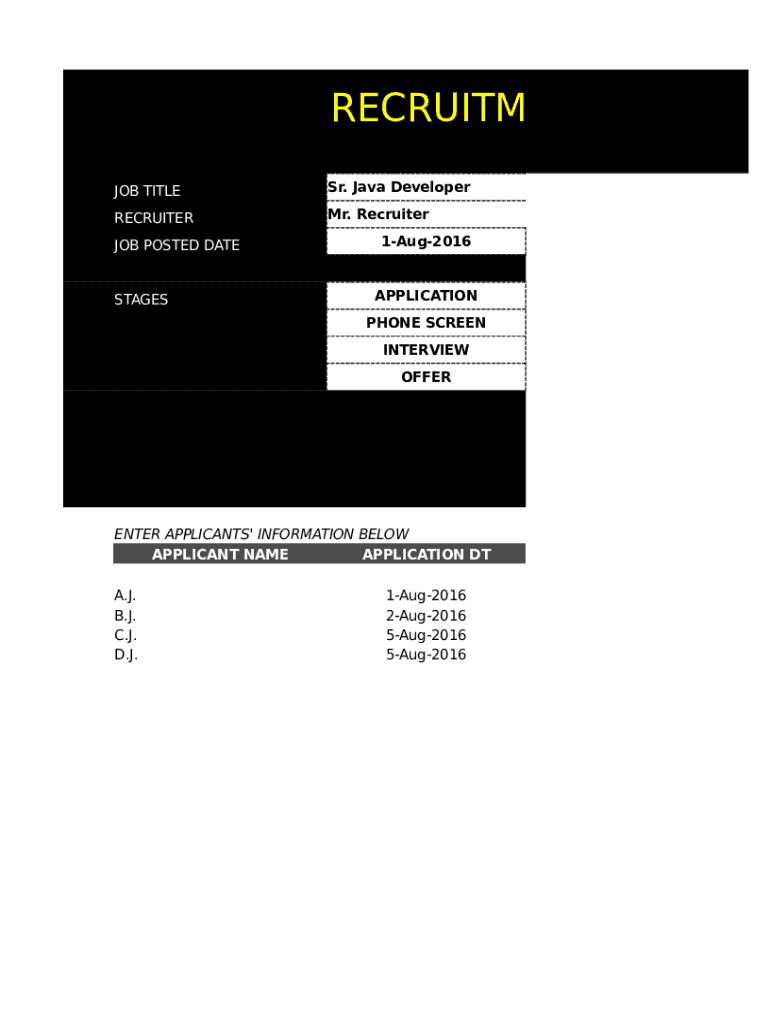
Recruitment Tracker Sheet free printable template
We are not affiliated with any brand or entity on this form

Fill out
Complete the form online in a simple drag-and-drop editor.

eSign
Add your legally binding signature or send the form for signing.

Share
Share the form via a link, letting anyone fill it out from any device.

Export
Download, print, email, or move the form to your cloud storage.
Why pdfFiller is the best tool for your documents and forms


End-to-end document management
From editing and signing to collaboration and tracking, pdfFiller has everything you need to get your documents done quickly and efficiently.
Accessible from anywhere
pdfFiller is fully cloud-based. This means you can edit, sign, and share documents from anywhere using your computer, smartphone, or tablet.
Secure and compliant
pdfFiller lets you securely manage documents following global laws like ESIGN, CCPA, and GDPR. It's also HIPAA and SOC 2 compliant.
What is Recruitment Tracker Sheet
The Recruitment Tracker Form is a document used by recruiters to monitor the hiring process for a Sr. Java Developer position.
pdfFiller scores top ratings on review platforms




Who needs Recruitment Tracker Sheet?
Explore how professionals across industries use pdfFiller.

Recruitment Tracker Sheet is needed by:
-
Recruiters seeking to streamline the hiring process.
-
Human resources departments managing job applications.
-
Companies looking to track recruitment statistics.
-
Hiring managers overseeing candidate evaluations.
-
Staff involved in onboarding new employees.
Comprehensive Guide to Recruitment Tracker Sheet
What is the Recruitment Tracker Form?
The Recruitment Tracker Form is a crucial tool designed to streamline the hiring process for positions like the Sr. Java Developer. Its primary function is to systematically track and organize applicant information, which enhances the overall recruitment strategy.
This form plays a vital role in monitoring each candidate's progress, capturing essential details such as applicant names, application dates, and the various stages of recruitment. By compiling this data, recruiters can efficiently manage a diverse pool of applicants while ensuring no detail is overlooked.
Purpose and Benefits of the Recruitment Tracker Form
This form is indispensable for recruiters and organizations aiming to optimize their hiring processes. It simplifies the management of applications and enhances organization through a structured approach.
Utilizing the Recruitment Tracker Form allows recruiters to effectively track each recruitment stage—ranging from initial application to final hiring decisions. Additionally, it facilitates the collection of summary statistics, aiding in informed decision-making that can significantly impact hiring outcomes.
Key Features of the Recruitment Tracker Form
The Recruitment Tracker Form is equipped with several user-friendly features that enhance its effectiveness. Key fields include:
-
APPLICANT NAME
-
APPLICATION DATE
-
HIRED DATE
The form also details tracking stages such as phone screenings, interviews, and job offers. Moreover, the inclusion of checkboxes enables recruiters to monitor progress easily and provides a clear visual indicator of where each applicant stands within the recruitment pipeline.
Who Needs the Recruitment Tracker Form?
HR professionals, recruiters, and hiring managers are the primary users of the Recruitment Tracker Form, benefiting from its systematic approach to applicant management. This tool is especially relevant in contexts like Sr. Java Developer recruitment, where detailed tracking is necessary to handle multiple candidates effectively.
Scenarios such as managing large volumes of applications or coordinating various recruitment stages make the form an invaluable asset for organizations aiming for efficiency and clarity in their hiring processes.
How to Fill Out the Recruitment Tracker Form
To complete the Recruitment Tracker Form accurately, follow these guidelines:
-
Begin with the 'APPLICANT NAME' section, ensuring the correct name is entered.
-
Input the 'APPLICATION DATE' once the application has been received.
-
Record the 'HIRED DATE' after a candidate has accepted an offer.
Before starting, gather necessary information such as resumes and cover letters to ensure accuracy. Common mistakes to avoid include entering incorrect dates or failing to update applicant progress, which can distort the tracking process.
Digital Options for the Recruitment Tracker Form
pdfFiller offers a cloud-based solution for managing the Recruitment Tracker Form, providing users with the ability to fill out and edit forms seamlessly online. This platform supports collaborative features that enhance usability for teams.
Security measures are a top priority; pdfFiller incorporates advanced features to safeguard sensitive applicant information. Users can eSign the form and share it securely with stakeholders, ensuring that the hiring process remains compliant and secure.
Tracking Application Status and Follow-Up
Monitoring applicants through the Recruitment Tracker Form involves actively assessing their progress at each stage of recruitment. Recruiters can easily check where each candidate stands, facilitating timely updates and necessary follow-ups.
In cases where applicants are not progressing, it's essential to establish a follow-up protocol to ensure proper communication and maintain a positive candidate experience. Maintaining accurate records also aids in compliance with reporting requirements.
Common Errors and Best Practices
To utilize the Recruitment Tracker Form effectively, it's crucial to recognize and avoid common errors, such as:
-
Overlooking to update applicant statuses
-
Incorrectly entering dates
Best practices include regularly validating data before submission and keeping the tracker updated to reflect real-time changes. Establishing a routine for checking and maintaining accurate information can greatly enhance the hiring process.
Security and Compliance for the Recruitment Tracker Form
When handling recruitment data, ensuring security and compliance is paramount. pdfFiller adheres to rigorous industry standards, such as HIPAA and GDPR, to protect sensitive applicant information.
Key security features include 256-bit encryption, which safeguards data against unauthorized access. Additionally, the platform's privacy policies ensure that personal applicant data is treated with the utmost confidentiality.
Streamlining Your Recruitment Process with pdfFiller
Leveraging pdfFiller's capabilities can significantly enhance the management of your recruitment processes. The Recruitment Tracker Form serves as a foundational tool for organizing and simplifying hiring logistics effectively.
By utilizing the digital features of pdfFiller, users gain easy access to essential forms and streamline their hiring practices, maximizing overall efficiency in their recruitment strategy.
How to fill out the Recruitment Tracker Sheet
-
1.Begin by accessing pdfFiller and searching for 'Recruitment Tracker Form' in the search bar.
-
2.Once you locate the form, click on it to open and view the contents.
-
3.Before filling out the form, gather all necessary information such as applicant details and stages of the recruitment process.
-
4.Use the navigation tools to move through the form. Click on the fields labeled appropriately, such as 'APPLICANT NAME' and 'APPLICATION DT'.
-
5.Fill in the required fields with accurate details; ensure you do this carefully to avoid errors.
-
6.For stages of the recruitment process, check the relevant boxes to indicate each step's completion, such as application or interview.
-
7.After you complete the form, review all entries for accuracy and completeness.
-
8.Utilize the review features in pdfFiller to confirm that all necessary sections have been filled correctly.
-
9.Once satisfied, save your progress within pdfFiller. You may download the completed form to your device in various formats.
-
10.If necessary, submit the form directly through pdfFiller using the available sharing options.

Who is eligible to use the Recruitment Tracker Form?
The Recruitment Tracker Form is intended for use by recruiters, human resources professionals, and hiring managers involved in the recruitment process for Sr. Java Developer positions.
Are there deadlines for submitting the Recruitment Tracker Form?
While there are no specific deadlines mentioned for using the Recruitment Tracker Form, it's important to complete it promptly to ensure effective monitoring of the hiring process.
How can I submit the completed form?
After finalizing the Recruitment Tracker Form, you can submit it through pdfFiller by utilizing the built-in sharing options or downloading it for email submission.
What supporting documents do I need for this form?
Generally, you may need supporting documents such as resumes, cover letters, and any internal policies regarding recruitment processes.
What common mistakes should I avoid when filling out the form?
Be cautious about entering incorrect applicant details and failing to check off completed stages in the recruitment process, as this could skew tracking data.
How long does it take to process submissions using this form?
Processing times can vary based on company procedures. However, once submitted, allow your HR department time to review the information provided.
What should I do if I encounter issues filling out the form on pdfFiller?
If you encounter issues, you can consult pdfFiller's support resources or check for any updates that could resolve functionality problems.
Related Forms



Get the latest insights from our blog


If you believe that this page should be taken down, please follow our DMCA take down process
here
.
This form may include fields for payment information. Data entered in these fields is not covered by PCI DSS compliance.