
Last updated on
Oct 31, 2026
Employment Application free printable template
We are not affiliated with any brand or entity on this form

Fill out
Complete the form online in a simple drag-and-drop editor.

eSign
Add your legally binding signature or send the form for signing.

Share
Share the form via a link, letting anyone fill it out from any device.

Export
Download, print, email, or move the form to your cloud storage.
Why pdfFiller is the best tool for your documents and forms


End-to-end document management
From editing and signing to collaboration and tracking, pdfFiller has everything you need to get your documents done quickly and efficiently.
Accessible from anywhere
pdfFiller is fully cloud-based. This means you can edit, sign, and share documents from anywhere using your computer, smartphone, or tablet.
Secure and compliant
pdfFiller lets you securely manage documents following global laws like ESIGN, CCPA, and GDPR. It's also HIPAA and SOC 2 compliant.
What is Employment Application
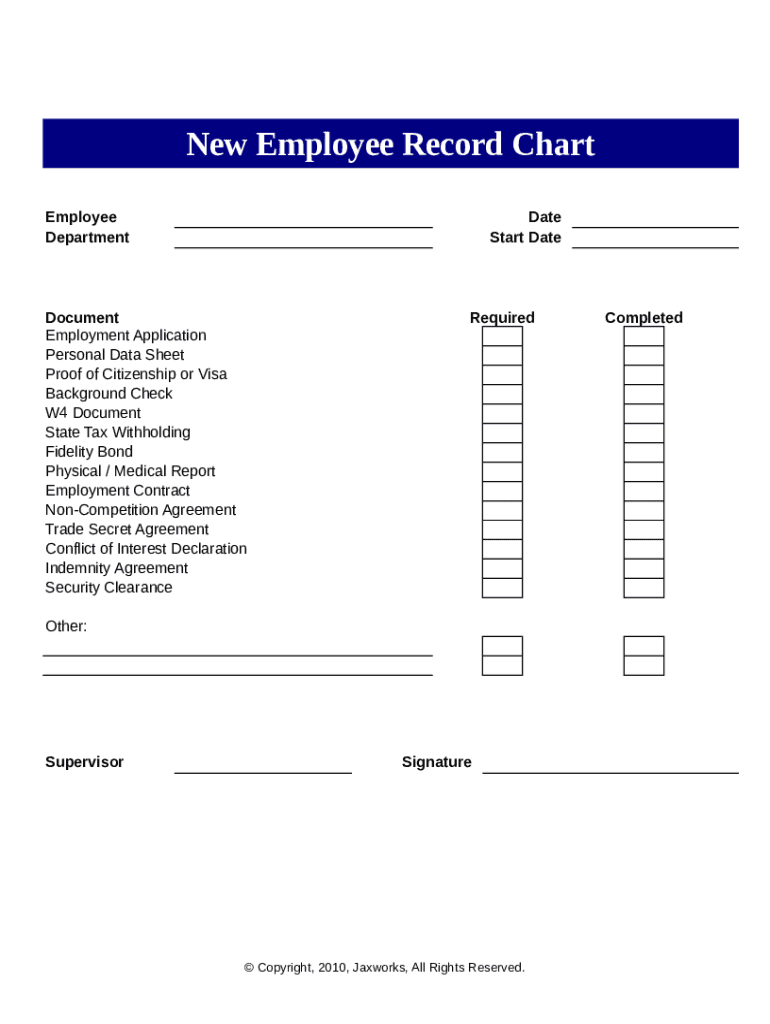
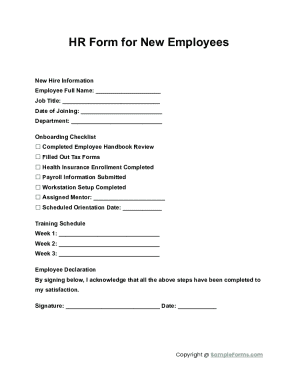
The New Employee Record Chart is an employment form used by supervisors to track the required documentation for new hires.
pdfFiller scores top ratings on review platforms




Who needs Employment Application?
Explore how professionals across industries use pdfFiller.

Employment Application is needed by:
-
HR Managers involved in employee onboarding
-
Supervisors overseeing new employees
-
Employees completing onboarding paperwork
-
Payroll administrators who manage employee records
-
Compliance officers ensuring document completion
Comprehensive Guide to Employment Application
What is the New Employee Record Chart?
The New Employee Record Chart serves as a crucial component of the employee onboarding process. It aids in organizing essential information about new hires and ensures that all required documents are collected efficiently. Key components of the chart include employee details, such as name and contact information, along with a list of required documents for onboarding. Additionally, it is vital for the supervisor to sign the form to acknowledge the accuracy and completion of the information provided.
Purpose and Benefits of the New Employee Record Chart
This form plays a significant role in streamlining the new hire paperwork process. By consolidating various documents into one chart, it simplifies the organization and tracking of necessary paperwork for both employees and supervisors. Furthermore, using the New Employee Record Chart promotes compliance with company policies, preventing oversights and ensuring all required actions are taken during onboarding.
Key Features of the New Employee Record Chart
The New Employee Record Chart includes several essential fields designed to capture pertinent information accurately. Key features comprise:
-
Employee details, including name, contact information, and department.
-
Start date and position offered to the new hire.
-
Checkboxes for required documents, such as applications and contracts.
-
A user-friendly layout that facilitates easy completion and review.
Who Should Use the New Employee Record Chart?
The primary users of the New Employee Record Chart include supervisors, HR personnel, and department heads. Each of these roles benefits from utilizing the chart for various scenarios, such as managing onboarding for multiple new hires and ensuring systematic compliance with documentation requirements. The form is essential for maintaining a clear record of all new employee documentation and approvals.
How to Fill Out the New Employee Record Chart Online (Step-by-Step)
Filling out the New Employee Record Chart using pdfFiller is straightforward. Follow these steps:
-
Access the New Employee Record Chart on pdfFiller.
-
Begin by entering the employee's personal details in the designated fields.
-
Select the appropriate department and input the start date.
-
Check off all required documents that have been submitted.
-
Review the completed form for accuracy before submitting.
Common Errors and How to Avoid Them When Using the New Employee Record Chart
Common mistakes when filling out the New Employee Record Chart can lead to delays in onboarding. To reduce errors:
-
Double-check all entries for accuracy before submission.
-
Ensure all required fields are completed, including supervisor verification.
-
Confirm that all necessary documents have been attached.
Supervisor verification is crucial to ensure that all information is accurate before final submission.
How to Sign the New Employee Record Chart
Signing the New Employee Record Chart can be done through various methods, including digital and wet signatures. To eSign the form using pdfFiller, follow these steps:
-
Navigate to the signature section of the chart.
-
Select the option to eSign using your preferred method.
-
Complete the signature steps as prompted by the platform.
-
Confirm your signature and save the completed form.
The supervisor's role in this process is essential, as their signature validates the form and acknowledges the completion of all necessary onboarding steps.
Security and Compliance with the New Employee Record Chart
Data security is paramount when handling employee documents. pdfFiller employs robust measures, including:
-
256-bit encryption to protect sensitive information.
-
Compliance with HIPAA and GDPR standards to ensure privacy and legal adherence.
-
Regular audits and updates to security protocols for enhanced protection.
Safeguarding sensitive employee information is critical for maintaining trust and compliance within the organization.
What Happens After Submitting the New Employee Record Chart?
Once the New Employee Record Chart is submitted, the subsequent steps typically include:
-
Receiving confirmations of submission completion.
-
Tracking the status of the submission through the pdfFiller platform.
-
Addressing any issues or requests for additional documentation promptly.
Maintaining a copy of the submitted chart is essential for compliance and future reference.
Experience the Benefits of pdfFiller for Your New Employee Record Chart Needs
Utilizing pdfFiller for managing the New Employee Record Chart enhances efficiency in form completion and document organization. The cloud-based platform offers features that simplify the overall process, making it easier to manage all aspects of employee onboarding.
How to fill out the Employment Application
-
1.To access the New Employee Record Chart on pdfFiller, visit the website and use the search bar to locate the form by its name.
-
2.Once found, click on the form to open it. Familiarize yourself with the fields provided for employee details and document requirements.
-
3.Before filling out the form, gather all necessary employee information including name, start date, department, and required documents like applications and contracts.
-
4.Use the pdfFiller interface to click on each field, entering the correct information for the new hire. For checkboxes, simply click to mark completion.
-
5.Ensure the supervisor’s signature is included by clicking on the signature field, which allows you to draw, upload a signature image, or type out their name for digital signing.
-
6.After filling out all fields, review the form thoroughly for accuracy, ensuring no required information is missing and signatures are properly placed.
-
7.Once satisfied, save the completed form by clicking on the save option in pdfFiller. You may also download the completed form to your device or submit it directly through email as needed.

Who is eligible to fill out the New Employee Record Chart?
Any supervisor or HR personnel involved in the onboarding process can fill out the New Employee Record Chart as part of the new hire's documentation.
Are there any deadlines associated with submitting this form?
While specific deadlines can vary based on company policy, it’s advisable to complete the New Employee Record Chart before the new employee's start date to ensure compliance with onboarding procedures.
What methods can I use to submit the completed form?
You can submit the completed New Employee Record Chart by downloading it directly to your device and emailing it to HR, or by using associated submission features in pdfFiller if available.
What supporting documents do I need to prepare alongside this form?
You’ll need to gather documents such as the new employee's employment application, personal data sheet, and employment contract to fully complete the New Employee Record Chart.
What are common mistakes to avoid when filling out this form?
Ensure all fields are completed accurately and that the supervisor's signature is present. Missing information or a lack of signatures can delay processing.
How long does it take to process the New Employee Record Chart once submitted?
Processing times can vary, but it typically takes a few days to a week for the form to be processed, depending on company protocols and approval procedures.
What if I need to make changes after submitting the form?
If changes are necessary after submission, contact your HR department to see if the form can be amended or if a new form must be submitted.
Related Forms





Get the latest insights from our blog


If you believe that this page should be taken down, please follow our DMCA take down process
here
.
This form may include fields for payment information. Data entered in these fields is not covered by PCI DSS compliance.