
Last updated on
Oct 31, 2026
Printable Expense Trends Sheet free printable template
We are not affiliated with any brand or entity on this form

Fill out
Complete the form online in a simple drag-and-drop editor.

eSign
Add your legally binding signature or send the form for signing.

Share
Share the form via a link, letting anyone fill it out from any device.

Export
Download, print, email, or move the form to your cloud storage.
Why pdfFiller is the best tool for your documents and forms


End-to-end document management
From editing and signing to collaboration and tracking, pdfFiller has everything you need to get your documents done quickly and efficiently.
Accessible from anywhere
pdfFiller is fully cloud-based. This means you can edit, sign, and share documents from anywhere using your computer, smartphone, or tablet.
Secure and compliant
pdfFiller lets you securely manage documents following global laws like ESIGN, CCPA, and GDPR. It's also HIPAA and SOC 2 compliant.
What is Printable Expense Trends Sheet
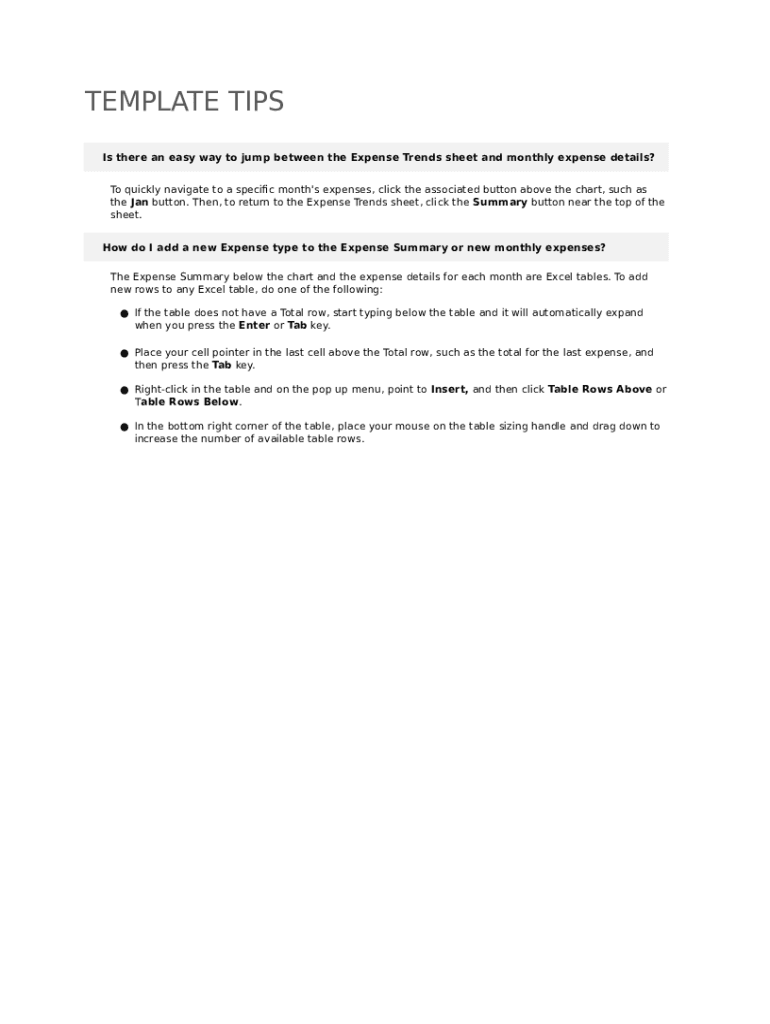
The Expense Tracking Template is a financial document used by businesses to record and analyze monthly expenses.
pdfFiller scores top ratings on review platforms




Who needs Printable Expense Trends Sheet?
Explore how professionals across industries use pdfFiller.

Printable Expense Trends Sheet is needed by:
-
Small business owners managing monthly budgets
-
Freelancers keeping track of project expenses
-
Accountants preparing financial statements
-
Finance teams monitoring operational costs
-
Individuals managing personal or household budgets
Comprehensive Guide to Printable Expense Trends Sheet
What is the Expense Tracking Template?
The expense tracking template is a specialized tool designed for recording and analyzing monthly expenses. This document serves as a practical financial management resource, aiding users in effectively managing their monthly expenses. Accessible in a fillable Excel format, it allows for personalized entries, ensuring users can tailor their reports to their unique needs.
Purpose and Benefits of Using an Expense Tracking Template
This template offers numerous advantages for effective expense management. Primarily, it enables users to visualize and summarize expenses according to categories and months, promoting better budgeting and financial planning. Keeping detailed month-by-month records is essential for understanding spending patterns and making informed financial decisions.
-
Enhances visualization of spending trends
-
Facilitates easier financial planning
-
Assists in categorizing expenses for clarity
Key Features of the Expense Tracking Template
The design of the expense tracking template includes several key functionalities essential for effective tracking. Users will find fields for 'Date', 'PO#', 'Amount', 'Category', and 'Description' thoroughly defined and easy to navigate. Additionally, the editable tables allow users to add new expense types and monthly expenses as needed, ensuring a user-friendly experience.
-
Multiple fillable fields for complete data entry
-
Editable tables for expanding expense categories
-
User-friendly interface designed for efficient tracking
Who Should Use the Expense Tracking Template?
The versatility of the expense tracking template makes it suitable for various users. Business owners and freelancers managing multiple expenses can streamline their tracking processes. Additionally, individuals seeking effective methods to monitor personal finances will benefit significantly from this template. Accountants and financial advisors will find it particularly useful for assisting clients with comprehensive expense reporting.
How to Fill Out the Expense Tracking Template Online
Using the expense tracking template online requires a systematic approach. Follow these steps to complete the template accurately:
-
Enter the date of each expense in the designated field.
-
Provide the purchase order number (PO#) for each transaction if applicable.
-
Input the total amount spent in the 'Amount' field.
-
Assign a category to each expense for better tracking.
-
Include a description to clarify the purpose of each expense.
To ensure accuracy while entering data, it is crucial to check figures and categories for correctness. Utilizing tools such as pdfFiller enhances the online editing and eSigning process.
Common Errors and How to Avoid Them
When filling out the expense tracking template, users may encounter several common pitfalls. Ensuring that all figures are double-checked and categorized correctly is vital to maintaining high-quality records. Adopting best practices for completing the template will lead to better accuracy and clarity in expense reporting.
-
Carefully review entries before submission
-
Keep consistent categorization of expenses
Digital Signature and Submission Options for the Expense Tracking Template
Finalizing and submitting the expense tracking template involves understanding signature options. Digital signatures provide a secure alternative to traditional wet signatures, enhancing the convenience of submission. Users should explore various methods for sharing completed reports while considering the security features of platforms like pdfFiller.
-
Utilize digital signatures for enhanced convenience
-
Understand different submission methods available
-
Ensure compliance with security standards for sensitive documents
Security and Compliance for Handling Sensitive Expenses
Handling financial documents requires stringent security measures to protect sensitive information. This template is backed by 256-bit encryption and adheres to compliance standards such as SOC 2 Type II, HIPAA, and GDPR. Users must prioritize the security of both personal and business financial data while utilizing document management tools.
-
Implementation of advanced encryption protocols
-
Compliance with industry security standards
-
Robust measures for maintaining user trust
What to Do After Submitting the Expense Tracking Template
Once the expense tracking template has been submitted, users should take steps to track the status of their reports. Understanding the confirmation processes will help in ensuring that submissions are received and processed accurately. If necessary, users should know how to amend submissions and maintain thorough records post-submission for effective financial oversight.
-
Track the confirmation status of submissions
-
Know how to make corrections if needed
Start Your Financial Management Journey with pdfFiller
Utilizing pdfFiller to fill out the expense tracking template is highly encouraged due to its intuitive interface. The platform's security features and efficiency make it a valuable tool for anyone aiming to improve their financial management practices. Begin leveraging this user-friendly resource for effective expense management today.
How to fill out the Printable Expense Trends Sheet
-
1.To start using the Expense Tracking Template on pdfFiller, visit the pdfFiller website and log in to your account. If you don’t have an account, you can create one for free.
-
2.Once logged in, use the search bar to find 'Expense Tracking Template' or navigate to the business forms section to locate it.
-
3.After opening the template, familiarize yourself with the layout, which includes fields labeled for date, PO#, amount, category, and description.
-
4.Before filling out the template, gather all necessary information regarding your monthly expenses, such as receipts and transaction records to ensure accurate reporting.
-
5.Click on each blank field in the template to enter your information. Use the 'Tab' key to navigate smoothly between fields. Ensure you accurately categorize each expense to simplify analysis later.
-
6.Review the completed sections to confirm that all entries are correct. You can modify any details by clicking into the fields again if changes are needed.
-
7.Once you have filled out the form, double-check for any missing information or errors. Utilize the pdfFiller tools like spell check to enhance the quality of your entries.
-
8.To save your completed Expense Tracking Template, click on the 'Save' button. You can also choose to download it as a PDF or Excel file for offline use.
-
9.Finally, if you need to submit the form digitally, use the 'Submit' option on pdfFiller to send it via email or share it directly with colleagues or accountants.

Who can use the Expense Tracking Template?
Anyone looking to manage their expenses can utilize the Expense Tracking Template, including small business owners, freelancers, and personal finance managers.
Is there a deadline for submitting the Expense Tracking Template?
There is no universal deadline for this template. It should be completed monthly to ensure accurate tracking. However, specific deadlines may apply if used for tax reporting.
How do I submit the completed Expense Tracking Template?
You can submit the template through pdfFiller directly via email or download it and submit it through your preferred method. Make sure to check your submission requirements.
What supporting documents do I need to complete the form?
Gather your receipts, invoices, or bank statements that detail your monthly expenses to accurately fill out the Expense Tracking Template.
What are common mistakes to avoid while using the template?
Common mistakes include forgetting to categorize expenses, entering incorrect amounts, and not saving changes after filling out the template. Always review your entries.
How can I finalize and save my template on pdfFiller?
To finalize your template, review all entries for accuracy. Then, click on the 'Save' button to store your changes and optionally download the file.
Are there any fees associated with using the Expense Tracking Template?
Using the Expense Tracking Template on pdfFiller typically incurs no fees. Any associated costs may depend on the subscription plan of your pdfFiller account.
Related Forms



Get the latest insights from our blog


If you believe that this page should be taken down, please follow our DMCA take down process
here
.
This form may include fields for payment information. Data entered in these fields is not covered by PCI DSS compliance.