
Last updated on
Oct 31, 2026

Petty Cashpetty Cash Receipt free printable template
We are not affiliated with any brand or entity on this form

Fill out
Complete the form online in a simple drag-and-drop editor.

eSign
Add your legally binding signature or send the form for signing.

Share
Share the form via a link, letting anyone fill it out from any device.

Export
Download, print, email, or move the form to your cloud storage.
Why pdfFiller is the best tool for your documents and forms


End-to-end document management
From editing and signing to collaboration and tracking, pdfFiller has everything you need to get your documents done quickly and efficiently.
Accessible from anywhere
pdfFiller is fully cloud-based. This means you can edit, sign, and share documents from anywhere using your computer, smartphone, or tablet.
Secure and compliant
pdfFiller lets you securely manage documents following global laws like ESIGN, CCPA, and GDPR. It's also HIPAA and SOC 2 compliant.
What is Petty Cashpetty Cash Receipt
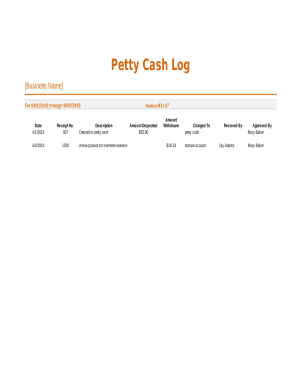
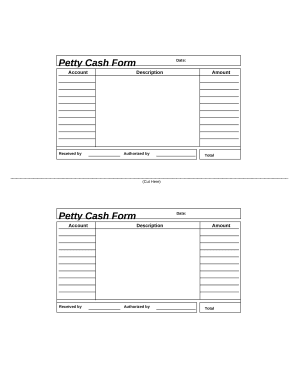
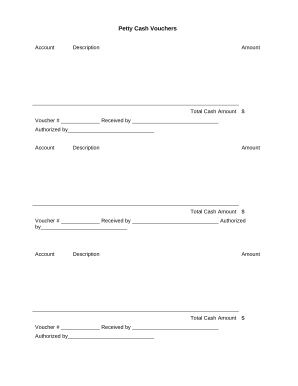
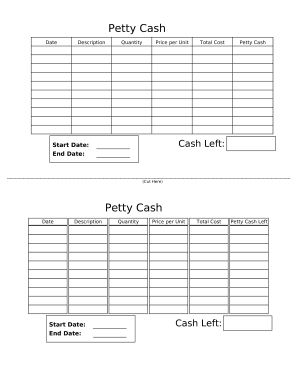
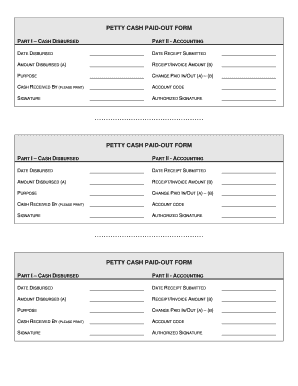
The Petty Cash Log is a financial document used by businesses to track petty cash transactions and manage cash flow efficiently.
pdfFiller scores top ratings on review platforms




Who needs Petty Cashpetty Cash Receipt?
Explore how professionals across industries use pdfFiller.

Petty Cashpetty Cash Receipt is needed by:
-
Business owners managing cash expenses
-
Accountants overseeing financial documentation
-
Finance departments tracking petty cash usage
-
Employees responsible for petty cash handling
-
Auditors reviewing financial records
Comprehensive Guide to Petty Cashpetty Cash Receipt
What is a Petty Cash Log?
The Petty Cash Log is a financial document that serves as a detailed record of petty cash transactions within an organization. Its primary purpose is to track these transactions effectively, ensuring accountability and accuracy in financial reporting. The log is structured to include key fields such as receipt numbers and amounts, allowing for thorough documentation of expenses. By using a petty cash log, businesses can streamline their petty cash tracking form and enhance their financial management processes.
Purpose and Benefits of the Petty Cash Log
A petty cash log is essential for businesses seeking to maintain clarity in their cash flow, particularly regarding small expenses that may otherwise be overlooked. It fosters financial transparency and accountability by providing a reliable method of recording expenditures. Additionally, utilizing a petty cash expense report simplifies the categorization of expenses, aiding in better reporting and financial analysis. The benefits of a petty cash log extend to improved expense tracking and management for organizations of all sizes.
Key Features of the Petty Cash Log
-
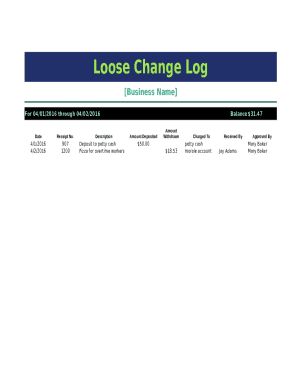
Essential fields such as Date, Receipt No., Description, Amount Deposited, and Amount Withdrawn.
-
Requirement for signatures from both the person receiving the cash and the one approving the expenses.
-
Availability of a fillable PDF version for user convenience.
These features contribute significantly to the utility of the petty cash log, as they enhance both the accuracy and accountability of financial documentation.
Who Needs the Petty Cash Log?
Various types of businesses and organizations benefit from using a petty cash log, including retail establishments, service providers, and non-profits. Employees responsible for managing petty cash transactions can utilize this log to facilitate tracking and reporting. Furthermore, accountants and financial managers can rely on the log to ensure that all petty cash expenditures are documented appropriately and in compliance with financial policies.
How to Fill Out the Petty Cash Log Online (Step-by-Step)
-
Open the petty cash tracking form in your browser.
-
Fill in the Date and Receipt No. fields accurately.
-
Provide a clear Description of the transaction.
-
Enter the Amount Deposited or Withdrawn as appropriate.
-
Ensure to obtain the necessary signatures from 'Received By' and 'Approved By'.
Following these steps helps maintain the accuracy of data entered into the petty cash log, ensuring compliance and accountability in financial practices.
Common Errors When Filling Out the Petty Cash Log and How to Avoid Them
Users may encounter common errors such as omitting signatures or misreporting amounts in the petty cash log. To mitigate these issues, it is crucial to double-check all entries for completeness and accuracy. Validating the information entered before finalizing the log helps to uphold the integrity of financial reporting.
How to Sign and Submit the Petty Cash Log
When it comes to signing and submitting the petty cash log, users have options for digital signatures and traditional wet signatures. Depending on the organization’s protocols, submission methods may include electronic logs submitted online or physical logs delivered in person. Ensuring timely submission is vital for complying with financial policies and maintaining accurate records.
Record Retention and Data Protection for Petty Cash Logs
It is essential to keep petty cash logs secure and compliant with legal standards. Recommended retention periods vary, but generally, organizations should maintain these records for a specified duration to ensure easy access during audits. Implementing best practices for data protection not only safeguards sensitive information but also ensures adherence to privacy regulations, while solutions like pdfFiller offer enhanced document security for their users.
Maximizing Efficiency with pdfFiller's Petty Cash Log Template
pdfFiller enhances the petty cash log process through its cloud-based platform, which facilitates efficient form management. Users benefit from features such as eSigning, easy edits, and form sharing, significantly reducing the time spent on administrative tasks. Testimonials from users highlight the improved efficiency and ease of access that pdfFiller provides, showcasing its value in managing petty cash transactions.
How to fill out the Petty Cashpetty Cash Receipt
-
1.To access the Petty Cash Log on pdfFiller, visit the pdfFiller website and search for 'Petty Cash Log template'. Select the document from the results.
-
2.Once open, familiarize yourself with the interface. You will see fillable fields including Date, Receipt No., Description, Amount Deposited, Amount Withdrawn, Charged To, Received By, and Approved By.
-
3.Before starting, gather all necessary supporting documents like receipts and any previously recorded transactions to ensure accurate input.
-
4.Begin filling in the form by entering the date of the transaction, followed by the corresponding receipt number for easy reference.
-
5.Provide a brief description of each transaction in the Description field to clarify the purpose of the cash movement.
-
6.Enter the amount deposited or withdrawn in the relevant fields based on the transactions you are recording.
-
7.Specify which category the expense is Charged To for better financial tracking.
-
8.Indicate who Received By the cash if it was disbursed, ensuring the appropriate person’s name is entered.
-
9.Record who Approved By signing off on the cash disbursement to confirm authorization.
-
10.After filling in all required fields, review the entire log for completeness and accuracy, confirming that all entries are correct.
-
11.Finally, save your completed form on pdfFiller. You can also download it in PDF format or share it via email directly from the platform.

Who is eligible to use the Petty Cash Log?
Any business or organization handling petty cash transactions can use the Petty Cash Log to manage and track their expenses efficiently.
What are the deadlines for submitting the Petty Cash Log?
While there's no strict deadline for each transaction, it’s advisable to update the Petty Cash Log regularly or at least at the end of each month for accurate financial reporting.
What is the submission method for the Petty Cash Log?
The Petty Cash Log can be completed electronically on pdfFiller, enabling you to save, download, or email the document directly to the necessary parties.
Are there supporting documents required with the Petty Cash Log?
Yes, you should attach any relevant receipts or invoices as supporting documents to verify the transactions recorded in the Petty Cash Log.
What common mistakes should I avoid when filling out the Petty Cash Log?
Ensure all entries are accurate and complete, especially amounts and descriptions. Mistakes in these areas can lead to discrepancies during auditing.
How long does it take to process the Petty Cash Log?
Processing the Petty Cash Log typically depends on the internal review procedures of your organization, but it can usually be completed in a few days.
How can I ensure my Petty Cash Log is accurate?
Regularly compare the entries in your log with receipts and bank statements and ensure all transactions are documented promptly for the best accuracy.


Related Catalogs
Get the latest insights from our blog



If you believe that this page should be taken down, please follow our DMCA take down process
here
.
This form may include fields for payment information. Data entered in these fields is not covered by PCI DSS compliance.