
Last updated on
Oct 31, 2026
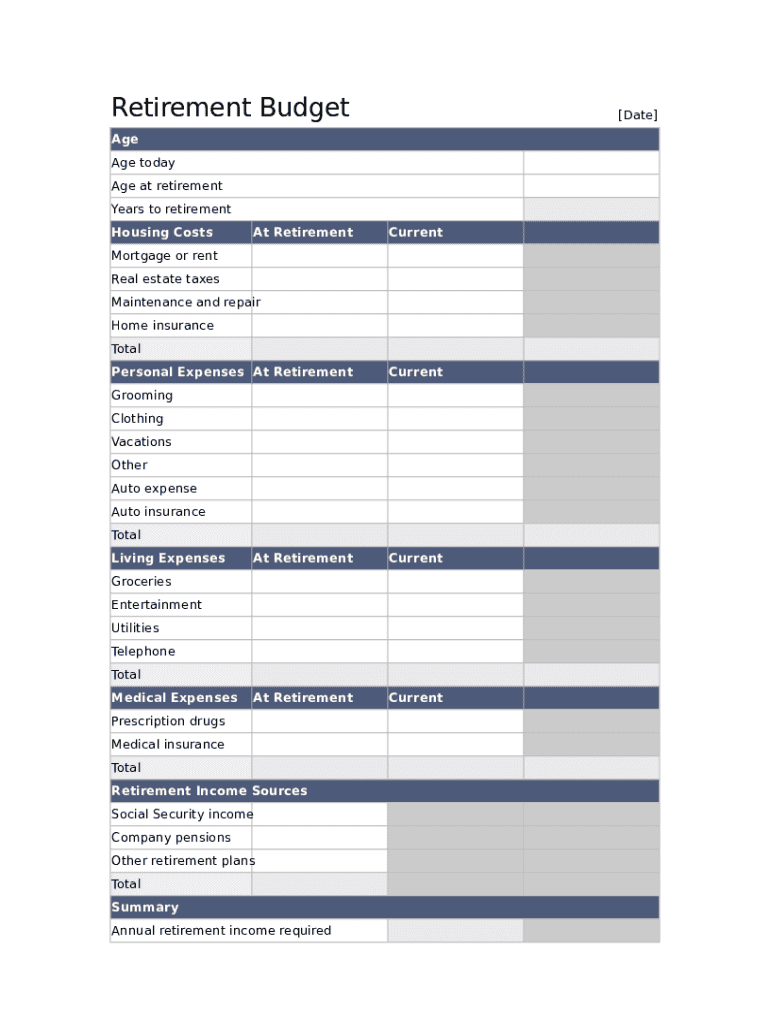
Retirement Budget Worksheet free printable template
We are not affiliated with any brand or entity on this form

Fill out
Complete the form online in a simple drag-and-drop editor.

eSign
Add your legally binding signature or send the form for signing.

Share
Share the form via a link, letting anyone fill it out from any device.

Export
Download, print, email, or move the form to your cloud storage.
Why pdfFiller is the best tool for your documents and forms


End-to-end document management
From editing and signing to collaboration and tracking, pdfFiller has everything you need to get your documents done quickly and efficiently.
Accessible from anywhere
pdfFiller is fully cloud-based. This means you can edit, sign, and share documents from anywhere using your computer, smartphone, or tablet.
Secure and compliant
pdfFiller lets you securely manage documents following global laws like ESIGN, CCPA, and GDPR. It's also HIPAA and SOC 2 compliant.
What is Retirement Budget Worksheet
The Retirement Budget Form is a personal finance document used by individuals to estimate and plan for retirement expenses and income.
pdfFiller scores top ratings on review platforms




Who needs Retirement Budget Worksheet?
Explore how professionals across industries use pdfFiller.

Retirement Budget Worksheet is needed by:
-
Individuals planning for retirement
-
Financial advisors assisting clients with retirement budgeting
-
Couples preparing joint retirement plans
-
Accountants managing personal finances
-
Retirement planners providing financial strategies
Comprehensive Guide to Retirement Budget Worksheet
What is the Retirement Budget Form?
The Retirement Budget Form is a crucial financial planning tool designed to assist individuals in estimating their retirement expenses and income. This form allows users to input specific data regarding their expected costs and income sources, offering a clear structure to guide their retirement planning. Essential fields typically include crucial data points such as current housing costs, personal expenses, and anticipated income streams during retirement.
By utilizing this retirement budget template, users can gain insights into their financial needs, promote disciplined budgeting, and ultimately work towards a secure financial future.
Purpose and Benefits of Using the Retirement Budget Form
Utilizing the Retirement Budget Form can significantly enhance the retirement planning experience. Budgeting for retirement expenses and income is vital to ensure that individuals are prepared for their financial needs in the later stages of life. One notable advantage of this form is that it allows users to identify potential income shortfalls early in the planning process.
This proactive approach enables comprehensive financial planning, ensuring that all aspects of retirement finances are taken into consideration, thereby minimizing surprise expenses later on.
Key Features of the Retirement Budget Form
The design of the Retirement Budget Form incorporates user-friendly features that streamline the budgeting process. Key input fields such as 'Age today', 'Housing Costs At Retirement Current', and 'Retirement Income Sources' are organized clearly to facilitate input.
Moreover, the form includes automated calculations for determining the required annual retirement income, making it easier for users to see their financial landscape. The flexibility of the form allows for various retirement scenarios to be modeled, accommodating different personal finance situations efficiently.
Who Can Benefit from the Retirement Budget Form?
The target audience for the Retirement Budget Form predominantly includes individuals nearing retirement or those actively planning for it. It is particularly beneficial for financial advisors and planners who assist clients in mapping out their financial futures.
Demographics such as retirees and soon-to-be retirees will find this retirement planning form especially helpful as it provides a clear view of their financial requirements and potential gaps in their funding.
How to Fill Out the Retirement Budget Form Online (Step-by-Step)
Filling out the Retirement Budget Form online can be a straightforward process if approached methodically. Here’s how to do it effectively:
-
Begin by gathering relevant financial data, including current expenses, income sources, and expected costs at retirement.
-
Access the form and systematically enter data into the labeled fields like 'Age today' and 'Housing Costs At Retirement Current'.
-
Review your figures carefully to ensure accuracy, especially focusing on expenses and income sources.
-
Finally, utilize the automated calculations for the required annual retirement income and check for any discrepancies.
Common Errors and How to Avoid Them When Using the Retirement Budget Form
When using the Retirement Budget Form, users may encounter various pitfalls that could hinder their financial planning. Common mistakes include underestimating living expenses or overestimating retirement income.
To minimize errors, it’s crucial to maintain accuracy in financial predictions. Tips for ensuring correctness include meticulously reviewing and validating each entry before finalization, which can prevent significant issues in budget accuracy.
How to Digital Sign or Notarize the Retirement Budget Form
The signing process for the Retirement Budget Form is essential to finalize agreements or document completion. To facilitate this:
-
Understand the requirements for digital signatures, which may differ based on legal standards.
-
You can utilize platforms like pdfFiller for eSigning without needing to print the form.
-
If notarization is required, familiarize yourself with alternative options available for document verification.
Security and Compliance Considerations While Using the Retirement Budget Form
Ensuring the security of your Retirement Budget Form is paramount, especially considering the sensitive financial information it contains. pdfFiller employs robust security measures, including 256-bit encryption, to safeguard user data.
The platform is compliant with HIPAA and GDPR regulations, which helps assure users about privacy and data protection throughout the document management process. This means that users can engage confidently with their financial planning activities.
How to Download and Save the Completed Retirement Budget Form
Once your Retirement Budget Form is finalized, knowing how to download and save it is vital for future reference. Follow these steps:
-
Navigate to the download options and select the format you desire, such as PDF.
-
Ensure that you save the document in a secure location on your device to simplify access later.
-
Consider sharing the completed form with financial advisors or family members for collaborative planning.
Empower Your Retirement Planning with pdfFiller
pdfFiller offers extensive features and ease of use that can enhance your financial planning experience. By utilizing this platform for creating your Retirement Budget Form, you benefit from robust security and reliable document management capabilities.
Take control of your retirement planning today. Create your Retirement Budget Form to secure your financial future efficiently.
How to fill out the Retirement Budget Worksheet
-
1.To access the Retirement Budget Form on pdfFiller, visit the website and use the search feature to locate the form by its name.
-
2.Once you find the form, click on it to open the editing interface, where you can view all input fields clearly labeled for your convenience.
-
3.Before completing the form, gather any necessary information such as current age, expected retirement age, and estimates for housing, medical, personal, and living expenses.
-
4.As you navigate the form, click on each input field to enter your data. Utilize the prompts to fill in the details accurately, ensuring nothing is overlooked.
-
5.Be sure to include all sources of projected retirement income in the designated sections, which will help in calculating your overall financial needs.
-
6.After filling in all relevant information, review the form thoroughly to ensure completeness and accuracy. Check for any errors or missing fields.
-
7.When you are satisfied with the filled form, you can save it to your pdfFiller account. You also have the option to download a copy or submit it directly through the platform if required.

Who should use the Retirement Budget Form?
The Retirement Budget Form is ideal for individuals planning for retirement, financial advisors, and accountants helping clients assess and manage their retirement finances.
What information do I need to complete the form?
To complete the Retirement Budget Form, gather information on your current and projected living costs, housing expenses, medical costs, and expected income sources during retirement.
How do I submit the completed form?
Once you have filled out the Retirement Budget Form on pdfFiller, you can save it to your account, download it, or submit it directly through the platform if there are specific submission requirements.
Are there any deadlines associated with using this form?
While the Retirement Budget Form does not have specific deadlines, completing it ahead of major financial decisions or retirement planning periods is advisable to ensure accurate budgeting.
What are common mistakes to avoid when filling out the form?
Common mistakes include omitting key income sources, underestimating expenses, and failing to update figures to reflect changing financial situations. Double-check all entries carefully.
Is notarization required for the Retirement Budget Form?
No, the Retirement Budget Form does not require notarization, making it easy to fill out and submit without additional legal steps.
How long does it take to process the completed form?
Processing time for the Retirement Budget Form will depend on how you submit it. If just for personal use, there’s no processing time, but if shared with a financial advisor or institution, check their specific timelines.
Related Forms




Get the latest insights from our blog


If you believe that this page should be taken down, please follow our DMCA take down process
here
.
This form may include fields for payment information. Data entered in these fields is not covered by PCI DSS compliance.