
Last updated on
Oct 31, 2026

Bookkeeping Excel Template free printable template
We are not affiliated with any brand or entity on this form

Fill out
Complete the form online in a simple drag-and-drop editor.

eSign
Add your legally binding signature or send the form for signing.

Share
Share the form via a link, letting anyone fill it out from any device.

Export
Download, print, email, or move the form to your cloud storage.
Why pdfFiller is the best tool for your documents and forms


End-to-end document management
From editing and signing to collaboration and tracking, pdfFiller has everything you need to get your documents done quickly and efficiently.
Accessible from anywhere
pdfFiller is fully cloud-based. This means you can edit, sign, and share documents from anywhere using your computer, smartphone, or tablet.
Secure and compliant
pdfFiller lets you securely manage documents following global laws like ESIGN, CCPA, and GDPR. It's also HIPAA and SOC 2 compliant.
What is Bookkeeping Excel Template
The Account Posting Form is a financial document used by accountants and financial professionals to record and track account transactions, including debits and credits.
pdfFiller scores top ratings on review platforms




Who needs Bookkeeping Excel Template?
Explore how professionals across industries use pdfFiller.

Bookkeeping Excel Template is needed by:
-
Accountants who manage financial records
-
Bookkeepers responsible for transaction tracking
-
Financial analysts needing to maintain accurate data
-
Business owners monitoring financial transactions
-
Auditors reviewing financial statements
-
Students studying accounting principles
Comprehensive Guide to Bookkeeping Excel Template
What is the Account Posting Form?
The Account Posting Form is an essential financial transaction form designed to capture and document various account activities. Its primary purpose is to accurately record financial transactions, thereby facilitating effective bookkeeping practices. The form encompasses several critical fields, including account names, account numbers, transaction dates, and transaction amounts, which are necessary for precise financial tracking.
By utilizing the account posting form, businesses can ensure a methodical approach to maintaining their financial records.
Purpose and Benefits of the Account Posting Form
The account posting form is vital for businesses and accountants alike, as it plays a crucial role in preserving accurate financial records. Implementing this form provides numerous benefits, notably reducing errors that commonly occur within bookkeeping processes. Additionally, it supports comprehensive financial analysis, enabling businesses to make informed decisions based on reliable data.
Understanding the advantages of using financial transaction forms can significantly enhance operational efficiency in financial management.
Key Features of the Account Posting Form
-
Uncomplicated design that promotes user-friendliness
-
Blank fields accommodating essential financial information
-
Flexibility in usage for various financial transactions
-
Capability to accurately document both debits and credits
These features collectively ensure that users can efficiently handle their financial documentation with minimal hassle.
Who Needs the Account Posting Form?
The primary users of the account posting form include accountants and financial professionals who routinely engage with financial transactions. However, the utility of this form extends to other individuals such as small business owners or freelancers who manage their finances independently. It is essential for anyone involved in processing financial transactions to be familiar with this form and its applications.
How to Fill Out the Account Posting Form Online (Step-by-Step)
-
Access the account posting form using pdfFiller.
-
Begin by entering the account names at the designated field.
-
Provide the corresponding account numbers accurately.
-
Fill in the transaction date, ensuring it reflects the actual transaction timing.
-
Specify the transaction amount, noting whether it’s a debit or credit.
-
Review the form for completeness to avoid common mistakes.
Being mindful of these steps will help streamline the filling process and enhance accuracy.
How to Submit the Account Posting Form and Delivery Options
Submitting the account posting form can be carried out through various methods, each tailored to different user preferences. Users have the option to submit the form electronically for immediate processing, or they may opt for printing and mailing it to the appropriate entity. Regardless of the chosen method, it is crucial to ensure that the form is fully completed and accurate prior to submission to avoid potential delays or complications.
Security and Compliance for the Account Posting Form
pdfFiller prioritizes security when handling sensitive financial documents, employing robust data protection measures. This includes the use of 256-bit encryption and adherence to regulations such as HIPAA and GDPR, ensuring user information is safeguarded at all times. Utilizing secure methods for form submission enhances the integrity of financial transactions, which is of paramount importance.
Using pdfFiller for Your Account Posting Form Needs
pdfFiller offers numerous features that specifically assist users in completing their account posting form efficiently. The platform is inherently user-friendly, allowing for easy text editing, annotations, and form filling. Moreover, users can take advantage of eSigning capabilities to ensure a seamless completion process. Leveraging pdfFiller’s tools facilitates effective document management and organization for all users.
Sample or Example of a Completed Account Posting Form
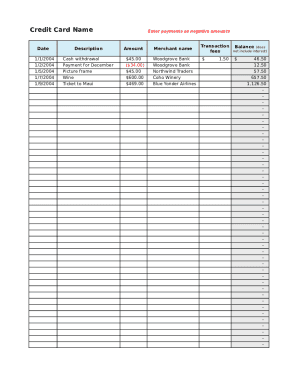
To aid users in understanding the form's structure and necessary information, a visually appealing example of a completed account posting form is provided. This example highlights filled-in fields, demonstrating the correct method of completing the form. Referring to an example simplifies the process, offering clarity on how to accurately fill out required information.
Start Managing Your Financial Transactions with pdfFiller
pdfFiller stands as a robust solution for users managing their document needs, particularly with regard to the account posting form. By choosing to fill out their form through the platform, users can benefit from the conveniences of cloud-based editing and direct sharing options. Embracing these tools empowers users to streamline their financial transaction management efficiently.
How to fill out the Bookkeeping Excel Template
-
1.To access the Account Posting Form on pdfFiller, go to the website and log into your account. If you don’t have an account, create one for free.
-
2.Once logged in, use the search bar to find 'Account Posting Form' or navigate through the business forms section until you locate it.
-
3.After opening the form, familiarize yourself with its layout. Take note of the fields available for input such as account names, numbers, dates, and transaction amounts.
-
4.Before filling out the form, gather necessary information, including account details, transaction types (debit or credit), dates of transactions, and amounts to ensure an accurate submission.
-
5.Begin filling out the form by clicking on each blank field. Use the provided text boxes to enter details directly into the form.
-
6.For each transaction, ensure you double-check the accuracy of account names, numbers, and amounts entered to avoid mistakes.
-
7.When all information is entered, thoroughly review the form to confirm that all fields are filled correctly with no omissions.
-
8.After verifying the information, utilize pdfFiller's options to save, download, or submit the form directly from the platform. Choose the appropriate option based on your needs.

Who needs the Account Posting Form?
The Account Posting Form is essential for accountants, bookkeepers, financial analysts, business owners, auditors, and students in accounting to accurately record financial transactions.
Are there any deadlines associated with this form?
The Account Posting Form itself does not have specific submission deadlines. However, it’s important to keep up with your accounting timelines for financial reporting.
How do I submit the Account Posting Form?
You can submit the completed Account Posting Form by saving it on your device, emailing it to relevant parties, or directly submitting it through pdfFiller if required by your organization.
What documents do I need while filling out the form?
While filling out the Account Posting Form, you will need your account names, numbers, transaction details, and relevant dates to ensure accuracy in your documentation.
What are some common mistakes to avoid on this form?
To avoid mistakes on the Account Posting Form, double-check all account names, transaction amounts, and ensure no fields are left blank that require input.
How long does processing take after submission?
Processing times for the Account Posting Form may vary based on your organization or financial institution, so it's best to confirm with them directly regarding any timelines.
Is notarization required for this form?
No, notarization is not required for the Account Posting Form, as it is primarily used for internal financial tracking rather than formal documentation.
Related Forms






Get the latest insights from our blog


If you believe that this page should be taken down, please follow our DMCA take down process
here
.
This form may include fields for payment information. Data entered in these fields is not covered by PCI DSS compliance.