
Last updated on
Oct 31, 2026
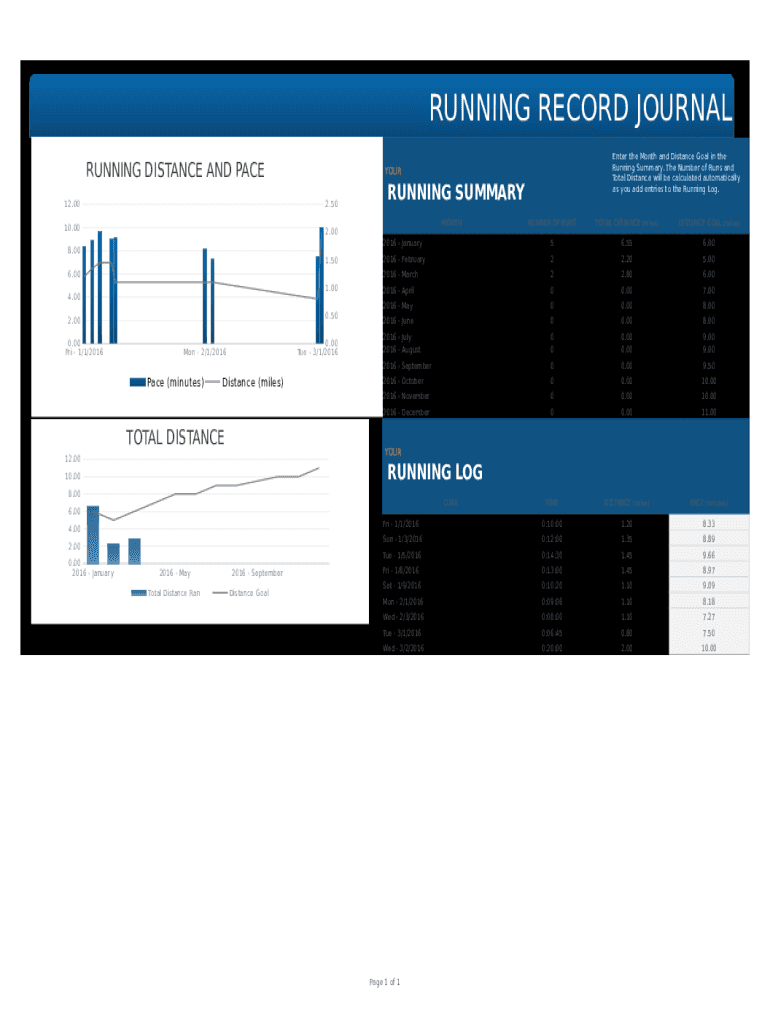
Running Record Journal free printable template
We are not affiliated with any brand or entity on this form

Fill out
Complete the form online in a simple drag-and-drop editor.

eSign
Add your legally binding signature or send the form for signing.

Share
Share the form via a link, letting anyone fill it out from any device.

Export
Download, print, email, or move the form to your cloud storage.
Why pdfFiller is the best tool for your documents and forms


End-to-end document management
From editing and signing to collaboration and tracking, pdfFiller has everything you need to get your documents done quickly and efficiently.
Accessible from anywhere
pdfFiller is fully cloud-based. This means you can edit, sign, and share documents from anywhere using your computer, smartphone, or tablet.
Secure and compliant
pdfFiller lets you securely manage documents following global laws like ESIGN, CCPA, and GDPR. It's also HIPAA and SOC 2 compliant.
What is Running Record Journal
The Running Distance and Pace Journal is a personal form used by individuals to track their running activities and improve their performance.
pdfFiller scores top ratings on review platforms




Who needs Running Record Journal?
Explore how professionals across industries use pdfFiller.

Running Record Journal is needed by:
-
Joggers wanting to monitor their progress
-
Competitive runners aiming to enhance their training
-
Fitness enthusiasts tracking their daily workouts
-
Personal trainers monitoring client running stats
-
Health and wellness coaches guiding clients on fitness journeys
-
Athletes preparing for marathons or races
Comprehensive Guide to Running Record Journal
Understanding the Running Distance and Pace Journal
The Running Distance and Pace Journal is designed to help individuals track their running activities effectively. Its primary purpose is to assist runners in monitoring their performance over time by recording essential data. This journal can benefit a diverse range of users, from casual joggers looking to improve their fitness levels to competitive athletes striving for peak performance. By utilizing the running distance journal and pace journal template, users can gain insights into their training patterns and progress.
Purpose and Benefits of the Running Distance and Pace Journal
Tracking running distance and pace can significantly enhance athletic performance. Maintaining a running log promotes accountability and encourages consistency, both of which are crucial for improvement. Additionally, users can experience mental benefits, such as reduced stress and improved mood, as well as physical advantages, including increased endurance and speed. By regularly reviewing their records, individuals can realize their goals more effectively, using the running log form and distance tracking form as vital tools in this journey.
Key Features of the Running Distance and Pace Journal
This journal encompasses several key features that streamline the tracking process. Users can easily log their entries, and the journal automatically calculates total distance and runs, saving valuable time. It also allows for customizable goals tailored to individual performance needs. The running summary template provides an easy way to visualize trends over time, further enhancing the user's experience with the distance tracking form.
Who Can Use the Running Distance and Pace Journal?
The versatility of the Running Distance and Pace Journal makes it suitable for various user groups. Beginners can use it to establish consistent running habits, while seasoned runners can leverage it to refine their training strategies. Coaches can also benefit from the journal by tracking their athletes' progress and adjusting training plans accordingly. Individual needs will vary, but the journal adapts to different goals and training styles, making it especially beneficial for those serious about their running pursuits.
How to Fill Out the Running Distance and Pace Journal Online
To fill out the journal using pdfFiller, follow these steps:
-
Access the Running Distance and Pace Journal template online.
-
Enter the key fields, including month, number of runs, total distance, and distance goal.
-
Use the provided options to record each run accurately.
-
Review entries for clarity and completeness before saving.
When tracking your data, aim for consistency in your entries. Employ effective techniques to ensure you accurately capture your running metrics using the running log form and distance tracking form for best results.
Common Mistakes to Avoid When Using the Running Distance and Pace Journal
While using the Running Distance and Pace Journal, users often make several common mistakes. Misentering data can lead to inaccurate results, so it's crucial to double-check entries for each run. Additionally, failing to maintain regular updates can hinder progress tracking. To ensure accurate calculations, follow these tips:
-
Be diligent about recording details immediately after each run.
-
Double-check calculations and entries for consistency.
Consistency is a vital element in tracking running metrics, and the running summary template can help you visualize your journey effectively.
Security and Privacy with the Running Distance and Pace Journal
When using the Running Distance and Pace Journal, users can trust pdfFiller to safeguard their data. The platform employs 256-bit encryption and adheres to rigorous security standards, including HIPAA and GDPR compliance. This commitment to user privacy ensures that personal information remains confidential and secure throughout the journaling process.
How to Download and Save Your Running Distance and Pace Journal
Once you have completed filling out the Running Distance and Pace Journal, follow these steps to save it:
-
Select the 'Download' option to save your journal.
-
Choose from available formats, such as PDF.
-
Organize files in a designated folder for easy access and future reference.
This straightforward process ensures you have a personal record of your running activities using the distance tracking form and running log form.
Sharing Your Running Distance and Pace Journal
Sharing your completed journal with trainers or fellow runners can enhance accountability and provide valuable feedback. Consider these methods for sharing your journal securely:
-
Email the completed PDF to your coach or training group.
-
Utilize cloud storage services to share links, ensuring only intended recipients have access.
This collaborative aspect can foster motivation and support throughout your running journey, especially when utilizing the running summary template and pace journal template for shared insights.
Start Tracking Your Running Journey Today!
Begin your journey by trying out the Running Distance and Pace Journal. The user-friendly nature of pdfFiller's capabilities makes tracking your progress easier than ever. Embrace the empowerment that comes with monitoring your running efforts and remember to keep your data secure while using the platform.
How to fill out the Running Record Journal
-
1.To access the Running Distance and Pace Journal, open pdfFiller and search for the form by its name. You can also navigate directly using a shared link if available.
-
2.Once the form is open, you'll see several blank fields. Familiarize yourself with the layout, where you’ll be entering data such as the month, number of runs, total distance, and distance goal.
-
3.Before filling in the form, gather the necessary information such as your running logs from the previous month, weekly training schedules, and specific distance goals you aim to achieve.
-
4.Begin by typing the month in the designated field. This sets the context for the entries and helps to organize your data chronologically.
-
5.Next, enter the number of runs you completed in that month in its respective field. Be accurate, as this helps in evaluating your performance.
-
6.Then, fill in the total distance covered in miles. Ensure you have calculated your distances accurately to reflect your progress.
-
7.Now, set a distance goal for the next month. This motivates you to stay on track and improve your running ability.
-
8.As you fill in each field, the form automatically calculates totals where applicable, making it easier to analyze your running statistics.
-
9.After completing all entries, review the information for any mistakes or inaccuracies in your data. Ensure everything is correctly filled out before finalizing.
-
10.To save your progress, click on the save button. You can also choose to download the completed journal in various formats for your records.
-
11.If you wish to submit the journal, follow the provided submission process on pdfFiller to send it to your coach or trainer.

Who can use the Running Distance and Pace Journal?
Anyone involved in running, including recreational joggers, competitive runners, and trainers, can effectively use this journal to track their progress and enhance performance.
Are there any deadlines for submitting this form?
The Running Distance and Pace Journal does not have specific submission deadlines. However, it’s best to update and review your entries monthly to keep performance data current.
Can I submit the journal online?
Yes, you can submit the completed Running Distance and Pace Journal through pdfFiller's online submission process or save it to email to your trainer.
What supporting documents do I need to complete this form?
Before starting, collect your previous running logs or notes that detail your daily distances and any set goals. These documents will help ensure accurate entries.
What common mistakes should I avoid while filling out the journal?
Be careful to accurately record the month and total distances. Ensure that the numbers reflect your actual performance to avoid errors in your training assessment.
How long does it take to process submissions of this form?
Since this is a personal tracking form, there is no formal processing time. However, ensure timely updates for personal review and goal setting.
Can I edit the journal after I save it?
Yes, you can reopen the Running Distance and Pace Journal on pdfFiller and make any necessary edits or updates as your running data changes.
Related Forms




Get the latest insights from our blog


If you believe that this page should be taken down, please follow our DMCA take down process
here
.
This form may include fields for payment information. Data entered in these fields is not covered by PCI DSS compliance.