
Last updated on
Oct 31, 2026
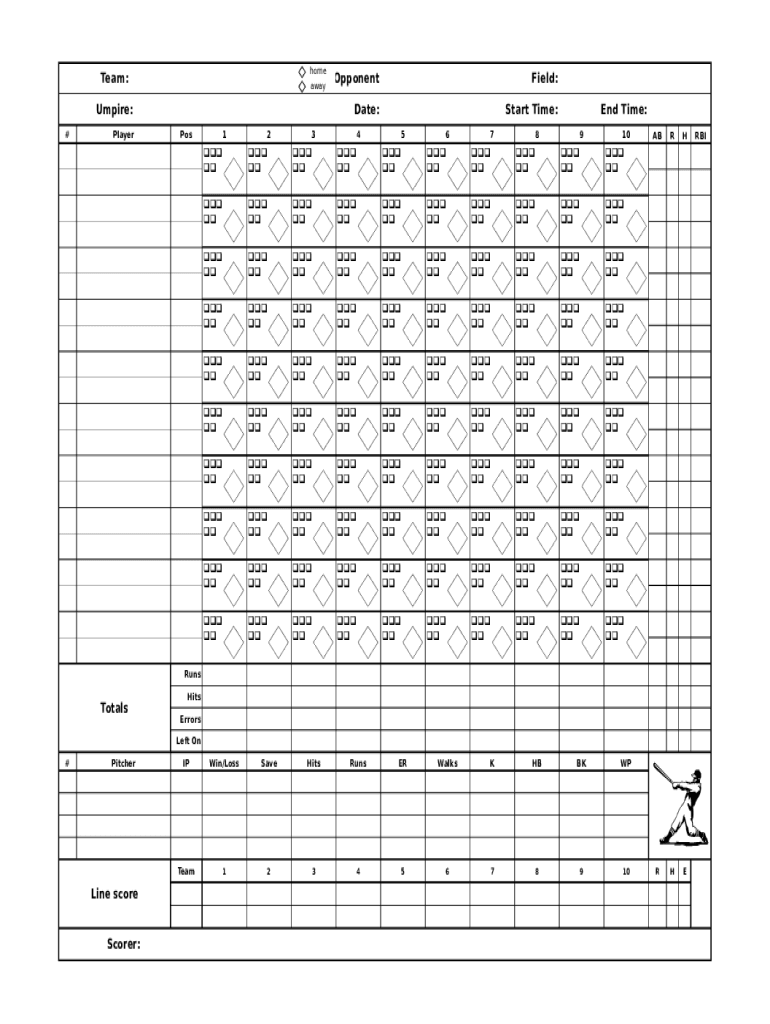
Scorekeeping List For Baseball free printable template
We are not affiliated with any brand or entity on this form

Fill out
Complete the form online in a simple drag-and-drop editor.

eSign
Add your legally binding signature or send the form for signing.

Share
Share the form via a link, letting anyone fill it out from any device.

Export
Download, print, email, or move the form to your cloud storage.
Why pdfFiller is the best tool for your documents and forms


End-to-end document management
From editing and signing to collaboration and tracking, pdfFiller has everything you need to get your documents done quickly and efficiently.
Accessible from anywhere
pdfFiller is fully cloud-based. This means you can edit, sign, and share documents from anywhere using your computer, smartphone, or tablet.
Secure and compliant
pdfFiller lets you securely manage documents following global laws like ESIGN, CCPA, and GDPR. It's also HIPAA and SOC 2 compliant.
What is Scorekeeping List For Baseball
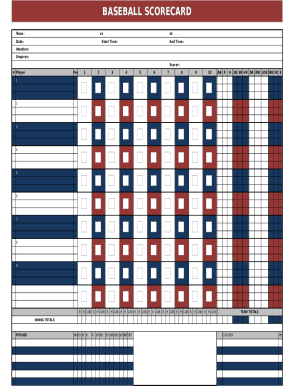
The Baseball Scorecard Template is a document used by baseball scorers to accurately record and track the performance of a baseball team during a game.
pdfFiller scores top ratings on review platforms




Who needs Scorekeeping List For Baseball?
Explore how professionals across industries use pdfFiller.

Scorekeeping List For Baseball is needed by:
-
Baseball coaches for tracking team performance.
-
Scorers maintaining game statistics during matches.
-
Parents wanting to record their child's game stats.
-
Sports analysts evaluating player performance.
-
Event organizers requiring game records for reporting.
-
Fans interested in keeping score during games.
Comprehensive Guide to Scorekeeping List For Baseball
What is the Baseball Scorecard Template?
The Baseball Scorecard Template is a structured tool designed for recording game statistics and player performance during a baseball match. This template facilitates the efficient documentation of essential game details, including team names, umpire information, and an organized scoring grid. The layout features designated sections to ensure that scorers can accurately track every aspect of the game.
Typically, a scorecard includes fields such as 'Team:', 'Opponent:', 'Date:', and a scoring grid, allowing for straightforward input of relevant statistics throughout the game. By using this template, individuals can enhance their record-keeping practices during baseball games.
Benefits of Using the Baseball Scorecard Template
Utilizing the Baseball Scorecard Template offers numerous advantages that aid in real-time game scoring. It allows individuals to keep meticulous track of player statistics, including runs, hits, and at-bats, making it easier to monitor performance as the game unfolds.
Having a physical or digital record through a printable scorecard is invaluable for future reference, enabling coaches and players to analyze performance trends over time. By employing a structured approach to scorekeeping, users can enhance their understanding of gameplay and player development.
Key Features of the Baseball Scorecard Template
The Baseball Scorecard Template boasts several key features that make it practical for scorers of all levels. Important fields include 'Team:', 'Opponent:', 'Date:', and a comprehensive scoring grid that details player positions and statistics.
This template is designed for accessibility, ensuring that scorers can easily fill out the information during games, whether physically or through a digital format. Its user-friendly structure promotes accuracy and helps prevent errors during intense game situations.
How to Fill Out the Baseball Scorecard Template
Filling out the Baseball Scorecard Template involves a straightforward process. Follow these steps for effective completion:
-
Enter the team names in the designated fields.
-
Document the date of the game.
-
Fill in umpire information and game location.
-
Track player statistics such as runs, hits, and errors throughout the game.
-
Use common scoring conventions to maintain accuracy.
Following these steps ensures a precise and comprehensive record of the game.
Common Mistakes to Avoid When Using the Baseball Scorecard Template
It’s crucial to avoid certain mistakes when using the Baseball Scorecard Template. Common pitfalls include failing to record player statistics correctly or neglecting essential fields in the template. These errors can lead to incomplete or inaccurate records that undermine the purpose of scorekeeping.
To enhance accuracy, scorers should double-check entries and familiarize themselves with common scoring conventions, ensuring comprehensive coverage of game details.
Who Should Use the Baseball Scorecard Template?
The Baseball Scorecard Template is beneficial for various users, including coaches, players, and parents involved in baseball activities. This template is particularly useful in settings such as amateur leagues or youth sports, where keeping track of game statistics can significantly impact player development.
By utilizing this template, participants can maintain detailed records that highlight individual and team performance, aiding in strategy and training discussions.
Where to Download and Save the Baseball Scorecard Template
Accessing the Baseball Scorecard Template is simple and efficient. Users can download the template via platforms like pdfFiller, which provides easy access to printable formats. Once downloaded, it is essential to save the file in a secure location for quick retrieval when needed.
For optimal organization, consider maintaining both digital and physical copies of the scorecard template, allowing for greater flexibility in scorekeeping practices.
Integrating the Baseball Scorecard Template with PDF Tools
pdfFiller enhances the scorekeeping experience by offering various features tailored to the Baseball Scorecard Template. Users can easily edit, fill, and eSign directly within the platform, which streamlines the process of completing scorecards.
Additionally, pdfFiller adheres to security standards, ensuring that sensitive documents related to scorekeeping are well-protected, providing peace of mind for users.
Next Steps After Filling Out the Baseball Scorecard Template
Once the Baseball Scorecard Template is filled out, users have several options for the completed document. They can save it for personal records, print it for physical copies, or share it with team members or coaches for further analysis.
Storing completed scorecards properly fosters ongoing evaluations and historical assessments of team performance, making it an essential part of the scoring process.
Make Scoring Easy and Efficient with pdfFiller
Leveraging pdfFiller for your scoring needs can significantly enhance the experience of using the Baseball Scorecard Template. The platform’s user-friendly interface and practical features make scoring efficient and straightforward.
By utilizing pdfFiller, scorers can fully realize the advantages of a well-structured scorecard, ensuring that every detail of the game is accurately recorded.
How to fill out the Scorekeeping List For Baseball
-
1.To access the Baseball Scorecard Template on pdfFiller, visit the pdfFiller website and use the search bar to find the template easily.
-
2.Once located, click on the template to open it in the editing interface provided by pdfFiller.
-
3.Before starting, gather the necessary information such as team names, date, time, and specific player statistics that you'll need to fill in.
-
4.Begin by entering the team names in the designated fields for 'Team:' and 'Opponent:'.
-
5.Fill in the 'Umpire:', 'Date:', 'Start Time:', and 'End Time:' fields with accurate information to ensure complete records.
-
6.For the scoring grid, input player names and their respective statistics like at-bats, runs, and hits as the game progresses.
-
7.Utilize the available tools in pdfFiller to ensure fields are filled correctly, using options like checkboxes for easy marking.
-
8.After completing the form, review all entries for accuracy, ensuring all statistics are recorded and fields are filled in thoroughly.
-
9.Once everything is finalized and checked, navigate to the save or download options to either save locally or submit your completed scorecard.
-
10.You can choose to download it as a PDF or directly share it through email or other submission methods available on pdfFiller.

Who can use the Baseball Scorecard Template?
The Baseball Scorecard Template can be used by coaches, scorers, parents, sports analysts, and fans who wish to track the performance of a baseball team during a game.
Is there a deadline for submitting the scorecard?
Typically, there is no formal deadline for submitting the scorecard as it’s primarily for personal records. However, it should be completed during the game for accuracy.
How can I submit the completed scorecard?
You can submit the completed scorecard by downloading it as a PDF from pdfFiller or sharing it via email directly from the platform after finalizing.
What supporting documents are required when using this form?
Generally, no supporting documents are required to use the Baseball Scorecard Template. However, it is helpful to have the player roster and game schedule on hand.
What are common mistakes to avoid when filling out the scorecard?
Avoid omitting player statistics and ensure accuracy in all entries. Double-check fields for spellings of player names and statistics to prevent inaccuracies.
How long will it take to process the submitted scorecard?
Since the scorecard is typically for personal use, processing is immediate after completion. Just ensure the data is saved correctly on pdfFiller.
Is notarization required for using the Baseball Scorecard Template?
No, notarization is not required when using the Baseball Scorecard Template, as it is intended for personal and informal usage.
Related Forms




Get the latest insights from our blog


If you believe that this page should be taken down, please follow our DMCA take down process
here
.
This form may include fields for payment information. Data entered in these fields is not covered by PCI DSS compliance.