
Last updated on
Oct 31, 2026
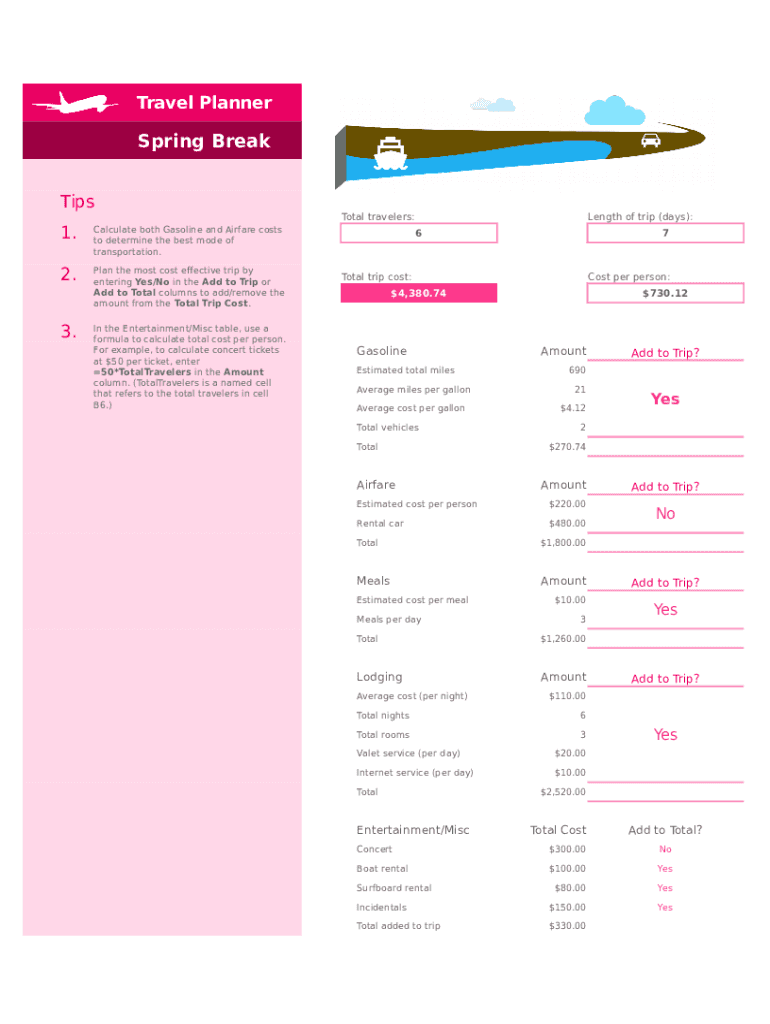
Travel Planner Template free printable template
We are not affiliated with any brand or entity on this form

Fill out
Complete the form online in a simple drag-and-drop editor.

eSign
Add your legally binding signature or send the form for signing.

Share
Share the form via a link, letting anyone fill it out from any device.

Export
Download, print, email, or move the form to your cloud storage.
Why pdfFiller is the best tool for your documents and forms


End-to-end document management
From editing and signing to collaboration and tracking, pdfFiller has everything you need to get your documents done quickly and efficiently.
Accessible from anywhere
pdfFiller is fully cloud-based. This means you can edit, sign, and share documents from anywhere using your computer, smartphone, or tablet.
Secure and compliant
pdfFiller lets you securely manage documents following global laws like ESIGN, CCPA, and GDPR. It's also HIPAA and SOC 2 compliant.
What is Travel Planner Template
The Spring Break Travel Planner is a personal form used by individuals to plan and calculate the costs of a spring break trip.
pdfFiller scores top ratings on review platforms




Who needs Travel Planner Template?
Explore how professionals across industries use pdfFiller.

Travel Planner Template is needed by:
-
Families planning a spring break vacation
-
Budget-conscious travelers
-
Travel groups organizing trips
-
Students preparing for spring break
-
Event planners coordinating accommodations and activities
Comprehensive Guide to Travel Planner Template
What Is the Spring Break Travel Planner?
The Spring Break Travel Planner is a valuable tool designed to streamline the planning process for a spring break trip. This form helps users estimate costs associated with travel, such as airfare, lodging, and meals, making it crucial for effective budgeting. By utilizing this vacation budget form, travelers can ensure they are adequately prepared financially for their upcoming adventures.
Planning a spring break trip is important because it allows travelers to make informed choices about their expenses while maximizing their experience.
Purpose and Benefits of the Spring Break Travel Planner
The Spring Break Travel Planner serves several key purposes. First, it aids in budgeting for essential trip expenses like airfare, lodging, and food, helping travelers avoid overspending. Users can easily track costs and compare different options, ensuring they get the best value for their money.
This trip cost calculator empowers users to make educated financial decisions, giving them confidence as they finalize their plans.
Key Features of the Spring Break Travel Planner
This planner includes several important features that enhance its usability. Fillable fields such as 'Total travelers' and 'Length of trip' allow for personalized planning. Additionally, checkboxes enable users to select which expenses they want to factor in, such as accommodations and entertainment.
The document also contains user-friendly instructions to guide users through each step, along with automatic calculations for total costs, ensuring a seamless planning experience.
Who Needs the Spring Break Travel Planner?
The Spring Break Travel Planner is ideal for a wide range of users, including families, groups of friends, and solo travelers. It is particularly beneficial for budget-conscious travelers who want to ensure that their trip is planned affordably. Families with children can use the planner to incorporate age-appropriate activities while keeping within budget constraints.
Ultimately, anyone looking to make the most of their spring break trip will find this form helpful.
How to Fill Out the Spring Break Travel Planner Online (Step-by-Step)
Filling out the Spring Break Travel Planner is straightforward. Follow these steps to complete the form effectively:
-
Gather necessary information, such as cost estimates for airfare, lodging, and meals.
-
Input the number of travelers and the length of the trip in the appropriate fields.
-
Check the boxes for all expenses you'd like to include in your budget.
-
Double-check all entries for accuracy before finalizing your planner.
Taking the time to validate the information enhances the planner's usefulness and accuracy.
Common Mistakes When Using the Spring Break Travel Planner and How to Avoid Them
Users may encounter a few common pitfalls while utilizing the Spring Break Travel Planner. One frequent mistake is underestimating costs, which can lead to budgeting issues later. Additionally, forgetting to include all travelers can result in inaccurate expense tracking.
Avoid these errors by diligently double-checking all entries and ensuring that all anticipated costs have been factored in. If mistakes occur post-submission, have a plan for adjusting your budget accordingly.
How to Save and Share Your Spring Break Travel Planner
Once you have filled out the Spring Break Travel Planner, saving it as a PDF is simple. Users can easily download their completed planner for personal records. Sharing the plan with fellow travelers is also straightforward, allowing for collaboration on trip details and expenses.
Utilizing pdfFiller's sharing options ensures that everyone involved is on the same page and can contribute to the planning process.
Why Choose pdfFiller for Your Spring Break Travel Planning Needs
pdfFiller provides unmatched convenience for users filling out the Spring Break Travel Planner. With cloud-based editing and filling capabilities, there's no need for downloads. This solution also prioritizes security, employing robust measures to protect users' sensitive information.
With tools such as eSigning and document sharing, pdfFiller significantly enhances the overall experience of planning your spring break trip.
Next Steps: Make Your Spring Break Dreams a Reality
Start planning your spring break trip today with the Spring Break Travel Planner to capitalize on an organized budgeting approach. Taking a proactive stance on your finances can greatly improve the overall enjoyment of your trip. Access your travel planner on pdfFiller for a hassle-free planning experience.
How to fill out the Travel Planner Template
-
1.To access the Spring Break Travel Planner on pdfFiller, visit the website and log in to your account. Search for the form by its title in the search bar.
-
2.Once you open the form, familiarize yourself with the layout. You will see fillable fields and checkboxes for the necessary information.
-
3.Before filling out the form, gather all relevant information, such as the total number of travelers, desired length of the trip, and estimated costs for transportation, meals, lodging, and entertainment.
-
4.Begin by entering the number of travelers in the designated field. Click inside the box and type the appropriate number.
-
5.Next, input the length of the trip in days in the corresponding field. This helps in calculating other expenses accordingly.
-
6.For each category of expense, click on the respective fields to enter the estimated costs. You can also check off items in the 'Add to Trip' checkbox as needed.
-
7.Make sure to follow the instructions provided for each section, which will guide you through adding your expenses and calculating the total trip cost.
-
8.Once you have completed all sections of the form, review your entries for accuracy. Verify that all costs are inputted correctly, and ensure that everything adds up as intended.
-
9.After reviewing, save your work. Use the 'Save' option to keep a copy of your completed planner in your pdfFiller account, or download the document if you prefer a physical copy.
-
10.Finally, if needed, submit the form via email or print a copy for in-person distribution. Ensure you follow any additional requirements for submission based on your travel arrangements.

Who can use the Spring Break Travel Planner?
The Spring Break Travel Planner is ideal for families, students, and groups planning a vacation. It's a practical tool for anyone needing to organize travel expenses.
What information do I need to complete the form?
Gather information about the number of travelers, trip duration, and all potential costs, including transportation, accommodation, meals, and activities before filling out the form.
How do I save my completed form?
You can save your completed Spring Break Travel Planner by using the 'Save' button in pdfFiller. Alternatively, download it to your device for personal records.
Are there any costs associated with using this form?
The Spring Break Travel Planner itself is free to use on pdfFiller, but you may incur standard subscription fees for accessing the platform and additional features.
Can I edit the form after saving it?
Yes, once saved, you can easily reopen and edit the Spring Break Travel Planner in pdfFiller. Make sure to save any changes again afterward.
What should I do if I encounter problems while filling out the form?
If you run into issues, check the pdfFiller help section for guidance. You can also reach out to their customer support team for assistance with any technical difficulties.
Is notarization required for the Spring Break Travel Planner?
No, notarization is not required for the Spring Break Travel Planner. It is a personal planning document and does not need to be notarized.
Related Forms



Get the latest insights from our blog


If you believe that this page should be taken down, please follow our DMCA take down process
here
.
This form may include fields for payment information. Data entered in these fields is not covered by PCI DSS compliance.