
Last updated on
Oct 31, 2026
College Student Budget Form free printable template
We are not affiliated with any brand or entity on this form

Fill out
Complete the form online in a simple drag-and-drop editor.

eSign
Add your legally binding signature or send the form for signing.

Share
Share the form via a link, letting anyone fill it out from any device.

Export
Download, print, email, or move the form to your cloud storage.
Why pdfFiller is the best tool for your documents and forms


End-to-end document management
From editing and signing to collaboration and tracking, pdfFiller has everything you need to get your documents done quickly and efficiently.
Accessible from anywhere
pdfFiller is fully cloud-based. This means you can edit, sign, and share documents from anywhere using your computer, smartphone, or tablet.
Secure and compliant
pdfFiller lets you securely manage documents following global laws like ESIGN, CCPA, and GDPR. It's also HIPAA and SOC 2 compliant.
What is College Student Budget Form
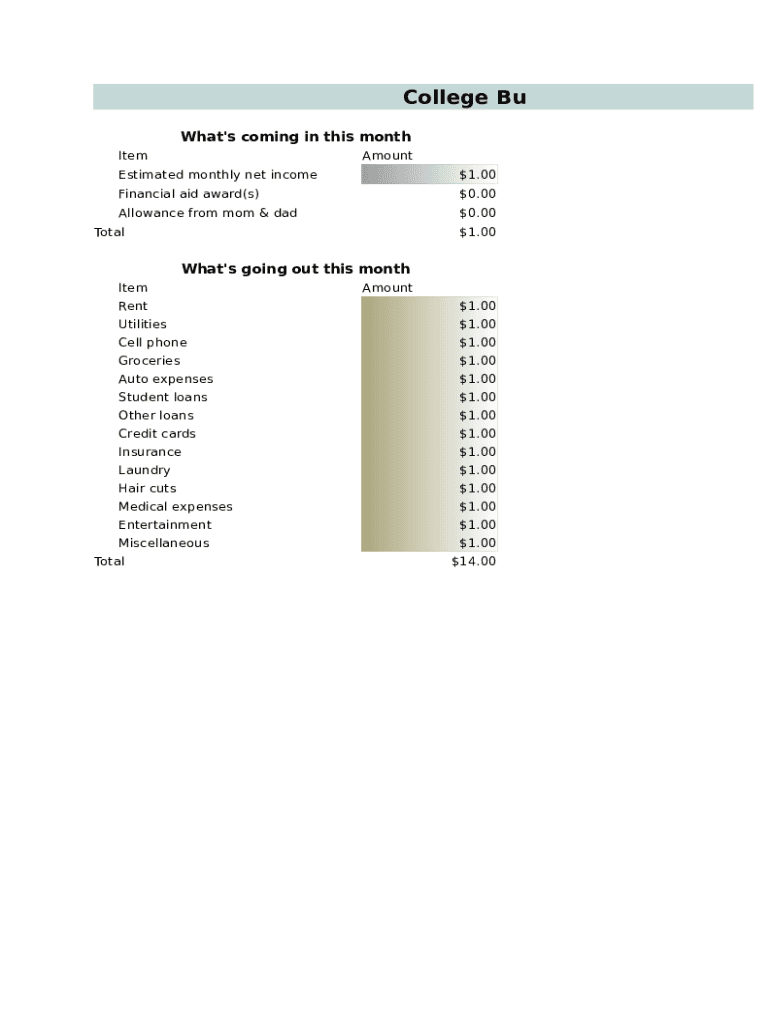
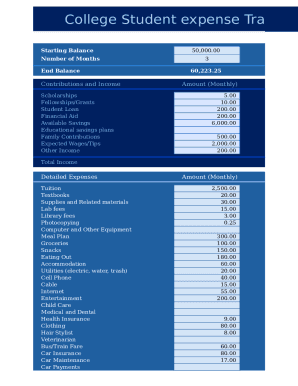
The College Budget Template is a budget document used by college students to track their monthly and semester expenses effectively.
pdfFiller scores top ratings on review platforms




Who needs College Student Budget Form?
Explore how professionals across industries use pdfFiller.

College Student Budget Form is needed by:
-
College students managing finances
-
Parents supporting college students
-
Financial advisors specializing in education
-
Budgeting coaches for students
-
Accounting professionals assisting students
Comprehensive Guide to College Student Budget Form
What is the College Budget Template?
The College Budget Template is a crucial tool designed for tracking both monthly and semester expenses for college students. This personal finance template plays a significant role in managing personal finances, providing students with a structured way to visualize their income and expenditures. With fillable fields for various income sources and expenses, using this template simplifies the budgeting process, making financial management accessible for all students.
Purpose and Benefits of Using the College Budget Template
This template empowers college students by allowing them to efficiently assess their financial situation. By calculating the differences between income and expenses, it provides insights into spending habits and financial health. Additionally, adopting budgeting practices early in college leads to long-term financial benefits, equipping students with essential skills for future financial stability.
-
Helps identify spending patterns
-
Encourages accountability in personal finance management
-
Facilitates sound financial decision-making based on actual figures
Key Features of the College Budget Template
The College Budget Template boasts several essential characteristics aimed at enhancing user experience. It includes various sections dedicated to income sources, monthly expenses, and semester costs, which are crucial for comprehensive financial planning. The user-friendly fillable nature of the template promotes ease of use, catering to the specific budgeting needs of diverse student populations.
-
Customizable fields dedicated to specific expense categories
-
Intuitive layout for easy navigation
-
Accommodates varying financial situations and goals
Who Needs the College Budget Template?
The primary audience for the College Budget Template includes college students from diverse financial backgrounds. It's particularly beneficial for new students adjusting to managing finances, those handling student loans, or interns juggling work and studies. Furthermore, it can also serve parents who are assisting their children in understanding and managing their financial responsibilities.
How to Use the College Budget Template Online (Step-by-Step)
Utilizing the College Budget Template effectively requires a straightforward approach. Here is a step-by-step guide:
-
Visit pdfFiller and access the College Budget Template.
-
Fill in the fields with your monthly income and expected expenses.
-
Review your entries for accuracy and completeness.
-
Utilize features such as saving and sharing your budget with advisors or family.
Common Errors and How to Avoid Them
While utilizing the budget template, users may encounter common budgeting pitfalls. One prevalent issue is underestimating expenses, which can skew the financial outlook. To avoid inaccuracies, it's crucial to recognize these pitfalls and adopt the following corrective measures:
-
Regularly review and update the budget as financial situations change
-
Double-check entries to ensure no items are overlooked
-
Consider all potential expenses, including hidden costs
Security and Compliance When Using the College Budget Template
Your personal information is secure when using the College Budget Template through pdfFiller. The platform implements robust security features, including 256-bit encryption and GDPR compliance, to safeguard sensitive financial data. This attention to security is vital when handling personal finance information, providing peace of mind for users. Additionally, the platform facilitates eSigning for added security when needed.
How to Download and Save the College Budget Template PDF
After filling out the budget template, it's essential to save it securely. Here are clear steps to download your completed document:
-
Select the download option on pdfFiller.
-
Choose your preferred file format, such as PDF or DOCX.
-
Organize the saved files in a way that allows for easy retrieval later.
Where to Submit the College Budget Template
Submitting your completed College Budget Template can be crucial for various financial processes. It may be submitted to different channels, such as the school's financial aid office or for personal record-keeping. Having a comprehensive budget is essential for securing student loans or scholarships and ensuring that all submissions are timely is equally important.
Start Budgeting Today with pdfFiller
Taking control of your financial future is easy with pdfFiller. By utilizing the College Budget Template, students can begin organizing and managing their finances effectively. The platform empowers users by offering flexible editing and sharing options, making budgeting not just a task but an empowering step towards financial clarity.
How to fill out the College Student Budget Form
-
1.To access the College Budget Template on pdfFiller, visit their website and search for 'College Budget Template'. Click on the appropriate link to open the form.
-
2.Once the form is open, familiarize yourself with the interface. Look for the blank fields designated for income and expenses.
-
3.Before you start filling out the form, gather necessary information including details of all income sources, monthly expenses such as rent and utilities, and estimated semester costs.
-
4.Begin by entering your estimated monthly net income in the designated field. Ensure that you include all sources of income, including part-time jobs or grants.
-
5.Next, fill in the monthly expenses section. This includes fixed costs like rent and variable costs such as groceries. Be as accurate as possible to get a clear budget overview.
-
6.Continue to the semester cost calculator section. Input estimated costs related to tuition, books, supplies, and additional fees to provide a comprehensive picture of your educational expenses.
-
7.As you complete each section, utilize pdfFiller's tools to add or remove entries as needed to best reflect your financial situation.
-
8.Once all fields are completed, review the entire form for accuracy. Make sure that all figures are correct and that you haven’t skipped any necessary fields.
-
9.Finally, save your completed form by clicking the 'Save' option. You can also choose to download or submit the form directly through pdfFiller to your intended recipient.

Who is eligible to use the College Budget Template?
The College Budget Template is primarily intended for college students who need to track their expenses. It can also be utilized by parents and financial advisors assisting students in managing budgets.
Is there a deadline for completing the budget template?
There are no strict deadlines for filling out the College Budget Template. However, it's recommended to complete it at the beginning of each semester for optimal financial planning.
How do I submit the College Budget Template?
You can submit the College Budget Template by downloading it after completion and then emailing it to your advisor or keeping it for personal records. Alternatively, use pdfFiller's submission options if available.
What supporting documents do I need to complete the form?
To effectively complete the College Budget Template, prepare supporting documents such as income statements, bank statements, and bills that reflect your anticipated expenditures.
What are common mistakes to avoid when filling out the template?
Common mistakes include underestimating expenses, omitting income sources, and not reviewing the completed form for errors. Double-checking figures can help ensure accuracy.
How long does it take to process the budget template once submitted?
The College Budget Template does not require processing like formal applications. Simply review it as needed. However, consult with your advisor for feedback after submission.
What if I need to make changes after submitting the form?
If you need to make changes after submitting the College Budget Template, simply reopen the form, make the necessary adjustments, and save or resubmit it as required.
Related Forms



Related Catalogs
Get the latest insights from our blog


If you believe that this page should be taken down, please follow our DMCA take down process
here
.
This form may include fields for payment information. Data entered in these fields is not covered by PCI DSS compliance.