
Last updated on
Oct 31, 2026

Profit And Loss Statement Form free printable template
We are not affiliated with any brand or entity on this form

Fill out
Complete the form online in a simple drag-and-drop editor.

eSign
Add your legally binding signature or send the form for signing.

Share
Share the form via a link, letting anyone fill it out from any device.

Export
Download, print, email, or move the form to your cloud storage.
Why pdfFiller is the best tool for your documents and forms


End-to-end document management
From editing and signing to collaboration and tracking, pdfFiller has everything you need to get your documents done quickly and efficiently.
Accessible from anywhere
pdfFiller is fully cloud-based. This means you can edit, sign, and share documents from anywhere using your computer, smartphone, or tablet.
Secure and compliant
pdfFiller lets you securely manage documents following global laws like ESIGN, CCPA, and GDPR. It's also HIPAA and SOC 2 compliant.
What is Profit And Loss Statement Form
The Profit and Loss Statement is a financial document used by businesses to track their income and expenses over a specific period, primarily to assess financial health.
pdfFiller scores top ratings on review platforms




Who needs Profit And Loss Statement Form?
Explore how professionals across industries use pdfFiller.

Profit And Loss Statement Form is needed by:
-
Small business owners monitoring financial performance.
-
Accountants preparing financial statements for clients.
-
Financial analysts conducting business evaluations.
-
Entrepreneurs planning for funding and investments.
-
Marketing professionals assessing profitability of campaigns.
-
Consultants advising on business strategy.
Comprehensive Guide to Profit And Loss Statement Form
What is a Profit and Loss Statement?
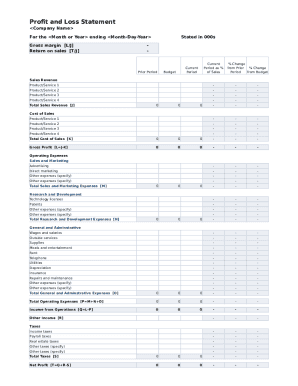
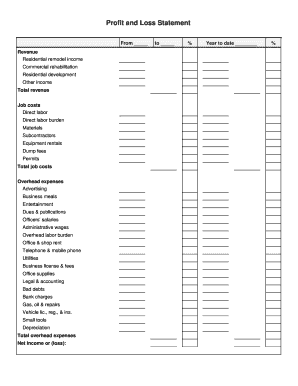
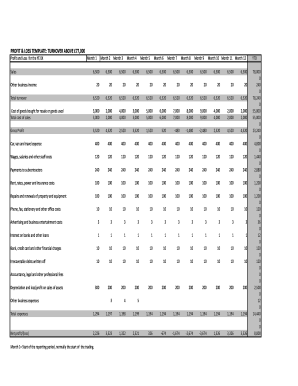
The Profit and Loss Statement (P&L Statement) is a critical financial document used by businesses to track income and expenses over a specific period. This statement typically includes essential components such as sales revenue, cost of sales, gross profit, operating expenses, and net profit. Understanding this document is crucial for assessing the overall financial health of a business and making informed decisions.
By providing a clear picture of revenues and expenses, the profit and loss statement serves as an invaluable tool for financial analysis and strategic planning.
Purpose and Benefits of the Profit and Loss Statement
The Profit and Loss Statement is essential for businesses to monitor their financial performance consistently. It aids in tracking income and expenses, allowing for effective decision-making and financial planning. Investors and stakeholders also rely on this document to understand a business's financial health and sustainability.
-
Tracks profitability over specific periods
-
Aids in identifying trends in revenue and expenses
-
Provides insights essential for making strategic business decisions
Key Features of the Profit and Loss Statement
This financial document incorporates various fillable fields, such as Sales Revenue, Cost of Sales, and Operating Expenses, making it user-friendly and practical. It also includes sections for instructions and guidelines to help users effectively complete each part of the statement.
-
Customizable fields for different business requirements
-
Clear instructions for each section
-
Organized layout for ease of use
Who Needs a Profit and Loss Statement?
Many individuals and entities can benefit from using a profit and loss statement. Small business owners, freelancers, corporate entities, and even startups should utilize this document to ensure they maintain a clear understanding of their financial circumstances.
-
Small business owners wanting to track operational performance
-
Freelancers needing to manage income and expenses
-
Corporate entities aiming for comprehensive financial assessments
How to Fill Out the Profit and Loss Statement Online (Step-by-Step)
Completing the Profit and Loss Statement using pdfFiller is a straightforward process. Here are the steps to guide users:
-
Access the Profit and Loss Statement template on pdfFiller.
-
Fill out the Sales Revenue and Cost of Sales fields accurately.
-
Calculate Gross Profit and enter values for Operating Expenses.
-
Review totals for accuracy before finalizing.
For best results, ensure you double-check each entry for accuracy and completeness. Common mistakes include miscalculated totals or missing values in key fields.
Review and Validation Checklist
To ensure the Profit and Loss Statement is complete, users should conduct a thorough review. Below are key items to verify:
-
Check calculations for accuracy
-
Ensure all fields are filled out correctly
-
Confirm that all supporting documents are attached
This checklist aids in preventing oversight and ensuring that the submission is accurate.
Submission Methods and Delivery
Once completed, the Profit and Loss Statement can be submitted via various methods. Users should consider the following:
-
Online platforms for immediate submission
-
Email submissions for direct communication
-
Postal mail for formal documentation
It is essential to include supporting documents when necessary and to keep track of submissions to confirm delivery.
Security and Compliance for the Profit and Loss Statement
Users can rest assured that their data is safe when utilizing pdfFiller for processing their Profit and Loss Statements. The platform employs high-level security measures, including encryption, to protect sensitive financial data.
-
Compliance with GDPR and HIPAA regulations
-
256-bit encryption for data security
-
Best practices for maintaining user privacy during filing
Sample of a Completed Profit and Loss Statement
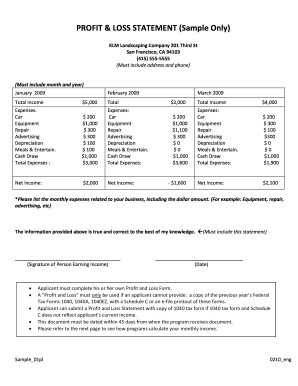
A completed Profit and Loss Statement serves as a valuable reference for users. This sample showcases how each section is filled out with relevant data.
-
Annotations explaining each section's purpose
-
Variations based on different business types
Consulting a sample can clarify how to effectively structure the document for your specific needs.
Why Choose pdfFiller for Your Profit and Loss Statement Needs?
pdfFiller offers a robust platform for creating and managing your Profit and Loss Statement. The platform features easy editing, eSigning capabilities, and comprehensive document management. Its user-friendly interface and accessibility ensure that users can complete their financial documents efficiently from any device.
Furthermore, stringent security measures provide users peace of mind when handling sensitive financial information.
How to fill out the Profit And Loss Statement Form
-
1.Access pdfFiller and search for the 'Profit and Loss Statement' in the template library.
-
2.Open the form by clicking on it, which will load the interactive fillable PDF.
-
3.Review the sections available such as 'Sales Revenue', 'Cost of Sales', and 'Operating Expense' to familiarize yourself with the layout.
-
4.Gather necessary financial information including revenue figures, cost of goods sold, and operating expenses before you begin filling out the form.
-
5.Click on the fields to begin entering your data. Use the arrows or tabs to navigate through each section, ensuring all required information is filled in.
-
6.Double-check your calculations for accuracy, especially in the gross profit and net profit fields.
-
7.Use the instructions included in the document as guidance on how to fill out specific entries.
-
8.Once completed, review the entire form for any missing information or potential errors before finalizing.
-
9.To save your work, click on the 'Save' option, then select if you want to download it to your device or save it on pdfFiller's cloud for future access.
-
10.You may also opt to submit the form directly from pdfFiller if sharing with others is required.

Who is eligible to use the Profit and Loss Statement?
Any business owner or entity, including freelancers, small businesses, and corporations, can use the Profit and Loss Statement to assess their financial performance.
Are there deadlines for submitting the Profit and Loss Statement?
The Profit and Loss Statement is typically used for internal record-keeping and does not have a formal submission deadline. However, it is advisable to prepare it quarterly or annually for tax purposes.
How can the Profit and Loss Statement be submitted?
If required for external purposes, the completed Profit and Loss Statement can be printed or emailed to stakeholders. Electronic submissions can also be completed through platforms like pdfFiller.
What supporting documents are needed for the Profit and Loss Statement?
You will need documents that provide details on your sales, expenses, and any other relevant financial records to accurately fill out the Profit and Loss Statement.
What common mistakes should be avoided on the Profit and Loss Statement?
Common mistakes include miscalculating totals, forgetting to include all revenue streams, and inaccurate recording of expenses. Always review calculations and entries carefully.
How long does it take to process the Profit and Loss Statement?
Processing time varies; however, once completed, the form can be reviewed immediately. For accounting purposes, ensure all data is accurate for timely reporting.
Can the Profit and Loss Statement be customized?
Yes, the Profit and Loss Statement template can be customized on pdfFiller to include additional sections or adjust categories based on specific business needs.




Get the latest insights from our blog


If you believe that this page should be taken down, please follow our DMCA take down process
here
.
This form may include fields for payment information. Data entered in these fields is not covered by PCI DSS compliance.