
Last updated on
Oct 31, 2026
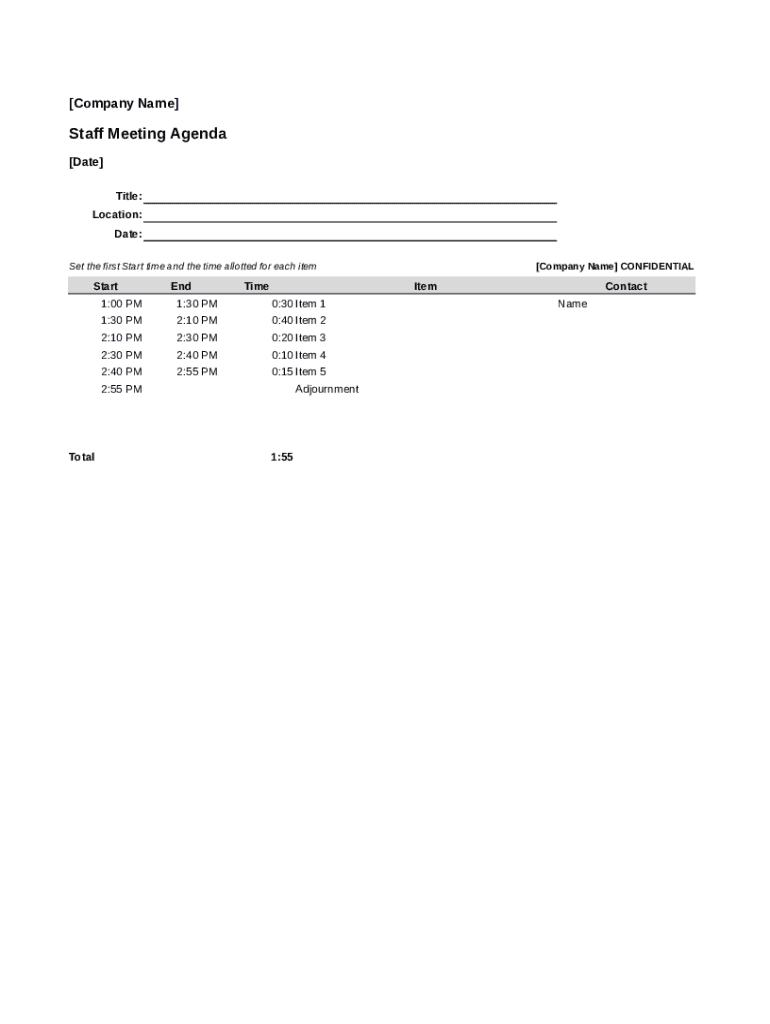
Staff Meeting Agenda free printable template
We are not affiliated with any brand or entity on this form

Fill out
Complete the form online in a simple drag-and-drop editor.

eSign
Add your legally binding signature or send the form for signing.

Share
Share the form via a link, letting anyone fill it out from any device.

Export
Download, print, email, or move the form to your cloud storage.
Why pdfFiller is the best tool for your documents and forms


End-to-end document management
From editing and signing to collaboration and tracking, pdfFiller has everything you need to get your documents done quickly and efficiently.
Accessible from anywhere
pdfFiller is fully cloud-based. This means you can edit, sign, and share documents from anywhere using your computer, smartphone, or tablet.
Secure and compliant
pdfFiller lets you securely manage documents following global laws like ESIGN, CCPA, and GDPR. It's also HIPAA and SOC 2 compliant.
What is Staff Meeting Agenda
The Staff Meeting Agenda Template is a business form used by organizations to create a structured agenda for staff meetings, ensuring effective planning and discussion of key items.
pdfFiller scores top ratings on review platforms




Who needs Staff Meeting Agenda?
Explore how professionals across industries use pdfFiller.

Staff Meeting Agenda is needed by:
-
Team leaders looking to organize meetings efficiently
-
HR managers coordinating staff discussions and updates
-
Project managers needing structured planning for team collaborations
-
Administrative staff preparing agendas for company meetings
-
Executives aiming to streamline meeting processes
-
Anyone responsible for organizing corporate gatherings
Comprehensive Guide to Staff Meeting Agenda
What is the Staff Meeting Agenda Template?
The staff meeting agenda template is designed to help organizers create structured meeting outlines. It includes essential fields such as the company name, date, location, start and end times, and discussion items, enabling an efficient setup to guide the meeting flow. Utilizing a staff meeting agenda template ensures that all pertinent topics are addressed systematically and helps keep meetings on track.
Purpose and Benefits of Using a Staff Meeting Agenda Template
Having a structured agenda for staff meetings is crucial for productive discussions. A well-defined agenda enhances organization by providing a clear framework, which ultimately leads to improved time management. With a meeting agenda form, participants can anticipate topics of discussion, leading to clearer communication during the meeting. These benefits contribute significantly to achieving meeting objectives.
Key Features of the Staff Meeting Agenda Template
This template boasts several user-friendly features. It includes fillable fields that allow users to input key details easily, as well as pre-set formats tailored for various meeting types. Additionally, its unique aspects, such as time trackers for staff meetings, set it apart from standard agenda templates. These functionalities ensure users can personalize their agendas based on specific needs.
Who Should Use the Staff Meeting Agenda Template?
The staff meeting agenda template is ideal for a diverse audience, including managers, team leaders, and administrators. It can be effectively utilized in different scenarios, ranging from small teams to large organizations, making it an essential tool for anyone involved in meeting planning. This flexibility ensures that all levels of an organization can benefit from a structured approach to meetings.
How to Fill Out the Staff Meeting Agenda Template Online
Filling out the staff meeting agenda template online is straightforward. Follow these steps to complete the form:
-
Open the template in pdfFiller.
-
Enter the company name in the designated field.
-
Input the date and select the location.
-
Designate the start and end times for the meeting.
-
Fill in the topics of discussion, allocating appropriate time for each.
By following these instructions, you will create a comprehensive agenda that keeps the meeting focused and organized.
Review and Validation Checklist for Your Completed Agenda
Before using the agenda in a meeting, it’s important to validate that all necessary parts have been accurately filled out. Consider the following checklist to ensure completeness:
-
Have all fields been filled out correctly?
-
Is the meeting time clearly specified?
-
Are all discussion items listed with allocated times?
-
Have you included necessary attachments or references?
Avoid common mistakes, such as leaving fields blank or miscalculating time allocations, to ensure an effective meeting experience.
Digital Signature and Document Security with pdfFiller
With pdfFiller, users can securely sign the agenda using the digital signature feature, which streamlines the approval process. The platform incorporates robust security measures, including 256-bit encryption, ensuring sensitive meeting details are protected. Additionally, pdfFiller complies with privacy regulations like HIPAA and GDPR, providing peace of mind when managing confidential documents.
How to Save, Download, and Share the Completed Staff Meeting Agenda Template
Once the staff meeting agenda template has been completed, users can easily save and download it in various formats. Here’s how to manage your completed agenda:
-
Select 'Save' and choose the desired file format (PDF, DOCX, etc.).
-
Download the file to your device for your records.
-
Share it with meeting participants via email or file-sharing services.
Organizing and retaining completed agendas will streamline future meetings and ensure that all attendees have access to necessary documentation.
What Happens After You Use the Staff Meeting Agenda Template?
Following a meeting, organizers are encouraged to create follow-up notes and action items based on the agenda. This practice not only helps track progress but also opens avenues for improvement in future meetings. Gathering feedback on the agenda’s effectiveness can be beneficial in refining the planning process.
Make Your Meetings More Productive with pdfFiller
By utilizing the staff meeting agenda template from pdfFiller, users can enhance their meeting planning significantly. The combination of a structured approach and user-friendly features fosters an organized meeting environment. Explore the template and discover the versatile functionalities of pdfFiller to streamline your document management and meeting organization.
How to fill out the Staff Meeting Agenda
-
1.Access the Staff Meeting Agenda Template on pdfFiller by searching for its name or locating it in the Business Forms category.
-
2.Open the form to view its structure, which includes labeled fields for essential details.
-
3.Gather necessary information before starting, including the company name, meeting date, location, start and end times, and main discussion points.
-
4.Begin filling out the form by entering your company name in the designated field.
-
5.Next, input the meeting date and location clearly to avoid any confusion.
-
6.Set the start time of the meeting and allocate time for each agenda item by filling in the corresponding fields.
-
7.List out all items to be discussed during the meeting in the provided space, ensuring a comprehensive overview.
-
8.Use pdfFiller's tools to navigate efficiently between fields and make edits as needed.
-
9.After completing the form, review all entries for accuracy and clarity to ensure it meets your needs.
-
10.Finalize the form by saving it, and use the download option to keep a copy on your device.
-
11.You can also submit the completed form directly through pdfFiller if required or share it via email with your team.

Who can use the Staff Meeting Agenda Template?
Any organization or individual looking to plan and structure staff meetings can use this template, including team leaders, managers, and administrative staff. It is designed to assist in effective meeting organization.
How do I submit the completed agenda?
You can submit the completed Staff Meeting Agenda Template directly through pdfFiller. After filling it out, use the submission options to send it to intended recipients via email or download for printing.
What information is required to fill out the template?
To complete the Staff Meeting Agenda Template, you'll need your company name, meeting date, location, start and end times, and discussion items. Collect this information before you begin filling out the form.
Are there any common mistakes to avoid?
Ensure that all details are accurately filled in, particularly the times and agenda items. Double-check for spelling errors in your company name and meeting details to avoid confusion.
Is there a time limit for completing the form?
While there is no strict deadline for filling out the Staff Meeting Agenda Template, it is advisable to complete it well in advance of the actual meeting to allow for thorough preparation and distribution to participants.
Can I edit the Staff Meeting Agenda Template after saving it?
Yes, after saving the template on pdfFiller, you can easily reopen and edit it as needed before finalizing it for your meeting.
What are the benefits of using this template?
Using the Staff Meeting Agenda Template enhances meeting organization, ensures that all relevant topics are covered, saves time in planning, and facilitates better participation from attendees.
Related Forms




Get the latest insights from our blog


If you believe that this page should be taken down, please follow our DMCA take down process
here
.
This form may include fields for payment information. Data entered in these fields is not covered by PCI DSS compliance.