
Last updated on
Oct 31, 2026
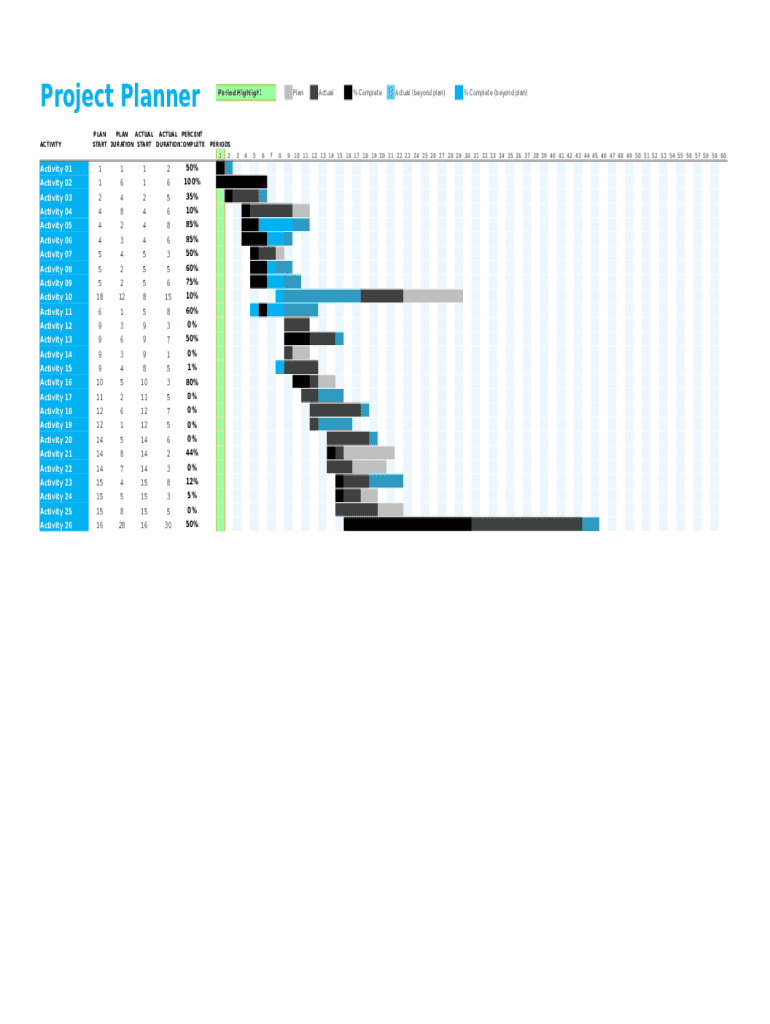
Gantt Chart Project Planner free printable template
We are not affiliated with any brand or entity on this form

Fill out
Complete the form online in a simple drag-and-drop editor.

eSign
Add your legally binding signature or send the form for signing.

Share
Share the form via a link, letting anyone fill it out from any device.

Export
Download, print, email, or move the form to your cloud storage.
Why pdfFiller is the best tool for your documents and forms


End-to-end document management
From editing and signing to collaboration and tracking, pdfFiller has everything you need to get your documents done quickly and efficiently.
Accessible from anywhere
pdfFiller is fully cloud-based. This means you can edit, sign, and share documents from anywhere using your computer, smartphone, or tablet.
Secure and compliant
pdfFiller lets you securely manage documents following global laws like ESIGN, CCPA, and GDPR. It's also HIPAA and SOC 2 compliant.
What is Gantt Chart Project Planner
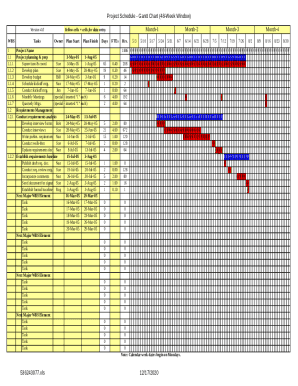
The Project Planner Template is a business form used by project managers to track and manage project activities, including dates, durations, and progress.
pdfFiller scores top ratings on review platforms




Who needs Gantt Chart Project Planner?
Explore how professionals across industries use pdfFiller.

Gantt Chart Project Planner is needed by:
-
Project Managers
-
Business Analysts
-
Team Leaders
-
Financial Controllers
-
Consultants
-
Small Business Owners
Comprehensive Guide to Gantt Chart Project Planner
What is the Project Planner Template?
The Project Planner Template is a vital tool in project management designed to track project activities effectively. Its main function is to capture various elements, including planned and actual start dates, durations, and completion percentages. By employing a project management template, users can monitor progress closely and make timely adjustments when necessary.
This template serves to enhance overall project visibility and facilitates better decision-making throughout the project lifecycle, thus ensuring alignment with goals.
Purpose and Benefits of the Project Planner Template
Utilizing the Project Planner Template presents several advantages for project management. First, it enhances organization and increases efficiency in tracking project progress. By visualizing project timelines, team members can allocate resources more effectively, ensuring that deadlines are met.
Furthermore, the template promotes team communication and accountability. By clearly outlining responsibilities and milestones, team members can stay informed and engaged, leading to improved collaboration.
Key Features of the Project Planner Template
The effectiveness of the Project Planner Template lies in its key features. Users will find specific fields designed for clarity, including sections for Activity, Start, Duration, and % Complete. Each labeled input section allows for comprehensive documentation of project details, facilitating straightforward completion.
These features not only streamline the data entry process but also contribute to achieving better project management outcomes by providing clear insights into the project’s status.
Who Needs the Project Planner Template?
The Project Planner Template is tailored for a diverse audience within project management. Professionals such as project managers, team leaders, and business owners will find it highly beneficial. It proves particularly advantageous during large-scale projects or when navigating tight deadlines, allowing these individuals to maintain effective oversight.
By utilizing this template, users can enhance their ability to manage projects systematically, regardless of complexity or scope.
How to Fill Out the Project Planner Template Online
Filling out the Project Planner Template online is a straightforward process. Follow these steps to ensure you complete the template effectively:
-
Access the template through pdfFiller’s platform.
-
Begin a new template and fill in fields labeled Activity and Duration.
-
Focus on accurately tracking completion percentages and adjust timelines as necessary.
By adhering to this guide, users can maximize the functionality of the template for their project needs.
Security and Compliance with the Project Planner Template
When using pdfFiller for document management, robust security measures are in place to protect sensitive project information. The platform employs 256-bit encryption and adheres to both HIPAA and GDPR compliance standards.
Users are encouraged to securely store and share their completed documents, ensuring that their project data remains confidential and protected against unauthorized access.
Additional Features of pdfFiller for Project Management
pdfFiller offers numerous functionalities that enhance the use of the Project Planner Template. Users can benefit from capabilities such as editing text and images, eSigning documents, and sharing completed files easily.
These features help streamline project management processes, making pdfFiller a comprehensive tool that supports efficient document handling in various project scenarios.
How to Download and Save the Project Planner Template PDF
After completing the Project Planner Template, users can download it in PDF format. To ensure you save the document correctly, follow these steps:
-
Click on the download option after completion.
-
Choose your preferred save format according to needs for sharing or printing.
This straightforward process guarantees that users have a record of their project planning efforts in an easily accessible format.
Submit Your Project Planner Template
After filling out the Project Planner Template, it's essential to know how to submit it appropriately. Users can opt for various submission methods, including email or direct printing.
Managing team feedback or revisions is crucial, so it's important to keep track of submission deadlines for timely project progression.
Experience the Benefits of Using pdfFiller for your Project Management Needs
pdfFiller enhances your experience with the Project Planner Template, making the entire process seamless. The user-friendly online platform allows for swift completion and easy management of project documents.
Starting a free trial or signing up can significantly impact your project management tasks, as many users have reported heightened satisfaction and efficiency from utilizing pdfFiller's features.
How to fill out the Gantt Chart Project Planner
-
1.Access pdfFiller and search for the Project Planner Template in the available forms.
-
2.Once located, open the form by clicking on it, which will display it in the editing interface.
-
3.Gather all necessary information such as activity details, scheduled start dates, and duration estimates before you begin filling in the form.
-
4.Start with the 'Activity' input field. Enter the name of each task involved in your project sequentially.
-
5.Move to the 'Start' field to indicate the planned start date for each activity, using the calendar tool for convenience.
-
6.Next, fill in the 'Duration' field to estimate how long each activity is expected to take, using days or weeks as appropriate.
-
7.Now, input the '% Complete' for each activity to reflect current progress in percentage terms.
-
8.As you fill out each field, use the 'Save' option to ensure your progress is not lost.
-
9.After completing all fields, review the entire form to confirm accuracy and completeness.
-
10.To finalize, click on the 'Download' option to save the completed template to your device, or use the 'Submit' feature if you need to send it directly to a stakeholder.

Who should use the Project Planner Template?
The Project Planner Template is ideal for project managers, team leaders, and small business owners working on project organization and management.
What information do I need to complete the form?
You'll need details about your project's activities, including start dates, durations, and current progress percentages to accurately fill out the template.
Can I submit the Project Planner Template online?
Yes, on pdfFiller, you have the option to submit the completed template directly online or save a copy for your records.
Is there a deadline for submitting the Project Planner Template?
Deadlines vary by project; it’s best to outline your own timeline for submitting the completed template based on your project schedule.
Are there common mistakes to avoid while filling out this form?
Ensure all fields are completed with accurate information and double-check your dates and durations to avoid scheduling conflicts.
How do I review the Project Planner Template before finalizing?
Use the review feature on pdfFiller to highlight all entries, ensuring that each field is filled in correctly and consistently.
What happens if I miss an important detail in the template?
Missing details can lead to inaccurate project tracking, so make sure to have all relevant information gathered before starting to fill out the template.
Related Forms

Get the latest insights from our blog


If you believe that this page should be taken down, please follow our DMCA take down process
here
.
This form may include fields for payment information. Data entered in these fields is not covered by PCI DSS compliance.