
Last updated on
Oct 31, 2026

Get the free Resume Rubric Evaluation Form
We are not affiliated with any brand or entity on this form

Fill out
Complete the form online in a simple drag-and-drop editor.

eSign
Add your legally binding signature or send the form for signing.

Share
Share the form via a link, letting anyone fill it out from any device.

Export
Download, print, email, or move the form to your cloud storage.
Why pdfFiller is the best tool for your documents and forms


End-to-end document management
From editing and signing to collaboration and tracking, pdfFiller has everything you need to get your documents done quickly and efficiently.
Accessible from anywhere
pdfFiller is fully cloud-based. This means you can edit, sign, and share documents from anywhere using your computer, smartphone, or tablet.
Secure and compliant
pdfFiller lets you securely manage documents following global laws like ESIGN, CCPA, and GDPR. It's also HIPAA and SOC 2 compliant.
What is Resume Rubric
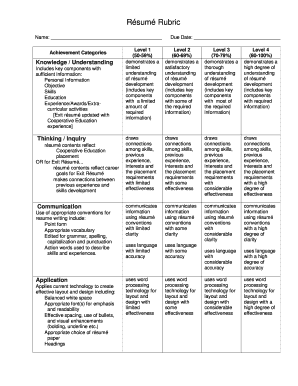
The Resume Rubric Evaluation Form is an educational document used by evaluators to assess the quality and completeness of resumes based on specific criteria.
pdfFiller scores top ratings on review platforms




Who needs Resume Rubric?
Explore how professionals across industries use pdfFiller.

Resume Rubric is needed by:
-
Academic institution faculty assessing student resumes
-
Career advisors assisting job seekers
-
Employers evaluating candidate resumes
-
Resume editing services for quality control
-
Students preparing for job applications
-
Human resources professionals in recruitment
-
Professional evaluators conducting resume assessments
Comprehensive Guide to Resume Rubric
What is the Resume Rubric Evaluation Form?
The Resume Rubric Evaluation Form serves as a critical tool in assessing resumes efficiently. This form is structured with clear components that guide evaluators in grading applicants based on a standardized set of criteria. Standardized evaluation criteria ensure fairness and uniformity in resume assessments, which is essential for making informed decisions in hiring processes.
Whether you are refining your resume assessment template or seeking an effective way to enhance candidate evaluations, this form provides a robust framework.
Purpose and Benefits of the Resume Rubric Evaluation Form
This evaluation form aids evaluators in judging the quality and completeness of resumes. By utilizing a standardized rubric, evaluators can maintain consistency across their assessments, making it easier to compare candidates fairly. Every evaluator can benefit from implementing this tool to enhance their evaluation processes.
Incorporating listed resume evaluation criteria allows for a comprehensive review, ensuring all essential components are considered during the assessment.
Key Features of the Resume Rubric Evaluation Form
The Resume Rubric Evaluation Form includes various fillable fields and checkboxes to facilitate streamlined evaluations. Evaluators can easily indicate their observations across different evaluation criteria, encompassing aspects such as knowledge, communication, and visual appeal.
Designed with user-friendliness in mind, the form includes clear instructions for assessors, enhancing the evaluation experience.
Who Needs the Resume Rubric Evaluation Form?
The target audience for this form includes educators, hiring managers, and recruitment professionals who can all leverage its features in their respective domains. By employing this form, different roles within academic and professional settings can assure consistency across evaluations for various candidate profiles, making it indispensable in the hiring process.
How to Fill Out the Resume Rubric Evaluation Form Online (Step-by-Step)
-
Access the Resume Rubric Evaluation Form through the pdfFiller platform.
-
Complete each fillable section by entering relevant information about the candidate's resume.
-
Utilize the checkboxes for quick assessments of specific criteria, ensuring a thorough review.
-
Follow best practices for clarity and coherence in your evaluations, focusing on detailed feedback.
Common Errors and How to Avoid Them
Frequent mistakes while filling out the Resume Rubric Evaluation Form may include overlooking critical criteria or failing to provide specific comments. To enhance the quality of evaluations, evaluators should ensure clarity in their feedback and revisit sections that may require more thorough input.
Staying focused on the evaluation criteria will help avoid common mistakes and improve accuracy.
How to Download and Save the Resume Rubric Evaluation Form PDF
To download the completed Resume Rubric Evaluation Form, follow these steps:
-
After completing the evaluation, select the download option on pdfFiller.
-
Choose an appropriate file format for saving.
-
Share the document securely or save it to cloud storage for easy access and management.
Utilizing cloud storage options ensures the form is both secure and easily accessible.
Where and How to Submit the Resume Rubric Evaluation Form
There are several methods for submitting the completed Resume Rubric Evaluation Form, including digital uploads or print submissions. Evaluators should check guidelines on submission methods tailored to their specific contexts and ensure that they track the status of their submissions for confirmation of receipt.
Security and Compliance for the Resume Rubric Evaluation Form
Ensuring document security is vital when managing evaluations. With features like 256-bit encryption and compliance with HIPAA and GDPR regulations, pdfFiller offers robust security for sensitive documents. Evaluators should take precautions for secure sharing and storage to protect candidate information.
Experience the Ease of Using pdfFiller for Your Resume Evaluations
Utilizing pdfFiller streamlines the process of filling out the Resume Rubric Evaluation Form. By taking advantage of pdfFiller's user-friendly tools, evaluators can enhance their resume evaluations significantly. Start using pdfFiller today to improve document management efficiency.
How to fill out the Resume Rubric
-
1.Access the Resume Rubric Evaluation Form on pdfFiller by searching for the form name in the platform’s search bar.
-
2.Once you locate the form, click on it to open using pdfFiller's interface.
-
3.Ensure you have the necessary information at hand, including the resume you are evaluating and the criteria to use.
-
4.Navigate through the form by clicking on the fillable fields and checkboxes to input your evaluations.
-
5.Carefully read the criteria columns, and use the provided guidelines to assess each section of the resume thoroughly.
-
6.As you fill out the rubric, ensure you are objective and follow the rating standards specified in the instructions.
-
7.Once you have completed your evaluations, review your entries for accuracy and completeness.
-
8.To finalize your responses, utilize the review tool offered by pdfFiller to check for any missed fields or errors.
-
9.After reviewing, save your progress and choose whether to download a copy of the evaluation or share it directly via email.
-
10.Submit the form through pdfFiller following the on-screen prompts to share your completed evaluation with the intended recipient.

Who can use the Resume Rubric Evaluation Form?
The form can be used by faculty at academic institutions, career advisors, employers, and any evaluator needing to assess the quality of resumes. Its design allows for a standardized evaluation process.
What criteria are included in the evaluation?
The form includes criteria for knowledge/understanding, thinking/inquiry, visual presentation, communication skills, and application of information, ensuring a comprehensive evaluation of each resume.
Are there any fees associated with using this form?
Using pdFiller typically does not involve fees for filling out forms, but it's important to check if any specific service charges apply for downloading or submitting the completed forms.
What common mistakes should I avoid when filling out the form?
Common mistakes include leaving fields blank, not adhering to the specified evaluation criteria, and failing to review the form before submission. Always double-check your entries.
How do I submit the completed evaluation form?
Complete the form using pdfFiller and follow the platform's prompts to submit it. You can choose to download it or send it via email directly from the system.
How can I ensure the evaluation is objective?
To maintain objectivity, refer closely to the evaluation criteria provided in the form and apply the same standards consistently across different resumes to avoid bias.
Can I revise my submission after sending?
Once submitted, revisions may not be possible unless the form allows for edits. It's best to review all entries carefully before submitting to avoid the need for changes later.
Related Forms



Related Catalogs
Get the latest insights from our blog


If you believe that this page should be taken down, please follow our DMCA take down process
here
.
This form may include fields for payment information. Data entered in these fields is not covered by PCI DSS compliance.