
Last updated on
Oct 31, 2026

Get the free grant budget template
We are not affiliated with any brand or entity on this form

Fill out
Complete the form online in a simple drag-and-drop editor.

eSign
Add your legally binding signature or send the form for signing.

Share
Share the form via a link, letting anyone fill it out from any device.

Export
Download, print, email, or move the form to your cloud storage.
Why pdfFiller is the best tool for your documents and forms


End-to-end document management
From editing and signing to collaboration and tracking, pdfFiller has everything you need to get your documents done quickly and efficiently.
Accessible from anywhere
pdfFiller is fully cloud-based. This means you can edit, sign, and share documents from anywhere using your computer, smartphone, or tablet.
Secure and compliant
pdfFiller lets you securely manage documents following global laws like ESIGN, CCPA, and GDPR. It's also HIPAA and SOC 2 compliant.
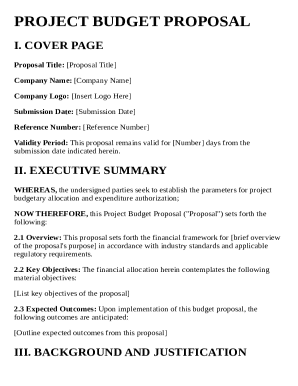
What is grant budget template
The grant budget template is a financial planning document used by organizations to outline the budget requirements for grant applications.
pdfFiller scores top ratings on review platforms




i like it a lot as I am able to have signed documents sent to my clients in a pdf format.
Great program. Has helped me tremendously.
Who needs grant budget template?
Explore how professionals across industries use pdfFiller.

Grant budget template is needed by:
-
Non-profit organizations preparing grant proposals
-
Research institutions seeking funding
-
Community groups applying for project grants
-
Educational entities applying for grants
-
Freelancers or consultants preparing budgets for clients
Comprehensive Guide to grant budget template
What is the Grant Budget Template?
A grant budget template is a structured tool used to outline and plan the financial aspects of a grant proposal. This document is essential for grant applicants and organizations, providing clarity and organization in financial projections. It is applicable to various types of grants, including those sought by non-profits, educational institutions, and researchers.
The significance of a grant budget template lies in its ability to communicate a clear financial plan to funders, ensuring that all budgetary needs are addressed efficiently.
Why Use a Grant Budget Template?
Utilizing a grant budget template offers numerous benefits that streamline the application process. The template promotes better organization, helping users track expenses and allocate resources effectively.
Moreover, this tool enhances the likelihood of grant proposal acceptance by funders by showcasing accurate and transparent budgeting. Demonstrating precise financial plans is crucial for gaining trust and approval from funding organizations.
Key Features of the Grant Budget Template
The grant budget template incorporates several key features that enhance its usability. Users can find editable sections that allow for customization of budget line items to fit their specific project needs.
-
Incorporates detailed cost breakdowns and financial justifications.
-
Automatically calculates totals for easier financial tracking.
-
Enables users to eSign and share documents digitally.
These features ensure that the grant budget template is not only user-friendly but also effective in meeting grant application requirements.
Who Needs a Grant Budget Template?
Various organizations and individuals can benefit from a grant budget template. Typically, non-profits, educational institutions, and researchers who seek funding are primary users of this template.
The importance of this tool extends to both first-time applicants who may be unfamiliar with the grant application process and seasoned grant writers looking to refine their proposals.
Steps to Fill Out the Grant Budget Template Online
Completing the grant budget template online is a straightforward process. Below are the steps to follow:
-
Access the template through pdfFiller's platform.
-
Gather necessary information such as project costs and financial resources before starting.
-
Fill out each section of the form methodically, ensuring all required fields are completed.
Following these steps will help users efficiently complete their grant budget template while minimizing errors.
Common Errors and How to Avoid Them
While filling out a grant budget template, users can encounter several common errors. Frequent mistakes include budget estimates that are too vague, missing essential information, and formatting inconsistencies.
-
Double-check all entries to ensure accuracy before finalizing the document.
-
Utilize pdfFiller's tools to help review and validate the information entered.
Taking these precautions can significantly reduce the likelihood of errors in grant budgeting.
How to Sign and Submit the Grant Budget Template
Understanding the signing and submission processes for the grant budget template is crucial. Proper signing adds validation to the document, whether using wet or digital signatures.
Users can submit the completed template through various methods, including digital submission and email. Tracking submission status post-filing is also recommended to ensure that the application is processed effectively.
Security and Compliance for the Grant Budget Template
When handling a grant budget template, security measures and compliance are integral. pdfFiller provides robust security features, including encryption and adherence to compliance standards.
Protecting confidential information is paramount during preparation for submissions. Mismanagement of grant funds and budgets can have legal repercussions, highlighting the necessity for secure document handling.
Enhance Your Grant Application with pdfFiller
pdfFiller is an ideal platform for completing your grant budget template efficiently. The user-friendly features of pdfFiller smoothen the process, offering cloud-based access for flexibility.
Users are encouraged to explore pdfFiller to enhance their grant application experience by utilizing intuitive tools designed for efficient budgeting.
How to fill out the grant budget template
-
1.To get started, visit pdfFiller and sign in or create an account if you don't have one. Use the search bar to find the grant budget template.
-
2.Once the form is open, take a moment to familiarize yourself with the layout and available fields to effectively complete the document.
-
3.Before filling out the template, gather all necessary financial information, including projected costs, existing funding sources, and any required documentation related to your project.
-
4.Begin by entering your organization's details in the designated fields, such as name, address, and contact information.
-
5.Next, fill in sections related to your project description and grant objectives. Clearly outline the purpose of the grant and what the funds will support.
-
6.Proceed to complete the budget sections, where you will input estimated expenses, categorized by direct costs, indirect costs, and other relevant categories.
-
7.As you enter data, make sure to double-check the calculations for accuracy. Validate all figures before moving to the next sections.
-
8.Once you've filled in all required fields, review the entire document for completeness, ensuring that all necessary details are captured clearly.
-
9.To finalize the form, save your changes regularly. Use the 'Preview' function to see how it appears and make any last-minute adjustments.
-
10.After finalizing your template, you can download it as a PDF or submit it directly from pdfFiller if required. Ensure to keep a copy for your records.

Who is eligible to use the grant budget template?
The grant budget template is typically used by organizations, such as non-profits, educational institutions, or community groups, that are applying for grant funding. Any entity seeking financial support through a grant can utilize this template to outline their budget.
What supporting documents are needed when submitting the grant budget?
When submitting your grant budget, it's advisable to include supporting documents such as project proposals, financial statements, and any other relevant documentation that can substantiate your budget estimates. Ensure all documents are accurate and reflective of your outlined costs.
How can I submit the grant budget template once completed?
You can submit the completed grant budget template either by downloading it as a PDF and submitting it via email or through a grant portal, if applicable. Some funding agencies also allow direct submissions through online forms, so check their guidelines for specifics.
What common mistakes should I avoid when filling out the grant budget template?
Common mistakes include underestimating costs, failing to categorize expenses accurately, and not providing enough detail in the project description. Always double-check your figures for accuracy and ensure your budget aligns with the project goals.
Are there any deadlines I need to be aware of for grant applications?
Grant application deadlines vary widely depending on the funding agency. Always check specific requirements for each grant you are applying for, as missing a deadline can disqualify your application.
What processing times can I expect after submitting the grant budget?
Processing times for grant applications can vary significantly. Typically, organizations might inform applicants within a few weeks to several months, dependent on the funding agency's review process. Be sure to confirm specifics with the agency.
Can I modify the grant budget template after submission?
In most cases, once a grant application is submitted, it is final. However, if you need to make changes, contact the funding agency as they may allow for amendments under certain conditions. Always refer to their guidelines for clarity.
Related Content
Related Forms

Related Catalogs
Get the latest insights from our blog


If you believe that this page should be taken down, please follow our DMCA take down process
here
.
This form may include fields for payment information. Data entered in these fields is not covered by PCI DSS compliance.