
Last updated on
Nov 6, 2026

GH GTBank Foreign Currency Domiciliary Account Opening Form 2006-2026 free printable template
We are not affiliated with any brand or entity on this form

Fill out
Complete the form online in a simple drag-and-drop editor.

eSign
Add your legally binding signature or send the form for signing.

Share
Share the form via a link, letting anyone fill it out from any device.

Export
Download, print, email, or move the form to your cloud storage.
Why pdfFiller is the best tool for your documents and forms


End-to-end document management
From editing and signing to collaboration and tracking, pdfFiller has everything you need to get your documents done quickly and efficiently.
Accessible from anywhere
pdfFiller is fully cloud-based. This means you can edit, sign, and share documents from anywhere using your computer, smartphone, or tablet.
Secure and compliant
pdfFiller lets you securely manage documents following global laws like ESIGN, CCPA, and GDPR. It's also HIPAA and SOC 2 compliant.
What is GH GTBank Foreign Currency Domiciliary Account Opening Form
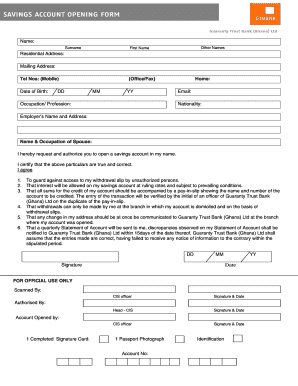
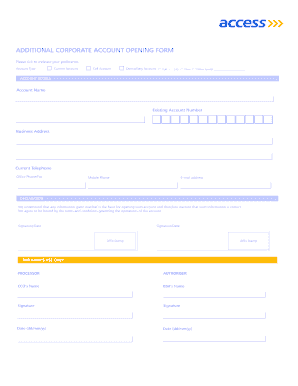
The Corporate Domiciliary Account Opening Form is a business document used by companies to request the establishment of a foreign currency account with Guaranty Trust Bank (Ghana) Ltd.
pdfFiller scores top ratings on review platforms




My experience has been very productive. Completing my son's Eagle Application and this is working well.
Seriously so easy to use!
Seriously so easy to use!! Amazed with this tech
Who needs GH GTBank Foreign Currency Domiciliary Account Opening Form?
Explore how professionals across industries use pdfFiller.

GH GTBank Foreign Currency Domiciliary Account Opening Form is needed by:
-
Corporate entities seeking foreign currency accounts
-
Financial departments of businesses in Nigeria
-
Company representatives including authorized signatories
-
Small to medium-sized enterprises (SMEs) in need of international transactions
-
Account officers facilitating corporate banking processes
-
Business owners looking to manage foreign exchange
Comprehensive Guide to GH GTBank Foreign Currency Domiciliary Account Opening Form
What is the Corporate Domiciliary Account Opening Form?
The Corporate Domiciliary Account Opening Form is a crucial document for businesses in Nigeria, enabling them to establish a foreign currency account with Guaranty Trust Bank. This form serves as the first step in accessing international transactions, allowing companies to manage foreign currency efficiently. By completing this form, businesses can tap into foreign exchange markets, which can be pivotal for trading and investment opportunities.
Purpose and Benefits of the Corporate Domiciliary Account Opening Form
This account opening form facilitates various essential functions for businesses. It allows companies to operate in foreign currencies, which can lead to increased financial flexibility and benefits. Specific advantages of holding a foreign currency account may include:
-
Hedging against currency fluctuations
-
Easier international payments
-
Potential for investment in foreign assets
Additionally, the form serves as a formal request for a business account, making it essential for corporate banking in Nigeria.
Who Needs the Corporate Domiciliary Account Opening Form?
Identifying the right businesses to fill out this form is essential. Companies engaged in international trade or those needing to conduct transactions in foreign currencies stand to benefit significantly. Various entities, including:
-
Exporters and importers
-
Businesses dealing in foreign contracts
-
Multinational companies operating in Nigeria
These organizations should consider establishing a domiciliary account to streamline their operations.
Eligibility Criteria for the Corporate Domiciliary Account Opening Form
To successfully utilize the Corporate Domiciliary Account Opening Form, businesses must meet specific eligibility criteria. These requirements may include:
-
Registered company status in Nigeria
-
Documentation of company incorporation
-
Identification of authorized signatories
Ensuring that all documentation is accurate and complete will facilitate a smoother application process.
How to Fill Out the Corporate Domiciliary Account Opening Form Online
Completing the Corporate Domiciliary Account Opening Form digitally through pdfFiller can enhance efficiency. Follow these steps to fill out the form:
-
Access the form on the pdfFiller platform.
-
Enter the 'Name / Company:' in the designated field.
-
Fill in the 'Address:' field accurately.
-
Add your 'Passport No:' and ensure all information aligns with official documents.
-
Review all fields for accuracy before submission.
This process ensures that all necessary information is included and reduces the likelihood of errors.
Common Mistakes When Filling Out the Corporate Domiciliary Account Opening Form
Many businesses encounter common pitfalls when filling out this form. Frequent mistakes include:
-
Omitting required fields
-
Using incorrect personal or company information
To avoid these errors, double-check all entries and ensure that document requirements are met before submission.
Submission Methods and Requirements for the Corporate Domiciliary Account Opening Form
Submitting the completed Corporate Domiciliary Account Opening Form can be done online or in-branch. Required documents to accompany the form include:
-
Certificate of incorporation
-
Identification for authorized signatories
-
Business registration documents
Understanding these requirements can make the submission process more efficient and straightforward.
How to Track Your Submission for the Corporate Domiciliary Account Opening Form
After submission, businesses can expect to receive updates regarding their application status. Utilizing pdfFiller, firms can efficiently track their submissions and manage documentation. Regular follow-ups with Guaranty Trust Bank can ensure timely updates on application progress.
Security and Compliance in Handling the Corporate Domiciliary Account Opening Form
Ensuring security and compliance when dealing with the Corporate Domiciliary Account Opening Form is essential. Personal and financial data must be protected through:
-
256-bit encryption
-
Adherence to HIPAA and GDPR regulations
pdfFiller’s security features guarantee that sensitive information remains safe throughout the process.
Start Filling Your Corporate Domiciliary Account Opening Form with pdfFiller
Users are encouraged to leverage pdfFiller for a seamless form-filling experience. Key functionalities—including document sharing, eSigning, and efficient storage options—make managing the Corporate Domiciliary Account Opening Form straightforward and secure.
How to fill out the GH GTBank Foreign Currency Domiciliary Account Opening Form
-
1.Access the Corporate Domiciliary Account Opening Form on pdfFiller by navigating to the provided link or searching for the form within the platform.
-
2.Once the form is open, review the fields carefully. Use the zoom feature on pdfFiller to ensure you can accurately see the text and fill out each section.
-
3.Before you begin filling in the form, gather all necessary documents such as your company registration certificate, identification of authorized signatories, and other relevant business details.
-
4.Start with the top section of the form and enter your company's name, address, and other basic information. Use the text entry tool in pdfFiller to click into each field and type your response.
-
5.Move through the form by either clicking on the next field or using the tab key to navigate seamlessly from one section to another. If there are checkboxes for account type selection, click to select the appropriate options.
-
6.Ensure all required fields are completed, including any specific instructions for signatures from authorized signatories. Utilize the signature tool in pdfFiller for easy signing.
-
7.Once all fields are filled out accurately, take a moment to review the form thoroughly, checking for any mistakes or omissions.
-
8.After your review, finalize the document in pdfFiller by saving it. You can also download it in your preferred file format, or submit it directly through the platform if this option is available.

Who is eligible to fill out the Corporate Domiciliary Account Opening Form?
This form is meant for corporate entities and businesses that need to establish a foreign currency account through Guaranty Trust Bank. Only authorized signatories designated by the company can fill out and submit the form.
What documents are required when submitting the form?
You will typically need your company's registration certificate, identification for authorized signatories, and information on the anticipated sources of foreign exchange to complete the form.
How can I submit the completed form?
After filling out the Corporate Domiciliary Account Opening Form, you can save it as a PDF, download it, and submit it through the bank's specified channels—either online or in person at a branch.
Are there any common mistakes I should avoid?
Common mistakes include incomplete fields, incorrect signatures, and missing documents. Ensure each section is thoroughly checked before submission, and verify that all information is accurate and up-to-date.
How long does it take for the account to be opened once the form is submitted?
Processing times can vary, but typically, once the completed form and documents are submitted, it may take several business days for the account to be opened, depending on the bank's procedures.
Is notarization required for this form?
No, the Corporate Domiciliary Account Opening Form does not require notarization. However, it should be signed by the authorized signatories as specified in the form.
What languages is the form available in?
The Corporate Domiciliary Account Opening Form is available in English, making it accessible for businesses operating in Nigeria.
Related Content
Related Forms




Get the latest insights from our blog


If you believe that this page should be taken down, please follow our DMCA take down process
here
.
This form may include fields for payment information. Data entered in these fields is not covered by PCI DSS compliance.