
Last updated on
Nov 6, 2026
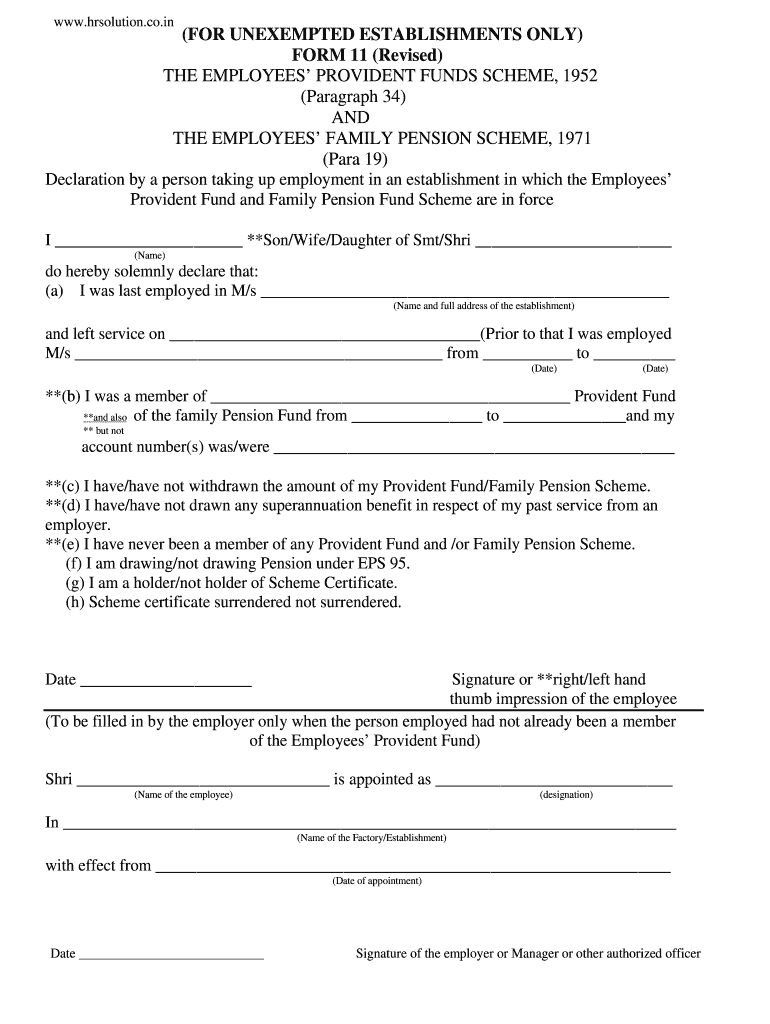
Get the free Form 11 Declaration for EPF and EPS Membership
We are not affiliated with any brand or entity on this form

Fill out
Complete the form online in a simple drag-and-drop editor.

eSign
Add your legally binding signature or send the form for signing.

Share
Share the form via a link, letting anyone fill it out from any device.

Export
Download, print, email, or move the form to your cloud storage.
Why pdfFiller is the best tool for your documents and forms


End-to-end document management
From editing and signing to collaboration and tracking, pdfFiller has everything you need to get your documents done quickly and efficiently.
Accessible from anywhere
pdfFiller is fully cloud-based. This means you can edit, sign, and share documents from anywhere using your computer, smartphone, or tablet.
Secure and compliant
pdfFiller lets you securely manage documents following global laws like ESIGN, CCPA, and GDPR. It's also HIPAA and SOC 2 compliant.
What is Form 11 Declaration
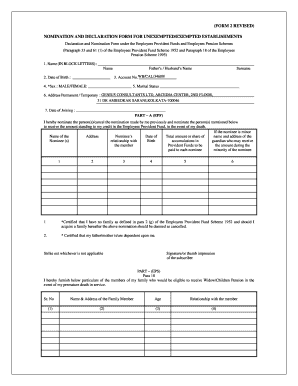
The Form 11 Declaration for EPF and EPS Membership is an employment form used by new employees in India to declare information relevant to the Employees' Provident Funds Scheme and the Employees' Family Pension Scheme.
pdfFiller scores top ratings on review platforms




Initial rough start when my first document could not be converted to PDFfiller format & problems setting up an account password, but that is behind me now and application is working as advertised.
Easy to use. Just had to remember what Social Account I signed in with.
Who needs Form 11 Declaration?
Explore how professionals across industries use pdfFiller.

Form 11 Declaration is needed by:
-
New employees joining unexempted establishments in India
-
Employers managing employee onboarding
-
Human resources professionals responsible for compliance
-
Payroll departments processing provident fund contributions
-
Employees switching jobs who need to declare previous fund memberships
Comprehensive Guide to Form 11 Declaration
What is the Form 11 Declaration for EPF and EPS Membership?
The Form 11 Declaration is a mandatory document for new employees in establishments covered by the Employees' Provident Fund (EPF) and the Employees' Pension Scheme (EPS) in India. It serves to clarify an individual's prior employment and their membership in any provident fund or pension schemes.
Understanding the intricacies of the EPF and EPS is crucial for both employees and employers, as this declaration significantly impacts compliance with Indian employment regulations. Completing the form accurately ensures that the employee’s rights to various benefits are preserved.
Purpose and Benefits of the Form 11 Declaration for EPF and EPS Membership
This declaration serves multiple essential purposes for employees and employers alike. One primary benefit is ensuring compliance with EPF and EPS regulations for new hires. By filing this form, employers can facilitate the correct tracking of employee entitlements and contributions.
Moreover, the form helps document previous employment histories, making it easier to ascertain previous provident fund memberships and any potential entitlements upon retirement or cessation of employment. Utilizing the employee declaration form reinforces good practices in workforce management.
Who Needs to Complete the Form 11 Declaration for EPF and EPS Membership?
The primary individuals responsible for completing the Form 11 Declaration are new employees in unexempted establishments. These new hires must provide accurate information regarding their employment history and prior provident fund memberships.
Employers also play a crucial role, as they are required to validate and sign off on the details submitted by the employees. Understanding who needs the form 11 declaration is vital for smooth processing and adherence to the relevant regulations.
Eligibility Criteria for the Form 11 Declaration for EPF and EPS Membership
To fill out the Form 11 Declaration, employees must meet specific eligibility criteria established under the Employee's Provident Funds Scheme of 1952. This includes criteria related to their current employment status and any previous engagement in similar provident funds or pension schemes.
It is also essential to consider an individual's history with previous employers, particularly regarding existing provident fund memberships, to avoid discrepancies in fund entitlements.
How to Fill Out the Form 11 Declaration for EPF and EPS Membership Online (Step-by-Step)
Filling out the Form 11 Declaration accurately is essential. To do so, follow these steps:
-
Access the online portal for the Form 11 Declaration.
-
Begin filling in personal information, such as your name and date of birth.
-
Provide details regarding your previous employment history, including any prior provident fund memberships.
-
Ensure accuracy in each declaration section, especially the thumb impression field.
-
Double-check all entered information before submission.
Common Errors and How to Avoid Them When Filling the Form 11 Declaration for EPF and EPS Membership
Many users face common pitfalls when completing the Form 11 Declaration. Mistakes often occur in personal details and the employment history sections, which can lead to complications.
To prevent these errors, it is crucial to review the form carefully before submitting it. Being attentive to details helps ensure that the declaration accurately reflects your employment situation and complies with regulatory requirements.
Digital Signature vs. Wet Signature Requirements for the Form 11 Declaration
When signing the Form 11 Declaration, you have two main options: digital signatures and traditional wet signatures. Each has specific compliance requirements that must be adhered to for validity.
Digital signatures often streamline the process, but traditional signature methods remain acceptable, depending on employer preferences and specific guidelines for submitting the form.
Where to Submit the Form 11 Declaration for EPF and EPS Membership
Submitting the Form 11 Declaration can be done through multiple channels. Employees can choose to submit their forms online via designated portals or through traditional offline methods.
It is essential to be aware of the timeline for submission and processing, as these can vary according to the establishment's policies and the regulatory frameworks involved.
Security and Compliance When Using pdfFiller for the Form 11 Declaration
When managing sensitive documents like the Form 11 Declaration, security is of utmost importance. pdfFiller employs advanced security measures, including encryption and compliance with GDPR regulations, ensuring that user data is protected throughout the form-filling process.
Utilizing pdfFiller for processing your Form 11 Declaration not only enhances compliance but also safeguards personal information from potential breaches.
Experience the Ease of Filling Out the Form 11 Declaration for EPF and EPS Membership with pdfFiller
pdfFiller offers an intuitive platform that simplifies the process of completing the Form 11 Declaration. With features that allow users to edit, eSign, and manage documents seamlessly, pdfFiller streamlines the entire workflow.
Start your journey towards hassle-free document management today by utilizing pdfFiller's user-friendly interface, enhancing efficiency while ensuring compliance with necessary regulations.
How to fill out the Form 11 Declaration
-
1.Access pdfFiller and log in to your account.
-
2.Use the search function to find 'Form 11 Declaration for EPF and EPS Membership.'
-
3.Click on the form to open it in the pdfFiller interface.
-
4.Carefully review the form requirements before starting to fill it out.
-
5.Prepare your previous employment details, including names and durations of jobs held.
-
6.Gather information about prior memberships in any provident fund or pension scheme.
-
7.Begin filling in the blank fields carefully, ensuring accurate spelling.
-
8.Select the appropriate checkboxes as required in the form.
-
9.In sections like 'Son/Wife/Daughter of Smt/Shri', fill in the requested names accurately.
-
10.Complete the signature field with either your signature or your thumb impression as directed.
-
11.Once all fields are filled out, review the form for any errors or missing information.
-
12.Make necessary corrections and ensure all required sections are complete.
-
13.Save your changes regularly to prevent data loss using the save option on pdfFiller.
-
14.When satisfied, download the completed form in your preferred format.
-
15.Submit the form to your employer as per their submission guidelines.

Who is eligible to fill out the Form 11 Declaration?
This form is designed for new employees in India joining establishments covered by the EPF and EPS schemes. It's mandatory for individuals starting their first job or those switching jobs.
Are there specific deadlines for submitting this form?
While there are no strict deadlines for submitting Form 11, it should be completed at the time of joining to ensure compliance with EPF and EPS regulations. Check with your employer for their specific requirements.
How do I submit the Form 11 after filling it out?
After completing the form, you can submit it to your employer directly. Ensure all required fields are filled out accurately and any necessary documents are attached as specified by your employer.
What supporting documents do I need when completing this form?
You may need documents verifying your previous employment details, such as appointment letters or provident fund membership details. Check with your employer to confirm any specific documentation requirements.
What are common mistakes to avoid when filling out Form 11?
Common mistakes include omitting previous employment details, misspelling names, or failing to properly sign the form. Always review the filled form for completeness and accuracy before submission.
How long does it take to process Form 11?
Processing times for Form 11 vary by employer. However, it is generally processed quickly to incorporate you into the EPF and EPS systems. Inquire with your HR department for specific timelines.
Can I edit the Form 11 after submitting it?
Once submitted, any changes to Form 11 should be made directly through your employer. Contact your HR or payroll department to ask about the process for correcting previously submitted forms.
Related Content
Related Forms




Related Catalogs
Get the latest insights from our blog


If you believe that this page should be taken down, please follow our DMCA take down process
here
.
This form may include fields for payment information. Data entered in these fields is not covered by PCI DSS compliance.