
Last updated on
Oct 19, 2026

Ohio State University Medical Center Referral for Admission Dodd Hall Inpatient Rehabilitation 2...
pdfFiller is not affiliated with any government organization

Fill out
Complete the form online in a simple drag-and-drop editor.

eSign
Add your legally binding signature or send the form for signing.

Share
Share the form via a link, letting anyone fill it out from any device.

Export
Download, print, email, or move the form to your cloud storage.
Why pdfFiller is the best tool for your documents and forms


End-to-end document management
From editing and signing to collaboration and tracking, pdfFiller has everything you need to get your documents done quickly and efficiently.
Accessible from anywhere
pdfFiller is fully cloud-based. This means you can edit, sign, and share documents from anywhere using your computer, smartphone, or tablet.
Secure and compliant
pdfFiller lets you securely manage documents following global laws like ESIGN, CCPA, and GDPR. It's also HIPAA and SOC 2 compliant.
What is Ohio State University Medical Center Referral for Admission Dodd Hall Inpatient Rehabilitation
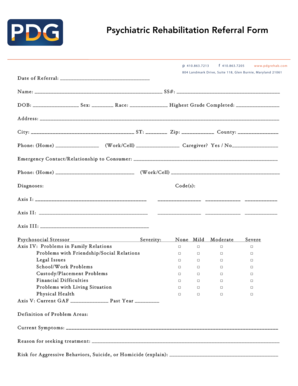
The Referral for Admission Form is a healthcare document used by referring physicians to officially refer patients to Dodd Hall Inpatient Rehabilitation.
pdfFiller scores top ratings on review platforms




Who needs Ohio State University Medical Center Referral for Admission Dodd Hall Inpatient Rehabilitation?
Explore how professionals across industries use pdfFiller.

Ohio State University Medical Center Referral for Admission Dodd Hall Inpatient Rehabilitation is needed by:
-
Referring physicians who want to admit patients.
-
Healthcare facilities that require patient referral information.
-
Patients seeking rehabilitation services at Dodd Hall.
-
Insurance providers needing referral documents for coverage.
-
Administrative staff processing inpatient admission requests.
Comprehensive Guide to Ohio State University Medical Center Referral for Admission Dodd Hall Inpatient Rehabilitation
What is the Referral for Admission Form?
The Referral for Admission Form is a critical document in healthcare, particularly for patient admissions. This form, pivotal for streamlining the patient admission process, is used to refer individuals to Dodd Hall Inpatient Rehabilitation. It plays a significant role in ensuring continuity of care by collecting essential patient information.
By utilizing this form, healthcare providers can maintain a seamless transfer of patient details, aiding in effective treatment planning.
Benefits of Using the Referral for Admission Form
The Referral for Admission Form provides numerous advantages for both physicians and patients. Firstly, it consolidates all necessary patient information, ensuring that the referring physician has complete and accurate data before submission.
Additionally, this form streamlines the admission process, facilitating timely access to rehabilitation services. Enhanced communication between healthcare providers is another key benefit, promoting collaboration in patient care.
Key Features of the Referral for Admission Form
This form consists of several essential components necessary for accurate completion. It requires important fields such as patient details, medical condition, and insurance information. Each section comes with specific instructions for filling out and signing the form, ensuring clarity throughout the process.
-
Patient’s Name
-
Date of Birth
-
Referring Physician’s Signature
-
Medical Condition Details
-
Insurance Information
The form is designed to be fillable and allows for easy completion on-the-go, catering to the dynamic needs of healthcare environments.
Who Needs to Complete the Referral for Admission Form?
The responsibility of completing the Referral for Admission Form primarily lies with the referring physician. This individual plays a crucial role in initiating the referral process for patients eligible for rehabilitation services.
Eligible patients typically include those requiring inpatient rehabilitation, and it's important for healthcare providers in Ohio to understand their role in this process to facilitate efficient admissions.
How to Fill Out the Referral for Admission Form Online
Completing the form online through pdfFiller is straightforward. Begin by gathering all relevant patient information before accessing the form. Here are the step-by-step instructions to guide users:
-
Open the Referral for Admission Form on pdfFiller.
-
Input the patient's name, date of birth, and other required information in the designated fields.
-
Fill out the medical condition and insurance details accurately.
-
Sign the form electronically using the built-in eSignature feature.
-
Review the completed form using the checklist to ensure all sections are filled correctly.
Implement these steps to ensure a smooth submission process.
Submission Process for the Referral for Admission Form
Submitting the Referral for Admission Form can be completed through various methods. The primary option is faxing the form directly to the admissions office. To ensure a complete submission, it’s essential to include all required documents along with the form.
Users should be aware of processing times and any potential fees associated with the submission to avoid surprises.
Common Mistakes to Avoid When Submitting the Referral for Admission Form
Many users encounter issues during submission due to avoidable errors. Common mistakes include leaving sections incomplete or overlooking necessary signatures. It's imperative to validate and review the form carefully before submitting to mitigate these risks.
-
Ensure all fields are filled out completely.
-
Confirm that the referring physician's signature is present.
-
Check for correct patient details and medical conditions.
-
Adhere to submission deadlines to avoid delays in processing.
Proper attention to these details can significantly enhance the submission experience.
Security and Compliance for the Referral for Admission Form
Safety is paramount when handling sensitive patient information. pdfFiller employs robust security measures, including 256-bit encryption, to ensure the protection of user data. Compliance with HIPAA and GDPR further underscores the importance of secure document handling in healthcare.
Users can confidently complete and submit the Referral for Admission Form, knowing their information remains confidential and secure throughout the process.
Next Steps After Submitting the Referral for Admission Form
After submitting the Referral for Admission Form, users should confirm receipt with the admissions office. It is also beneficial to track the status of the referral to ensure timely processing.
Depending on the response, follow-up actions may be necessary. Users should be prepared to correct or amend any submissions if required, maintaining open communication with the healthcare provider.
Why Choose pdfFiller for Your Referral for Admission Form Needs?
Choosing pdfFiller for completing the Referral for Admission Form offers numerous advantages. The platform provides features such as fillable forms and electronic signatures, enhancing user convenience. Testimonials from healthcare professionals highlight the platform's efficacy in managing healthcare forms seamlessly.
In addition, its user-friendly interface makes document management straightforward, encouraging users to complete forms efficiently.
How to fill out the Ohio State University Medical Center Referral for Admission Dodd Hall Inpatient Rehabilitation
-
1.Access the Referral for Admission Form on pdfFiller by searching the title in the document library or uploading an existing file.
-
2.Open the form using pdfFiller’s interface, which allows for easy navigation and editing.
-
3.Before filling out the form, gather essential information such as the patient's name, medical condition, health status, and insurance details.
-
4.Begin completing the name and identification fields, making sure to input the patient's information accurately.
-
5.Proceed to the section that requires details about the medical condition and current health status; provide comprehensive descriptions.
-
6.Utilize checkboxes for standardized responses where applicable, ensuring clarity and simplicity.
-
7.After filling out the necessary fields, review the completed form for any errors or missing information.
-
8.Ensure that the referring physician section is filled out and signed, which is a crucial step for the document’s validity.
-
9.To finalize, save your progress and download the form in your preferred format, or use the submit feature if sending directly through pdfFiller.
-
10.If faxing is needed, choose the fax option on pdfFiller after final review; prepare to send it to the admission office for processing.

Who is eligible to complete the Referral for Admission Form?
Only licensed referring physicians can complete the Referral for Admission Form as it requires their professional signature to validate the patient’s admission request.
Is there a deadline for submitting the form?
While the form itself does not specify deadlines, it is advisable to submit the Referral for Admission Form as soon as possible to avoid delays in patient admission to the rehabilitation facility.
How should the form be submitted once completed?
The Referral for Admission Form can typically be faxed to the admission office. Alternatively, if submitted via pdfFiller, utilize the direct submission features provided within the platform.
What supporting documents are required with the form?
Typically, no additional documents are required with the Referral for Admission Form; however, including relevant medical records or insurance documentation may be beneficial.
What are common mistakes to avoid when filling out this form?
Be sure to double-check that all patient details are accurate, especially the referring physician’s signature. Missing signatures or incorrect patient information can delay processing.
How long does it take for the form to be processed?
Processing times can vary, but once faxed or submitted through pdfFiller, expect a response from the admission office within a few business days regarding the patient's status.
Can the form be filled out digitally?
Yes, the Referral for Admission Form can be completed digitally using pdfFiller, which allows for easy editing and signing before submission.
Related Content
Related Forms

Get the latest insights from our blog


If you believe that this page should be taken down, please follow our DMCA take down process
here
.
This form may include fields for payment information. Data entered in these fields is not covered by PCI DSS compliance.