
Last updated on
Nov 9, 2026

DOD Personnel Action 2003-2026 free printable template
We are not affiliated with any brand or entity on this form

Fill out
Complete the form online in a simple drag-and-drop editor.

eSign
Add your legally binding signature or send the form for signing.

Share
Share the form via a link, letting anyone fill it out from any device.

Export
Download, print, email, or move the form to your cloud storage.
Why pdfFiller is the best tool for your documents and forms


End-to-end document management
From editing and signing to collaboration and tracking, pdfFiller has everything you need to get your documents done quickly and efficiently.
Accessible from anywhere
pdfFiller is fully cloud-based. This means you can edit, sign, and share documents from anywhere using your computer, smartphone, or tablet.
Secure and compliant
pdfFiller lets you securely manage documents following global laws like ESIGN, CCPA, and GDPR. It's also HIPAA and SOC 2 compliant.
What is DOD Personnel Action
The US Army Personnel Action Form is a government document used by soldiers to request personnel actions such as reassignment, retirement, or training.
pdfFiller scores top ratings on review platforms




Reliable and user friendly software
user interface was really flexible to edit the PDF document. Thanks for the reliable and user friendly software
I love the features I've used so far and looking forward to use more
Who needs DOD Personnel Action?
Explore how professionals across industries use pdfFiller.

DOD Personnel Action is needed by:
-
Active Duty Soldiers seeking reassignment
-
Retiring Army Personnel
-
Commanders approving personnel changes
-
Administrative Staff handling personnel requests
-
Human Resources personnel in military units
Comprehensive Guide to DOD Personnel Action
What is the US Army Personnel Action Form?
The US Army Personnel Action Form is a crucial document used by soldiers to request various personnel actions within the military. Its main functions include facilitating requests for reassignment, retirement, and training opportunities. By utilizing this form, soldiers can formally communicate their needs to their commanders, ensuring a structured evaluation of their requests.
Soldiers can request specific actions, including changes in duty assignments and retirement processing. This form holds significant importance as it requires signatures from both the soldier and the commander, which validates the request and initiates further action. The dual-signature requirement reinforces the accountability and oversight necessary in military processes.
Purpose and Benefits of the US Army Personnel Action Form
The US Army Personnel Action Form streamlines the request process for soldiers, allowing them to efficiently navigate significant career transitions. By using this form, soldiers can adhere to required protocols while expediting their requests for reassignment or retirement.
Completing the form accurately can positively impact a soldier's career trajectory, making it essential for their overall military service. Furthermore, proper use of the form enhances compliance with military regulations, contributing to overall operational efficiency within the Army.
Who Needs the US Army Personnel Action Form?
The primary users of the US Army Personnel Action Form include soldiers and their commanders, both of whom are required to engage with the document during various personnel actions. Specific scenarios that necessitate the use of this form include altering duty status and processing retirement requests.
Exceptions to standard form usage may exist in certain cases, such as emergency reassignments or unique administrative actions. Understanding the target users helps ensure that the appropriate personnel are equipped to manage this essential document effectively.
How to Fill Out the US Army Personnel Action Form Online
Filling out the US Army Personnel Action Form online involves several vital steps. First, access the form and review its major sections, each of which requires specific information.
Key fields include personal identification details and the type of action being requested. To avoid mistakes, pay attention to detailed instructions for each field. You can utilize features from pdfFiller, such as auto-fill and validation tools, to simplify the completion process and enhance accuracy.
Review and Validation Checklist for the US Army Personnel Action Form
Before submitting the US Army Personnel Action Form, it is crucial to validate the document for potential errors. Common mistakes to look out for include missing signatures or incomplete fields, which can delay processing.
A checklist can assist users in confirming that all fields are adequately filled out. Additionally, ensure that any required documentation, such as the DA Form 31 and other related DD forms, are included with the submission to facilitate proper processing.
How to Submit the US Army Personnel Action Form
Once the form is completed, submission can occur through designated channels within the military structure. Soldiers should be aware of submission locations and methods to ensure that their requests are properly received.
Additional factors to consider include potential fees and submission deadlines associated with the form. After submission, soldiers can typically track the status of their requests to remain informed about processing times and outcomes.
Security and Compliance When Handling the US Army Personnel Action Form
Handling the US Army Personnel Action Form involves critical security measures to protect sensitive information. Soldiers must understand the importance of data protection during the submission process.
pdfFiller ensures compliance with HIPAA and GDPR regulations, thus safeguarding the information contained within the form. Utilizing pdfFiller's security features, users can manage their documents securely while maintaining compliance with necessary legal standards.
Benefits of Using pdfFiller for the US Army Personnel Action Form
Using pdfFiller to complete the US Army Personnel Action Form offers several advantages. The platform allows users to edit and save forms online without the need for downloads, making the process more convenient.
Furthermore, pdfFiller's eSigning capabilities are particularly relevant, enabling quick and secure submissions. Enhanced document tracking and management features within the platform streamline the overall process, providing users with a comprehensive solution for their form needs.
Sample of a Completed US Army Personnel Action Form
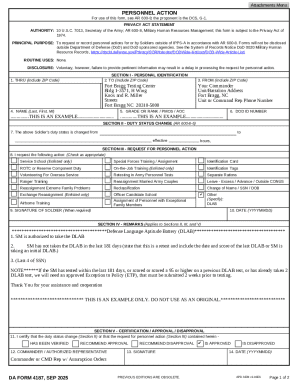
To aid in understanding the US Army Personnel Action Form, a visual example of a filled form can be beneficial. This sample illustrates the correct layout and required information, serving as a useful reference for users.
Critical parts of the sample should be explained, highlighting essential filling tips to ensure compliance. It's imperative that the example adheres to security and compliance standards, offering users confidence in the submission process.
Maximize Your Efficiency with pdfFiller for Your Form Needs
pdfFiller allows users to maximize their efficiency when managing forms like the US Army Personnel Action Form. The platform provides a range of features designed to simplify the process of filling, signing, and submitting documents online.
Prioritizing data security and compliance, pdfFiller supports users in handling their documentation responsibly. Engaging with this platform not only streamlines form management but also reinforces best practices for secure document handling within the military context.
How to fill out the DOD Personnel Action
-
1.Access pdfFiller and search for 'US Army Personnel Action Form' in the available documents.
-
2.Click on the form to open it in the pdfFiller interface.
-
3.Read the instructions at the top of the form to understand the requirements.
-
4.Gather necessary information such as your personal details, current duty status, and specific requests for personnel actions.
-
5.Fill in the personal identification fields accurately, ensuring your details match official records.
-
6.Use the checkboxes to indicate the personnel actions you are requesting like reassignment or retirement.
-
7.Follow the explicit prompts in the form, paying attention to sections requiring your signature.
-
8.After completing the form, review all fields to ensure information is complete and accurate.
-
9.Save your progress frequently on pdfFiller to avoid data loss.
-
10.To finalize, ensure you have selected all required documentation, like DA Form 31, DD Form 108, and DD Form 2656, for attachment.
-
11.Once satisfied with the form, utilize the download feature to save it or submit directly through pdfFiller.

Who is eligible to complete the US Army Personnel Action Form?
Active duty soldiers who need to initiate personnel actions are eligible to complete the US Army Personnel Action Form. Commanders are also involved in the approval process.
What documents need to be attached with the US Army Personnel Action Form?
Typically, you should attach DA Form 31 and DD Forms 108 and 2656 along with the US Army Personnel Action Form to support your request and provide necessary context.
How do I submit the US Army Personnel Action Form once completed?
After filling out the form on pdfFiller, you can submit it electronically through the platform, or download it for physical submission as required by your command.
What common mistakes should I avoid when filling out the form?
Ensure that all personal information is accurate, check all boxes relevant to your request, and do not forget to obtain the required signatures from both yourself and the commander.
Is there a deadline for submitting the US Army Personnel Action Form?
Deadlines for submission may vary based on the type of personnel action being requested. It's advisable to check with your commander or HR department for specific time-sensitive procedures.
What happens after I submit the US Army Personnel Action Form?
Once submitted, the form will be reviewed by your commander or HR staff for approval, and you will be notified of the outcome or any additional steps required.
Related Content
Related Forms




Related Catalogs
Get the latest insights from our blog


If you believe that this page should be taken down, please follow our DMCA take down process
here
.
This form may include fields for payment information. Data entered in these fields is not covered by PCI DSS compliance.