
Last updated on
Nov 6, 2026
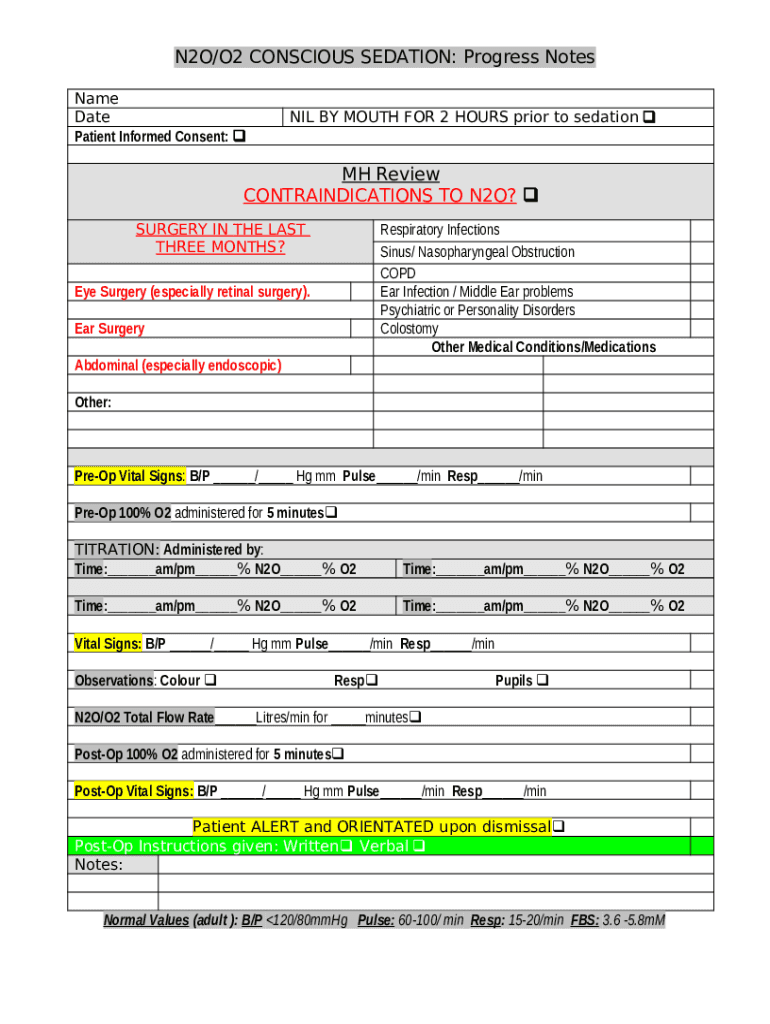
N2O/O2 Conscious Sedation Progress Notes 2021-2026 free printable template
pdfFiller is not affiliated with any government organization

Fill out
Complete the form online in a simple drag-and-drop editor.

eSign
Add your legally binding signature or send the form for signing.

Share
Share the form via a link, letting anyone fill it out from any device.

Export
Download, print, email, or move the form to your cloud storage.
Why pdfFiller is the best tool for your documents and forms


End-to-end document management
From editing and signing to collaboration and tracking, pdfFiller has everything you need to get your documents done quickly and efficiently.
Accessible from anywhere
pdfFiller is fully cloud-based. This means you can edit, sign, and share documents from anywhere using your computer, smartphone, or tablet.
Secure and compliant
pdfFiller lets you securely manage documents following global laws like ESIGN, CCPA, and GDPR. It's also HIPAA and SOC 2 compliant.
What is N2O/O2 Conscious Sedation Progress Notes
The N2O/O2 Conscious Sedation Form is a healthcare document used by medical professionals to document patient consent and procedures involving nitrous oxide and oxygen sedation.
pdfFiller scores top ratings on review platforms




EASY!! QUICKLY DID WHAT I NEED TO WITH A 2015 941 IRS FORM - THANKS
I am retired and use it mostly for medical forms. A little difficult to learn how to begin but once I figured it out everything worked just the way I wanted and I learned more as I went along.
Who needs N2O/O2 Conscious Sedation Progress Notes?
Explore how professionals across industries use pdfFiller.

N2O/O2 Conscious Sedation Progress Notes is needed by:
-
Healthcare providers administering sedation
-
Dental professionals performing procedures
-
Anesthesiologists managing conscious sedation
-
Medical assistants recording patient consent
-
Surgeons conducting outpatient procedures
Comprehensive Guide to N2O/O2 Conscious Sedation Progress Notes
What is the N2O/O2 Conscious Sedation Form?
The N2O/O2 Conscious Sedation form is a crucial document in healthcare that records the use of nitrous oxide and oxygen for conscious sedation during medical procedures. Its primary function is to ensure that practitioners can administer sedation safely and effectively while maintaining an accurate record of the patient's consent and related information. The form includes essential sections that help in documenting the patient's status and informed consent, making it a vital tool for both healthcare providers and patients.
Nitrous oxide, commonly known as laughing gas, is an anesthetic agent that, when combined with oxygen, allows for a state of consciousness where patients remain responsive while still experiencing pain relief and relaxation. This form is essential in facilitating that process.
Purpose and Benefits of the N2O/O2 Conscious Sedation Form
This form plays a significant role in ensuring patient safety and fostering effective communication among medical staff during procedures that require sedation. It outlines clear protocols that must be followed, thus enhancing the overall patient care experience.
Utilizing the N2O/O2 Conscious Sedation form provides several benefits:
-
Guarantees comprehensive documentation of the patient's consent and medical history.
-
Supports legal protection for both healthcare providers and patients, reducing liability risks.
-
Facilitates smooth interactions among healthcare professionals, ensuring everyone is informed about the patient's condition and treatment.
Key Features of the N2O/O2 Conscious Sedation Form
This form includes several essential components that ensure a thorough understanding of the sedation process. Key features consist of:
-
Fillable fields for patient consent and medically relevant contraindications.
-
Sections dedicated to monitoring vital signs before, during, and after the application of sedation.
-
Detailed titration instructions and post-operative care guidelines to follow.
Each of these features aids in promoting patient safety and effective monitoring throughout the sedation process.
Who Needs the N2O/O2 Conscious Sedation Form?
This form is essential for a variety of healthcare professionals involved in administering conscious sedation. Key users include anesthesiologists, dentists, and any medical personnel responsible for patient care during sedation processes.
Patients who may require procedures involving nitrous oxide sedation should also have this form completed to ensure all necessary precautions are taken. It is a fundamental document for anyone involved in such medical treatments.
How to Fill Out the N2O/O2 Conscious Sedation Form Online (Step-by-Step)
Filling out the N2O/O2 Conscious Sedation form online is straightforward when following these steps:
-
Access the form through the designated online platform.
-
Begin with the patient’s personal details and related medical history.
-
Fill in any contraindications present and check applicable sections regarding consent.
-
Document vital signs and any necessary pre-operative instructions.
-
Review and confirm all entries before final submission.
Gathering all necessary patient information beforehand will streamline the form-filling process.
Common Errors and How to Avoid Them When Submitting the N2O/O2 Conscious Sedation Form
Individuals may encounter several common errors during the submission process. Awareness of these can help prevent issues such as:
-
Skipping essential fields that may lead to incomplete information.
-
Misinterpreting medical terminology related to contraindications.
-
Submitting outdated or illegible versions of the form.
To avoid these pitfalls, double-check all entries and ensure clarity in documentation prior to submission.
Security and Compliance for the N2O/O2 Conscious Sedation Form
When using the N2O/O2 Conscious Sedation Form, security is paramount. pdfFiller employs robust security measures, including advanced encryption and compliance with HIPAA regulations, to safeguard sensitive patient data. These protocols assure users that their information remains confidential and secure throughout the filling, submission, and archiving processes.
Patients and providers alike can have peace of mind knowing that all steps to protect personal information are taken seriously.
How to Submit the N2O/O2 Conscious Sedation Form and Next Steps
Submitting the N2O/O2 Conscious Sedation form can be accomplished through several methods:
-
Online submission through the designated healthcare platform.
-
Printing the completed form and submitting it in person or via mail.
Once submitted, users should ensure tracking and confirmations are carried out to verify compliance and processing of the form.
Sample or Example of a Completed N2O/O2 Conscious Sedation Form
Providing a filled-out example of the N2O/O2 Conscious Sedation form can greatly assist users in understanding its structure. Key sections, such as patient consent and vital sign records, should be clearly highlighted in the example.
This visual reference will enhance user understanding and aid in accurately completing their own forms.
Discover the Efficiency of Using pdfFiller for Your N2O/O2 Conscious Sedation Form
Utilizing pdfFiller to handle your N2O/O2 Conscious Sedation form simplifies the process considerably. With features such as easy fillable forms, eSigning capabilities, and the option to securely share documentation, users will appreciate the convenience it brings to their practice.
The platform ensures that maintaining security while managing sensitive documents is straightforward and efficient, providing an ideal solution for healthcare providers.
How to fill out the N2O/O2 Conscious Sedation Progress Notes
-
1.Access pdfFiller and log into your account. Use the search feature to find the N2O/O2 Conscious Sedation Form by typing its name.
-
2.Once you have located the form, click on it to open it in the pdfFiller interface. Familiarize yourself with the layout and available tools.
-
3.Before you start filling out the form, gather all necessary patient information such as medical history, current medications, and any previous sedative experiences.
-
4.Begin entering patient details into the relevant fields, starting with the patient's name and date. Ensure accuracy in all entries.
-
5.Complete the consent section, including the checkbox for 'Patient Informed Consent'. This indicates that the patient has understood the procedure and possible risks.
-
6.Fill in the contraindications section and provide any vital sign readings if available. Use checkboxes for additional notes as required.
-
7.For titration information, enter the specific dosages administered during the procedure. Be meticulous to ensure patient safety.
-
8.Review all filled fields carefully to ensure there are no mistakes or omissions. Double-check that all required fields are completed.
-
9.After verifying the information, you can save the completed form to your pdfFiller account. Use the download option to export a copy for your records.
-
10.If needed, submit the form via email or print it directly from pdfFiller. Ensure that the submission complies with your facility's protocols.

Who needs to complete the N2O/O2 Conscious Sedation Form?
Healthcare providers, including dentists and anesthesiologists, should complete this form to ensure that patient consent and sedation procedures are properly documented.
What information is required to fill out this form?
You will need the patient's personal information, medical history, current medications, and vital signs prior to sedation to complete the form accurately.
How do I submit the N2O/O2 Conscious Sedation Form after filling it out?
After filling out the form on pdfFiller, you can save, download, or print it based on your facility's requirements. Email submission options may also be available.
Are there any deadlines for submitting this form?
While specific deadlines may vary by institution, it is generally advisable to complete and submit the N2O/O2 Conscious Sedation Form before the day of the procedure.
What are common mistakes to avoid when filling this form?
Common mistakes include overlooking vital sections, failing to obtain proper consent, and not double-checking patient details. Always ensure completeness and accuracy.
When should this form be completed?
The N2O/O2 Conscious Sedation Form should be completed during the pre-operative phase, before any sedation procedures take place, to ensure all protocols are followed.
Is notarizing required for this form?
No, notarization is not required for the N2O/O2 Conscious Sedation Form, but ensure that the appropriate signatures are obtained from involved parties.
Related Forms



Get the latest insights from our blog


If you believe that this page should be taken down, please follow our DMCA take down process
here
.
This form may include fields for payment information. Data entered in these fields is not covered by PCI DSS compliance.