
Last updated on
Nov 7, 2026
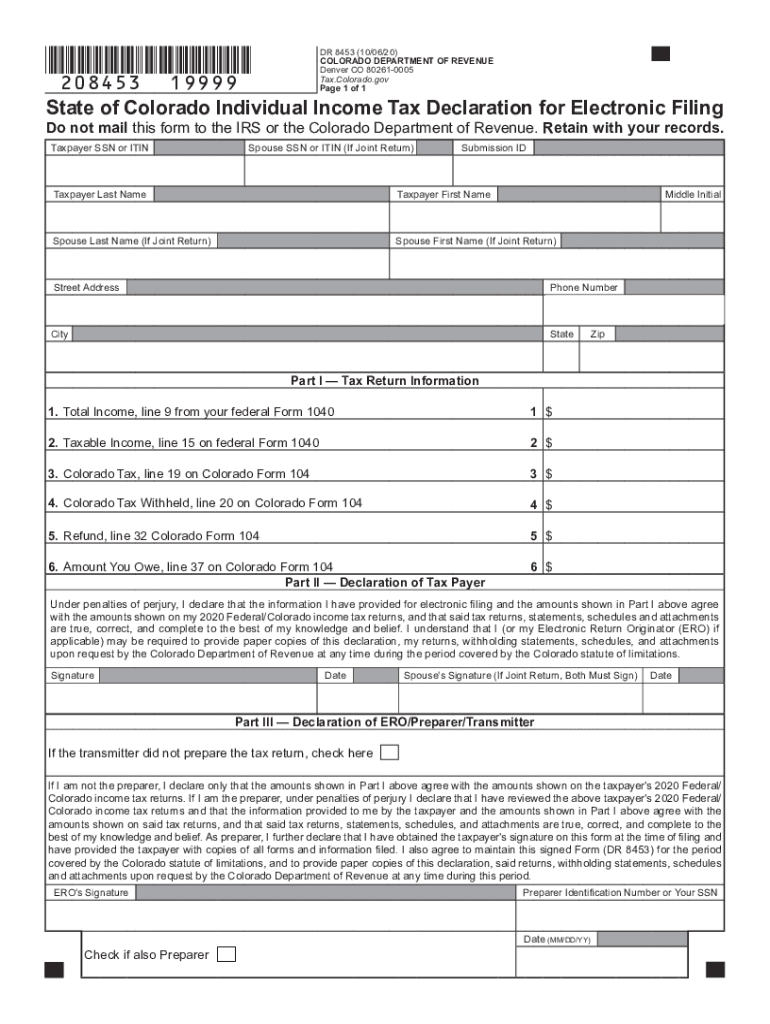
CO DR 8453 2020 free printable template
We are not affiliated with any brand or entity on this form

Fill out
Complete the form online in a simple drag-and-drop editor.

eSign
Add your legally binding signature or send the form for signing.

Share
Share the form via a link, letting anyone fill it out from any device.

Export
Download, print, email, or move the form to your cloud storage.
Why pdfFiller is the best tool for your documents and forms


End-to-end document management
From editing and signing to collaboration and tracking, pdfFiller has everything you need to get your documents done quickly and efficiently.
Accessible from anywhere
pdfFiller is fully cloud-based. This means you can edit, sign, and share documents from anywhere using your computer, smartphone, or tablet.
Secure and compliant
pdfFiller lets you securely manage documents following global laws like ESIGN, CCPA, and GDPR. It's also HIPAA and SOC 2 compliant.
What is CO DR 8453
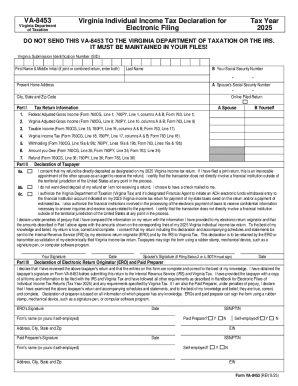
The Colorado DR 8453 Tax Form is a state tax document used by taxpayers to declare their electronic filing information for Colorado income taxes.
pdfFiller scores top ratings on review platforms




Who needs CO DR 8453?
Explore how professionals across industries use pdfFiller.

CO DR 8453 is needed by:
-
Taxpayers filing taxes in Colorado
-
Spouses of joint filers
-
Electronic Return Originators (EROs)
-
Tax preparers assisting with Colorado tax filings
-
Individuals claiming deductions in Colorado
Comprehensive Guide to CO DR 8453
What is the Colorado DR 8453 Tax Form?
The Colorado DR 8453 form is a specific tax document essential for taxpayers filing electronically in Colorado. This state-specific form serves a vital role in the electronic filing process, ensuring that all necessary electronic filing information is declared correctly. Unlike federal forms, it adheres strictly to the requirements set forth by the state of Colorado.
Purpose and Benefits of the Colorado DR 8453 Tax Form
The Colorado DR 8453 form is crucial for preventing penalties associated with tax declaration errors. By ensuring that electronic filing information is accurately declared, this form benefits both taxpayers and their Electronic Return Originators (EROs) by streamlining the overall filing process. It ultimately enhances compliance and reduces the potential for mistakes during electronic submissions.
Key Features of the Colorado DR 8453 Tax Form
Key components of the Colorado DR 8453 tax form include several essential fields that must be completed. These fields encompass total income, taxable income, and specific Colorado tax figures. Additionally, this form includes signature requirements for the taxpayer, spouse, and ERO, ensuring all relevant parties validate the information provided. The inclusion of explicit instructions, checkboxes, and fillable areas simplifies the process of completing the form accurately.
Who Needs the Colorado DR 8453 Tax Form?
The Colorado DR 8453 form must be filed by taxpayers who are either completing their tax declarations individually or jointly with a spouse. It is also essential for those utilizing the services of an ERO or tax preparer. Specific situations that necessitate form completion include filing electronically and circumstances where accurate electronic filing declarations are mandatory.
How to Fill Out the Colorado DR 8453 Tax Form Online (Step-by-Step)
To successfully complete the Colorado DR 8453 tax form online, follow these step-by-step instructions:
-
Access the form through an online platform such as pdfFiller.
-
Fill in your total income, taxable income, and Colorado tax figures as directed.
-
Check the relevant boxes to confirm the accuracy of the information.
-
Ensure both you and your spouse (if applicable) provide signatures in the designated fields.
-
Complete the ERO's signature section if applicable.
It’s important to pay attention to signature requirements and utilize tips to avoid common errors during your completion.
Submission Methods and Delivery of the Colorado DR 8453 Tax Form
Once the Colorado DR 8453 form is filled out, it can be submitted in various ways. Taxpayers may choose to submit electronically through approved platforms or opt for traditional mailing methods. Securing confirmation of your submission is critical; make sure to follow designated guidelines for delivery, including specific addresses or online submission platforms provided by the state of Colorado.
What Happens After You Submit the Colorado DR 8453 Tax Form
After submitting the Colorado DR 8453 tax form, taxpayers should expect a processing period during which they may receive confirmation receipts. Following submission, taxpayers can check the status of their application through the state’s designated channels. Common issues encountered after submission can include processing delays or discrepancies in the filed information, which should be promptly addressed with the appropriate authorities.
Security and Compliance for the Colorado DR 8453 Tax Form
When handling the Colorado DR 8453 form, users can be assured of comprehensive security measures designed to protect sensitive information. Compliance with stringent regulations such as HIPAA and GDPR is maintained through the submission process. Using platforms like pdfFiller ensures that document security is prioritized, with features that safeguard personal information throughout completion and submission.
Optimize Your Experience with pdfFiller for the Colorado DR 8453 Tax Form
Utilizing pdfFiller for completing the Colorado DR 8453 tax form enhances your overall experience. The platform offers convenient features such as e-signature capabilities, cloud storage for easy access, and a user-friendly interface accessible from any browser. Users have successfully streamlined their form-filling process using pdfFiller, leading to efficient and compliant tax submissions.
Sample Completed Colorado DR 8453 Tax Form
For guidance, a sample completed Colorado DR 8453 form is available. This example illustrates a correctly filled-out form with annotations explaining each section for clarity. Users can learn how to create and edit their versions using pdfFiller, making the completion process more intuitive.
How to fill out the CO DR 8453
-
1.To access the Colorado DR 8453 Tax Form on pdfFiller, visit their website and use the search function to find the form by name.
-
2.Open the form by clicking on it. This will launch the pdfFiller editor where you can begin working on your form.
-
3.Before completing the form, gather all necessary information, including total income, taxable income, and details from both your federal and state tax returns.
-
4.In the pdfFiller interface, navigate through the fillable fields using your mouse or keyboard. Click on each field to input the required information.
-
5.Ensure that both the taxpayer and spouse (if applicable) enter their names, signatures, and dates in the signature fields provided on the form.
-
6.Once you have filled in all required fields, review the information for accuracy. Check entries such as income, deductions, and personal details for any mistakes.
-
7.After reviewing, finalize your document by saving the changes. You can either download the form to your computer or submit it directly through the pdfFiller platform.
-
8.If you choose to download, select the 'Download' button and follow prompts to save your completed form. Make sure to keep a copy for your records.

Who needs to sign the Colorado DR 8453 Tax Form?
The Colorado DR 8453 Tax Form must be signed by the taxpayer and their spouse if filing jointly, as well as the Electronic Return Originator (ERO) or tax preparer.
Is there a deadline for submitting the Colorado DR 8453 Form?
Yes, the Colorado DR 8453 Form should be submitted along with your tax filings by the general tax deadline, which is typically April 15 unless it falls on a weekend or holiday.
How can I submit the Colorado DR 8453 Tax Form?
You can submit the Colorado DR 8453 Form electronically via your ERO or tax preparer, or you may print and mail it as part of your tax filing documents.
What supporting documents do I need when filing the Colorado DR 8453 Form?
You should have your federal tax return and any relevant financial documents, such as W-2s and 1099s, along with the completed Colorado tax return for reference.
What are some common mistakes to avoid when completing the form?
Common mistakes include forgetting to sign and date the form, entering incorrect income figures, and submitting without all required signatures, including those of the ERO.
How long does it take for my submission to be processed?
Processing times can vary but expect to receive confirmation of your electronic filing typically within 24-48 hours. Paper submissions may take longer.
Do I need to notarize the Colorado DR 8453 Form?
No, the Colorado DR 8453 Form does not require notarization; however, all required signatures must be present for a valid submission.
CO DR 8453 Form Versions
Related Content
Related Forms





Get the latest insights from our blog


If you believe that this page should be taken down, please follow our DMCA take down process
here
.
This form may include fields for payment information. Data entered in these fields is not covered by PCI DSS compliance.