
Last updated on
Nov 9, 2026

Lloyds Bank 13250 2021-2026 free printable template
pdfFiller is not affiliated with any government organization

Fill out
Complete the form online in a simple drag-and-drop editor.

eSign
Add your legally binding signature or send the form for signing.

Share
Share the form via a link, letting anyone fill it out from any device.

Export
Download, print, email, or move the form to your cloud storage.
Why pdfFiller is the best tool for your documents and forms


End-to-end document management
From editing and signing to collaboration and tracking, pdfFiller has everything you need to get your documents done quickly and efficiently.
Accessible from anywhere
pdfFiller is fully cloud-based. This means you can edit, sign, and share documents from anywhere using your computer, smartphone, or tablet.
Secure and compliant
pdfFiller lets you securely manage documents following global laws like ESIGN, CCPA, and GDPR. It's also HIPAA and SOC 2 compliant.
What is Lloyds Bank 13250
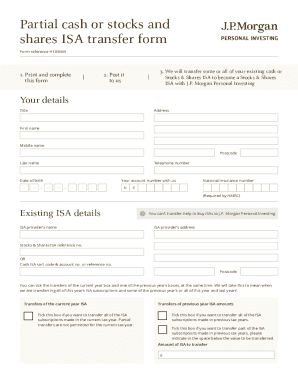
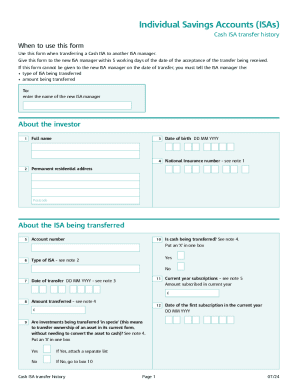
The ISA Manager Transfer Form is a financial document used by ISA holders to transfer their Individual Savings Account to Lloyds Bank e-Investments stocks and shares ISA.
pdfFiller scores top ratings on review platforms




Love this software. It is user friendly and easy to navigate.
I have been struggling with location of the right forms for a Sacramento County Probate case and the PDFfiller site made it simpler.
Who needs Lloyds Bank 13250?
Explore how professionals across industries use pdfFiller.

Lloyds Bank 13250 is needed by:
-
ISA Holders transferring accounts
-
Individuals looking to invest in stocks and shares ISAs
-
Clients of Lloyds Bank e-Investments
-
Financial advisors assisting clients with ISA transfers
-
Individuals seeking to consolidate ISA accounts
Comprehensive Guide to Lloyds Bank 13250
What is the ISA Manager Transfer Form?
The ISA Manager Transfer Form is a critical document for transferring an existing Individual Savings Account (ISA) to Lloyds Bank e-Investments. This transfer form streamlines the process, ensuring a smooth transition of funds and investments. An ISA, or Individual Savings Account, allows users to save or invest money without paying tax on the income generated, making it a popular choice to maximize savings and growth.
This form serves the specific intent of consolidating financial assets under a new manager while taking advantage of Lloyds Bank's investment opportunities.
Purpose and Benefits of the ISA Manager Transfer Form
The primary purpose of the ISA Manager Transfer Form is to facilitate the timely transfer of financial assets between ISA managers. Utilizing this form offers several benefits, including gaining the ability to transfer funds seamlessly to a Lloyds Bank e-Investments ISA.
Among the advantages is the potential for enhanced financial growth through improved investment opportunities available at Lloyds Bank. Users often find that transferring their ISAs can lead to better financial outcomes due to more favorable interest rates and investment options.
Who Needs to Use the ISA Manager Transfer Form?
This form is intended for current ISA holders looking to shift their accounts to another manager, specifically to Lloyds Bank. The target audience primarily consists of individuals currently holding ISAs with different managers who want to take advantage of new offerings.
Eligibility criteria typically require that users possess a valid ISA account and meet the specific guidelines set by Lloyds Bank regarding transfer submissions.
How to Fill Out the ISA Manager Transfer Form Online
Filling out the ISA Manager Transfer Form online can be a straightforward process when approached step-by-step:
-
Begin by visiting the bank’s official website to access the form.
-
Provide personal details, including your name, address, and National Insurance number.
-
Enter your current ISA manager’s details accurately.
-
Complete sections on the specifics of the ISA that is being transferred.
Common errors include missing signatures or incorrect account details. It’s crucial to cross-check all fields before submission to ensure accuracy.
Required Documents and Supporting Materials
To submit the ISA Manager Transfer Form, specific documents are necessary to validate your request. Users should gather the following:
-
Current ISA statements.
-
Identification proof, such as a passport or driving license.
-
Any correspondence from your existing ISA manager.
Having these documents ready will streamline the transfer process and reduce delays.
How to Submit the ISA Manager Transfer Form
Once the ISA Manager Transfer Form is completed, it’s essential to know the correct submission process. You have two primary options for submitting:
-
Mail the completed form to the designated address provided by Lloyds Bank.
-
Use the online submission portal if available for faster processing.
Users can track their submission status through the bank’s online system or by contacting customer service for updates.
Consequences of Not Submitting or Late Submission
Failing to submit the ISA Manager Transfer Form on time can lead to significant risks, such as missed investment growth opportunities or penalties from existing managers.
If deadlines are not met, individuals may explore alternative options, including reapplying for a transfer or consulting their current ISA manager for other potential solutions.
Security and Privacy of Your Information
When dealing with personal financial information, security measures are paramount. The ISA Manager Transfer Form adheres to strict data protection regulations, ensuring sensitive information is securely handled.
Compliance with GDPR and other relevant regulations is a fundamental aspect of the processing procedure, offering peace of mind to users concerned about privacy.
Utilizing pdfFiller to Complete the ISA Manager Transfer Form
pdfFiller serves as an invaluable resource for users needing assistance with the ISA Manager Transfer Form. This platform offers several features that enhance form completion:
-
Edit and annotate fillable PDFs easily.
-
eSign documents securely and efficiently.
-
Save and organize completed documents without hassle.
The security benefits associated with pdfFiller provide users with confidence while managing their documents online, making it a practical choice for handling sensitive information.
Sample Completed ISA Manager Transfer Form
To ensure accuracy when filling out the form, reviewing a sample completed ISA Manager Transfer Form can be beneficial. This example highlights the essential components for users to replicate.
When using the example as a guide, double-check all entries concerning your personal information and confirm that all required fields are filled correctly.
How to fill out the Lloyds Bank 13250
-
1.Access the ISA Manager Transfer Form on pdfFiller by searching for the form name or using a direct link provided by Lloyds Bank.
-
2.Open the form in the pdfFiller interface where you will see various fillable fields to complete.
-
3.Before starting, gather necessary information such as your personal details, current ISA manager’s contact information, and specifics about the ISA you wish to transfer.
-
4.Begin filling in the personal details section, ensuring accuracy in your name, address, and contact information.
-
5.Next, input your current ISA manager's details in the designated fields, making sure to provide accurate contact information to avoid delays.
-
6.Fill in the section requesting specifics about the ISA you want to transfer, indicating the type of ISA and other relevant aspects.
-
7.Carefully read through the instructions provided within the form to ensure all required fields are completed properly.
-
8.Once all sections are filled out, review the entire form for any potential errors or missing information.
-
9.Finalize the form by signing it in the designated area, ensuring your signature matches your official documentation.
-
10.After completing the form, you can save it directly within pdfFiller, download it for your records, or submit it electronically to Lloyds Bank as instructed.

Who is eligible to use the ISA Manager Transfer Form?
The ISA Manager Transfer Form is designed for existing ISA holders looking to transfer their funds to a different manager, specifically to Lloyds Bank e-Investments.
What information do I need before I start filling out the form?
You'll need to gather personal details, your current ISA manager’s contact details, and specific information about the ISA you plan to transfer.
How do I submit the completed form?
Once you have completed and signed the form, you can submit it by sending it to the address specified by Lloyds Bank, or you may have the option to submit it directly through pdfFiller if available.
Are there any fees associated with transferring my ISA?
Typically, there are no fees for transferring an ISA, but it’s advised to check with your current manager and Lloyds Bank for any specific fees that may apply.
How long does the ISA transfer process take?
The transfer duration can vary, but it usually takes 2-4 weeks to complete. It's best to check with your ISA manager and Lloyds Bank for specific processing times.
What common mistakes should I avoid when filling out the form?
Be sure to double-check all entries for spelling errors, especially in names and account numbers. Missing a signature or leaving questions blank are also common mistakes.
Can I change my mind after submitting the form?
If you decide to cancel the transfer after submission, contact both your current ISA manager and Lloyds Bank immediately to understand your options and possible consequences.
Lloyds Bank 13250 Form Versions
Related Forms





Get the latest insights from our blog


If you believe that this page should be taken down, please follow our DMCA take down process
here
.
This form may include fields for payment information. Data entered in these fields is not covered by PCI DSS compliance.