
Last updated on
Nov 9, 2026

USPS PS 1261 1995 free printable template
We are not affiliated with any brand or entity on this form

Fill out
Complete the form online in a simple drag-and-drop editor.

eSign
Add your legally binding signature or send the form for signing.

Share
Share the form via a link, letting anyone fill it out from any device.

Export
Download, print, email, or move the form to your cloud storage.
Why pdfFiller is the best tool for your documents and forms


End-to-end document management
From editing and signing to collaboration and tracking, pdfFiller has everything you need to get your documents done quickly and efficiently.
Accessible from anywhere
pdfFiller is fully cloud-based. This means you can edit, sign, and share documents from anywhere using your computer, smartphone, or tablet.
Secure and compliant
pdfFiller lets you securely manage documents following global laws like ESIGN, CCPA, and GDPR. It's also HIPAA and SOC 2 compliant.
What is USPS PS 1261
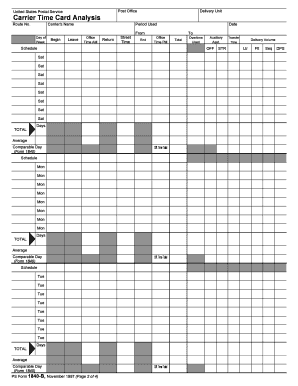
The PS Form 1261 is a payroll form used by U.S. government employees to report employee payroll information, including overtime and outside of schedule premiums.
pdfFiller scores top ratings on review platforms




iT HAS BEEN A GOOD EXPERIENCE. JUST TRYING TO BECOME FAMILIAR WITH THE PROGRAM.
What do you like best?
Ability to use templates was the most helpful. I like PDF filler because I can encrypt and decrypt documents, merge PDF files, crop or rotate PDF pages. It's fairly easy to use but the interface isn't great.
What do you dislike?
The user interface is not intuitive for me. I liked all other features and don't have much bad to say. I'll continue to refer people.
Recommendations to others considering the product:
Great product!
What problems are you solving with the product? What benefits have you realized?
Filling out of legal documents for real estate transactions.
Who needs USPS PS 1261?
Explore how professionals across industries use pdfFiller.

USPS PS 1261 is needed by:
-
U.S. government employees
-
Payroll administrators
-
Human resources personnel
-
Accountants managing payroll
-
Supervisors monitoring employee hours
Comprehensive Guide to USPS PS 1261
What is the PS Form 1261?
The PS Form 1261 is a crucial government form utilized for reporting employee payroll information. This form plays a significant role in ensuring accurate payroll documentation, particularly in regard to overtime and outside-of-schedule premiums. It is vital for both employees and employers to understand its function and the potential consequences of submitting outdated forms, as the last update occurred in October 1995.
Purpose and Benefits of the PS Form 1261
The PS Form 1261 is essential for maintaining proper payroll records and ensuring compliance with U.S. government regulations. Accurate payroll documentation is crucial to avoid discrepancies that could affect both employees' payments and employers' records. Timely submission of this form not only streamlines the payroll process but also enhances the accuracy of overtime reporting and time tracking.
Who Needs the PS Form 1261?
This form is necessary for specific employees and employers engaged in roles that require accurate payroll reporting. Typically, it applies to employees who work overtime and need to document their additional hours. Industries such as healthcare, education, and public service commonly utilize the PS Form 1261 to fulfill payroll obligations.
How to Fill Out the PS Form 1261 Online (Step-by-Step)
Completing the PS Form 1261 online can be a straightforward process when following these steps:
-
Gather necessary employee information, including full name and work hours.
-
Access the online form through a secure platform.
-
Input administrative details relevant to the payroll period.
-
Review and ensure all fields are filled accurately.
-
Sign the form as required to validate the information.
Be aware of common errors, such as leaving fields incomplete or failing to provide required signatures, to avoid complications during submission.
Field-by-Field Instructions for PS Form 1261
To ensure clarity when completing the PS Form 1261, it's important to understand the purpose of each field:
-
Employee details: Include full name, position, and identification numbers.
-
Time worked: Specify the exact hours worked, distinguishing between regular and overtime.
-
Signatures: Ensure that all required signatures are obtained, as they hold legal implications.
-
Additional documentation: Include any necessary documents that support the reported hours.
When and Where to Submit the PS Form 1261
Understanding the submission process is critical for compliance. Adhere to the following key points:
-
Submit the form by the specified deadlines to avoid any penalties for late filing.
-
Choose between digital submission via a secure platform or physical mailing.
-
Confirm the correct location or address for submitting your form to ensure it reaches the intended recipient.
Security and Compliance for the PS Form 1261
The security of payroll information is paramount. Consider the following:
-
Ensure compliance with data protection and privacy regulations related to handling payroll data.
-
Utilize platforms that offer robust security measures, such as 256-bit encryption and compliance with HIPAA and GDPR.
-
Choosing trusted document management solutions is vital for protecting sensitive information.
Streamline Your Form Submission with pdfFiller
Utilizing pdfFiller can enhance your experience with the PS Form 1261:
-
Features are available that make filling out forms easier, including text editing and annotation.
-
eSigning capabilities allow for quick and secure signing of your documents.
-
Document sharing and collaboration options simplify the management of form submissions.
Common Rejection Reasons and How to Avoid Them
To ensure your form is accepted upon submission, be aware of frequent rejection reasons:
-
Incomplete information can lead to automatic disqualification of your submission.
-
Missing signatures are one of the top reasons for rejected forms.
-
Double-check compliance with the guidelines provided to minimize errors.
Sample PS Form 1261 for Reference
Having a reference can enhance your understanding of the PS Form 1261:
-
A downloadable sample of a completed PS Form 1261 is available for users.
-
Review differences between filled and blank sections to better understand the requirements.
-
Refer to this example as a guide when completing your own forms for accuracy.
How to fill out the USPS PS 1261
-
1.To access the PS Form 1261, visit pdfFiller and search for the form using its official name or form number.
-
2.Once located, click on the form to open it in the pdfFiller interface.
-
3.Before completing the form, gather necessary information such as your personal details, hours worked, and any relevant overtime records.
-
4.Begin filling out the form by entering your information into the appropriate fields. Use pdfFiller's easy-to-navigate interface to tap or click into each field.
-
5.Make sure to accurately record your total hours worked, including overtime and any special premiums as outlined in the form instructions.
-
6.If any field requires a signature, ensure you use pdfFiller’s signing tools to add your electronic signature where necessary.
-
7.After completing all fields, review the form carefully to confirm that all the information is accurate and that no fields are left unfilled.
-
8.To finalize your submission, use pdfFiller’s options to save the document, download it in your preferred format, or submit it directly as instructed by your employer or the relevant department.

Who needs to fill out PS Form 1261?
PS Form 1261 needs to be filled out by U.S. government employees reporting their payroll information, including details about worked hours and any overtime.
Is there a deadline for submitting the PS Form 1261?
While the form may not have a strict submission deadline, it is advisable to complete and submit it promptly to ensure timely payroll processing.
How can I submit the PS Form 1261 after completing it?
You can submit the PS Form 1261 by downloading it from pdfFiller and sending it to your payroll department via email, or as directed by your supervisor.
What information do I need before filling out the form?
Before filling out PS Form 1261, ensure you have your personal details, hours worked, overtime records, and any relevant premium information readily available.
What are common mistakes to avoid when filling out this form?
Common mistakes include leaving required fields blank, inaccurate hour calculations, and forgetting to sign the form where necessary. Double-check all entries.
How long does it take to process PS Form 1261?
Processing times can vary, but it typically takes a few payroll cycles to reflect changes indicated on PS Form 1261 in your pay.
Is notarization required for PS Form 1261?
No, PS Form 1261 does not require notarization. Completing the form accurately and signing it is sufficient.
USPS PS 1261 Form Versions
Related Content
Related Forms



Related Catalogs
Get the latest insights from our blog


If you believe that this page should be taken down, please follow our DMCA take down process
here
.
This form may include fields for payment information. Data entered in these fields is not covered by PCI DSS compliance.