
Last updated on
Oct 31, 2026
Get the free Patient Health History Form
We are not affiliated with any brand or entity on this form

Fill out
Complete the form online in a simple drag-and-drop editor.

eSign
Add your legally binding signature or send the form for signing.

Share
Share the form via a link, letting anyone fill it out from any device.

Export
Download, print, email, or move the form to your cloud storage.
Why pdfFiller is the best tool for your documents and forms


End-to-end document management
From editing and signing to collaboration and tracking, pdfFiller has everything you need to get your documents done quickly and efficiently.
Accessible from anywhere
pdfFiller is fully cloud-based. This means you can edit, sign, and share documents from anywhere using your computer, smartphone, or tablet.
Secure and compliant
pdfFiller lets you securely manage documents following global laws like ESIGN, CCPA, and GDPR. It's also HIPAA and SOC 2 compliant.
What is Health History Form
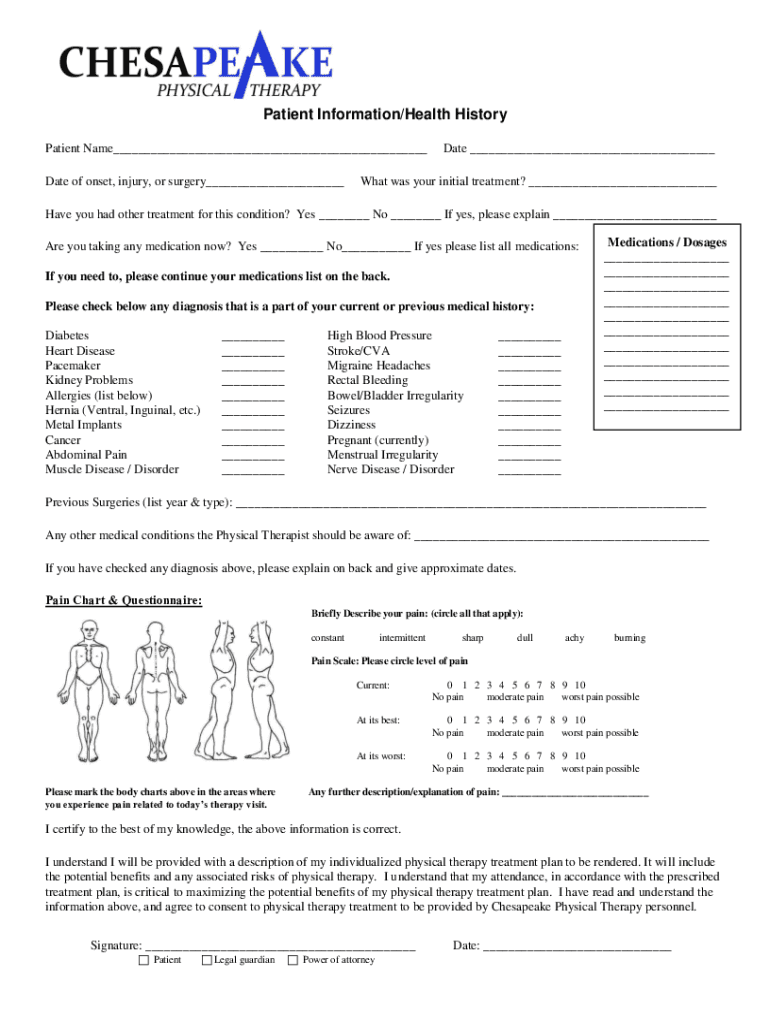
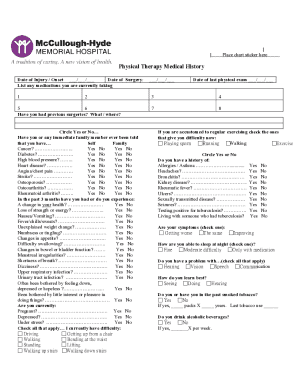
The Patient Health History Form is a medical document used by patients to provide their medical history and current medications to a physical therapist.
pdfFiller scores top ratings on review platforms




Who needs Health History Form?
Explore how professionals across industries use pdfFiller.

Health History Form is needed by:
-
Patients seeking physical therapy
-
Legal guardians of patients
-
Power of attorneys representing patients
-
Healthcare providers for patient intake
-
Physical therapists for treatment planning
-
Medical administrators for record-keeping
Comprehensive Guide to Health History Form
What is the Patient Health History Form?
The Patient Health History Form is an essential document in the healthcare process, designed to gather comprehensive medical information from patients. This form plays a significant role in ensuring that healthcare providers have accurate details about a patient's medical background, current medications, and any existing conditions. Key components of the form include sections for patient information, treatment history, and a list of medications, each aimed at delivering precise and effective care.
Purpose and Benefits of the Patient Health History Form
Accurate completion of the Patient Health History Form is vital for patients as it directly impacts the quality of treatment they receive. By providing a detailed account of their medical history, patients help healthcare providers tailor their treatments more effectively. Benefits include enhanced treatment accuracy and reduced risk of medical errors, thus fostering a more streamlined healthcare experience for all parties.
Key Features of the Patient Health History Form
This patient intake form boasts a variety of important features that facilitate easy completion and comprehensive reporting. Users will find fillable fields and checkboxes that allow quick inputs, along with sections dedicated to pain charts which help in evaluating patient discomfort levels. A crucial requirement is that the form must be signed by both patients and guardians, validating the information provided.
Who Needs the Patient Health History Form?
The Patient Health History Form must be filled out by various parties, including patients themselves, legal guardians, and individuals authorized by power of attorney. This form is particularly necessary in circumstances such as physical therapy evaluations, where a detailed medical history is essential for safe and effective treatment.
How to Fill Out the Patient Health History Form Online (Step-by-Step)
Filling out the Patient Health History Form online is a straightforward process with pdfFiller. Follow these steps for successful completion:
-
Access the form on pdfFiller.
-
Begin with the patient identification section, providing personal details.
-
Complete the treatment history and medication sections accurately.
-
Address any previous surgeries or medical conditions as required.
-
Fill in the pain chart, indicating any discomfort or issues.
-
Sign and submit the form electronically to ensure compliance and validation.
Common Errors and How to Avoid Them
While completing the Patient Health History Form, individuals often make common errors that can lead to inaccurate medical records. To avoid these mistakes, ensure that all sections are thoroughly filled out, and double-check for completeness before submission. Key errors to look out for include missing information, incorrect medication names, and failing to sign the form where required.
How to Sign the Patient Health History Form
The process of signing the Patient Health History Form varies based on the method used. Patients can choose between digital signatures and traditional wet signatures, both of which hold legal validity. Using pdfFiller, eSigning is made simple and secure, allowing for an efficient and compliant signing process for healthcare documents.
Submission Methods and Where to Submit the Patient Health History Form
Once completed, there are several methods to submit the Patient Health History Form to healthcare providers. Options may include electronic submission through a secure cloud-based platform, faxing, or delivering a printed copy in person. Choosing a cloud-based solution offers security and ease of access for both patients and providers.
Security and Compliance for the Patient Health History Form
When dealing with sensitive patient information, the security features of pdfFiller are paramount. The platform employs advanced tools, such as 256-bit encryption, and adheres to strict compliance regulations like HIPAA and GDPR. This ensures that patient data remains protected throughout the form-filling and submission processes.
Experience the Convenience of Using pdfFiller for Your Patient Health History Form
Utilizing pdfFiller for the Patient Health History Form facilitates a hassle-free experience, making the process of filling out and managing healthcare documents efficient. With streamlined document capabilities and robust security features, pdfFiller significantly enhances user satisfaction while ensuring compliance and data protection.
How to fill out the Health History Form
-
1.To access the Patient Health History Form on pdfFiller, simply visit the pdfFiller website and use the search bar to locate the form by its name.
-
2.Once opened, familiarize yourself with the pdfFiller interface, which allows you to click through the fields directly on the form.
-
3.Before starting, gather necessary information such as your medical history, current medications, and any previous surgeries; this will ensure a smooth filling process.
-
4.Begin by entering your personal information in the designated fields. This typically includes your name, date of birth, and contact information.
-
5.Proceed to fill in your treatment history, detailing any past therapies or interventions you have undergone.
-
6.Next, input your current medications and any medical conditions you are experiencing. Use clear and accurate terms to avoid confusion.
-
7.Completing the pain chart is essential. Use the provided scale to depict your pain levels and descriptions of symptoms.
-
8.After filling in all fields, take a moment to review the form to ensure that all information is correct and complete.
-
9.If pdfFiller indicates any missing fields or errors, correct them before finalizing the form.
-
10.Once everything is checked, save your progress and choose the option to download the form. You may also opt to submit it directly if required.
-
11.Ensure to follow any additional submission instructions provided by your physical therapist or healthcare facility concerning file submissions.

Who is eligible to fill out the Patient Health History Form?
The Patient Health History Form should be filled out by patients seeking physical therapy services, as well as their legal guardians or powers of attorney when required.
Are there specific deadlines for submitting this form?
While deadlines can vary based on healthcare facilities, it is advisable to submit the Patient Health History Form as soon as you schedule your appointment to ensure timely evaluation.
How can I submit the completed Patient Health History Form?
You can submit the completed form through pdfFiller by downloading it after filling out and then emailing it or uploading it to your healthcare provider's patient portal.
What supporting documents do I need to accompany this form?
Generally, you may not need additional documents with the Patient Health History Form; however, some facilities might require identification or previous medical records depending on their policies.
What common mistakes should I avoid when completing the form?
Common mistakes include failing to fill all required fields, providing inaccurate or outdated information, and neglecting to sign the form as needed.
How long does it take to process the Patient Health History Form?
Processing times can vary but submitting the form promptly allows your healthcare provider adequate time to review your history before your appointment.
Can I make changes to the form after it has been signed?
Once the Patient Health History Form is signed, you should discuss any necessary changes with your healthcare provider as it may require a new submission for accuracy.
Related Forms





Get the latest insights from our blog


If you believe that this page should be taken down, please follow our DMCA take down process
here
.
This form may include fields for payment information. Data entered in these fields is not covered by PCI DSS compliance.