
Last updated on
Nov 9, 2026

CA STD. 692 2000 free printable template
pdfFiller is not affiliated with any government organization

Fill out
Complete the form online in a simple drag-and-drop editor.

eSign
Add your legally binding signature or send the form for signing.

Share
Share the form via a link, letting anyone fill it out from any device.

Export
Download, print, email, or move the form to your cloud storage.
Why pdfFiller is the best tool for your documents and forms


End-to-end document management
From editing and signing to collaboration and tracking, pdfFiller has everything you need to get your documents done quickly and efficiently.
Accessible from anywhere
pdfFiller is fully cloud-based. This means you can edit, sign, and share documents from anywhere using your computer, smartphone, or tablet.
Secure and compliant
pdfFiller lets you securely manage documents following global laws like ESIGN, CCPA, and GDPR. It's also HIPAA and SOC 2 compliant.
What is CA STD. 692
The California Dental Plan Enrollment Authorization is a healthcare document used by employees to enroll in, change, or cancel dental plan coverage.
pdfFiller scores top ratings on review platforms




Who needs CA STD. 692?
Explore how professionals across industries use pdfFiller.

CA STD. 692 is needed by:
-
California employees seeking dental insurance
-
Authorized agency representatives managing enrollment
-
HR and payroll personnel handling benefits
-
Dentists requiring proof of insurance for patients
-
Family members of employees enrolling in dental plans
Comprehensive Guide to CA STD. 692
What is the California Dental Plan Enrollment Authorization?
The California Dental Plan Enrollment Authorization (STD 692) serves as a critical document for employees seeking to enroll, modify, or terminate their dental plan coverage. This form plays a vital role in ensuring that employees have access to necessary dental benefits while facilitating easier management of their coverage. To complete this authorization, individuals must provide personal information, including their name and social security number, along with obtaining required signatures from both the employee and an authorized agency representative.
Purpose and Benefits of the California Dental Plan Enrollment Authorization
This form is essential for employees because it streamlines the management of dental coverage. By allowing for the authorization of salary deductions designated for premium payments, employees can ensure continuous access to dental care. Moreover, the California Dental Plan Authorization empowers employees to take control of their healthcare options, making it easier to manage their dental needs effectively.
Who Needs the California Dental Plan Enrollment Authorization?
The California Dental Plan Enrollment Authorization is specifically designed for employees seeking dental coverage under California's healthcare programs. Eligible individuals include those who are currently employed and need to enroll in a dental plan, make changes to their existing coverage, or cancel their plans. Outlined criteria detail who should fill out the form based on employment status, changes in dependency, or transitions between jobs.
How to Fill Out the California Dental Plan Enrollment Authorization Online (Step-by-Step)
To complete the California Dental Plan Enrollment Authorization digitally, follow these steps:
-
Access the online form through a reliable platform.
-
Enter your personal information accurately, including your full name and social security number.
-
Add details of family members who will be included in the dental plan.
-
Review all entered information for accuracy before proceeding.
-
Ensure you sign the form and have it signed by an authorized agency representative.
By closely following these steps, users can properly complete the California Dental Plan Form without errors.
Detailed Instructions for Specific Fields in the California Dental Plan Enrollment Authorization
Understanding specific fields is crucial for filling out the California Dental Plan Enrollment Authorization correctly. Key sections include:
-
Personal Information: Input your name, social security number, and contact details.
-
Family Member Information: Include names and birthdates of those being enrolled with you.
-
Authorization for Salary Deductions: Clearly indicate your consent for premium payments to be deducted from your salary.
Be aware of common pitfalls such as leaving fields blank or providing incorrect information, as these can delay processing.
Common Errors and How to Avoid Them When Submitting the California Dental Plan Enrollment Authorization
Some frequent mistakes include:
-
Omitting essential personal information.
-
Failing to secure necessary signatures.
-
Misidentifying dependent family members.
To prevent these issues, follow best practices: review the form thoroughly before submission and use a checklist to ensure every required section is complete. This proactive approach can significantly reduce the chances of errors.
How to Submit the California Dental Plan Enrollment Authorization
There are multiple methods to submit the California Dental Plan Enrollment Authorization:
-
Online submission via a designated platform.
-
Mailing the completed form to your employer’s payroll or human resources department.
-
Submitting it in person at your HR office.
Consider timing when submitting the form, as deadlines can affect coverage start dates. Processing times may vary based on submission methods and your employer’s internal procedures.
Why Use pdfFiller for the California Dental Plan Enrollment Authorization?
Utilizing pdfFiller to manage the California Dental Plan Enrollment Authorization provides several advantages. Users benefit from:
-
Seamless eSigning capabilities.
-
Easy editing features for correcting information quickly.
-
Secure document storage to protect sensitive personal information.
This combination of features not only enhances the user experience but also ensures that all data remains secure throughout the process.
What Happens After You Submit the California Dental Plan Enrollment Authorization?
Once the California Dental Plan Enrollment Authorization is submitted, users can expect the following:
-
A confirmation notification acknowledging receipt of the form.
-
Opportunities to track application status through the employer’s HR portal.
-
Potential follow-up actions if further information or corrections are required.
Understanding these steps can help set expectations and ensure the completion of the enrollment process seamlessly.
Creating and Storing Your California Dental Plan Enrollment Authorization with pdfFiller
pdfFiller offers users the ability to create and store their California Dental Plan Enrollment Authorization securely. Recommendations include:
-
Regularly updating documentation to reflect changes in family status.
-
Utilizing document retention best practices to comply with privacy regulations.
-
Accessing past forms easily for quick reference during updates or renewals.
By leveraging pdfFiller’s capabilities, users can efficiently manage their dental plan enrollment documents.
How to fill out the CA STD. 692
-
1.Access the California Dental Plan Enrollment Authorization form on pdfFiller by searching for 'California Dental Plan Enrollment Authorization' in the search bar.
-
2.Open the form by clicking on it, which will load it into the pdfFiller interface for editing.
-
3.Ensure you have your personal information ready, including your name, social security number, and details of any family members to be enrolled.
-
4.Navigate through the form’s fields by clicking on each section, using the text box to input your information directly.
-
5.Complete all required fields marked with an asterisk (*) to avoid submission errors.
-
6.Utilize pdfFiller’s tools to sign the form electronically by following the prompts for adding signatures if you need to.
-
7.After filling out the form, carefully review all entries for accuracy and completeness, checking against your gathered information.
-
8.Finalizing the form includes clicking the 'Finish' button in pdfFiller to either print, download, or submit electronically as required.
-
9.Choose to save your completed form on your device or submit it directly to your personnel/payroll office through pdfFiller's submission options.

Who is eligible to complete the California Dental Plan Enrollment Authorization?
Employees of California organizations who wish to enroll in a dental plan are eligible to complete the California Dental Plan Enrollment Authorization. Authorized agency representatives may also need to sign the form.
What information do I need to complete the form correctly?
You will need personal details such as your name, social security number, and the names of any family members you wish to include in the dental coverage. Ensure all information is accurate to avoid processing delays.
How do I submit the California Dental Plan Enrollment Authorization form?
After completing the form on pdfFiller, you can submit it electronically or print it out and send it to your personnel or payroll office as required by your employer's policies.
What are common mistakes to avoid when filling out this form?
Common mistakes include incomplete fields, especially those marked as required. Ensure all information is typed clearly and that you complete all necessary sections before submitting.
Is there a deadline for submitting the enrollment form?
Submission deadlines may vary by employer and benefit plan. Check with your HR department for any specific deadlines related to the California Dental Plan Enrollment Authorization.
Are there any fees associated with submitting the form?
Typically, submitting the California Dental Plan Enrollment Authorization does not incur fees; however, check with your employer or agency for any specific policies or costs associated with dental coverage.
What happens after I submit the California Dental Plan Enrollment Authorization?
Once submitted, your enrollment request will be processed by your HR or benefits department. Processing times may vary, so follow up if you do not receive confirmation.
CA STD. 692 Form Versions
Related Content
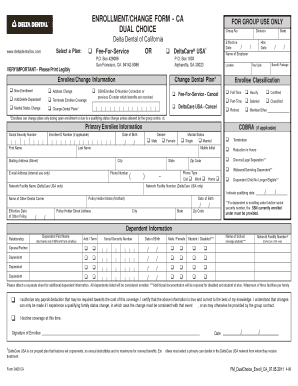
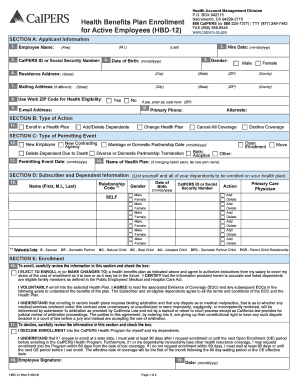
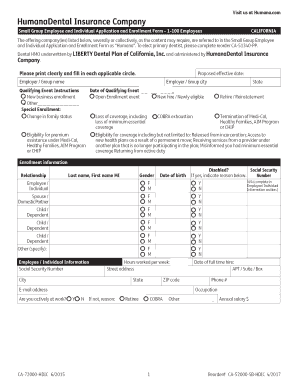
Related Forms





Get the latest insights from our blog


If you believe that this page should be taken down, please follow our DMCA take down process
here
.
This form may include fields for payment information. Data entered in these fields is not covered by PCI DSS compliance.