
Last updated on
Nov 7, 2026

Get the free Employment Application Form
pdfFiller is not affiliated with any government organization

Fill out
Complete the form online in a simple drag-and-drop editor.

eSign
Add your legally binding signature or send the form for signing.

Share
Share the form via a link, letting anyone fill it out from any device.

Export
Download, print, email, or move the form to your cloud storage.
Why pdfFiller is the best tool for your documents and forms


End-to-end document management
From editing and signing to collaboration and tracking, pdfFiller has everything you need to get your documents done quickly and efficiently.
Accessible from anywhere
pdfFiller is fully cloud-based. This means you can edit, sign, and share documents from anywhere using your computer, smartphone, or tablet.
Secure and compliant
pdfFiller lets you securely manage documents following global laws like ESIGN, CCPA, and GDPR. It's also HIPAA and SOC 2 compliant.
What is Employment Application
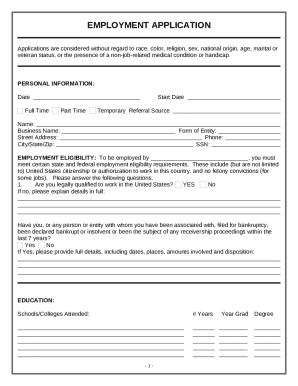
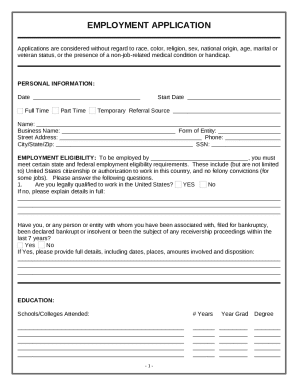
The Employment Application Form is a document used by P.D. Quix to collect essential personal and professional information from job applicants.
pdfFiller scores top ratings on review platforms




Who needs Employment Application?
Explore how professionals across industries use pdfFiller.

Employment Application is needed by:
-
Job seekers applying for positions at P.D. Quix
-
Human resource personnel reviewing applicant information
-
Recruiters sourcing candidates for job openings
-
Educational institutions verifying employment history
-
Government agencies requiring employment documentation
Comprehensive Guide to Employment Application
What is the Employment Application Form?
The Employment Application Form is a critical tool used by employers to collect essential information from job applicants. This form serves to streamline the hiring process by gathering personal details, educational background, and work experience.
Job seekers utilize the employment application form to present their qualifications, while employers rely on it to evaluate candidates effectively. The form not only ensures that potential employees provide crucial information but also establishes a standardized method for collecting applications across various positions.
Purpose and Benefits of the Employment Application Form
The primary objective of the Employment Application Form is to facilitate the hiring process by providing a structured method for applicants to submit their information. This tool benefits both job seekers and employers in several ways.
-
Enhances organization of applicant data for easier review.
-
Improves the accuracy of applicant information through standardized questions.
-
Streamlines documentation and hiring procedures for employers.
By utilizing this application template, employers can make more informed decisions and expedite the recruitment process.
Key Features of the Employment Application Form
This form includes several essential components necessary for evaluating job applicants. Key sections typically found in the application include personal details such as full name, address, social security number, education, and employment history.
Additionally, the application requires a certification statement where the applicant must sign to confirm the accuracy of the provided information. Importantly, it is designed to comply with the Fair Credit Reporting Act, ensuring responsible handling of candidate data.
Who Needs the Employment Application Form?
Job applicants across various sectors benefit from the Employment Application Form, making it a vital document for anyone seeking employment. This form plays a significant role for employers looking to evaluate candidates based on a standardized approach.
-
Individuals seeking job opportunities in different industries.
-
Employers who need to assess qualifications consistently.
Its versatility makes it a necessary component of the hiring process for both parties.
How to Fill Out the Employment Application Form Online (Step-by-Step)
Filling out the Employment Application Form online is straightforward when using pdfFiller. Follow these step-by-step instructions to ensure you complete the form accurately.
-
Access the Employment Application Form via pdfFiller.
-
Enter your full name in the designated field.
-
Input your current address and contact information.
-
Provide your educational background, including schools attended and degrees obtained.
-
List your previous employment history detailing job titles and responsibilities.
-
Sign the certification statement acknowledging the accuracy of your information.
Remember to be honest and precise in your responses, as this can impact the evaluation process.
Common Errors and How to Avoid Them
When completing the Employment Application Form, applicants often make several common errors that can detract from their prospects. Being aware of these pitfalls can help ensure that your application is successful.
-
Incorrect or incomplete personal information.
-
Omitting relevant work history or educational qualifications.
-
Failing to sign the certification statement.
To avoid these mistakes, double-check your entries and ensure all sections are fully completed before submission.
Security and Compliance When Using the Employment Application Form
When utilizing pdfFiller for the Employment Application Form, users can rest assured that their sensitive information is protected. The platform implements robust security measures, including encryption and compliance with data protection regulations.
This commitment to security ensures that all personal information is handled responsibly, providing a safe environment for applicants filling out their employment applications.
How to Sign the Employment Application Form
Understanding the signing requirements for the Employment Application Form is essential. There are two types of signatures that can be used: digital and wet signatures.
To electronically sign the form using pdfFiller, follow these steps:
-
Select the signature option within the pdfFiller platform.
-
Follow the prompts to create or upload your digital signature.
-
Place your signature on the designated line in the form.
Ensure that your signature is applied in accordance with legal requirements for authenticity.
Submission Methods and What Happens After You Submit
Once you have completed the Employment Application Form, there are various methods available for submission. You can submit the form via email, online portal, or directly to the hiring manager.
Applicants should expect to receive communication regarding the next steps in the hiring process. This typically includes an acknowledgment of receipt and information on anticipated processing times.
Take the Next Step with Your Employment Application
Utilizing pdfFiller's features can greatly simplify the process of completing and submitting your Employment Application Form. The platform offers tools that enhance your experience by allowing you to save, share, and efficiently manage your application.
Start your application today for a streamlined experience that enhances your chances of success in the hiring process.
How to fill out the Employment Application
-
1.To begin, navigate to pdfFiller and search for 'Employment Application Form' in the search bar.
-
2.Once you find the form, click to open it and familiarize yourself with the layout and sections.
-
3.Gather all necessary information including your full name, address, social security number, education background, work experience, and availability.
-
4.As you begin filling out the form, use pdfFiller's fillable fields to enter your information directly into each section.
-
5.Pay particular attention to fields requiring accurate data, especially personal identifiers like your social security number.
-
6.Review the certification statement at the end of the form to ensure you understand that you must confirm your information is accurate.
-
7.After completing all fields, take the opportunity to double-check each entry for accuracy and completeness using the visual cues provided.
-
8.When satisfied, proceed to the signature line where you can electronically sign your certification using pdfFiller's signature feature.
-
9.Once everything is finalized, select the option to save and choose whether to download or submit the form electronically through pdfFiller.

Who is eligible to complete the Employment Application Form?
Any individual seeking employment with P.D. Quix is eligible to complete the Employment Application Form. Ensure you provide accurate and complete information to improve your application chances.
What information is required to fill out the form?
The Employment Application Form requires personal details such as your full name, address, social security number, educational qualifications, work experience, and availability. Gather this information beforehand for efficiency.
How do I submit the Employment Application Form?
After completing the form on pdfFiller, you can submit it electronically or download it for physical submission. Make sure to follow the submission guidelines specified by P.D. Quix.
What are some common mistakes to avoid when completing this form?
Common mistakes include omitting important information, typos in personal identifiers like your social security number, and forgetting to sign the certification statement. Double-check your entries before finalizing.
Is notarization required for the Employment Application Form?
No, notarization is not required for the Employment Application Form when submitted to P.D. Quix. However, signing the certification statement is mandatory.
How can I access the Employment Application Form on pdfFiller?
Access the Employment Application Form by visiting pdfFiller and entering its name in the search function. This will direct you to the form where you can begin your fillable process.
What happens after I submit the Employment Application Form?
After submission, your application will be reviewed by P.D. Quix's human resources team. Expect follow-up communications regarding your application status or interview opportunities.
Related Content
Related Forms




Get the latest insights from our blog


If you believe that this page should be taken down, please follow our DMCA take down process
here
.
This form may include fields for payment information. Data entered in these fields is not covered by PCI DSS compliance.