
Last updated on
Oct 31, 2026

Get the free Blue Cross Blue Shield Member Application
We are not affiliated with any brand or entity on this form

Fill out
Complete the form online in a simple drag-and-drop editor.

eSign
Add your legally binding signature or send the form for signing.

Share
Share the form via a link, letting anyone fill it out from any device.

Export
Download, print, email, or move the form to your cloud storage.
Why pdfFiller is the best tool for your documents and forms


End-to-end document management
From editing and signing to collaboration and tracking, pdfFiller has everything you need to get your documents done quickly and efficiently.
Accessible from anywhere
pdfFiller is fully cloud-based. This means you can edit, sign, and share documents from anywhere using your computer, smartphone, or tablet.
Secure and compliant
pdfFiller lets you securely manage documents following global laws like ESIGN, CCPA, and GDPR. It's also HIPAA and SOC 2 compliant.
What is BCBSM Payment Application
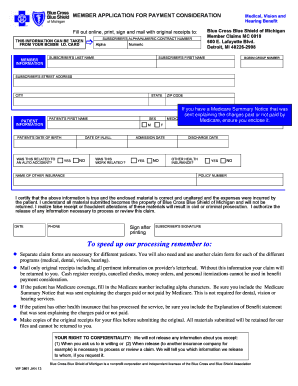
The Blue Cross Blue Shield Member Application is a health insurance claim form used by Michigan residents to submit claims for medical, vision, and hearing benefits.
pdfFiller scores top ratings on review platforms




Who needs BCBSM Payment Application?
Explore how professionals across industries use pdfFiller.

BCBSM Payment Application is needed by:
-
Michigan residents enrolled in Blue Cross Blue Shield
-
Subscribers submitting medical claims
-
Patients seeking vision and hearing benefits
-
Healthcare providers assisting patients with claims
-
Administrators managing healthcare billing processes
Comprehensive Guide to BCBSM Payment Application
What is the Blue Cross Blue Shield Member Application?
The Blue Cross Blue Shield Member Application is designed to facilitate Payment Consideration for Blue Cross Blue Shield of Michigan members. This form allows users to claim essential benefits, encompassing medical, vision, and hearing care services. For members of Blue Cross Blue Shield of Michigan, completing this application is crucial for receiving reimbursements for eligible expenses.
By utilizing the Member Application, subscribers can manage their health benefits effectively and ensure they are accessing the care they deserve.
Purpose and Benefits of the Blue Cross Blue Shield Member Application
The Blue Cross Blue Shield Member Application serves a pivotal role in the claims process, making it easier for members to access reimbursements. This application allows users to claim various benefits, leading to financial relief concerning medical expenses. Submitting accurate claims through this form ensures prompt and proper reimbursement, which is vital for maintaining affordable healthcare.
Additionally, correctly completing this application helps streamline communication between providers and Blue Cross Blue Shield, improving overall service efficiency.
Eligibility Criteria for the Blue Cross Blue Shield Member Application
The eligibility to use the Blue Cross Blue Shield Member Application is primarily dependent on membership status. To qualify, users must be active subscribers of Blue Cross Blue Shield in Michigan. Furthermore, dependents may also submit claims, provided they meet certain conditions outlined by the insurer.
Understanding these criteria ensures that only eligible individuals utilize the application, preventing unnecessary delays in processing claims.
How to Fill Out the Blue Cross Blue Shield Member Application Online (Step-by-Step)
To complete the Blue Cross Blue Shield Member Application online, follow these steps:
-
Access the online form through the Blue Cross Blue Shield portal.
-
Fill in your personal details in the designated fields.
-
Provide medical information relevant to your claim.
-
Sign the form electronically to authorize processing.
-
Review the completed form for accuracy before submission.
Ensuring that each section is filled out completely and correctly can prevent delays in the claims process.
Common Errors and How to Avoid Them
When completing the Blue Cross Blue Shield Member Application, many users encounter frequent mistakes. Common errors include:
-
Incomplete fields, which can lead to processing delays.
-
Incorrect patient information, causing confusion in claims.
-
Omitting signatures, which are necessary for authorizing releases.
Double-checking your application against the submission guidelines before finalizing can significantly reduce these errors and help ensure accurate processing.
Submission Methods and Delivery of the Blue Cross Blue Shield Member Application
Once the Blue Cross Blue Shield Member Application is completed, it can be submitted through various methods. Members can choose to submit their claims online or via traditional mail. Each method includes specific timelines for claims submission, along with processing durations that members should be aware of.
It is essential to accompany your application with original receipts and any necessary documentation to facilitate timely processing of your claims.
What Happens After You Submit the Blue Cross Blue Shield Member Application
After submission, the Blue Cross Blue Shield of Michigan team reviews the application to determine eligibility for claims. Members can expect confirmation of their claims status within a specified timeframe. Regular updates may be available for tracking claims, which helps subscribers stay informed throughout the process.
Understanding what occurs post-submission aids in managing expectations regarding reimbursements and processing times.
How to Correct or Amend the Blue Cross Blue Shield Member Application
In instances where corrections are necessary, knowing how to amend your application can be invaluable. Amendments may be required due to:
-
Errors in personal information.
-
Missed signatures or incomplete sections.
The correction process typically involves re-evaluating the submitted application and making the necessary adjustments according to the specified guidelines. Members should be aware of timelines that govern these changes, as delayed amendments may affect claims processing.
Security and Compliance for the Blue Cross Blue Shield Member Application
Security is a primary concern when handling sensitive health information. pdfFiller ensures that data protection measures are in place while users fill out the Blue Cross Blue Shield Member Application. Compliance with HIPAA and other relevant regulations is strictly maintained to protect user privacy throughout the claims process.
Ensuring the security of personal health details is essential in fostering trust and transparency between members and the organization.
Simplify Your Blue Cross Blue Shield Member Application Experience with pdfFiller
Utilizing pdfFiller's platform for completing the Blue Cross Blue Shield Member Application can significantly enhance the user experience. With features like eSigning, users can conveniently sign and save their documents while tracking submissions for additional peace of mind. pdfFiller aims to support users throughout the entire claims process, making it a valuable tool for Blue Cross Blue Shield members.
This seamless integration of technology simplifies claims management, providing users with a reliable solution for their healthcare documentation needs.
How to fill out the BCBSM Payment Application
-
1.Access the Blue Cross Blue Shield Member Application on pdfFiller by searching for the form name in the search bar.
-
2.Once open, familiarize yourself with the form's structure and required fields.
-
3.Before starting, prepare necessary information such as personal details, patient's medical condition, and any original receipts.
-
4.Utilize pdfFiller's fillable fields to enter your personal information clearly and accurately.
-
5.Use the checkboxes provided to specify the benefits you are claiming.
-
6.Review your entries for completeness and accuracy using pdfFiller’s review feature.
-
7.If needed, refer to the included instructions to ensure all required fields are completed.
-
8.Finalize the form by digitally signing it, making sure you follow the prompts on pdfFiller for signature addition.
-
9.Save your completed form within pdfFiller. You can choose to download it or submit it directly through the platform.

Who is eligible to use the Blue Cross Blue Shield Member Application?
Eligible users include Michigan residents who are subscribers of Blue Cross Blue Shield seeking to submit claims for medical, vision, and hearing benefits.
What supporting documents are required with this application?
You will need to attach original receipts of expenses, along with any required medical documentation as stated on the form instructions to support your claim.
How can I submit the completed form?
The completed form can be submitted directly through pdfFiller by following the submission instructions on the platform, or you may print and mail it to the appropriate Blue Cross Blue Shield office.
What common mistakes should I avoid when filling out this form?
Make sure to double check that all fields are completed, all signatures are included, and that you are attaching any required documentation. Missing details can delay processing.
Are there any deadlines for submitting claims using this application?
While specific deadlines can vary, it is important to submit claims as soon as possible after the services are received to ensure timely processing. Check Blue Cross Blue Shield policies for more details.
How long does it take to process a claim using this form?
Processing times for claims can vary, but typically it takes several weeks. For specific inquiries, contact Blue Cross Blue Shield directly for claim status updates.
Can I modify the form once I have submitted it?
Once submitted, forms typically cannot be modified. If you realize there's an error, contact Blue Cross Blue Shield to inquire about the next steps for correcting the claim.
Related Forms






Get the latest insights from our blog


If you believe that this page should be taken down, please follow our DMCA take down process
here
.
This form may include fields for payment information. Data entered in these fields is not covered by PCI DSS compliance.