
Last updated on
Oct 31, 2026

Get the free Certified Copies Identification Form
We are not affiliated with any brand or entity on this form

Fill out
Complete the form online in a simple drag-and-drop editor.

eSign
Add your legally binding signature or send the form for signing.

Share
Share the form via a link, letting anyone fill it out from any device.

Export
Download, print, email, or move the form to your cloud storage.
Why pdfFiller is the best tool for your documents and forms


End-to-end document management
From editing and signing to collaboration and tracking, pdfFiller has everything you need to get your documents done quickly and efficiently.
Accessible from anywhere
pdfFiller is fully cloud-based. This means you can edit, sign, and share documents from anywhere using your computer, smartphone, or tablet.
Secure and compliant
pdfFiller lets you securely manage documents following global laws like ESIGN, CCPA, and GDPR. It's also HIPAA and SOC 2 compliant.
What is Identity Verification Form
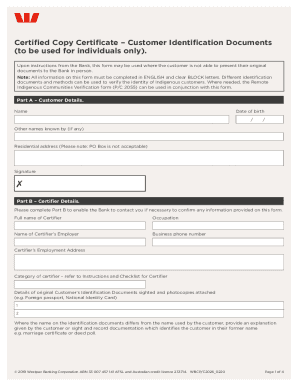
The Certified Copies Identification Form is a business document used by the Commonwealth Bank of Australia to verify the identity of individuals for account services.
pdfFiller scores top ratings on review platforms




Who needs Identity Verification Form?
Explore how professionals across industries use pdfFiller.

Identity Verification Form is needed by:
-
Individuals opening a new bank account
-
Existing customers adding a signatory
-
Prescribed persons certifying identification
-
Compliance officers in financial institutions
-
Financial service providers
-
Business owners requiring identity verification
Comprehensive Guide to Identity Verification Form
What is the Certified Copies Identification Form?
The Certified Copies Identification Form serves as a crucial tool in identity verification for the Commonwealth Bank of Australia. This form plays a significant role in the account opening process and adding signatories to existing accounts. Under the legal framework established by the Anti-Money Laundering and Counter-Terrorism Financing Act 2006, this form ensures that banks can appropriately verify the identity of individuals, maintaining compliance with regulations and reducing the risk of identity fraud.
Purpose and Benefits of the Certified Copies Identification Form
The importance of verified identification in banking cannot be overstated. The Certified Copies Identification Form offers numerous advantages including enhanced security, strict compliance with legal requirements, and simplified processes for adding new signatories. By utilizing this form, users contribute to the prevention of identity fraud, creating a safer banking environment for all parties involved.
Who Needs the Certified Copies Identification Form?
This form is primarily intended for two categories of users: Applicants and Prescribed Persons. Applicants typically include individuals seeking to open a new account or amend existing account signatories. Prescribed Persons, on the other hand, are responsible for certifying the identification documents. In Australia, eligibility criteria include being a resident and possessing valid identification, making the form relevant to both personal and commercial banking scenarios.
Required Documents for the Certified Copies Identification Form
When completing the Certified Copies Identification Form, specific documentation is necessary. The types of identification documents required include:
-
Passport
-
Driver's license
-
Other government-issued identification
Additionally, the documents must be certified by a prescribed person, ensuring authenticity. To streamline the process, it is advisable for users to gather these documents ahead of time for a smooth submission.
How to Fill Out the Certified Copies Identification Form Online
Filling out the Certified Copies Identification Form online can be accomplished easily through platforms like pdfFiller. Users should follow these steps to ensure the form is completed correctly:
-
Access the form via pdfFiller.
-
Fill in the applicant's details, ensuring accuracy.
-
Provide information for the prescribed person.
-
Complete the declaration section with care, understanding its implications.
These steps provide a foundation for successful online completion of the form.
Common Errors and How to Avoid Them
To ensure the accuracy of the Certified Copies Identification Form, users must be aware of common errors that can occur during the completion process. Frequent mistakes include:
-
Leaving signatures blank
-
Entering incorrect or outdated details
To avoid these pitfalls, it's recommended that users review the form thoroughly before submission. Creating a checklist can also help in validating the information provided in the form.
Signing and Submitting the Certified Copies Identification Form
The signing process for the Certified Copies Identification Form has specific requirements that users must adhere to. Digital signatures are accepted, but users should understand the legal implications of both digital and wet signatures. There are multiple submission methods available for this form:
-
Online submission through pdfFiller
-
In-person submission at the Commonwealth Bank branch
-
Mail submission
Each submission method may have its own guidelines and requirements to follow, as specified by the Commonwealth Bank.
What Happens After You Submit the Certified Copies Identification Form?
After submitting the Certified Copies Identification Form, users can track the status of their submission through the bank’s online platform. The processing time may vary, and users should expect notifications regarding their application status. If any corrections or amendments are necessary, options will be provided for users to address these issues promptly.
Security and Compliance with the Certified Copies Identification Form
Security is paramount when handling sensitive documents like the Certified Copies Identification Form. pdfFiller employs robust security measures, such as encryption and compliance with standards like HIPAA and GDPR, to protect user data. Maintaining privacy and ensuring data protection are critical throughout the form completion process. Users are encouraged to take precautions to safeguard their personal information.
Use pdfFiller to Complete Your Certified Copies Identification Form
To enhance the experience of filling out the Certified Copies Identification Form, pdfFiller offers a variety of features tailored to streamline the process. Users can take advantage of tools such as eSigning, document editing, and ease of access to fillable forms. By utilizing pdfFiller, individuals can simplify their form-filling experience while ensuring that their sensitive documents are handled securely.
How to fill out the Identity Verification Form
-
1.To access the Certified Copies Identification Form on pdfFiller, visit the website and log in to your account. Use the search bar to find the form by entering its name.
-
2.Once you locate the form, click on it to open. Familiarize yourself with the layout and the fillable fields that need completion.
-
3.Before starting to fill out the form, ensure you have your certified identification documents ready, along with the details of the prescribed person who will certify your copies.
-
4.Begin filling in your personal information, such as your full name, address, and date of birth. Use pdfFiller’s tools to easily click into the fields and type your information.
-
5.After completing the applicant's section, provide the required details for the prescribed person. This includes their name, title, and contact information.
-
6.Be sure to read through the instructions provided on the form. There are important notes, such as needing to be in the presence of the prescribed person while signing.
-
7.After filling in all required fields, review the form thoroughly to ensure accuracy. Look for any missed fields or incorrect information.
-
8.Once satisfied, you can save your progress by clicking the 'Save' option on pdfFiller, and use the 'Download' button to get a copy on your device.
-
9.If you're ready to submit the form, follow the prompts on pdfFiller for electronic submission if available, or download the form to physically mail it to the appropriate institution.

Who is eligible to use the Certified Copies Identification Form?
Any individual seeking to open a new account or add a signatory at the Commonwealth Bank of Australia is eligible to use this form, provided they have certified copies of their identification.
What supporting documents are required to complete the form?
You will need certified copies of your identification documents, which must be verified by a prescribed person. Make sure these documents are ready before you start filling out the form.
How do I submit the Certified Copies Identification Form?
You can submit the form electronically through pdfFiller if that option is available. Alternatively, complete and download the form, then mail it to the Commonwealth Bank or submit it in-person at a branch.
Are there any fees associated with using the Certified Copies Identification Form?
Typically, there are no direct fees for processing this form; however, please check with the Commonwealth Bank for any applicable fees related to account opening or service processing.
What common mistakes should I avoid when filling out this form?
Common mistakes include failing to provide certified documents, missing required signatures, or incorrect information in fields. Ensure all information is clear and accurate before submission.
How long does it take to process the Certified Copies Identification Form?
Processing time may vary, depending on the bank's workload and internal procedures. It is advisable to allow a week or more for verification after submission.
What should I do if I encounter issues while using pdfFiller?
If you experience issues on pdfFiller, consult their help section or customer support. It's recommended to troubleshoot common issues like browser compatibility or form loading errors.
Related Forms




Get the latest insights from our blog


If you believe that this page should be taken down, please follow our DMCA take down process
here
.
This form may include fields for payment information. Data entered in these fields is not covered by PCI DSS compliance.