
Last updated on
Oct 31, 2026

Get the free Michigan Incident Accident Report Form
We are not affiliated with any brand or entity on this form

Fill out
Complete the form online in a simple drag-and-drop editor.

eSign
Add your legally binding signature or send the form for signing.

Share
Share the form via a link, letting anyone fill it out from any device.

Export
Download, print, email, or move the form to your cloud storage.
Why pdfFiller is the best tool for your documents and forms


End-to-end document management
From editing and signing to collaboration and tracking, pdfFiller has everything you need to get your documents done quickly and efficiently.
Accessible from anywhere
pdfFiller is fully cloud-based. This means you can edit, sign, and share documents from anywhere using your computer, smartphone, or tablet.
Secure and compliant
pdfFiller lets you securely manage documents following global laws like ESIGN, CCPA, and GDPR. It's also HIPAA and SOC 2 compliant.
What is MI Accident Report
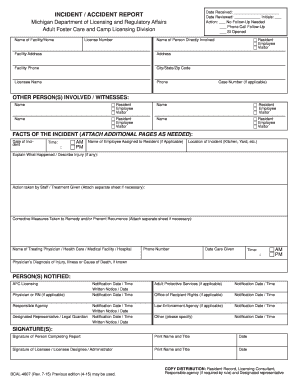
The Michigan Incident Accident Report Form is a legal notice form used by licensed facilities to report incidents, accidents, illnesses, and deaths involving residents, employees, or visitors.
pdfFiller scores top ratings on review platforms




Who needs MI Accident Report?
Explore how professionals across industries use pdfFiller.

MI Accident Report is needed by:
-
Licensed adult foster care facility administrators
-
Employees of licensed care facilities
-
Health and safety officers
-
Compliance and regulatory staff
-
Legal representatives in care facilities
-
Residents' family members
-
Accident investigation teams
Comprehensive Guide to MI Accident Report
What is the Michigan Incident Accident Report Form?
The Michigan Incident Accident Report Form serves a critical role in licensed facilities across Michigan, enabling them to report significant events involving residents, employees, or visitors. This report is primarily utilized to document various incidents, including accidents, illnesses, absences, and deaths.
Completion of the form demands a high level of detail, including vital information regarding each incident and the actions taken in response. Furthermore, licensed facilities must adhere to specified timing requirements for completion, ensuring that incidents are documented promptly and thoroughly.
Purpose and Benefits of the Michigan Incident Accident Report Form
This form is essential for maintaining legal compliance within licensed facilities. Accurate reporting of incidents not only fulfills regulatory obligations but also significantly enhances overall safety and care for residents. By documenting events properly, facilities can identify trends and implement necessary improvements.
For employees and administrators, thorough incident reporting provides a framework for accountability and fosters a culture of safety. Documenting incidents accurately can also help in assessing liability and enhancing operational practices.
Who Needs the Michigan Incident Accident Report Form?
The responsibility for completing the Michigan Incident Accident Report Form typically falls to designated personnel within the facility, specifically the Person Completing Report and the Licensee or Administrator. Each role has its own set of responsibilities that ensure a detailed and accurate representation of the incident.
Signature requirements highlight the importance of accountability, indicating that the report has been reviewed and validated by responsible parties. Scenarios mandating the completion of this form encompass a wide range of incidents that impact resident welfare.
When to File the Michigan Incident Accident Report Form
Timeliness is crucial when submitting the Michigan Incident Accident Report Form. Licensed facilities must understand specific deadlines, which dictate when a report should be filed based on the rules established for licensure.
Understanding what constitutes timely versus late filing is essential, as failing to submit the report within designated timeframes may lead to repercussions for the facility. These consequences can include legal penalties or increased scrutiny during inspections.
How to Fill Out the Michigan Incident Accident Report Form Online
Utilizing pdfFiller to complete the Michigan Incident Accident Report Form online offers an efficient and user-friendly experience. The platform features fillable fields and checkboxes designed for ease of use, streamlining the documentation process.
Field-by-field instructions guide users through critical sections, such as 'Date Received' and 'Signature', ensuring that every important detail is captured. By leveraging pdfFiller's digital capabilities, users can simplify their form completion experience significantly.
Common Errors in Completing the Michigan Incident Accident Report Form
To minimize mistakes while filling out the form, it's beneficial to be aware of common errors that can occur. Frequent pitfalls include incomplete fields, missing signatures, and incorrect dates.
Double-checking information and employing a validation checklist can help ensure accuracy prior to submission. Taking these proactive steps can prevent the need for corrections and resubmissions, streamlining the reporting process.
How to Submit the Michigan Incident Accident Report Form
Once completed, the Michigan Incident Accident Report Form can be submitted through various methods, accommodating the preferences of different facilities. Facilities may choose to submit the form online, via email, or by traditional mail.
It's essential to ensure that any necessary accompanying documents are included with the submission to avoid processing delays. Additionally, a confirmation procedure should be followed to verify that the form has been successfully submitted.
Security and Compliance Considerations
Handling sensitive information related to the Michigan Incident Accident Report Form necessitates careful attention to security. pdfFiller incorporates robust security measures including encryption to protect data integrity and user privacy.
Compliance with industry standards such as HIPAA and GDPR further underscores the importance of data protection during the filing process. Understanding the record retention requirements for incident reports is also crucial, ensuring all documentation is maintained appropriately.
How pdfFiller Can Help You with the Michigan Incident Accident Report Form
pdfFiller offers a range of tools designed to simplify the process of filling out the Michigan Incident Accident Report Form. Users can easily edit, fill out, and eSign documents directly from their browsers without the need for downloads.
Additionally, the platform provides various support and resources to assist users throughout the document completion process, making it a valuable asset for those navigating form requirements.
Sample Completed Michigan Incident Accident Report Form
A visual aid can be extremely helpful for users looking to complete the Michigan Incident Accident Report Form accurately. Providing an annotated example of a filled-out report serves to clarify key areas and common entries.
Referring to this completed sample can enhance the understanding of necessary details, assisting users in ensuring that their submissions meet all required standards for completeness and accuracy.
How to fill out the MI Accident Report
-
1.To access the Michigan Incident Accident Report Form on pdfFiller, visit the pdfFiller website and search for the form title in the search bar.
-
2.Once you locate the form, click on it to open the fillable PDF in the pdfFiller interface.
-
3.Before filling out the form, gather all necessary information, including details of the incident and any witnesses, as you will need this information to complete the report accurately.
-
4.Navigate through the form's fillable fields, using the mouse or tab key to move between sections. Pay attention to fields that require your signature or specific dates.
-
5.Fill in all required fields, ensuring that you provide clear and precise information about the incident, actions taken, and corrective measures implemented.
-
6.Review your completed form to double-check for accuracy. Make sure all required sections are filled, including the signature of the person completing the report.
-
7.Once you are satisfied with the information provided, use the save function to download a copy of the form for your records, or submit it directly through pdfFiller if allowed.

Who is eligible to use the Michigan Incident Accident Report Form?
The form can be used by licensed adult foster care facilities, their administrators, and designated employees responsible for reporting incidents, accidents, or relevant events.
What are the deadlines for submitting this report?
The Michigan Incident Accident Report Form must be completed and submitted within the timeframes specified in Michigan's licensing rules for adult foster care facilities. Ensure you check local regulations.
How can I submit the completed form?
You can submit the completed Michigan Incident Accident Report Form either electronically through pdfFiller, if supported, or print and mail it to the appropriate licensing authority.
Are there any supporting documents required when submitting this form?
Typically, no additional documents are required when submitting the Michigan Incident Accident Report Form. However, any relevant incident documentation may be helpful.
What common mistakes should be avoided when filling out the form?
Common mistakes include failing to sign the form, not entering all required information, and submitting it after the deadline. Double-check that all fields are filled correctly.
What are the processing times for this report?
Processing times may vary based on the authority receiving the report. Generally, expect the review and follow-up to occur within a few weeks, depending on the incident's nature.
What should I do if I encounter issues while filling out the form on pdfFiller?
If you experience issues, check the pdfFiller help center for troubleshooting. You can also contact their support team for assistance with the filling process.
Related Forms



Related Catalogs
Get the latest insights from our blog


If you believe that this page should be taken down, please follow our DMCA take down process
here
.
This form may include fields for payment information. Data entered in these fields is not covered by PCI DSS compliance.