
Last updated on
Oct 31, 2026
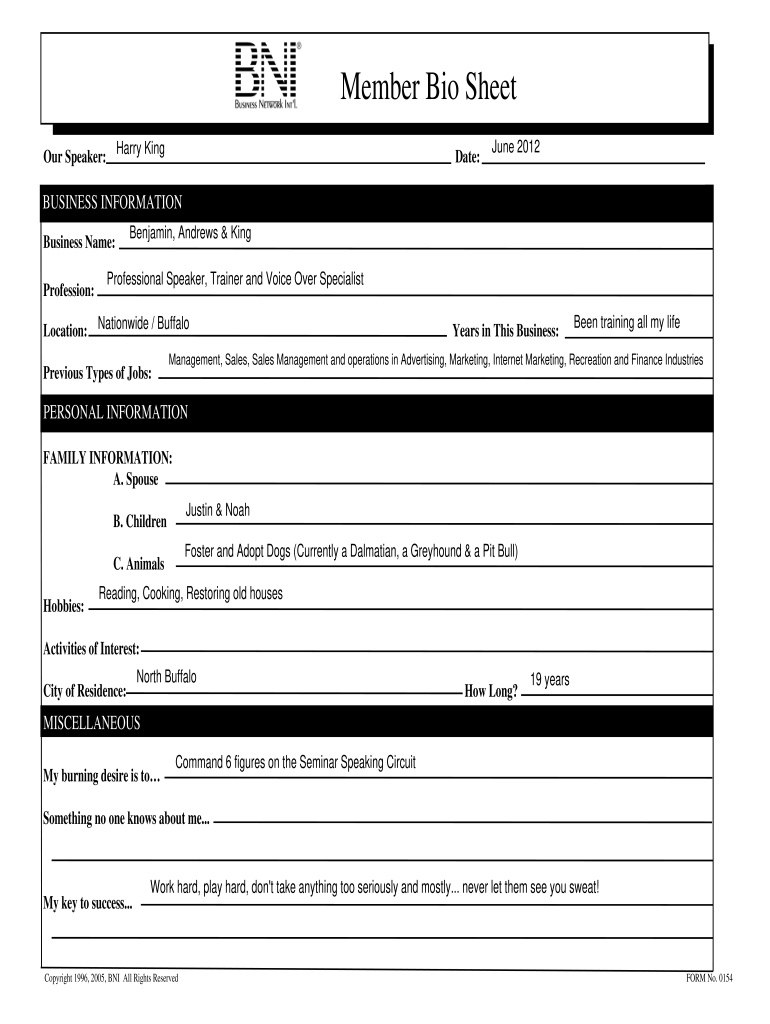
Get the free BNI Member Bio Sheet
We are not affiliated with any brand or entity on this form

Fill out
Complete the form online in a simple drag-and-drop editor.

eSign
Add your legally binding signature or send the form for signing.

Share
Share the form via a link, letting anyone fill it out from any device.

Export
Download, print, email, or move the form to your cloud storage.
Why pdfFiller is the best tool for your documents and forms


End-to-end document management
From editing and signing to collaboration and tracking, pdfFiller has everything you need to get your documents done quickly and efficiently.
Accessible from anywhere
pdfFiller is fully cloud-based. This means you can edit, sign, and share documents from anywhere using your computer, smartphone, or tablet.
Secure and compliant
pdfFiller lets you securely manage documents following global laws like ESIGN, CCPA, and GDPR. It's also HIPAA and SOC 2 compliant.
What is BNI Bio Sheet
The BNI Member Bio Sheet is a business form used by members of BNI (Business Network International) to share personal and professional information about themselves.
pdfFiller scores top ratings on review platforms




User friendly once to got the feel of how the menus worked.
Easy to use, allows to make your own form. You can always find what you looking fo
Who needs BNI Bio Sheet?
Explore how professionals across industries use pdfFiller.

BNI Bio Sheet is needed by:
-
BNI members looking to build connections
-
Business professionals seeking networking opportunities
-
Entrepreneurs needing to share their profiles
-
Networking event organizers requiring member details
-
Team leaders aiming to understand their members better
-
Individuals interested in enhancing their professional bios
Comprehensive Guide to BNI Bio Sheet
What is the BNI Member Bio Sheet?
The BNI Member Bio Sheet is a crucial tool for networking within BNI (Business Network International). This document serves to collect essential personal and professional information, enhancing connections among members. Its structure includes sections dedicated to business details and individual insights, which are vital for effective networking.
The BNI Member Bio Sheet is utilized by members to present themselves and their services clearly. This information helps facilitate meaningful interactions, allowing members to understand each other's strengths and offerings in a professional context.
Purpose and Benefits of the BNI Member Bio Sheet
The BNI Member Bio Sheet plays a pivotal role in promoting networking opportunities among members. By clearly outlining personal branding and business information, this form helps BNI members forge vital connections.
One of the key advantages of using this bio sheet is its ability to enhance relationships and foster trust among members. By sharing relevant information, individuals can create a solid foundation for collaboration and referrals, essential elements in the BNI networking environment.
Key Features of the BNI Member Bio Sheet
The form includes several specific features designed to aid users in providing comprehensive information. Key fields encompass the Business Name, Date, and sections for personal interests and business offerings.
-
Fillable fields for easy completion.
-
Sections that guide users through necessary information.
-
Miscellaneous details aimed at fostering deeper connections.
Who Needs to Use the BNI Member Bio Sheet?
This form is primarily intended for members of BNI who wish to enhance their networking capabilities. It is especially beneficial for new members, providing them with a structured method to introduce themselves to the group.
Networking groups looking to create a comprehensive member profile can also utilize this form. The insights generated from completed bio sheets aid in crafting a more connected and informed network.
How to Fill Out the BNI Member Bio Sheet Online
Filling out the BNI Member Bio Sheet is a straightforward process. Before starting, ensure you have all required information handy by following this pre-filing checklist:
-
Your full business name.
-
Date of completion.
-
Contact information.
-
Details of your business services.
Once prepared, follow these steps to complete each section online:
-
Access the form on the pdfFiller platform.
-
Input your Business Name and relevant details into the designated fields.
-
Review all sections for completeness before submitting.
Tips for Avoiding Common Errors on the BNI Member Bio Sheet
When completing the BNI Member Bio Sheet, users may encounter typical pitfalls during the submission process. To avoid common errors, consider these key tips:
-
Double-check all entered personal and business details for accuracy.
-
Ensure that all required fields are filled completely.
-
Utilize the validation checklist to confirm that no vital information is missing.
How to Submit the Completed BNI Member Bio Sheet
Submission of the BNI Member Bio Sheet can be done through several methods. Members may choose to submit their forms digitally, utilizing pdfFiller for a seamless experience.
-
Digital options are available through pdfFiller, making submission efficient.
-
Be aware of any deadlines or potential fees associated with submission.
Security and Privacy Concerns with the BNI Member Bio Sheet
When filling out the BNI Member Bio Sheet, security and privacy are of utmost importance. Users can rest assured as pdfFiller incorporates advanced security measures, such as encryption, to protect sensitive data.
Additionally, members are advised to be cautious when sharing personal information. Understanding how to handle personal data securely is vital for maintaining privacy in networking.
How pdfFiller Supports You in Filling Out the BNI Member Bio Sheet
pdfFiller enhances the user experience when completing the BNI Member Bio Sheet. This platform offers features like fillable forms and eSigning, streamlining the process for users.
-
User-friendly interface that simplifies form completion.
-
Secure handling of documents to protect user information.
Get Started with Your BNI Member Bio Sheet Today!
Utilizing pdfFiller to fill out your BNI Member Bio Sheet is both simple and efficient. Members are encouraged to begin the process online using the available tools.
How to fill out the BNI Bio Sheet
-
1.Start by navigating to pdfFiller's website and log in to your account. If you don't have an account, create one to access the form.
-
2.Once logged in, use the search bar to type 'BNI Member Bio Sheet' and select the form from the search results to open it.
-
3.Review the sections on the form and gather the necessary information such as your business name, contact details, and personal accomplishments.
-
4.Begin filling out the form by clicking into each field. Input your business information, ensuring you provide accurate and up-to-date details.
-
5.Use the fillable fields provided for personal information like previous work experience or education. Make sure to format your responses clearly.
-
6.If you need to add additional information, utilize the miscellaneous section of the form to include any relevant insights about yourself.
-
7.Once all fields are completed, double-check your entries for any errors or omissions before finalizing the form.
-
8.Use pdfFiller's review feature to see a snapshot of your completed form to ensure all information is correct and professional.
-
9.After reviewing, you can save your progress, download a copy for your records, or directly submit the form via pdfFiller if required.

Who needs to complete the BNI Member Bio Sheet?
Any member of BNI who wants to effectively network within their organization should complete the BNI Member Bio Sheet. This form helps members share essential personal and professional information and can facilitate better connections.
What information is required on the BNI Member Bio Sheet?
The BNI Member Bio Sheet requires various types of information, including your business name, personal achievements, networking goals, and contact details. Ensure that the information is accurate to help facilitate your networking efforts.
How do I submit the completed form?
After completing the BNI Member Bio Sheet on pdfFiller, you have several options. You can download the completed form to your device or submit it directly through pdfFiller to your designated BNI group or member.
Is there a deadline to submit the form?
Deadlines for submitting the BNI Member Bio Sheet may vary by chapter. It’s best to check with your local BNI group for any specific submission dates to ensure that you provide your bio on time for networking events.
Can I edit the form after submission?
Usually, once a form is submitted, it cannot be edited. However, if you need to make updates, you can contact your BNI chapter leader to discuss your submitted information and request modifications if necessary.
What are common mistakes to avoid when filling out the form?
Common mistakes include providing outdated information, leaving sections incomplete, and using unclear language. Always proofread your responses for clarity and accuracy before finalizing the form.
Related Forms




Related Catalogs
Get the latest insights from our blog


If you believe that this page should be taken down, please follow our DMCA take down process
here
.
This form may include fields for payment information. Data entered in these fields is not covered by PCI DSS compliance.