
Last updated on
Nov 9, 2026

SC Verification of Withdrawal from Schools 2013 free printable template
pdfFiller is not affiliated with any government organization

Fill out
Complete the form online in a simple drag-and-drop editor.

eSign
Add your legally binding signature or send the form for signing.

Share
Share the form via a link, letting anyone fill it out from any device.

Export
Download, print, email, or move the form to your cloud storage.
Why pdfFiller is the best tool for your documents and forms


End-to-end document management
From editing and signing to collaboration and tracking, pdfFiller has everything you need to get your documents done quickly and efficiently.
Accessible from anywhere
pdfFiller is fully cloud-based. This means you can edit, sign, and share documents from anywhere using your computer, smartphone, or tablet.
Secure and compliant
pdfFiller lets you securely manage documents following global laws like ESIGN, CCPA, and GDPR. It's also HIPAA and SOC 2 compliant.
What is SC Verification of Withdrawal from Schools
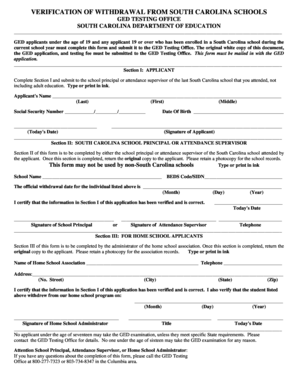
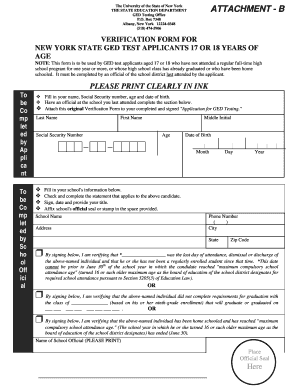
The Verification of Withdrawal from South Carolina Schools Form is a document used by GED® applicants to verify their withdrawal from a South Carolina school for various purposes.
pdfFiller scores top ratings on review platforms




Who needs SC Verification of Withdrawal from Schools?
Explore how professionals across industries use pdfFiller.

SC Verification of Withdrawal from Schools is needed by:
-
GED® applicants under 19 years of age
-
Individuals 19 or older enrolled in South Carolina schools
-
School principals or attendance supervisors
-
Home school administrators
-
Parents or guardians of students withdrawing
-
Educational institutions requiring verification
Comprehensive Guide to SC Verification of Withdrawal from Schools
What is the Verification of Withdrawal from South Carolina Schools Form?
The Verification of Withdrawal from South Carolina Schools Form is a crucial document for GED applicants in South Carolina. It serves to officially indicate a student's withdrawal from their current educational institution, essential for maintaining educational compliance. The form is intended for students under the age of 19, as well as those over 19 who are currently enrolled in South Carolina schools. It requires signatures from both the applicant and authorized school officials, ensuring proper verification of withdrawal.
Purpose and Benefits of the Verification of Withdrawal from South Carolina Schools Form
Completing this form streamlines the withdrawal process for students, providing a clear pathway from one educational environment to another. It holds significant benefits, such as ensuring proper documentation that enhances eligibility for the GED program and supporting educational continuity. The form not only facilitates individual transitions but also reinforces the importance of formal procedures in education.
Who Needs the Verification of Withdrawal from South Carolina Schools Form?
This form is designed for both applicants and school administrators involved in the withdrawal process. Specifically, students planning to transition to different educational setups, such as home schooling or transferring to another school, are required to complete it. Additionally, parents or guardians engaging in the home school process must understand the necessity of this documentation.
Eligibility Criteria for the Verification of Withdrawal from South Carolina Schools Form
Certain eligibility criteria must be met for various categories of applicants. Key considerations include age restrictions, where the applicant must be under 19 years old or over 19 and enrolled during the current school year. Furthermore, residency and educational status play critical roles in determining qualification for this form.
How to Fill Out the Verification of Withdrawal from South Carolina Schools Form Online (Step-by-Step)
Filling out the Verification of Withdrawal from South Carolina Schools Form online involves a straightforward process. Follow these steps:
-
Access the form on a compatible platform.
-
Enter your personal information, including name and date of birth.
-
Provide your social security number as required.
-
Ensure that both the applicant's and school officials' signatures are included.
-
Review the form thoroughly to avoid common mistakes.
Submission Methods and Delivery for the Verification of Withdrawal from South Carolina Schools Form
There are various submission options available for the Verification of Withdrawal from South Carolina Schools Form. The completed form can be sent via email or fax to the GED Testing Office. Following the correct submission protocols is crucial for avoiding delays in processing. Using tools like pdfFiller can further streamline this submission process by simplifying documentation handling.
Common Errors and How to Avoid Them with the Verification of Withdrawal from South Carolina Schools Form
When filling out the Verification of Withdrawal from South Carolina Schools Form, several errors are commonly encountered. To ensure accuracy, consider the following tips:
-
Double-check all personal information for accuracy.
-
Validate that required signatures are present before submission.
-
Review the form for any missing fields or incorrect data.
Security and Compliance when Filling Out the Verification of Withdrawal from South Carolina Schools Form
Security is paramount when handling sensitive information on the Verification of Withdrawal from South Carolina Schools Form. It's essential to utilize secure platforms that protect data integrity. pdfFiller implements robust security measures, including 256-bit encryption and compliance with HIPAA and GDPR, ensuring a safe experience for users.
What Happens After You Submit the Verification of Withdrawal from South Carolina Schools Form?
After submitting the Verification of Withdrawal from South Carolina Schools Form, applicants can expect a specific processing timeline. Understanding potential outcomes or next steps in the GED application process is crucial for maintaining progress. Applicants should also know how to track the status of their application post-submission, keeping informed at every stage.
Experience Seamless Form Management with pdfFiller
pdfFiller provides a hassle-free experience when filling out the Verification of Withdrawal from South Carolina Schools Form. With features like eSigning and secure sharing, users can enjoy streamlined submissions. Additionally, pdfFiller offers a variety of tools for managing educational documents, making document handling efficient and straightforward.
How to fill out the SC Verification of Withdrawal from Schools
-
1.Begin by navigating to pdfFiller and logging into your account or creating a new one if necessary. Use the search bar to find the 'Verification of Withdrawal from South Carolina Schools Form.'
-
2.Once you have opened the form, familiarize yourself with the layout. The form consists of multiple sections, including personal information and signatures. Make sure to have all necessary information at hand before you start filling it in.
-
3.Ensure you have the applicant's personal information ready, including their name, social security number, and date of birth, as these are required fields.
-
4.Use the interactive fields to input the required information accurately. The pdfFiller interface allows you to click into each field to enter data. For checkboxes, simply click to mark the correct options.
-
5.Next, ensure that the form is signed by the applicant in the designated 'Signature of Applicant' field. You may also need to gather a signature from the school principal or attendance supervisor, or from the home school administrator.
-
6.After completing all sections of the form, thoroughly review each field to confirm that all information is accurate and properly filled out. Double-check for any missed fields or required signatures.
-
7.Once you are satisfied with the form's completeness, proceed to save your changes. pdfFiller offers options to download the completed form, save it to your account, or submit it directly to the GED® Testing Office through email or fax.

Who is eligible to use the Verification of Withdrawal from South Carolina Schools Form?
This form is designed for GED® applicants under the age of 19 and for those aged 19 or older who have been enrolled in a South Carolina school during the current school year.
What is the procedure for submitting the completed form?
After filling out the Verification of Withdrawal Form, you must submit it by emailing or faxing it to the GED® Testing Office. Ensure accurate submission to avoid any delays.
What information do I need to complete the form?
You will need to provide the applicant's personal information, such as their full name, social security number, and date of birth. Additionally, signatures are required from both the applicant and a school authority.
Are there any common mistakes to avoid when filling out this form?
Common mistakes include omitting required signatures, failing to enter accurate personal information, or leaving sections incomplete. Ensure that all fields required are filled out and reviewed.
How can I ensure my form is processed in a timely manner?
To ensure timely processing, submit your completed form as soon as possible. Check for any specific deadlines related to your situation and provide all required information correctly.
Do I need to notarize the Verification of Withdrawal Form?
No, notarization is not required for the Verification of Withdrawal from South Carolina Schools Form. Ensure all required signatures are present instead.
What if I have questions about filling out the form?
If you have questions about the form, it's best to contact your last school attended or the GED® Testing Office for assistance, as they can provide specific guidance related to your situation.
SC Verification of Withdrawal from Schools Form Versions
Related Forms




Get the latest insights from our blog


If you believe that this page should be taken down, please follow our DMCA take down process
here
.
This form may include fields for payment information. Data entered in these fields is not covered by PCI DSS compliance.