
Last updated on
Nov 6, 2026
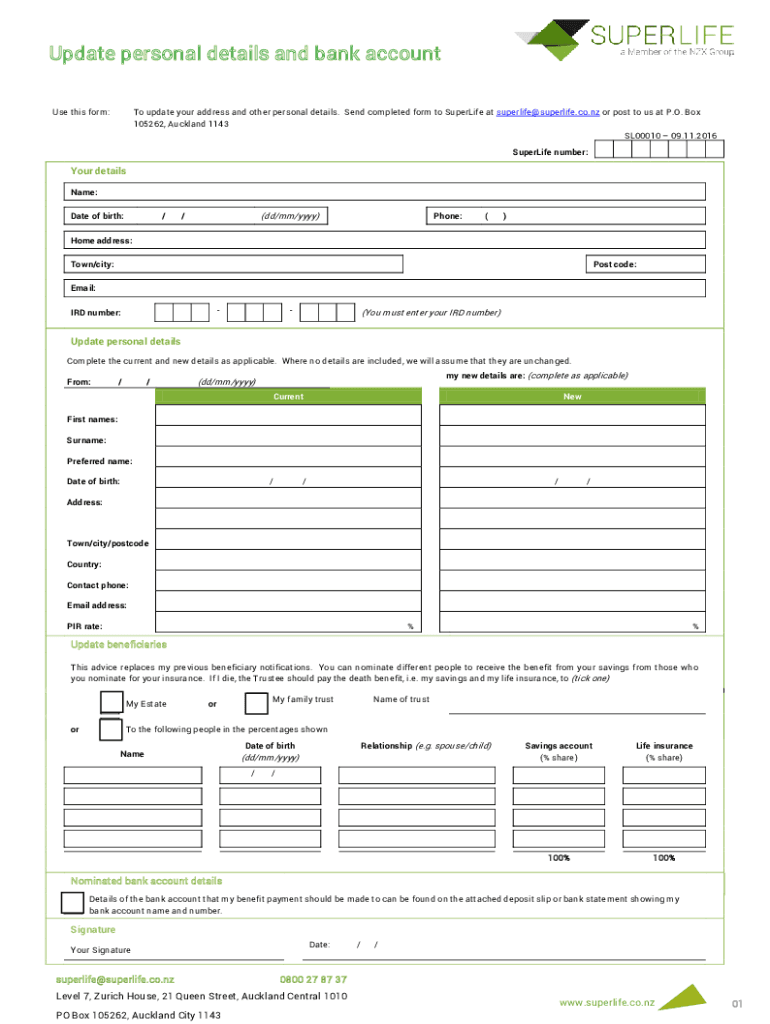
NZ SuperLife Update Personal Details and Bank Account 2016 free printable template
We are not affiliated with any brand or entity on this form

Fill out
Complete the form online in a simple drag-and-drop editor.

eSign
Add your legally binding signature or send the form for signing.

Share
Share the form via a link, letting anyone fill it out from any device.

Export
Download, print, email, or move the form to your cloud storage.
Why pdfFiller is the best tool for your documents and forms


End-to-end document management
From editing and signing to collaboration and tracking, pdfFiller has everything you need to get your documents done quickly and efficiently.
Accessible from anywhere
pdfFiller is fully cloud-based. This means you can edit, sign, and share documents from anywhere using your computer, smartphone, or tablet.
Secure and compliant
pdfFiller lets you securely manage documents following global laws like ESIGN, CCPA, and GDPR. It's also HIPAA and SOC 2 compliant.
What is NZ SuperLife Update Personal Details and Bank Account
The SuperLife Personal Details Update Form is a personal finance document used by individuals to update their personal information with SuperLife, including address, contact details, and beneficiary information.
pdfFiller scores top ratings on review platforms




It has allowed me to modify PDF Forms when I urgently needed them changed within a short span of time.
AMAZING tool
AMAZING tool, really useful and easy to use.
Who needs NZ SuperLife Update Personal Details and Bank Account?
Explore how professionals across industries use pdfFiller.

NZ SuperLife Update Personal Details and Bank Account is needed by:
-
Individuals updating their beneficiary information.
-
SuperLife account holders needing to change contact details.
-
Residents of New Zealand managing personal financial records.
-
Clients of SuperLife ensuring accurate personal data.
-
Persons requiring official documentation for financial purposes.
Comprehensive Guide to NZ SuperLife Update Personal Details and Bank Account
What is the SuperLife Personal Details Update Form?
The SuperLife Personal Details Update Form is essential for updating personal information for SuperLife users. This form allows individuals to modify their details, such as address and beneficiary information. Accurate personal details are crucial for financial services, as they ensure that account management and service delivery are seamless. Utilizing the SuperLife personal details update form enhances the reliability of the information that affects users' financial entitlements in New Zealand.
Benefits of Using the SuperLife Personal Details Update Form
Updating personal information has numerous benefits, particularly in account management and service efficiency. By leveraging a digital platform, users can conveniently amend their details without the hassle of paperwork. The advantages of using a digital form include faster processing time and reduced errors compared to traditional methods. This makes it easier for users to manage their accounts and maintain up-to-date records of beneficiary information.
Key Features of the SuperLife Personal Details Update Form
The SuperLife Personal Details Update Form includes various fillable fields and checkboxes to ensure comprehensive completion. Key fields within the form are:
-
Name
-
Date of Birth
-
Signature
Additionally, the form contains instructions for filling out and signing, guiding users through the process of updating their information accurately.
Who Should Use the SuperLife Personal Details Update Form?
This form is specifically designed for individuals needing to update their personal information. Ensuring that accurate information is submitted is crucial for beneficiaries to avoid complications. The SuperLife Personal Details Update Form is ideal for anyone who relies on correct personal details for their financial services with SuperLife.
How to Fill Out the SuperLife Personal Details Update Form Online
To fill out the SuperLife Personal Details Update Form online using pdfFiller, follow these steps:
-
Access pdfFiller and log in to your account.
-
Upload the SuperLife form if not already available.
-
Complete the required fields such as your SuperLife number and personal details.
-
Add beneficiary information if applicable.
-
Review all information to ensure accuracy.
-
Sign the form electronically.
Gathering specific details beforehand will facilitate a smoother filling process.
Reviewing and Submitting the SuperLife Personal Details Update Form
Before submitting the SuperLife Personal Details Update Form, you should conduct a thorough review. Important checks include verifying that all required fields are completed and that information is accurate. Submission methods may vary, so it's essential to follow the necessary steps to ensure proper delivery of your form. Ensure you are aware of the submission channels available to you within the platform.
What Happens After You Submit the SuperLife Personal Details Update Form?
Once you submit the SuperLife Personal Details Update Form, processing times may vary, so it’s good to anticipate waiting periods. Users can expect confirmation tracking as a means to monitor their submission status. Access to status updates will help ensure that you stay informed throughout the processing of your information.
Security and Compliance for Submitting Personal Information
Security is paramount when updating sensitive personal information. The platform used for the SuperLife Personal Details Update Form complies with GDPR standards, ensuring that your data is handled securely. With 256-bit encryption and adherence to privacy and data protection norms, you can trust that your information remains safe during the submission process.
Correcting or Amending Your Personal Details Update Form
If you need to rectify errors or make additional updates post-submission, follow the appropriate guidance provided by SuperLife. Common reasons for rejection may include incomplete fields or discrepancies in information submitted. It is advisable to review the instructions carefully to prevent such issues and ensure your personal details are always up to date.
Utilizing pdfFiller for Your SuperLife Personal Details Update Form
pdfFiller offers an easy and secure way to complete the SuperLife Personal Details Update Form. Users can take advantage of various features, such as editing text, creating fillable fields, and eSigning documents, which significantly enhance the overall filling and submission experience. Using pdfFiller simplifies the process, making it efficient for you to manage your personal details effectively.
How to fill out the NZ SuperLife Update Personal Details and Bank Account
-
1.Access the SuperLife Personal Details Update Form on pdfFiller by searching the form name in the platform's search bar.
-
2.Once the form is open, familiarize yourself with the layout and available fields.
-
3.Before filling out the form, gather all necessary information such as your SuperLife number, current address, new address, contact details, and any beneficiary information that needs to be updated.
-
4.Start filling in the fields by clicking on them. Provide your full name, date of birth, and other required details in the respective blanks.
-
5.Ensure that you replace any outdated information with the current personal details accurately.
-
6.For beneficiary updates, fill in the required details to ensure the correct information is submitted.
-
7.After completing all fields, carefully review your entries for accuracy. Double-check names, dates, and other crucial information.
-
8.Upon final review, navigate to the signature field. Use the digital signing option to sign the document electronically.
-
9.Once everything is complete, save your work. You can download a copy directly to your device or choose to submit it electronically through pdfFiller's submission options.

Who is eligible to use the SuperLife Personal Details Update Form?
Any individual who holds an account with SuperLife and needs to update their personal or beneficiary information is eligible to use this form.
What documents do I need to complete this form?
You will need your SuperLife number, current and new personal details, and any relevant beneficiary information to complete the form accurately.
How do I submit the completed form?
You can submit the completed form by downloading it after filling out on pdfFiller and sending it directly to SuperLife either via email or postal service.
Is there a deadline for submitting the form?
While there are no strict deadlines stated, it's advisable to submit the form as soon as possible to ensure your records are up to date, especially if there are changes in your personal information.
What are common mistakes to avoid when filling out the form?
Ensure that all information is accurate and current. Double-check spellings and numeric entries, particularly for your SuperLife number and contact information to avoid processing delays.
How long does it take for changes to be processed?
Processing times can vary, but typically, updates submitted to SuperLife are handled promptly. Check with customer support for specific timelines.
Do I need to notarize the form?
No, notarization is not required for the SuperLife Personal Details Update Form. You need only to sign it before submission.
NZ SuperLife Update Personal Details and Bank Account Form Versions
Related Forms




Get the latest insights from our blog


If you believe that this page should be taken down, please follow our DMCA take down process
here
.
This form may include fields for payment information. Data entered in these fields is not covered by PCI DSS compliance.