
Last updated on
Oct 31, 2026
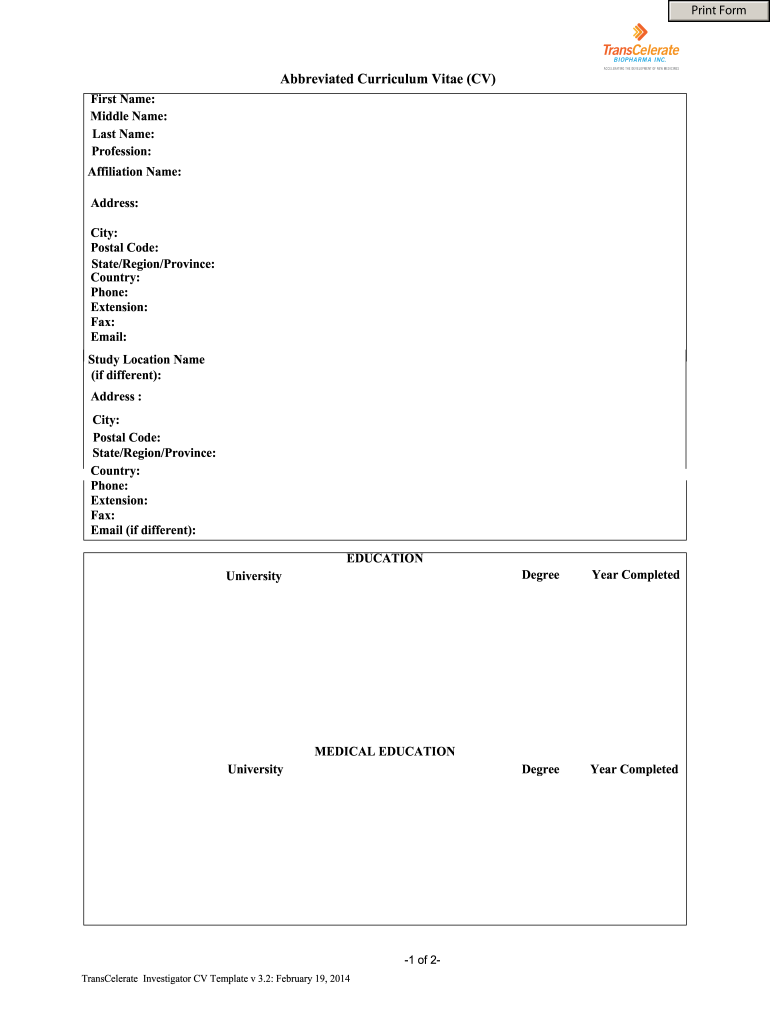
TransCelerate Abbreviated Curriculum Vitae (CV) 2014-2026 free printable template
pdfFiller is not affiliated with any government organization

Fill out
Complete the form online in a simple drag-and-drop editor.

eSign
Add your legally binding signature or send the form for signing.

Share
Share the form via a link, letting anyone fill it out from any device.

Export
Download, print, email, or move the form to your cloud storage.
Why pdfFiller is the best tool for your documents and forms


End-to-end document management
From editing and signing to collaboration and tracking, pdfFiller has everything you need to get your documents done quickly and efficiently.
Accessible from anywhere
pdfFiller is fully cloud-based. This means you can edit, sign, and share documents from anywhere using your computer, smartphone, or tablet.
Secure and compliant
pdfFiller lets you securely manage documents following global laws like ESIGN, CCPA, and GDPR. It's also HIPAA and SOC 2 compliant.
What is TransCelerate Abbreviated Curriculum Vitae (CV)
The Abbreviated Curriculum Vitae Template is a document used by professionals, primarily in the medical field, to summarize their education, experience, and research interests.
pdfFiller scores top ratings on review platforms




Who needs TransCelerate Abbreviated Curriculum Vitae (CV)?
Explore how professionals across industries use pdfFiller.

TransCelerate Abbreviated Curriculum Vitae (CV) is needed by:
-
Medical professionals applying for jobs or grants
-
Researchers seeking funding opportunities
-
Academics needing a compact CV format
-
Students applying for internships in healthcare
-
Job seekers in clinical trial fields
Comprehensive Guide to TransCelerate Abbreviated Curriculum Vitae (CV)
What is an Abbreviated Curriculum Vitae Template?
The Abbreviated Curriculum Vitae (CV) Template serves as a critical tool for medical and professional individuals to succinctly present their qualifications. This template is particularly significant in the medical field, where a streamlined summary is often necessary.
This form generally includes essential components such as personal information, education, and relevant experience, offering an at-a-glance view of a professional's background. It's important to note that the abbreviated version highlights key achievements, distinguishing itself from a full CV by focusing on brevity and relevance.
Purpose and Benefits of the Abbreviated Curriculum Vitae Template
The Abbreviated CV Template offers immense value to professionals by providing a clear and concise summary of qualifications. This clarity is not only beneficial for job applications but also enhances research proposals and showcases professional credentials.
Using this template can significantly expedite the application process, saving time while ensuring that applicants present their best selves. By focusing on essential information, users can avoid overwhelming detail that often hinders prospective opportunities.
Key Features of the Abbreviated Curriculum Vitae Template
Understanding the structure of the Abbreviated CV Template is paramount. Key features include:
-
Fillable fields for First Name, Last Name, Profession, and more.
-
Signature line that serves to authenticate the completion of the form.
-
Date field to document when the form was signed.
-
Editable aspects allowing for personalization to fit individual experiences.
These features make the template user-friendly and adaptable for various professional contexts.
Who Needs the Abbreviated Curriculum Vitae Template?
The Abbreviated CV Template is designed for a diverse group of professionals. This includes individuals in the medical field, academics, and researchers who require a succinct presentation of their credentials.
Additionally, it is particularly useful for candidates transitioning in their careers or those needing to exhibit their qualifications for grants, jobs, or educational programs. Its relevance spans various stages in a professional's journey.
How to Fill Out the Abbreviated Curriculum Vitae Template Online (Step-by-Step)
Completing the Abbreviated CV Template accurately is vital. Here’s a step-by-step guide to effectively fill out the online form:
-
Input your First and Last Name in the designated fields.
-
Select your Profession from the options provided.
-
Provide educational background, ensuring to include relevant degrees.
-
List your professional experience, focusing on key roles and responsibilities.
-
Review all fields for accuracy before submission.
Utilizing tools available at pdfFiller can streamline the filling process, ensuring completeness and precision.
Review and Validation Checklist for Completing Your Abbreviated CV
Conducting a thorough review before submitting your Abbreviated CV Template is crucial. Here are common errors to avoid:
-
Missing personal information such as your contact details.
-
Inaccurate or outdated educational qualifications.
-
Omitting relevant professional experiences.
Taking the time to validate credentials and personal information can enhance the effectiveness of your CV. Seeking feedback from mentors or peers can also provide valuable insights.
How to Sign the Abbreviated Curriculum Vitae Template
Signing the completed Abbreviated CV is an essential step in confirming the accuracy of the submitted information. Users need to understand the requirements for both digital and wet signatures.
eSigning options available through pdfFiller allow for ease of completion, ensuring that the signature line is properly addressed. This process is essential for verifying the legitimacy of the document.
Processing and Submission of the Abbreviated Curriculum Vitae Template
Submitting your completed Abbreviated CV Template correctly is vital for maximizing your chances of success. There are various submission methods available:
-
Uploading to applications directly through platforms.
-
Sending the CV via email as an attachment.
Tracking receipts and ensuring compliance with deadlines are also important factors to consider, especially for job or academic applications.
Ensuring Security and Compliance in Document Handling
Users must prioritize data privacy and document security when handling the Abbreviated CV Template. pdfFiller implements robust security measures such as encryption and compliance with regulations.
Taking additional steps to protect sensitive information while filling out the form can further enhance security. Understanding HIPAA and GDPR compliance is pivotal in safeguarding CV information and maintaining privacy.
Your Next Steps with pdfFiller
Embracing pdfFiller for your CV needs offers a streamlined approach to accessing and filling out the Abbreviated CV Template. Users can easily explore additional related forms and templates tailored for professionals.
With pdfFiller, the document handling process is more efficient, allowing individuals to focus on presenting their qualifications effectively.
How to fill out the TransCelerate Abbreviated Curriculum Vitae (CV)
-
1.Access the Abbreviated Curriculum Vitae Template on pdfFiller by typing the form name into the search bar.
-
2.Once you've found the form, click on it to open the fillable template in the pdfFiller interface.
-
3.Gather necessary personal information, such as your full name, address, education history, and details of professional licenses prior to starting the form.
-
4.Begin by filling in your first name and last name in the designated fields, ensuring correct spelling for formal usage.
-
5.Next, enter your profession, making sure it accurately reflects your current role or qualification.
-
6.Continue to fill out your education details, including institutions attended and degrees earned.
-
7.Provide information regarding your professional licenses, listing any relevant certifications or credentials you hold.
-
8.In the section for research interests, articulate your primary areas of focus in a concise manner.
-
9.Once all fields are completed, review the entire form for accuracy to ensure all information is correct.
-
10.Finalize the form by adding your signature in the provided signature line and dating it.
-
11.After reviewing, you can save your work by clicking on the save option on pdfFiller.
-
12.If you're ready to submit the form, choose the download option to save it or utilize the submit function to send it electronically.

Who should use the Abbreviated Curriculum Vitae Template?
This template is ideal for medical professionals, researchers, and students applying for roles or grants, allowing them to succinctly present their qualifications.
What information do I need to complete the CV?
You will need your personal details including name, contact information, education history, professional licenses, and research interests to properly fill out the CV.
How do I submit my completed CV?
Once you've completed the CV on pdfFiller, you can either download it to your device or use the built-in submit features to send it electronically as required.
Are there any common mistakes I should avoid?
Ensure all fields are accurately filled and proofread your CV before submitting to avoid errors in critical information like names and qualifications.
How long will it take to complete the CV?
The time required to complete the Abbreviated Curriculum Vitae can vary but generally takes around 30-60 minutes depending on the amount of information provided.
Can I edit my CV after saving it?
Yes, you can edit your saved CV at any time by reopening the template on pdfFiller, making changes, and then saving it once more.
Is there a fee to use the pdfFiller template?
While accessing the CV template itself may be free, some features on pdfFiller may require a subscription or one-time fee to utilize fully.
Related Forms





Related Catalogs
Get the latest insights from our blog


If you believe that this page should be taken down, please follow our DMCA take down process
here
.
This form may include fields for payment information. Data entered in these fields is not covered by PCI DSS compliance.