
Last updated on
Oct 31, 2026

Get the free Texas Employee Training Verification Form
We are not affiliated with any brand or entity on this form

Fill out
Complete the form online in a simple drag-and-drop editor.

eSign
Add your legally binding signature or send the form for signing.

Share
Share the form via a link, letting anyone fill it out from any device.

Export
Download, print, email, or move the form to your cloud storage.
Why pdfFiller is the best tool for your documents and forms


End-to-end document management
From editing and signing to collaboration and tracking, pdfFiller has everything you need to get your documents done quickly and efficiently.
Accessible from anywhere
pdfFiller is fully cloud-based. This means you can edit, sign, and share documents from anywhere using your computer, smartphone, or tablet.
Secure and compliant
pdfFiller lets you securely manage documents following global laws like ESIGN, CCPA, and GDPR. It's also HIPAA and SOC 2 compliant.
What is Texas Training Verification
The Texas Employee Training Verification Form is a document used by employers in Texas to confirm the distribution of required health care notices to employees.
pdfFiller scores top ratings on review platforms




Who needs Texas Training Verification?
Explore how professionals across industries use pdfFiller.

Texas Training Verification is needed by:
-
Texas employers distributing health care network notices
-
Human resources personnel managing employee training compliance
-
Employers needing worker's compensation verification
-
Legal representatives ensuring adherence to health regulations
-
Administrators verifying employee acknowledgments
Comprehensive Guide to Texas Training Verification
What is the Texas Employee Training Verification Form?
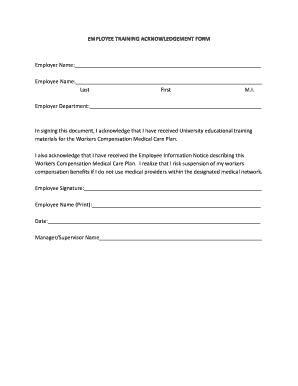
The Texas Employee Training Verification Form is a crucial document that allows employers in Texas to confirm the distribution of the Health Care Network Employee Notice and the Employee Acknowledgement Form to their employees. This form enhances communication between employers and employees, ensuring that healthcare training and compliance are acknowledged appropriately. Utilizing the Texas Employee Training Verification Form not only streamlines internal processes but also establishes accountability in healthcare training efforts.
Purpose and Benefits of the Texas Employee Training Verification Form
The primary purpose of the Texas Employee Training Verification Form is to ensure adherence to healthcare regulations set forth by state authorities. By utilizing this form, employers can demonstrate compliance, thereby reducing potential legal risks associated with improper training acknowledgment. The form also yields substantial benefits, including:
-
Boosted employee awareness of healthcare policies.
-
Simplified verification processes during regulatory checks.
-
Increased overall compliance with health care network regulations.
Key Features of the Texas Employee Training Verification Form
Key features of the Texas Employee Training Verification Form enhance its usability and effectiveness. Among these features are multiple fillable fields and the requirement for signatures. Essential fields included in the form are:
-
Employer Name
-
Signature of Employer Representative
-
Distribution Date
These details ensure that all necessary information is captured for verification and compliance purposes.
Who Needs the Texas Employee Training Verification Form?
Employers in Texas across various industries, particularly those operating in healthcare, are the primary users of the Texas Employee Training Verification Form. This includes organizations that engage with healthcare services or training programs, where there is a need to acknowledge employee understanding and compliance with required training protocols.
How to Fill Out the Texas Employee Training Verification Form Online (Step-by-Step)
Filling out the Texas Employee Training Verification Form online is a straightforward process. Follow these steps to ensure accurate completion:
-
Access the form on pdfFiller’s platform.
-
Enter the 'Employer Name' in the designated field.
-
Provide the 'Mailing Address' and 'Employer Email Address'.
-
Input the 'Travelers Workers’ Compensation Policy Number'.
-
Select the 'Distribution Date'.
-
Fill in the 'Name' and 'Title of Employer Representative'.
-
Obtain the necessary signature and date to complete the form.
Information You'll Need to Gather Before Filling Out the Form
Before filling out the Texas Employee Training Verification Form, ensure you have the following information readily available:
-
Complete employer details including name and address.
-
Email and phone number of the employer representative.
-
Travelers workers’ compensation policy number.
-
Accurate distribution date for the form.
Correctness in these details is imperative for ensuring compliance and facilitating the verification process.
Submitting the Texas Employee Training Verification Form
Once completed, the Texas Employee Training Verification Form can be submitted through various methods, including online submission via pdfFiller. Pay attention to submission deadlines to ensure compliance and check for any potential fees associated with the process. Timely submission is crucial to maintain regulatory standards.
What Happens After You Submit the Texas Employee Training Verification Form?
After submitting the Texas Employee Training Verification Form, employers can expect a verification process to take place. This may involve tracking the submission status and receiving confirmation from the relevant authorities regarding acknowledgment of the submitted documentation. This step ensures that the employer's compliance with training regulations is officially recognized.
Common Errors and How to Avoid Them When Submitting the Form
Employees may encounter several common errors while completing the Texas Employee Training Verification Form. To mitigate these issues, consider the following tips:
-
Double-check all entered information for accuracy.
-
Ensure all mandatory fields are filled completely.
-
Verify that signatures are obtained in the appropriate areas.
By following these suggestions, you can significantly reduce the likelihood of submission delays.
Securely Handling Your Texas Employee Training Verification Form with pdfFiller
Handling sensitive documents necessitates a focus on security and compliance. pdfFiller ensures that your Texas Employee Training Verification Form is treated with high levels of confidentiality, utilizing advanced features such as:
-
256-bit encryption for document security.
-
Compliance with SOC 2 Type II standards.
-
HIPAA and GDPR compliance for handling sensitive information.
Start Using pdfFiller for Your Texas Employee Training Verification Form Today!
Utilizing pdfFiller for your Texas Employee Training Verification Form allows for a seamless experience in form creation and submission. With its user-friendly interface and compliance features, pdfFiller simplifies the process and ensures that all training verifications are properly documented.
How to fill out the Texas Training Verification
-
1.To begin, access pdfFiller and log in or create an account if you don't have one. Once logged in, search for 'Texas Employee Training Verification Form' in the template library and select it to open.
-
2.Once the form is loaded, navigate through the document's fillable fields. These fields include 'Employer Name', 'Mailing Address', 'Employer Email Address', and 'Travelers Workers’ Compensation Policy Number'. Click on each field to enter the required information.
-
3.Before completing the form, gather all necessary information including your policy number, distribution dates, the employer representative's name and title, and the signature date. Ensure accuracy to avoid delays.
-
4.As you complete the fields, take your time to double-check for accuracy. Ensure all required fields are filled, especially the signature from the employer representative is provided where necessary.
-
5.After completing the form, review all entries carefully for completeness and correctness. Pay attention to any sections that specify information critical for verification.
-
6.Once satisfied with the filled form, you can save a copy on pdfFiller for your records. Choose the 'Save' option from the menu. Additionally, you can download the form in PDF format for submission later.
-
7.To submit, find the 'Submit' button after saving the final form. Follow the prompts for sending the completed verification form to Travelers to ensure that it is received for processing.

Who is eligible to use the Texas Employee Training Verification Form?
This form is specifically intended for employers located in Texas who need to verify that they have distributed health care network employee notices and acknowledgments to their employees.
Are there any deadlines for submitting this form?
While specific deadlines may vary, it's crucial to submit the Texas Employee Training Verification Form promptly after distributing employee notices to comply with regulatory requirements.
How do I submit the completed Texas Employee Training Verification Form?
You can submit the completed form electronically via pdfFiller, or you may save and print the form to physically send it to Travelers using the address provided for verification.
What supporting documents are required with this form?
Typically, no additional documents are needed; however, you should retain copies of the health care notices distributed to employees for your records as a reference if needed.
What common mistakes should I avoid when filling out this form?
Ensure all fields are filled out accurately, especially your signature and the employer representative's details. Double-check names, contact information, and dates to prevent any processing delays.
What is the processing time for this form?
Processing times may vary based on Travelers' internal verification procedures. It's best to follow up if you do not receive confirmation within a few weeks after submission.
Is this form required for all Texas employers?
Not all employers are required to use this form; it specifically applies to those required to distribute health care network notices. Verify your compliance needs with state regulations.
Related Forms



Related Catalogs
Get the latest insights from our blog


If you believe that this page should be taken down, please follow our DMCA take down process
here
.
This form may include fields for payment information. Data entered in these fields is not covered by PCI DSS compliance.