
Last updated on
Nov 9, 2026
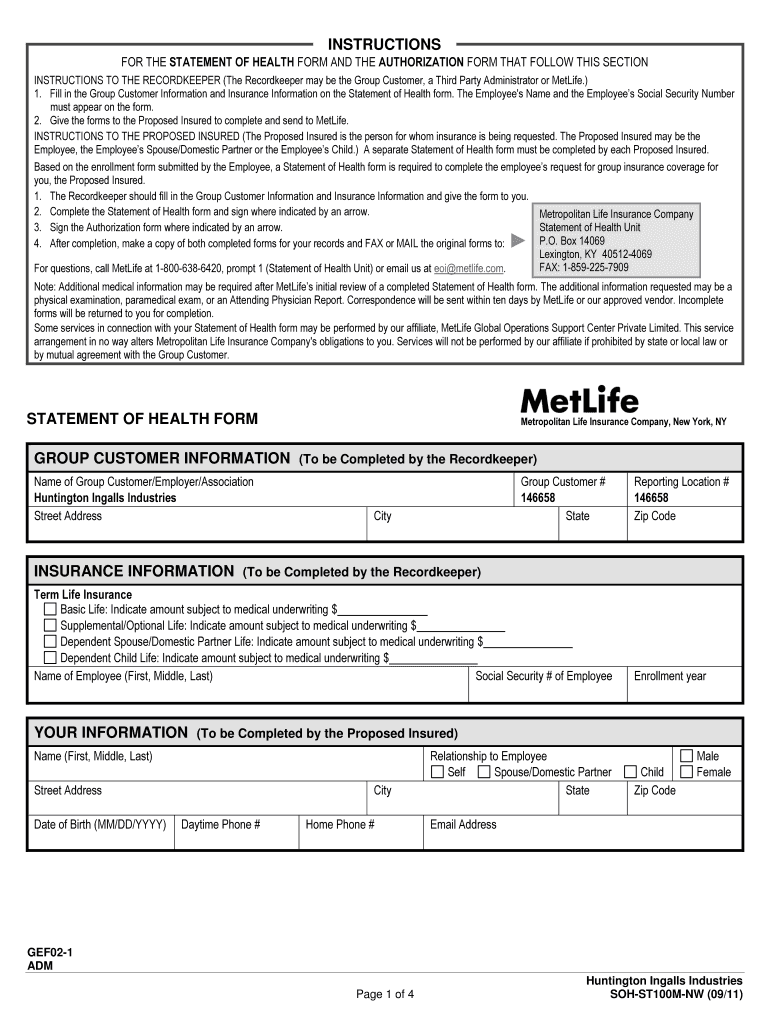
MetlLife SOH-ST100M-NW 2011 free printable template
pdfFiller is not affiliated with any government organization

Fill out
Complete the form online in a simple drag-and-drop editor.

eSign
Add your legally binding signature or send the form for signing.

Share
Share the form via a link, letting anyone fill it out from any device.

Export
Download, print, email, or move the form to your cloud storage.
Why pdfFiller is the best tool for your documents and forms


End-to-end document management
From editing and signing to collaboration and tracking, pdfFiller has everything you need to get your documents done quickly and efficiently.
Accessible from anywhere
pdfFiller is fully cloud-based. This means you can edit, sign, and share documents from anywhere using your computer, smartphone, or tablet.
Secure and compliant
pdfFiller lets you securely manage documents following global laws like ESIGN, CCPA, and GDPR. It's also HIPAA and SOC 2 compliant.
What is MetlLife SOH-ST100M-NW
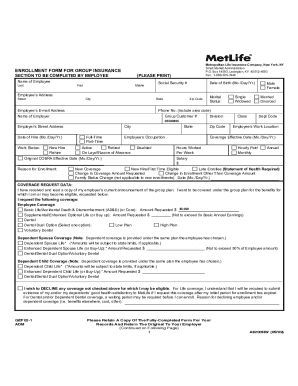
The MetLife Statement of Health Form is a healthcare document used by employees and their dependents to apply for group insurance coverage with MetLife.
pdfFiller scores top ratings on review platforms




Who needs MetlLife SOH-ST100M-NW?
Explore how professionals across industries use pdfFiller.

MetlLife SOH-ST100M-NW is needed by:
-
Employees seeking group insurance coverage
-
Dependents of employees applying for insurance
-
Personal representatives assisting applicants
-
HR professionals managing insurance enrollments
-
Insurance brokers facilitating group plans
Comprehensive Guide to MetlLife SOH-ST100M-NW
What is the MetLife Statement of Health Form?
The MetLife Statement of Health Form is a critical document in the insurance application process, designed for employees and their dependents to apply for group insurance coverage. This health insurance form collects detailed health information, which is vital for the underwriting process. Both the Proposed Insured and the Personal Representative must complete and sign the form to ensure its validity. The completion of this insurance authorization form plays a significant role in determining eligibility for coverage.
Purpose and Benefits of the MetLife Statement of Health Form
The purpose of the MetLife Statement of Health Form extends beyond mere application; it supports the medical underwriting process, helping to evaluate potential risks associated with applicants. Employees and their dependents benefit by streamlining the application for coverage while ensuring accurate health information is recorded. This accuracy is crucial, as it prevents delays in the approval of group insurance applications. By providing comprehensive and truthful health details, applicants can enhance their chances of receiving coverage.
Who Needs the MetLife Statement of Health Form?
The MetLife Statement of Health Form is tailored for individuals qualifying as either the Proposed Insured or the Personal Representative. To properly complete this essential document, certain criteria must be met concerning group insurance coverage. Common scenarios necessitating the form include applying for life insurance policies or updating health information after significant changes in one's condition.
How to Fill Out the MetLife Statement of Health Form Online (Step-by-Step)
Filling out the MetLife Statement of Health Form online is straightforward with the following steps:
-
Access the digital form through pdfFiller.
-
Fill in the Group Customer Information and Insurance Information sections accurately.
-
Ensure that all required signatures are obtained where indicated.
-
Review your entries for completeness before submission.
This structured approach ensures a smooth application process when using the online platform.
Common Errors and How to Avoid Them
Many applicants encounter frequent mistakes during the submission of the MetLife Statement of Health Form. Common pitfalls include:
-
Omitting required health details which can lead to rejections.
-
Failing to provide signatures where necessary.
-
Submitting forms with incomplete information.
To avoid these issues, thoroughly validate all information and review completed forms to ensure accuracy before submission.
Submission Methods and Delivery for the MetLife Statement of Health Form
Once the MetLife Statement of Health Form is completed, applicants have several options for submission. Available methods include:
-
Online submission through pdfFiller for immediate processing.
-
Mailing the form to the designated address provided by MetLife.
It is important to adhere to submission deadlines and understand the processing times associated with each method, allowing for timely updates on the application's status.
Security and Compliance for the MetLife Statement of Health Form
Data protection is a top priority when completing the MetLife Statement of Health Form. Key measures include:
-
Utilizing platforms like pdfFiller ensures compliance with HIPAA and GDPR standards.
-
256-bit encryption safeguards sensitive health information during transmission.
By employing secure methods, applicants can confidently submit their forms without compromising their privacy.
How to Correct or Amend the MetLife Statement of Health Form
If there is a need to make changes after submitting the MetLife Statement of Health Form, follow these steps:
-
Identify the specific information that requires correction.
-
Prepare the amended form using pdfFiller.
-
Submit the corrected form following the original submission method.
Tracking submission status can help applicants stay informed about their application and ensure all necessary amendments are acknowledged.
Utilizing pdfFiller for the MetLife Statement of Health Form
pdfFiller offers a suite of features designed to enhance the completion of the MetLife Statement of Health Form. Benefits include:
-
Easy editing and filling capabilities for all required fields.
-
eSigning options to streamline the process of obtaining necessary signatures.
-
Security measures that protect sensitive health data throughout the form-filling process.
By leveraging pdfFiller, users can efficiently handle their MetLife Statement of Health Form while prioritizing data security.
How to fill out the MetlLife SOH-ST100M-NW
-
1.Access the MetLife Statement of Health Form on pdfFiller by using the search function or directly entering the document link.
-
2.After opening the form, familiarize yourself with each section, noting fields that require input and those that may need signatures.
-
3.Before filling out the form, gather essential health information, policy numbers, and personal identification details for both the proposed insured and any dependents.
-
4.Begin by filling in the Group Customer Information and Insurance Information sections, ensuring accuracy in all details provided.
-
5.Use pdfFiller's fillable fields to enter information electronically. Click on each field to type or select options where applicable.
-
6.Pay close attention to sections requiring signatures. Have all relevant parties sign where indicated, using the digital signature feature.
-
7.Once all fields are complete, review the form thoroughly. Ensure that all required sections are filled out and that no information is missing.
-
8.After finalizing your entries, save the completed form to your pdfFiller account. Choose the option to download or submit it directly from the platform.
-
9.When downloading, select your preferred file format and save it to a secure location. Ensure to keep a copy for your records.

Who is eligible to use the MetLife Statement of Health Form?
The MetLife Statement of Health Form is designed for employees and their dependents applying for group insurance coverage. Both the proposed insured and personal representatives can complete this form.
What information do I need before filling out the form?
This will ensure accurate and efficient completion of all required sections.
What submission methods are available for this form?
You can submit the MetLife Statement of Health Form directly through pdfFiller or download it and submit it via mail or email to the designated MetLife representative, following their specific instructions.
What are common mistakes to avoid when filling out the form?
Common mistakes include leaving fields blank, providing incorrect personal details, and failing to sign where indicated. Ensure all sections are completed accurately and signatures are provided as required.
How long does processing take after submission?
Processing times for the MetLife Statement of Health Form can vary. Typically, you will receive feedback from MetLife within a few weeks, depending on the volume of applications submitted.
Are there any fees associated with filling out this form?
Generally, there are no fees associated specifically with completing the MetLife Statement of Health Form. However, it’s best to check with your employer or MetLife for any potential costs related to insurance coverage.
What do I do if I make a mistake on the form?
If you make a mistake while filling out the MetLife Statement of Health Form, you can easily correct it directly in pdfFiller. Make necessary edits and ensure all information is accurate before final submission.
MetlLife SOH-ST100M-NW Form Versions
Related Content
Related Forms




Related Catalogs
Get the latest insights from our blog


If you believe that this page should be taken down, please follow our DMCA take down process
here
.
This form may include fields for payment information. Data entered in these fields is not covered by PCI DSS compliance.