
Last updated on
Nov 7, 2026
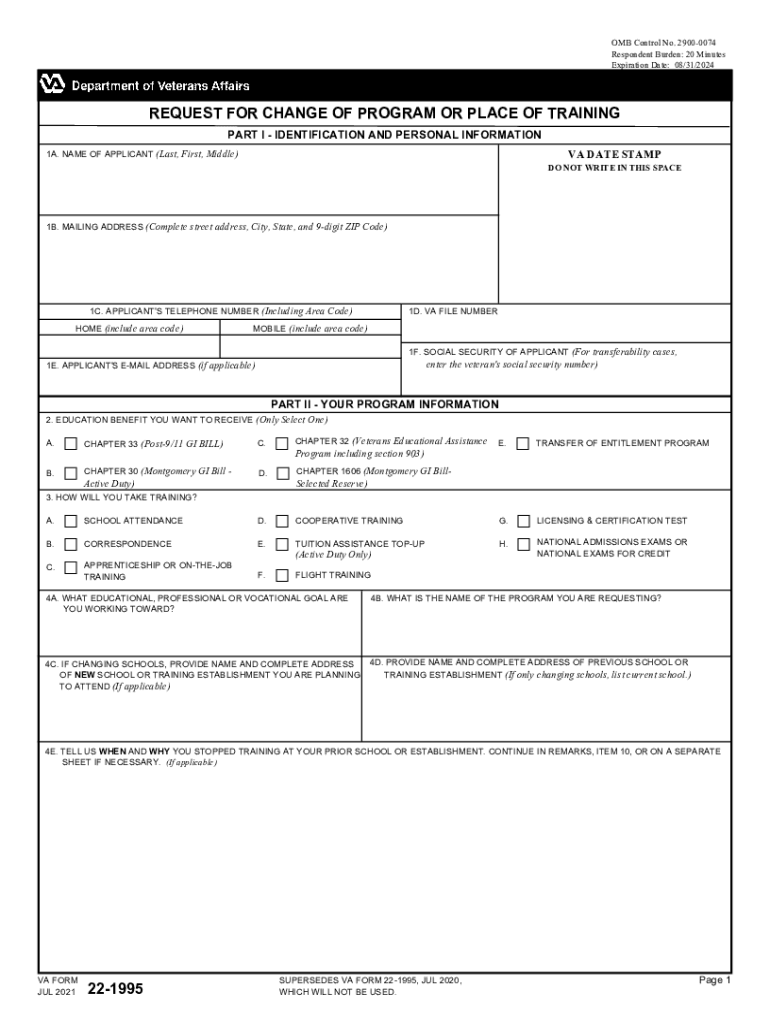
VA 22- 2021 free printable template
We are not affiliated with any brand or entity on this form

Fill out
Complete the form online in a simple drag-and-drop editor.

eSign
Add your legally binding signature or send the form for signing.

Share
Share the form via a link, letting anyone fill it out from any device.

Export
Download, print, email, or move the form to your cloud storage.
Why pdfFiller is the best tool for your documents and forms


End-to-end document management
From editing and signing to collaboration and tracking, pdfFiller has everything you need to get your documents done quickly and efficiently.
Accessible from anywhere
pdfFiller is fully cloud-based. This means you can edit, sign, and share documents from anywhere using your computer, smartphone, or tablet.
Secure and compliant
pdfFiller lets you securely manage documents following global laws like ESIGN, CCPA, and GDPR. It's also HIPAA and SOC 2 compliant.
What is VA 22-
The VA Form 22-1995 is a government document used by veterans and service members to request a change in their education or training program or place of training.
pdfFiller scores top ratings on review platforms




I'm still learning the program. So far it is sufficing all of my needs.
I love this application! It has made my life so much easier in filing medical claims. I used to have to write or type them out (yes with a typewriter!) but now I just do them on PDFfiller and it takes me less than 1/2 the time! Thank you!
Who needs VA 22-?
Explore how professionals across industries use pdfFiller.

VA 22- is needed by:
-
Veterans seeking to change their training program
-
Service members transitioning to new education opportunities
-
Individuals utilizing GI Bill benefits for education
-
Those needing to update their training program with the VA
-
Veterans applying for training at a new institution
-
Educational institutions processing requests from veterans
Comprehensive Guide to VA 22-
Overview of VA Form 22-1995: Request for Change of Program or Place of Training
The VA Form 22-1995 is a crucial document utilized by veterans to request modifications to their current education or training program. This form plays a significant role for those looking to transition between different educational opportunities, ensuring that service members can adapt their training based on changing needs. Veterans who seek to change their school or training program must complete this form to access their education benefits effectively.
Purpose and Benefits of the VA Form 22-1995
The primary goal of the VA Form 22-1995 is to facilitate a seamless transition in educational paths for veterans. By submitting this form, veterans can enjoy numerous benefits, including access to updated GI Bill education funding and potential financial support adjustments. These changes can significantly enhance their educational experiences and better align with their career goals.
Who Needs to Complete the VA Form 22-1995?
Veterans or service members contemplating a change in their training program should consider completing the VA Form 22-1995. Scenarios may include changing schools, seeking new areas of study, or altering training locations due to personal circumstances. It is essential for eligible individuals under various VA education programs to understand when and why to submit this request for a program change.
How to Fill Out the VA Form 22-1995 Online
Filling out the VA Form 22-1995 online involves several straightforward steps:
-
Access the online form through the designated VA website.
-
Complete the personal information section including your name, Social Security number, and contact details.
-
Provide information about your current program and the desired program changes.
-
Ensure that all critical fields are filled to avoid common errors.
-
Review your entries thoroughly before submission.
Submission Process for VA Form 22-1995
After completing the VA Form 22-1995, you have several options for submission. The form can be sent via mail or electronically depending on VA guidelines. Ensure you are aware of:
-
The appropriate VA Regional Office to which the form should be sent.
-
Any deadlines associated with your submission.
-
Required supporting documents that must accompany the form.
What Happens After You Submit the VA Form 22-1995?
Once your VA Form 22-1995 is submitted, the processing time can vary. Users are encouraged to track their application status through the appropriate VA channels. Common reasons for rejection may include inaccuracies on the form or missing documentation, so it is vital to ensure all details are correct to avoid delays.
Security and Data Protection of Your Information
The confidentiality of the information provided in the VA Form 22-1995 is paramount. The VA employs robust security measures to protect personal data and is compliant with data protection regulations, providing peace of mind for applicants about their information safety.
Utilizing pdfFiller for Your VA Form 22-1995
pdfFiller offers a user-friendly platform for completing the VA Form 22-1995 easily. With features designed for editing and eSigning, pdfFiller enhances the form-filling process significantly:
-
Edit text and images directly on the PDF.
-
Utilize fillable fields for ease of entry.
-
eSign documents securely to ensure validity.
Examples and Resources
To aid in the completion of the VA Form 22-1995, users can access various resources that provide extra assistance. For instance, a sample completed VA Form 22-1995 can illustrate the necessary fields and information to include. Additionally, links to related forms and guidelines on managing educational benefits are available for further support.
How to fill out the VA 22-
-
1.To access the VA Form 22-1995 on pdfFiller, go to the site and search for the form using the search bar or browse through the government forms section.
-
2.Once you find the form, click on it to open the editor. Familiarize yourself with the interface, including tools for filling and navigation options provided by pdfFiller.
-
3.Before starting to fill out the form, gather necessary information like your personal details, current training program, new program details, and direct deposit information to ensure efficiency.
-
4.Begin entering your information into the appropriate fields, ensuring you complete all required sections. Utilize the built-in text fields, checkboxes, and instructions provided within the form.
-
5.As you fill out the form, regularly save your progress using the save function. This will prevent loss of data and allow for easy revisits to complete the form.
-
6.Once you have filled all required fields and reviewed your entries for accuracy, finalize the form by clicking the option to review or finalize in the pdfFiller interface.
-
7.After finalizing, either download the form to your device or submit it directly through pdfFiller as guided. Ensure you choose the correct submission method suited to your needs.

Who is eligible to file VA Form 22-1995?
Eligibility to file VA Form 22-1995 includes any veteran or service member who is currently enrolled in an education or training program and wishes to change their program or place of training.
What is the deadline for submitting the VA Form 22-1995?
There is no strict deadline for submitting VA Form 22-1995; however, it is advisable to submit as soon as you decide to change your training program to avoid interruptions in your education benefits.
How can I submit VA Form 22-1995?
You can submit VA Form 22-1995 by mailing it to the appropriate VA Regional Office after signing it. Alternatively, if using pdfFiller, you can submit directly through their platform, following the prompts provided.
What supporting documents are required with VA Form 22-1995?
While the form itself does not specify additional required documents, you may need to provide information about your current and new training program and possibly your military service records to support your request.
What are common mistakes to avoid when filling out the form?
Common mistakes include not signing the form, leaving required fields blank, and providing incorrect information about your training programs. Always double-check for accuracy before submission.
How long does it take for the VA to process Form 22-1995?
Processing times for VA Form 22-1995 can vary but typically take several weeks. It is best to allow adequate time for processing, especially before the start of a new training program.
Can I appeal if my change of program is denied?
Yes, if your request for a change of program is denied, you have the right to appeal the decision. Follow the instructions provided in the decision letter for the appeal process.
VA 22-1995 Form Versions
Related Content
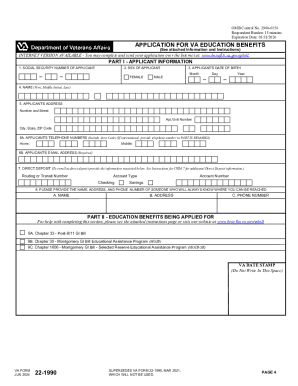
Related Forms





Get the latest insights from our blog


If you believe that this page should be taken down, please follow our DMCA take down process
here
.
This form may include fields for payment information. Data entered in these fields is not covered by PCI DSS compliance.