
Last updated on
Nov 7, 2026
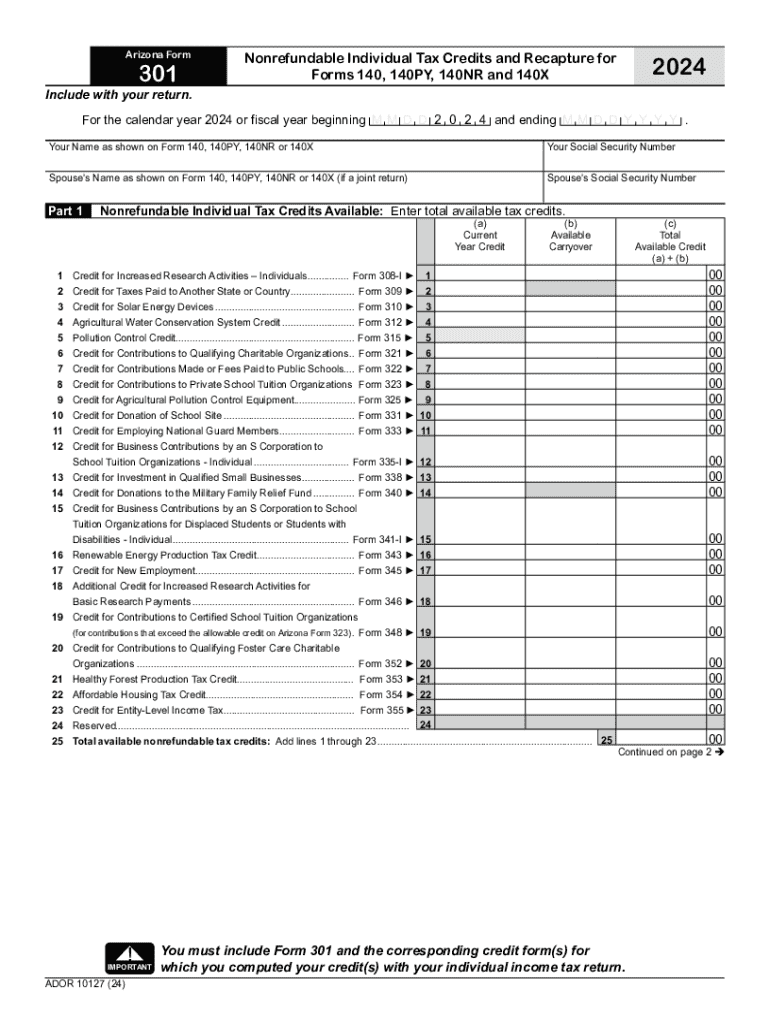
AZ DoR Form 301 2024 free printable template
pdfFiller is not affiliated with any government organization

Fill out
Complete the form online in a simple drag-and-drop editor.

eSign
Add your legally binding signature or send the form for signing.

Share
Share the form via a link, letting anyone fill it out from any device.

Export
Download, print, email, or move the form to your cloud storage.
Why pdfFiller is the best tool for your documents and forms


End-to-end document management
From editing and signing to collaboration and tracking, pdfFiller has everything you need to get your documents done quickly and efficiently.
Accessible from anywhere
pdfFiller is fully cloud-based. This means you can edit, sign, and share documents from anywhere using your computer, smartphone, or tablet.
Secure and compliant
pdfFiller lets you securely manage documents following global laws like ESIGN, CCPA, and GDPR. It's also HIPAA and SOC 2 compliant.
What is AZ DoR Form 301
The Arizona Form 301 Nonrefundable Individual Tax Credits 2024 is a state tax form used by individuals to claim nonrefundable tax credits for the tax year 2024.
pdfFiller scores top ratings on review platforms




Who needs AZ DoR Form 301?
Explore how professionals across industries use pdfFiller.

AZ DoR Form 301 is needed by:
-
Arizona residents seeking tax credits
-
Individuals filing state income tax returns in Arizona
-
Taxpayers claiming credits for research activities or solar energy
-
People making qualifying charitable contributions
-
Joint filers needing to report spouse's information
Comprehensive Guide to AZ DoR Form 301
What is the Arizona Form 301 Nonrefundable Individual Tax Credits 2024?
The Arizona Form 301 is a tax form designed for individuals to claim nonrefundable individual tax credits for the calendar year 2024. This form is instrumental in enabling Arizona taxpayers to benefit from various credit options, which help reduce their state tax liabilities.
This form encompasses several types of nonrefundable tax credits, including those related to solar energy devices, contributions to charitable organizations, and taxes paid to other states. Filing this form is essential for anyone claiming these credits, as it needs to be attached to the Arizona state income tax return.
Purpose and Benefits of Arizona Form 301 Nonrefundable Individual Tax Credits 2024
Claiming nonrefundable tax credits through the Arizona Form 301 can significantly decrease an individual's tax burden. By taking advantage of these credits, taxpayers can achieve financial savings and gain incentives for promoting certain activities, such as adopting solar energy solutions.
The impact of this form is particularly important for Arizona residents who wish to maximize their tax benefits. Along with savings, it encourages responsible actions like charitable giving, effectively enhancing community support through tax incentives.
Who Needs the Arizona Form 301 Nonrefundable Individual Tax Credits 2024?
The Arizona Form 301 is primarily directed towards individuals who have contributed to qualifying activities and wish to claim those credits. It is necessary for those who meet specific conditions, such as making charitable donations or paying taxes in another jurisdiction.
Filing is mandated under certain circumstances, particularly when claiming credits for contributions to nonprofits or taxes paid outside of Arizona. Understanding who needs this form can streamline the process for eligible claimants and ensure compliance with state tax regulations.
Eligibility Criteria for Arizona Form 301 Nonrefundable Individual Tax Credits 2024
To qualify for the credits available on the Arizona Form 301, individuals must meet specific criteria relevant to each credit type. Limitations may apply based on the nature of the credit, requiring taxpayers to carefully review guidelines to confirm eligibility.
General conditions for successful submission include accurate completion of the form, providing supporting documentation, and adhering to deadlines set by the state. Understanding these criteria is vital for maximizing tax benefits through this form.
How to Fill Out Arizona Form 301 Nonrefundable Individual Tax Credits 2024 Online
Completing the Arizona Form 301 online using platforms like pdfFiller is a straightforward process. Users should follow these steps for effective submission:
-
Access the Arizona form through the pdfFiller platform.
-
Fill in your name and social security number as required.
-
Complete each section diligently, ensuring all necessary information is accurate.
-
Double-check all fields to avoid common mistakes before final submission.
Each section of the form may require specific details relevant to your claims, emphasizing the need for careful and precise input during the electronic filling process.
Submission Methods and Delivery for Arizona Form 301 Nonrefundable Individual Tax Credits 2024
After completing the Arizona Form 301, several submission methods are available. Taxpayers can submit the form either electronically through authorized platforms like pdfFiller or by mailing it to the appropriate state department.
It is crucial to be aware of submission deadlines to ensure timely processing of claims. Note that certain submission methods may incur fees, so understanding the options can assist in making an informed choice regarding the delivery method for Form 301.
What Happens After You Submit Arizona Form 301 Nonrefundable Individual Tax Credits 2024?
Once the Arizona Form 301 is submitted, taxpayers can expect a confirmation process that may include tracking options for their submissions. The outcomes vary and can include approval, requests for additional information, or denial of the credits.
Understanding what to anticipate in terms of processing times and notifications is essential for individuals to remain informed about their tax credit claims and next steps following submission.
Security and Compliance When Filing Arizona Form 301 Nonrefundable Individual Tax Credits 2024
When filing the Arizona Form 301, security and compliance are paramount. Data protection is critical during submission, and platforms like pdfFiller implement robust security measures, including encryption and compliance with legal standards such as HIPAA and GDPR.
Using a trusted platform for filling out sensitive tax documents assures users that their information is handled securely, providing peace of mind throughout the filing process.
Get Started with Arizona Form 301 Nonrefundable Individual Tax Credits 2024 Using pdfFiller
Utilizing pdfFiller for completing the Arizona Form 301 can simplify the process significantly. With features such as fillable templates and e-sign options, users can effectively manage their forms online.
Moreover, pdfFiller prioritizes user security, ensuring that completed documents are accessible and secure throughout the editing and submission process. Leveraging these capabilities can make claiming tax credits more efficient and reliable.
How to fill out the AZ DoR Form 301
-
1.Begin by visiting pdfFiller's website and search for 'Arizona Form 301'. You can access the form directly from the search results.
-
2.Once the form has opened in pdfFiller, familiarize yourself with the interface. Use the toolbar to zoom in or out for better visibility.
-
3.Review the form's fields, and before you begin, gather necessary information like your name, Social Security Number, and spouse's information, if applicable.
-
4.Start filling in your name exactly as it appears on your primary tax return, such as Form 140, 140PY, 140NR, or 140X. Ensure you double-check spelling for accuracy.
-
5.Next, input your Social Security Number in the designated field. If you're filing jointly, provide your spouse's name and Social Security Number in the appropriate sections.
-
6.If you need to claim specific credits, there are checkboxes and additional fields to fill out on the form. Make sure to read the descriptions carefully.
-
7.After filling out all sections, review each entry for completeness and accuracy. Use pdfFiller's validation tools if available to help spot errors.
-
8.When satisfied with the information entered, you can save your progress or download the completed form as a PDF. Look for the save or download options in the toolbar.
-
9.If needed, you can immediately submit the form through pdfFiller if the option is available or save it for later submission.

Who is eligible to use Arizona Form 301?
Arizona Form 301 is for individuals who are residents of Arizona and wish to claim nonrefundable tax credits associated with their state income tax for the year 2024.
What are the common types of tax credits available on Form 301?
Form 301 offers various nonrefundable tax credits, including credits for increased research activities, contributions to charitable organizations, and taxes paid to another state or country.
What is the deadline to submit Form 301?
The deadline for submitting Arizona Form 301 is typically the same as the state tax return due date, which is generally April 15th for the previous tax year.
What documents do I need to submit with Form 301?
You may need to provide additional documentation supporting your claims, such as proof of charitable contributions, and any relevant tax records related to the credits you are claiming.
How do I submit Form 301 after filling it out?
You can submit Arizona Form 301 either by mailing it along with your completed tax return or electronically if your tax software supports electronic filing of state tax forms.
What mistakes should I avoid when filling out Form 301?
Ensure all names and Social Security Numbers are entered correctly, verify that you’ve selected the appropriate credits, and double-check that you’ve attached all required documents.
How long does it take to process Form 301?
Processing times for Arizona tax forms can vary, but generally, you'll receive a response in several weeks. Check the Arizona Department of Revenue's website for updates on processing times.
AZ DoR Form 301 Form Versions
Related Forms




Get the latest insights from our blog



If you believe that this page should be taken down, please follow our DMCA take down process
here
.
This form may include fields for payment information. Data entered in these fields is not covered by PCI DSS compliance.