
Last updated on
Nov 9, 2026

GSCNC Girl Health History and Emergency Medical Authorization Form 2012 free printable template
pdfFiller is not affiliated with any government organization

Fill out
Complete the form online in a simple drag-and-drop editor.

eSign
Add your legally binding signature or send the form for signing.

Share
Share the form via a link, letting anyone fill it out from any device.

Export
Download, print, email, or move the form to your cloud storage.
Why pdfFiller is the best tool for your documents and forms


End-to-end document management
From editing and signing to collaboration and tracking, pdfFiller has everything you need to get your documents done quickly and efficiently.
Accessible from anywhere
pdfFiller is fully cloud-based. This means you can edit, sign, and share documents from anywhere using your computer, smartphone, or tablet.
Secure and compliant
pdfFiller lets you securely manage documents following global laws like ESIGN, CCPA, and GDPR. It's also HIPAA and SOC 2 compliant.
What is GSCNC Girl Health History and Emergency Medical Authorization Form
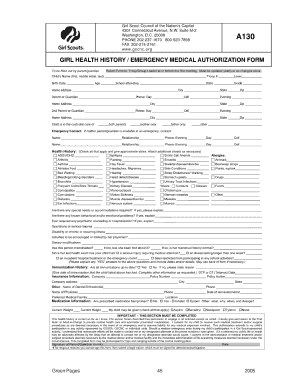
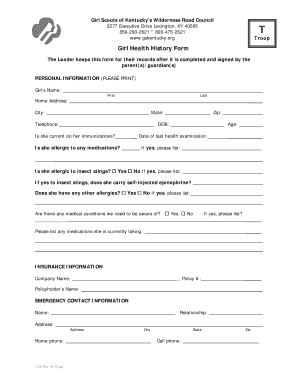
The Girl Health History Emergency Medical Authorization Form is a medical consent document used by parents or guardians to provide essential health information and emergency contacts for their child participating in Girl Scout activities.
pdfFiller scores top ratings on review platforms




Who needs GSCNC Girl Health History and Emergency Medical Authorization Form?
Explore how professionals across industries use pdfFiller.

GSCNC Girl Health History and Emergency Medical Authorization Form is needed by:
-
Parents or guardians of Girl Scouts
-
Girl Scout troop leaders
-
Camp coordinators for Girl Scout events
-
Healthcare providers associated with Girl Scouts
-
Event organizers for Girl Scout activities
Comprehensive Guide to GSCNC Girl Health History and Emergency Medical Authorization Form
What is the Girl Health History Emergency Medical Authorization Form?
The Girl Health History Emergency Medical Authorization Form is a crucial document for parents and guardians of girls participating in Girl Scout activities. It serves to collect essential health information and emergency contact details necessary for the safety of minors during these events.
This form gathers comprehensive data, including the child's health history, immunization records, and emergency contacts, ensuring that caregivers are well-prepared for any medical situation. The necessity of having accurate and updated information is paramount for effective emergency care.
Purpose and Benefits of the Girl Health History Emergency Medical Authorization Form
This form plays a vital role not only in facilitating participation in Girl Scout activities but also in ensuring the safety and well-being of the child. Emergency medical consent is essential during outings where immediate medical attention may be required.
By providing this authorization, guardians gain peace of mind knowing that they have taken responsibility for their child's health. It enables preparedness for any unforeseen medical situations, thereby enhancing the safety of all participants involved in group activities.
Key Features of the Girl Health History Emergency Medical Authorization Form
The form includes essential sections that maximize its utility and accessibility. It consists of fields for health history, immunization records, and emergency contacts.
Designed for user-friendliness, it features fillable fields and checkboxes, along with clear instructions to guide parents through the process efficiently.
-
Health history section for documenting past medical issues.
-
Immunization records for ensuring up-to-date vaccinations.
-
Emergency contacts to provide alternative caregivers.
-
Fillable fields for easier completion of necessary information.
Who Needs the Girl Health History Emergency Medical Authorization Form?
This form is applicable to parents and guardians of minors involved in Girl Scout activities. It is especially important for those whose children participate in camps, trips, or any other events sponsored by the organization.
Having this authorization on file is critical for any situations that may arise where medical treatment is needed while away from home.
How to Fill Out the Girl Health History Emergency Medical Authorization Form Online
Filling out this form online is straightforward. Begin by entering the child’s name and providing emergency contact information in the designated fields.
-
Fill out the health history section carefully, noting any past illnesses.
-
Provide an accurate list of immunizations to date.
-
Double-check emergency contact details for completeness.
Consider reviewing the form thoroughly to avoid common errors, ensuring all necessary information is accurately captured.
How to Sign the Girl Health History Emergency Medical Authorization Form
The signing process for this form offers flexibility with both digital and wet signature options available. Understanding these requirements is essential for validation.
For those opting for eSigning, pdfFiller provides a user-friendly platform for completing this process seamlessly.
Submission Methods and Delivery for the Girl Health History Emergency Medical Authorization Form
Upon completion, the form can be submitted through various methods, catering to individual preferences. Options include both online submission and submitting a hard copy.
-
Ensure you follow the specified guidelines for either submission method.
-
Keep track of your submission and seek confirmation of receipt for peace of mind.
Security and Compliance for the Girl Health History Emergency Medical Authorization Form
The handling of sensitive information is paramount. pdfFiller implements stringent security protocols including encryption to safeguard user data.
This commitment to privacy extends to compliance with established standards like HIPAA and GDPR, ensuring that all data shared through the form remains confidential and secure.
Sample Completed Girl Health History Emergency Medical Authorization Form
Providing a visual example of a filled-out Girl Health History Emergency Medical Authorization Form can greatly aid in understanding the completion process. This sample illustrates common entries found in each section.
Referencing such an example helps clarify the information required, making the process easier for parents and guardians.
Experience Easy Form Filling with pdfFiller
Utilizing pdfFiller for completing the Girl Health History Emergency Medical Authorization Form enhances the overall experience. Features such as editing, eSigning, and sharing options simplify the process.
Consider creating an account with pdfFiller to access these tools and streamline your document management needs effectively.
How to fill out the GSCNC Girl Health History and Emergency Medical Authorization Form
-
1.Access pdfFiller and search for the 'Girl Health History Emergency Medical Authorization Form'. Open the document in your browser.
-
2.Navigate through the form by scrolling down, using the pdfFiller interface, or the toolbar provided for easy movement.
-
3.Gather all the needed information before starting, including your child's health history, emergency contacts, and immunization records.
-
4.Begin entering details in the designated fields. Use the text boxes for your child's name, and ensure accuracy in emergency contact sections.
-
5.Use dropdown menus and checkboxes as needed to complete the health history and consent sections, referring to your gathered information for accuracy.
-
6.Once all fields are completed, review the entire form thoroughly for any errors or missing information, ensuring everything is filled according to the guidelines.
-
7.To finalize the document, select the 'Save' option. You can choose to download a copy or submit it electronically through pdfFiller if required.
-
8.Ensure you save a copy for your records. You may choose to print it directly from pdfFiller if a hard copy is preferred.

Who is eligible to complete the Girl Health History Emergency Medical Authorization Form?
The form must be completed by a parent or guardian of the child who is participating in Girl Scout activities. It provides crucial health information for emergency situations.
When should the form be updated?
The form should be updated yearly or whenever there are changes in your child's health status, emergency contacts, or immunization records. Keeping it current ensures safety during activities.
How do I submit the completed form?
After filling out the form, you can either save and download it for personal records or submit it electronically via pdfFiller to your designated Girl Scout leader or organization.
What information is required to complete the form?
Required information includes your child's full name, health history details, emergency contacts, and immunization records. Be prepared with accurate and up-to-date information before starting.
What common mistakes should I avoid when filling out the form?
Common mistakes include not updating emergency contacts, providing incomplete health information, or missing signatures. Always double-check the form to ensure all required fields are completed.
What options do I have after filling out the form?
After completing the form, you can save it to your device, print a hard copy, or submit it electronically through pdfFiller. Make sure to keep a record for your personal files.
How long does it take to fill out the form?
The time to fill out the form can vary depending on the information you have. Typically, it takes 15 to 30 minutes to gather information and complete the form thoroughly.
GSCNC Girl Health History and Emergency Medical Authorization Form Form Versions
Related Content
Related Forms

Related Catalogs
Get the latest insights from our blog



If you believe that this page should be taken down, please follow our DMCA take down process
here
.
This form may include fields for payment information. Data entered in these fields is not covered by PCI DSS compliance.