
Last updated on
Oct 31, 2026

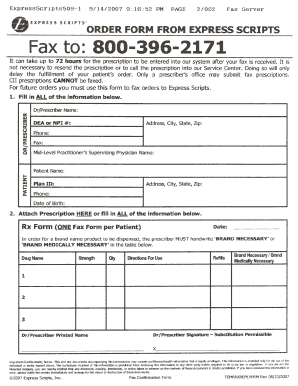
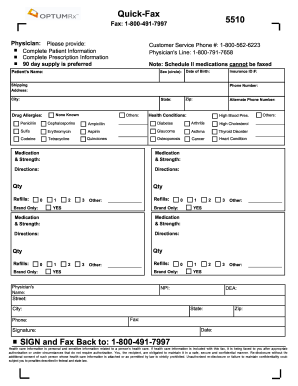
Express Scripts New Prescription Fax Form 2012 free printable template
We are not affiliated with any brand or entity on this form

Fill out
Complete the form online in a simple drag-and-drop editor.

eSign
Add your legally binding signature or send the form for signing.

Share
Share the form via a link, letting anyone fill it out from any device.

Export
Download, print, email, or move the form to your cloud storage.
Why pdfFiller is the best tool for your documents and forms


End-to-end document management
From editing and signing to collaboration and tracking, pdfFiller has everything you need to get your documents done quickly and efficiently.
Accessible from anywhere
pdfFiller is fully cloud-based. This means you can edit, sign, and share documents from anywhere using your computer, smartphone, or tablet.
Secure and compliant
pdfFiller lets you securely manage documents following global laws like ESIGN, CCPA, and GDPR. It's also HIPAA and SOC 2 compliant.
What is Express Scripts New Prescription Fax Form
The Express Scripts Confidentiality Notice is a document used by healthcare providers to inform recipients about the confidentiality of medical information and the intended nature of communication.
pdfFiller scores top ratings on review platforms




Who needs Express Scripts New Prescription Fax Form?
Explore how professionals across industries use pdfFiller.

Express Scripts New Prescription Fax Form is needed by:
-
Healthcare professionals managing patient information
-
Pharmacy staff handling sensitive data
-
Medical administrators overseeing communication protocols
-
Legal teams ensuring HIPAA compliance
-
Insurance representatives dealing with patient records
Comprehensive Guide to Express Scripts New Prescription Fax Form
What is the Express Scripts Confidentiality Notice?
The Express Scripts Confidentiality Notice is a document that ensures secure communication regarding sensitive healthcare information. Its primary intent is to inform recipients that all communications, along with any attached files, are intended only for the designated recipient and contain private details. This notice plays a crucial role in safeguarding medical information privacy by clearly outlining the confidential nature of the correspondence.
Designed specifically for secure healthcare communication, the confidentiality notice emphasizes the importance of maintaining the confidentiality of medical information. Recipients are prohibited from disclosing, copying, or disseminating the contents, thereby protecting patient privacy and upholding ethical standards in healthcare.
Purpose and Benefits of the Express Scripts Confidentiality Notice
The Express Scripts Confidentiality Notice is vital for ensuring that sensitive information remains protected within healthcare communications. Its role extends to legal significance, as it aligns with HIPAA compliance, safeguarding patient privacy rights. The benefits of utilizing this notice encompass the protection of sensitive data from unauthorized access and informing unintended recipients about the confidential nature of the communication.
This proactive measure helps healthcare providers and pharmacies manage information securely, reducing the risk of breaches and enhancing trust among patients and providers. An essential feature of this notice is its function as a safeguard against potential HIPAA violations, which can have serious repercussions in the healthcare industry.
Key Features of the Express Scripts Confidentiality Notice
The Express Scripts Confidentiality Notice is characterized by its straightforward content structure, primarily presented as continuous text without fillable fields. This format ensures clarity in communication while conveying the essential confidentiality message effectively. A key feature is its explicit prohibition against the dissemination of the notice's contents, which further emphasizes the importance of confidentiality.
This document supports maintaining a secure communication framework by providing clear guidelines for recipients on handling sensitive information. By doing so, it assists healthcare entities in fostering an environment of trust and accountability.
Who Needs the Express Scripts Confidentiality Notice?
The target audience for the Express Scripts Confidentiality Notice primarily includes healthcare providers, pharmacies, and organizations that exchange patient information. These entities must utilize the notice to ensure compliance with confidentiality standards and protect patient data from unauthorized access. Additionally, understanding the potential implications for unintended recipients is critical, as health information may be improperly disclosed.
Industries heavily involved in patient information exchange, such as healthcare administration, billing, and insurance, must adopt this notice to mitigate risks associated with data breaches and uphold confidentiality standards.
How to Use the Express Scripts Confidentiality Notice Online
Using the Express Scripts Confidentiality Notice online is straightforward, particularly through platforms like pdfFiller. Users can easily access the notice via pdfFiller, allowing for seamless editing and secure sharing of the document. The digital tools provided enhance the process of preparing communications with the notice, ensuring compliance and security in sharing sensitive information.
To effectively use the notice, follow these steps:
-
Access the notice through pdfFiller.
-
Edit the document as necessary to include specific details relevant to your communication.
-
Securely share the finalized notice with intended recipients.
Security and Compliance Considerations for the Express Scripts Confidentiality Notice
Securing the Express Scripts Confidentiality Notice involves adhering to both HIPAA and GDPR standards, which are essential for protecting patient information. Ensuring compliance with these regulations helps prevent legal repercussions while fostering patient trust in healthcare providers. Key security measures implemented by platforms like pdfFiller include 256-bit encryption and SOC 2 Type II compliance, which ensure sensitive documents are handled appropriately.
Best practices for sending and storing the notice securely include:
-
Consistently encrypting documents during transmission and storage.
-
Verifying recipient identities before sharing sensitive information.
-
Implementing access controls to restrict document visibility.
How to Download and Save the Express Scripts Confidentiality Notice PDF
Downloading the Express Scripts Confidentiality Notice in PDF format is a simple process through pdfFiller. Users can follow the outlined steps to ensure secure handling of the document after downloading. The platform offers flexibility in saving the notice, whether to local devices or to cloud storage, accommodating various storage preferences.
To download and save the notice, follow these steps:
-
Navigate to pdfFiller and locate the Express Scripts Confidentiality Notice.
-
Select the download option to save the document in your preferred format.
-
Choose the location for saving the file on your device or cloud storage.
What Happens After Using the Express Scripts Confidentiality Notice?
After utilizing the Express Scripts Confidentiality Notice, it is crucial to track all sent communications to ensure accountability and security. Recipients who mistakenly receive the notice must take recommended actions, such as notifying the sender of the error and securely deleting the document to prevent unauthorized access. Ignoring a confidentiality notice can lead to significant implications, as it may expose sensitive information to unintended parties.
Maintaining diligence in handling the notice reinforces the importance of confidentiality in healthcare communications, ultimately supporting a secure environment for patient information.
How pdfFiller Enhances Your Experience with the Express Scripts Confidentiality Notice
pdfFiller significantly improves user experience when handling the Express Scripts Confidentiality Notice through its robust features, including eSigning and document editing capabilities. The platform’s user-friendly interface simplifies the management of confidentiality documents, helping users adhere to security guidelines while ensuring compliance with regulations.
Utilizing pdfFiller for the Express Scripts Confidentiality Notice allows users to benefit from efficient document management and secure processes that prioritize patient confidentiality and data protection.
Engage with pdfFiller for Your Documentation Needs
Choosing pdfFiller for handling the Express Scripts Confidentiality Notice simplifies the process of managing confidentiality documents. With its focus on security and ease of use, pdfFiller is an excellent solution for healthcare providers, pharmacies, and any organizations managing sensitive patient information. By leveraging this platform, users can explore a range of document management solutions tailored to their needs while ensuring the highest standards of confidentiality.
How to fill out the Express Scripts New Prescription Fax Form
-
1.Access pdfFiller and search for the 'Express Scripts Confidentiality Notice' in the form catalog.
-
2.Open the document in pdfFiller by clicking on the form title.
-
3.Review the document to familiarize yourself with its contents and ensure you understand its purpose.
-
4.If necessary, gather information on the intended recipient's name, address, and any other relevant details.
-
5.Since there are no fillable fields, ensure the document's integrity is maintained.
-
6.Once you've reviewed the document, you can finalize it by checking for any needed changes.
-
7.To save your work, click on 'Save' or 'Download' to keep a copy of the confidentiality notice on your device.
-
8.If submission is required, follow the instructions provided for sending the form via secure channels.

Who is required to use the Express Scripts Confidentiality Notice?
Healthcare providers, pharmacy personnel, and anyone dealing with confidential medical information are required to use the Express Scripts Confidentiality Notice to ensure sensitive information remains protected and private.
Is there a deadline for submitting the confidentiality notice?
There are typically no strict deadlines for submitting the Express Scripts Confidentiality Notice, but it is important to use it as soon as sensitive communications occur to protect patient information.
How do I submit the confidentiality notice after completion?
After completing the Express Scripts Confidentiality Notice, you can submit it through secure communication methods such as email or fax, as directed in your organization's protocols for handling confidential communications.
Are supporting documents required with the Express Scripts confidentiality notice?
Generally, you do not need supporting documents with the Express Scripts Confidentiality Notice. Simply ensure that the notice is complete and sent securely to the intended recipient.
What are common mistakes to avoid when using this form?
When using the Express Scripts Confidentiality Notice, avoid omitting recipient details or failing to clearly communicate the confidentiality notice. Always ensure you send it to the correct recipient.
How long does it take to process the Express Scripts Confidentiality Notice?
Processing times for the Express Scripts Confidentiality Notice may vary depending on internal protocols, but since it's primarily a notification, action is usually taken immediately upon receipt.
What if the notice is sent to the wrong recipient?
If the Express Scripts Confidentiality Notice is sent to the wrong recipient, the unintended recipient should be instructed to notify Express Scripts immediately and refrain from disseminating the information.
Express Scripts New Prescription Fax Form Form Versions
Related Content
Related Forms




Get the latest insights from our blog


If you believe that this page should be taken down, please follow our DMCA take down process
here
.
This form may include fields for payment information. Data entered in these fields is not covered by PCI DSS compliance.