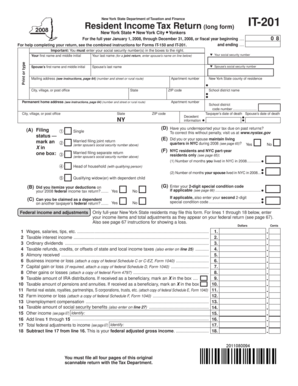
Form preview

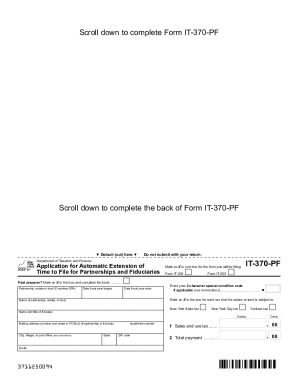
NY DTF IT-370 2020 free printable template


Get Form
pdfFiller is not affiliated with any government organization
Screenshot
Screenshot
Screenshot

Get, Create, Make, and Sign NY DTF IT-370

Edit your NY DTF IT-370 online
Type text, complete fillable fields, insert images, highlight or blackout data for discretion, add comments, and more.
Screenshot
Add your legally-binding signature
Draw or type your signature, upload a signature image, or capture it with your digital camera.
Screenshot
Share your form instantly
Email, fax, or share your NY DTF IT-370 via URL. You can also download, print, or export forms to your preferred cloud storage service.
Screenshot

Instructions and Help about NY DTF IT-370

How to edit NY DTF IT-370

To edit the NY DTF IT-370 tax form, first obtain a blank copy from the New York State Department of Taxation and Finance (DTF) website or through a tax preparation service. If you need to make changes to an already completed form, use a PDF editing tool like pdfFiller to make direct modifications. Remember to verify all edited information for accuracy before submission.

How to fill out NY DTF IT-370

To fill out the NY DTF IT-370 form correctly, follow these steps:
01
Download the form and open it using a PDF editor or print a hard copy.
02
Provide your personal information in the designated fields, including your name, address, and taxpayer identification number.
03
Enter your financial information as required, ensuring that all figures are accurate and match your records.
04
Sign and date the form where indicated.
05
Review the entire form for completeness before submitting.

About NY DTF IT previous version

What is NY DTF IT-370?

NY DTF IT-370 is a New York State tax form used by certain individuals and organizations to report certain income or transactions. This form enables the state to collect taxes on various activities, including but not limited to, transaction reporting for sellers and lessors.

When am I exempt from filling out this form?

You may be exempt from filling out the NY DTF IT-370 form if you do not engage in taxable activity within New York State or if your income falls below the mandatory reporting threshold. Additionally, certain organizations, such as tax-exempt entities, may also be exempt.

What are the penalties for not issuing the form?

Failure to issue the NY DTF IT-370 form when required can result in penalties imposed by the New York State Department of Taxation and Finance. These penalties typically include fines that vary based on the amount of tax owed and the duration of the delay in filing.

Is the form accompanied by other forms?

In some cases, the NY DTF IT-370 may need to be accompanied by other forms, especially if you are reporting multiple types of income or claiming certain deductions or credits. Always check the specific filing instructions or consult a tax professional for guidance on necessary accompanying documents.

What is the purpose of this form?

The primary purpose of the NY DTF IT-370 form is to facilitate the reporting of income that may be subject to state taxes. It helps to ensure compliance with New York tax laws by documenting financial transactions that result in tax obligations.

Who needs the form?

Individuals and entities that conduct certain taxable activities within New York State may need to file the NY DTF IT-370 form. This includes businesses that make sales or lease property, as well as independent contractors who receive payments that are taxable.

Components of the form

The NY DTF IT-370 form includes several components that must be completed, such as identifying information, income details, and a signature section. Each component serves to provide necessary information to the state regarding your financial activities for the reporting period.

What information do you need when you file the form?

When filing the NY DTF IT-370, you will need to have your tax identification number, detailed financial records regarding income and transactions, and any relevant documentation that supports your reported figures. This information is crucial for ensuring the accuracy of your submission.

Where do I send the form?

The completed NY DTF IT-370 form should be sent to the address specified in the form instructions. Typically, this will be the New York State Department of Taxation and Finance. Ensure that you are sending the form to the correct location to avoid delays in processing.

FAQ about NY DTF IT-370

If you discover an error after submitting the it 370 pdf 2021, you should file an amended return. This process typically requires you to complete the appropriate amendment form and indicate the changes made. Keep thorough records of both your original submission and the amended version to ensure clarity in any future discussions with tax authorities.

To verify the receipt and processing status of your it 370 pdf 2021, you can use the state’s online tracking system or contact their support. It's essential to have your filing details handy, such as submission date and any reference numbers provided during the e-filing process, to expedite inquiries.

When completing the it 370 pdf 2021, common errors include incorrect Social Security numbers, failing to sign the document, and overlooking required attachments. Carefully reviewing your form before submission can help avoid these pitfalls and ensure accurate processing.

Yes, the it 370 pdf 2021 can be e-filed, but you must meet certain technical requirements. This includes using compatible software that supports electronic submissions and ensuring your internet browser is up to date to avoid rejection issues during the filing process.

If you receive a notice or audit request after filing the it 370 pdf 2021, it's important to read the correspondence carefully. Prepare the requested documentation and contact the tax authority by the specified deadline to resolve any issues. Having a record of your submission can assist in clarifying any misunderstandings.

See what our users say

Read user feedback and try pdfFiller to explore all its benefits for yourself
I have just started using PDFfiller, but I love it.
Linda W
So far so good. Need to use it a bit more...
Cyndi T
I've had a good experience with PDFfiller so far.
elaine c
Product works great. There is a misunderstanding on pricing for paying one-time vs. monthly. They issued a refund proactively.
Eric
Had similar capability on work computer(s)> I was fine with filling out PDF files and saving them. Ths allows signatures and other features that may get me to keep it.
Pat D
Easy to use Easy to use and very helpful with any document editing!
Daniel Ruth
See what our users say
Trust Seal
Trust Seal
Trust Seal
Trust Seal
Trust Seal
Trust Seal
Trust Seal
Trust Seal
Rate free form
4.1
satisfied
67 votes
If you believe that this page should be taken down, please follow our DMCA take down process here .
This form may include fields for payment information. Data entered in these fields is not covered by PCI DSS compliance.