
Last updated on
Nov 9, 2026
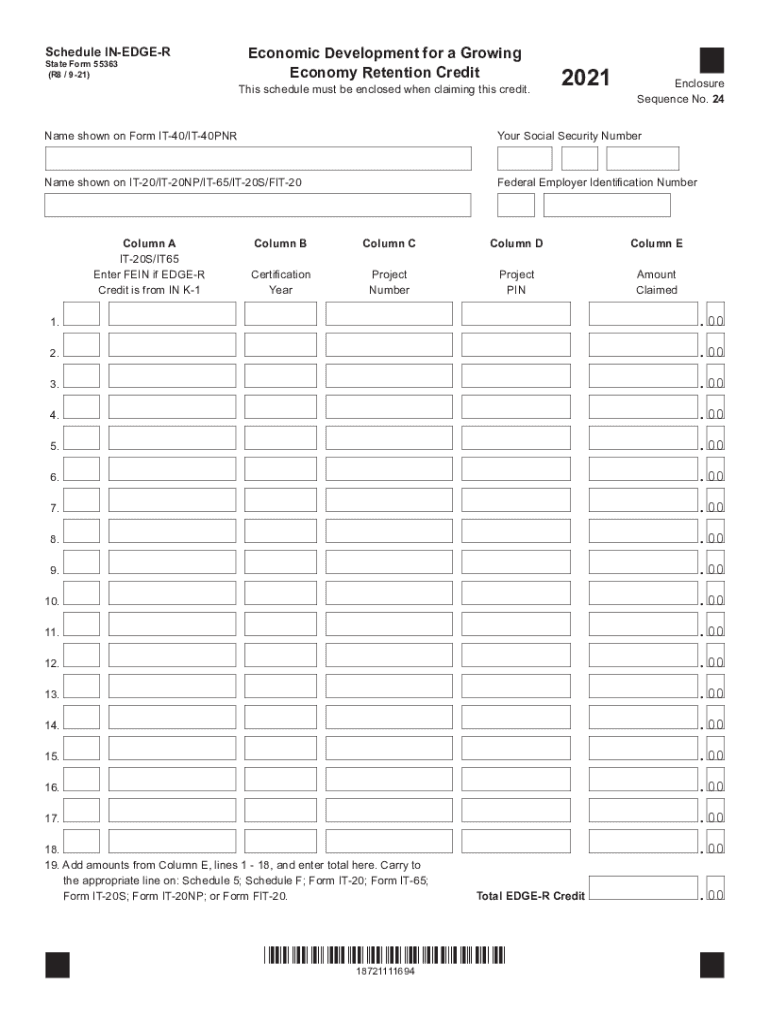
IN Schedule IN-EDGE-R 2021 free printable template
pdfFiller is not affiliated with any government organization

Fill out
Complete the form online in a simple drag-and-drop editor.

eSign
Add your legally binding signature or send the form for signing.

Share
Share the form via a link, letting anyone fill it out from any device.

Export
Download, print, email, or move the form to your cloud storage.
Why pdfFiller is the best tool for your documents and forms


End-to-end document management
From editing and signing to collaboration and tracking, pdfFiller has everything you need to get your documents done quickly and efficiently.
Accessible from anywhere
pdfFiller is fully cloud-based. This means you can edit, sign, and share documents from anywhere using your computer, smartphone, or tablet.
Secure and compliant
pdfFiller lets you securely manage documents following global laws like ESIGN, CCPA, and GDPR. It's also HIPAA and SOC 2 compliant.
What is IN Schedule IN-EDGE-R
The Schedule IN-EDGE-R is a tax form used by taxpayers in Indiana to claim the Economic Development for a Growing Economy Retention (EDGE-R) Credit.
pdfFiller scores top ratings on review platforms




Who needs IN Schedule IN-EDGE-R?
Explore how professionals across industries use pdfFiller.

IN Schedule IN-EDGE-R is needed by:
-
Indiana taxpayers seeking economic development credits
-
Individuals claiming the EDGE-R tax benefit
-
Corporations eligible for the EDGE-R Credit
-
Nonprofit organizations pursuing tax relief
-
Tax professionals assisting clients with Indiana tax forms
Comprehensive Guide to IN Schedule IN-EDGE-R
What is the Schedule IN-EDGE-R Economic Development for a Growing Economy Retention Credit?
The Schedule IN-EDGE-R form is crucial for claiming the EDGE-R Credit, a significant initiative in Indiana's economic development strategy. This credit aims to support businesses by providing tax benefits that can enhance their operations and contribute to the state's economic growth. The Schedule IN-EDGE-R form serves as an essential tool for individuals, corporations, and nonprofits seeking to leverage this credit for financial advantages.
Purpose and Benefits of the Schedule IN-EDGE-R Credit
The Schedule IN-EDGE-R Credit is designed to offer substantial financial advantages to eligible taxpayers. Claiming this credit can lead to considerable tax savings, ultimately encouraging further economic development and job creation within Indiana. Long-term benefits include improved business sustainability, which can lead to investment in local communities and workforce enhancement.
Eligibility Criteria for the Schedule IN-EDGE-R Economic Development Credit
To qualify for the EDGE-R Credit, taxpayers must meet specific eligibility requirements. Key qualifications include:
-
Registered businesses or entities in Indiana.
-
Compliance with state regulations and project-specific criteria.
-
Provision of accurate project details and documentation.
Understanding and adhering to these criteria is vital for a successful credit claim, emphasizing the need for complete and accurate information.
How to Fill Out the Schedule IN-EDGE-R Economic Development for a Growing Economy Retention Credit Online (Step-by-Step)
To complete the Schedule IN-EDGE-R form digitally, follow these steps:
-
Access the fillable form online through pdfFiller.
-
Carefully read the instructions provided with the form.
-
Fill out key fields accurately, using complete and precise information.
-
Review all entries before submission to ensure validity.
Gathering necessary information, such as your Federal Employer Identification Number, is critical before starting the form.
Required Documents and Supporting Materials for the Schedule IN-EDGE-R Credit
Claiming the EDGE-R Credit requires specific documentation to support your application effectively. Essential documents include:
-
Proof of business registration in Indiana.
-
Detailed project plans and financial records.
-
Any correspondence confirming credit eligibility.
It's also essential to maintain the security of sensitive documents while ensuring all materials are complete before submission.
Common Errors and How to Avoid Them When Submitting the Schedule IN-EDGE-R
Many applicants encounter issues during the submission process. Common pitfalls include:
-
Incomplete or inaccurate information on the form.
-
Failure to include necessary supporting documents.
To prevent these issues, validate the completed form thoroughly before submission and understand the potential consequences of errors on your credit claim process.
Where and How to Submit the Schedule IN-EDGE-R Economic Development Retention Credit Form
Submission of the Schedule IN-EDGE-R form can be done through various methods:
-
Online submission via official state tax portals.
-
Mailing the completed form to the appropriate tax office.
Be mindful of submission deadlines to ensure timely processing and avoid penalties from late submissions.
What Happens After You Submit the Schedule IN-EDGE-R Form?
After submitting your Schedule IN-EDGE-R form, you'll want to track its status effectively. Key points to remember include:
-
Checking for confirmation of receipt from the tax office.
-
Understanding the typical time frames for processing your claim.
If you discover any errors in your submission, know the steps for correcting or amending the form as needed.
Securely Manage Your Schedule IN-EDGE-R Economic Development Retention Credit Documents
Handling sensitive tax documents requires a commitment to security. Utilize the following best practices:
-
Implement strong passwords and encryption for stored documents.
-
Share sensitive documents only through secure channels.
Ensuring compliance with privacy regulations, such as HIPAA and GDPR, is also imperative when managing sensitive information.
Get Started Today with pdfFiller for Your Schedule IN-EDGE-R Form Needs!
Utilizing pdfFiller can simplify your experience with the Schedule IN-EDGE-R form. The platform offers features such as online editing, eSigning, and efficient document management, enabling users to complete the form quickly and easily. Sign up for pdfFiller today to enjoy a seamless filing experience.
How to fill out the IN Schedule IN-EDGE-R
-
1.Begin by accessing pdfFiller and search for 'Schedule IN-EDGE-R' in the template library.
-
2.Open the form and take a moment to familiarize yourself with its sections and fields.
-
3.Before filling out the form, gather essential information including your Social Security Number or Federal Employer Identification Number, the certified tax year, project number, project PIN, and the amount of credit to claim.
-
4.Use the input fields on pdfFiller to enter your personal information and other required details accurately.
-
5.As you fill out the form, refer to the on-screen instructions provided by pdfFiller for guidance on each section.
-
6.After completing all fields, review the form thoroughly to ensure all entries are correct and all required information is included.
-
7.Once you are satisfied with your entries, utilize pdfFiller's options to save or download the form as a PDF.
-
8.Finally, submit the completed form with your tax return as directed on the Indiana state guidelines for EDGE-R credits.

Who is eligible to claim the EDGE-R Credit?
Eligibility for the EDGE-R Credit typically includes individuals, corporations, and nonprofit organizations actively involved in economic development projects within Indiana.
What are the key deadlines for submitting this form?
The Schedule IN-EDGE-R must be submitted with your tax return for the corresponding year. Ensure you review Indiana tax deadlines to avoid late submissions.
How do I submit the Schedule IN-EDGE-R form?
The Schedule IN-EDGE-R must be enclosed with your tax return when filing. You can file electronically or submit a paper return by mail, depending on your filing method.
What supporting documents do I need when filing this form?
When claiming the EDGE-R Credit, you should have documentation showcasing the project's details, including project numbers and any certifications related to the credit.
What common mistakes should I avoid when filling out this form?
Ensure that all fields are properly completed without leaving blanks, double-check your Social Security Number or EIN, and verify the project number and PIN for accuracy.
How long does it take to process the EDGE-R Credit claim?
Processing times vary, but typically, you can expect feedback on your tax return from the Indiana Department of Revenue within several weeks of submission.
Are there any fees associated with filing this form?
Filing the Schedule IN-EDGE-R form itself does not come with fees; however, general tax filing might incur costs depending on your chosen method or tax professional's services.
IN Schedule IN-EDGE-R Form Versions
Related Forms



Get the latest insights from our blog


If you believe that this page should be taken down, please follow our DMCA take down process
here
.
This form may include fields for payment information. Data entered in these fields is not covered by PCI DSS compliance.