
Last updated on
Oct 19, 2026

Get the free Preamble to the Constitution Lesson
We are not affiliated with any brand or entity on this form

Fill out
Complete the form online in a simple drag-and-drop editor.

eSign
Add your legally binding signature or send the form for signing.

Share
Share the form via a link, letting anyone fill it out from any device.

Export
Download, print, email, or move the form to your cloud storage.
Why pdfFiller is the best tool for your documents and forms


End-to-end document management
From editing and signing to collaboration and tracking, pdfFiller has everything you need to get your documents done quickly and efficiently.
Accessible from anywhere
pdfFiller is fully cloud-based. This means you can edit, sign, and share documents from anywhere using your computer, smartphone, or tablet.
Secure and compliant
pdfFiller lets you securely manage documents following global laws like ESIGN, CCPA, and GDPR. It's also HIPAA and SOC 2 compliant.
What is Constitution Lesson
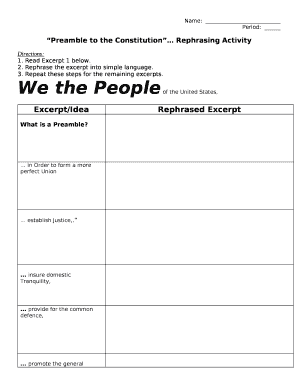
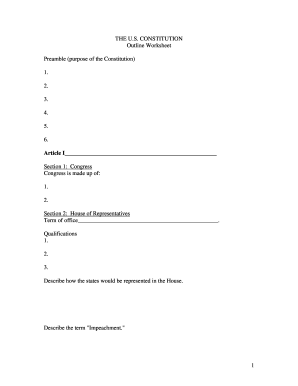
The Preamble to the Constitution Lesson is an educational document used by teachers to facilitate a close reading lesson and government formation activities in classrooms.
pdfFiller scores top ratings on review platforms




Who needs Constitution Lesson?
Explore how professionals across industries use pdfFiller.

Constitution Lesson is needed by:
-
Educators looking for classroom resources
-
Teachers of civics or social studies
-
Students needing structured lessons
-
Parents wanting to support educational activities
-
Schools implementing curriculum standards
-
Education administrators planning educational tools
Comprehensive Guide to Constitution Lesson
What is the Preamble to the Constitution Lesson?
The Preamble to the Constitution Lesson serves as a foundational activity for students exploring the U.S. Constitution. This educational worksheet is specifically designed for classroom environments, providing a structured approach to understanding government formation. It contains a variety of questions and activities aimed at enhancing student engagement and comprehension of the core principles of governance.
Included within the worksheet are detailed instructions and interactive activities that drive collaborative learning among students. The format is user-friendly, allowing educators to effectively facilitate discussions and group brainstorming sessions based on the content provided.
Purpose and Benefits of the Preamble to the Constitution Lesson
The primary purpose of this lesson is to deepen students' understanding of the U.S. Constitution and its significance in government formation. By utilizing this educational worksheet, educators can achieve several educational goals, all focused on enhancing comprehension of constitutional principles.
Key benefits also include fostering engagement through collaborative activities, which makes the lesson more dynamic and interactive. This worksheet serves as a valuable classroom tool that provides educators with a structured framework to help students analyze and discuss the Preamble effectively.
Key Features of the Preamble to the Constitution Lesson
This worksheet is equipped with several essential features that support classroom applications. It includes blank fields for students to fill in their names and dates, making it easy to keep track of participation. Additionally, the document outlines clear instructions for group activities, enabling teachers to guide students effectively during collaborative sessions.
Another noteworthy feature is the worksheet's reproducibility, allowing educators to create multiple copies for classroom distribution. This makes it a practical choice for lessons and ensures that all students have access to the materials.
Who Can Use the Preamble to the Constitution Lesson?
The Preamble to the Constitution Lesson is tailored primarily for teachers and educators at various educational levels. Its adaptable format makes it suitable for different grade levels, ensuring that all students can engage with the content regardless of their academic background.
Furthermore, parents can also use this material at home to assist their children in understanding the Preamble and its relevance. By exploring this lesson together, families can enhance their collective knowledge of constitutional principles.
How to Fill Out the Preamble to the Constitution Lesson Online
Filling out the Preamble to the Constitution Lesson online can be accomplished seamlessly using pdfFiller. To guide users through this process, here are the steps:
-
Open the designated PDF using pdfFiller.
-
Locate the fields for student information, including names and dates.
-
Proceed to complete the questionnaire based on the lesson’s activities.
-
Ensure all required fields are filled for effective lesson comprehension.
pdfFiller offers user-friendly features that streamline this process, making it straightforward for users to complete the document efficiently.
How to Download and Save the Preamble to the Constitution Lesson PDF
Once the Preamble to the Constitution Lesson is filled out, the document can be downloaded easily. Here are the steps to download and save the PDF:
-
Select the "Download" option once your document is complete.
-
Choose an appropriate file location on your device for easy access.
-
Save the document in a secure folder to manage it effectively and avoid confusion.
When handling educational documents, especially those containing personal information, it’s crucial to follow security measures to ensure data protection.
Common Errors and How to Avoid Them While Completing the Preamble to the Constitution Lesson
When filling out the Preamble to the Constitution Lesson worksheet, users may encounter several common errors. To address these issues, it’s important to follow these recommendations:
-
Carefully read all instructions provided in the worksheet.
-
Double-check entries for accuracy before submission.
-
Ensure compliance with any educational standards relevant to the lesson.
By taking these steps, individuals can minimize mistakes and enhance the overall quality of their submissions.
Security and Compliance When Using the Preamble to the Constitution Lesson
Security is paramount when managing educational documents like the Preamble to the Constitution Lesson. It is essential to ensure that data protection measures are in place when handling sensitive information.
pdfFiller demonstrates a strong commitment to security through robust practices, including compliance with HIPAA and GDPR. Users can trust that their documents are encrypted and handled with care, providing peace of mind when engaging with educational materials.
Engage with Your Educational Journey Using pdfFiller
Using pdfFiller's tools can significantly enhance your educational experience. The convenience of filling out the Preamble to the Constitution Lesson online allows for efficient editing and sharing of the document.
Educators are encouraged to explore other features that make document management more effective within the classroom. Embracing these tools opens up opportunities for more productive and streamlined educational engagements.
How to fill out the Constitution Lesson
-
1.Access pdfFiller and sign in or create an account if you do not have one.
-
2.Use the search bar to find the 'Preamble to the Constitution Lesson' form.
-
3.Click on the document to open it in the pdfFiller interface.
-
4.Review the fields available for completion. Gather necessary information such as student names and group activity details before starting.
-
5.Start filling in the blank fields designated for student names, dates, and other required information about classroom activities.
-
6.Refer to the provided instructions within the form to accurately complete group activity elements.
-
7.Once all fields are filled, review your entries for any errors or omissions.
-
8.Use the preview mode to see how the completed document will look.
-
9.When satisfied with the form, utilize pdfFiller’s save option to keep your work.
-
10.Choose to download the completed form as a PDF or directly submit it through pdfFiller if required by your institution.

Who can use the Preamble to the Constitution Lesson form?
The Preamble to the Constitution Lesson form is intended for educators and teachers who are planning lessons related to the Preamble of the Constitution, making it an essential tool in classrooms.
Is there a deadline for submitting the completed form?
This educational form does not typically have a submission deadline, but you should check with your school’s guidelines or curriculum planner for specific timelines.
How do I submit the completed form?
After completing the Preamble to the Constitution Lesson form on pdfFiller, you can either download it for physical submission or use electronic submission methods if your school permits.
Are there required documents to accompany this form?
Generally, this form does not require additional supporting documents, but you may include parent consent if necessary for activities that require it.
What common mistakes should I avoid when filling out the form?
Common mistakes to avoid include leaving blank fields, missing dates, or misrepresenting student participation in group activities. Always double-check your entries.
How long will it take to process this form?
Processing time for this educational form varies depending on your school’s administrative procedures; generally, allow a few days for verification or approval.
Can I edit the form after saving it?
Yes, you can reopen and edit the saved PDF document on pdfFiller at any time before final submission to make any necessary changes.
Related Forms




Get the latest insights from our blog



If you believe that this page should be taken down, please follow our DMCA take down process
here
.
This form may include fields for payment information. Data entered in these fields is not covered by PCI DSS compliance.