
Last updated on
Nov 7, 2026

WV DoR IT-140 2021 free printable template
pdfFiller is not affiliated with any government organization

Fill out
Complete the form online in a simple drag-and-drop editor.

eSign
Add your legally binding signature or send the form for signing.

Share
Share the form via a link, letting anyone fill it out from any device.

Export
Download, print, email, or move the form to your cloud storage.
Why pdfFiller is the best tool for your documents and forms


End-to-end document management
From editing and signing to collaboration and tracking, pdfFiller has everything you need to get your documents done quickly and efficiently.
Accessible from anywhere
pdfFiller is fully cloud-based. This means you can edit, sign, and share documents from anywhere using your computer, smartphone, or tablet.
Secure and compliant
pdfFiller lets you securely manage documents following global laws like ESIGN, CCPA, and GDPR. It's also HIPAA and SOC 2 compliant.
What is WV DoR IT-140
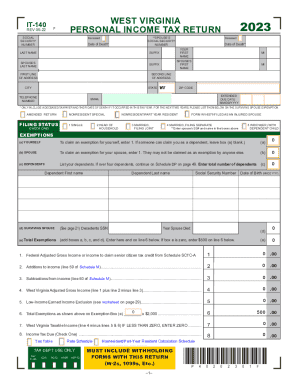
The West Virginia Personal Income Tax Return 2021 is a tax document used by residents of West Virginia to report their annual income to the state.
pdfFiller scores top ratings on review platforms




Love it. It has made it so much easier to revise documents for exhibits, etc.
PDFfiller is so user friendly. It helps immensely as a private practice owner where I need to fill-in pdf documents, convert to other formats, and insert verified signatures. I would recommend to other business owners.
It's great, easy to edit and move docs via email
Just started using......so far so good!!!
So easy to use. Not sure why I was filling out forms by hand.
I like using this great for my business.
Who needs WV DoR IT-140?
Explore how professionals across industries use pdfFiller.

WV DoR IT-140 is needed by:
-
West Virginia residents filing their personal income tax for 2021
-
Married couples filing a joint tax return in West Virginia
-
Tax preparers assisting clients with West Virginia tax filings
-
Individuals seeking to claim deductions and credits on their state tax return
-
Anyone needing to submit their income information to the West Virginia State Tax Department
Comprehensive Guide to WV DoR IT-140
What is the West Virginia Personal Income Tax Return 2021?
The West Virginia Personal Income Tax Return 2021 is a crucial document for residents to report their annual income to the state. It contains essential details that need to be filled out accurately for tax purposes. This form requires various key details, including personal information, income amounts, and precise calculations of owed taxes.
Filing this form is significant for compliance with West Virginia tax laws. Residents must provide their personal data and ensure all figures are calculated correctly to avoid issues with the West Virginia State Tax Department.
Who Needs the West Virginia Personal Income Tax Return 2021?
Individuals required to file the West Virginia Personal Income Tax Return 2021 include all qualifying residents, taxpayers, and their spouses. Specifically, those with income exceeding the state's set thresholds must submit this form.
Additionally, couples who file jointly will need to complete the form together. It's essential for both individuals and couples to understand these requirements to ensure they adhere to filing regulations.
Key Features of the West Virginia Personal Income Tax Return 2021
The West Virginia Personal Income Tax Return 2021 includes several vital features that users should be aware of. Fillable fields encompass personal information such as LAST NAME, FIRST MI, ADDRESS, and additional contact details.
-
Sections for reporting income and deductions
-
Areas designated for exemptions, tax credits, and payment options
-
Signature requirements for both the taxpayer and spouse, if applicable
Understanding these components is crucial for a complete and accurate submission.
How to Fill Out the West Virginia Personal Income Tax Return 2021 Online
To fill out the West Virginia Personal Income Tax Return 2021 online, follow these step-by-step instructions:
-
Access the form through pdfFiller.
-
Begin by filling in your LAST NAME and FIRST MI.
-
Provide your ADDRESS, TELEPHONE NUMBER, and EMAIL.
-
Complete the fields concerning your income and tax calculations carefully.
-
Sign the form where specified, ensuring accuracy in your entries.
Double-checking your information before submission helps prevent errors that could complicate your tax filing.
When to File the West Virginia Personal Income Tax Return 2021
Understanding filing deadlines is crucial. Specific due dates for the West Virginia Personal Income Tax Return 2021 must be adhered to avoid penalties.
-
File by the state-mandated deadline to prevent assessment of late fees.
-
Consider early filing to mitigate last-minute complications.
By planning ahead, taxpayers can ensure timely submission and compliance with state regulations.
Submitting the West Virginia Personal Income Tax Return 2021
There are two primary methods for submitting the West Virginia Personal Income Tax Return 2021: online submission through designated platforms or mailing a physical copy to the tax department. Each method has its benefits depending on preference for convenience or traditional filing.
-
Online submission offers immediate tracking options for your filing status.
-
If mailing, ensure to send it to the correct address and keep proof of submission.
It's advisable to confirm submission to avoid any potential issues with your filing status.
Common Errors to Avoid When Filing the West Virginia Personal Income Tax Return 2021
To minimize mistakes during the filing process, be aware of common pitfalls that can affect your tax return. Frequent errors include incorrect numerical entries and missing required signatures.
-
Always double-check the accuracy of personal information entered.
-
Review all calculations thoroughly before finalizing your submission.
Utilizing review resources can help ensure compliance with the state tax filing requirements.
Security and Compliance for the West Virginia Personal Income Tax Return 2021
Handling sensitive information requires strict adherence to security standards. pdfFiller employs advanced security features, including 256-bit encryption, to protect users' data during the filing process.
-
Compliance with privacy regulations such as HIPAA and GDPR is critical.
-
Users must also ensure they take necessary precautions to protect their personal information.
Understanding these security measures fosters confidence when filing sensitive tax documents online.
Utilizing pdfFiller for Your West Virginia Personal Income Tax Return 2021
pdfFiller offers a suite of tools designed to simplify the process of completing the West Virginia Personal Income Tax Return 2021. Users benefit from an intuitive interface for filling out, editing, and eSigning the form with ease.
Accessing and downloading the form is straightforward, allowing users to focus on accuracy and timely submission without unnecessary complications. pdfFiller truly simplifies the entire filing process for its users.
How to fill out the WV DoR IT-140
-
1.To access the West Virginia Personal Income Tax Return 2021 on pdfFiller, visit the pdfFiller website and search for the form by entering its name in the search bar. Once located, click on the form to open it.
-
2.Navigate through the form using pdfFiller's interface. Click on fillable fields to enter personal information such as your last name, first name, address, telephone number, and email.
-
3.Before starting, gather all necessary documentation such as W-2s, 1099s, and any records of income or deductions you plan to claim. This will ensure you can accurately complete the form.
-
4.Once you have filled out the form, review it carefully for any errors. Make sure all information is complete and consistent with your gathered documents.
-
5.Finalizing the form involves adding your signature. Use the signing features in pdfFiller to sign the document electronically, ensuring it meets state submission requirements.
-
6.After signing, save your progress. You can download a copy of the filled form to your device for your records, or choose to submit it directly through pdfFiller.

What are the eligibility requirements for filing the West Virginia Personal Income Tax Return?
To file the West Virginia Personal Income Tax Return, you must be a resident of West Virginia and have earned taxable income during the 2021 tax year. It is suitable for individuals and married couples filing jointly.
What is the deadline for submitting the West Virginia Personal Income Tax Return 2021?
The deadline for submitting the West Virginia Personal Income Tax Return for the 2021 tax year typically falls on April 15, unless it lands on a weekend or holiday, which may extend the deadline.
How do I submit the West Virginia Personal Income Tax Return?
You can submit the completed return by mailing it directly to the West Virginia State Tax Department or electronically through platforms like pdfFiller that support e-filing.
What supporting documents are required for filing this tax return?
When filing, you typically need supporting documents such as W-2 forms, 1099s, receipts for deductions, and any other income verification. Ensure you have these documents to accurately complete your tax return.
What are common mistakes to avoid when filing the West Virginia tax return?
Common mistakes include missing signatures, inaccurate income reporting, and incorrect math in calculations. Always double-check your entries and ensure completeness before submission.
How long does it take to process my West Virginia tax return?
Processing times can vary. Generally, electronically filed returns are processed faster, within a few weeks, while paper returns may take longer, typically ranging from 6-8 weeks.
Are there any fees associated with filing the West Virginia Personal Income Tax Return?
There are generally no fees required directly for filing the West Virginia tax return itself; however, online services like pdfFiller may charge a fee for their e-filing services or premium features.
WV DoR IT-140 Form Versions
Related Content
Related Forms


Get the latest insights from our blog


If you believe that this page should be taken down, please follow our DMCA take down process
here
.
This form may include fields for payment information. Data entered in these fields is not covered by PCI DSS compliance.