
Last updated on
Oct 31, 2026

Get the free Georgia State Withholding Form
We are not affiliated with any brand or entity on this form

Fill out
Complete the form online in a simple drag-and-drop editor.

eSign
Add your legally binding signature or send the form for signing.

Share
Share the form via a link, letting anyone fill it out from any device.

Export
Download, print, email, or move the form to your cloud storage.
Why pdfFiller is the best tool for your documents and forms


End-to-end document management
From editing and signing to collaboration and tracking, pdfFiller has everything you need to get your documents done quickly and efficiently.
Accessible from anywhere
pdfFiller is fully cloud-based. This means you can edit, sign, and share documents from anywhere using your computer, smartphone, or tablet.
Secure and compliant
pdfFiller lets you securely manage documents following global laws like ESIGN, CCPA, and GDPR. It's also HIPAA and SOC 2 compliant.
What is Georgia State Withholding Form
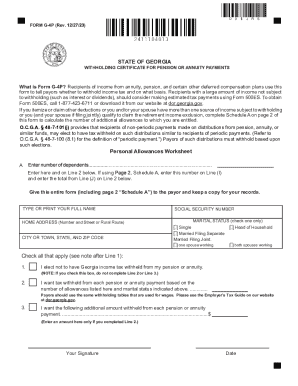
The Georgia State Withholding Form is a tax document used by retirees to specify the amount of state tax to be withheld from their monthly pension benefits.
pdfFiller scores top ratings on review platforms




Who needs Georgia State Withholding Form?
Explore how professionals across industries use pdfFiller.

Georgia State Withholding Form is needed by:
-
Retirees receiving pension benefits in Georgia
-
Individuals managing state tax deductions
-
Financial advisors assisting clients with tax forms
-
Human resources departments in Georgia employers
-
Tax preparers specializing in state income tax issues
Comprehensive Guide to Georgia State Withholding Form
What is the Georgia State Withholding Form?
The Georgia State Withholding Form serves a crucial role for retirees by specifying the amount of state tax withholding from their pension checks. This form requires key information such as the retiree's name, Social Security Number (SSN), address, and marital status, as well as the number of deductions applicable. This form is primarily designed for individuals receiving retirement benefits from state or local government plans.
Purpose and Benefits of the Georgia State Withholding Form
Retirees should specify state tax withholding for various reasons, including ensuring the appropriate amount is deducted to avoid tax penalties. By using the Georgia State Withholding Form, retirees can effectively plan their finances, aligning tax with their income from pensions. Timely submission of the form is vital, as delays could affect the amount withheld from upcoming pension checks.
Key Features of the Georgia State Withholding Form
The Georgia State Withholding Form includes essential fields such as:
-
Payee Name
-
SSN
-
Street Address
-
City
-
State
-
Zip Code
-
Daytime Phone
-
Home Phone
-
Cell Phone
-
Email
-
Marital Status
-
Number of Deductions
-
Amount for State Tax Deduction
pdfFiller ensures secure handling of data while providing a user-friendly interface to fill out this form online.
Who Needs the Georgia State Withholding Form?
This form is necessary for retirees who receive pension benefits. Important eligibility criteria include marital status and the number of deductions, which can influence overall tax liability. Situations that require this form could include starting retirement, changing the amount withheld, or when a retiree's tax situation changes.
How to Fill Out the Georgia State Withholding Form Online (Step-by-Step)
Completing the Georgia State Withholding Form through pdfFiller is straightforward. Follow these steps:
-
Access the document on pdfFiller's platform.
-
Enter your personal information in the specified fields.
-
Indicate your marital status and number of deductions.
-
Specify the amount you wish to have withheld for state tax.
-
Review all entered information for accuracy.
-
Sign the form electronically.
Accurate completion is crucial to prevent errors that could delay processing.
Submission Methods for the Georgia State Withholding Form
Completed forms must be submitted to the Finance Department of the Georgia Municipal Association. Submission can be done either digitally or via traditional mail. Make sure to submit by the 15th of the month to ensure changes take effect in the same month's pension check.
What Happens After You Submit the Georgia State Withholding Form?
After submission, the processing timeline can vary, but generally, retirees should anticipate a response within a specific timeframe. Tracking the status of your submission is possible through the appropriate channels provided by the Finance Department. Be aware of potential follow-up actions that may be required, especially if any issues arise.
Security and Compliance for the Georgia State Withholding Form
Data protection is paramount when handling the Georgia State Withholding Form. Compliance with privacy standards such as HIPAA and GDPR is ensured. pdfFiller employs robust security measures, including 256-bit encryption, to safeguard all sensitive information filled out on the form.
Enhancing Your Experience with pdfFiller
pdfFiller not only allows you to fill out the Georgia State Withholding Form but also provides features like editing and eSigning for a comprehensive document management experience. Users can benefit from customer service support for any inquiries that may arise during the completion process.
Sample of a Completed Georgia State Withholding Form
To assist in understanding the completion process, a visual example of a filled-out Georgia State Withholding Form can be invaluable. This example includes annotations that highlight key sections of the form, demonstrating how to accurately provide the necessary information.
How to fill out the Georgia State Withholding Form
-
1.Begin by accessing pdfFiller and searching for the Georgia State Withholding Form in the form library.
-
2.Open the form to view its fillable fields, and familiarize yourself with the layout of the document.
-
3.Before you start filling out the form, gather necessary personal information such as your name, Social Security Number (SSN), and contact details like address and phone numbers.
-
4.Locate the 'Payee Name' field at the top of the form and type in your full name as it appears on official documents.
-
5.Enter your SSN in the designated field, ensuring it is accurate to avoid processing issues.
-
6.Fill in your street address, city, state, and zip code as required in the respective fields.
-
7.Provide your daytime phone number, home phone number, and cell phone number in the appropriate sections.
-
8.In the 'E-mail' field, enter your email address to receive confirmations or updates related to your submission.
-
9.Select your marital status from the provided options, ensuring you check the correct box.
-
10.Indicate the number of deductions you qualify for, filling in the appropriate number in the relevant field.
-
11.Next, specify the amount you would like to have deducted for state tax in the 'Amount' field.
-
12.Once you have filled in all required information, take a moment to review the form thoroughly for accuracy and completeness.
-
13.When you are satisfied that all fields are correctly filled, finalize the form by adding your signature in the designated area.
-
14.After signing, save the completed form to your device as a PDF document.
-
15.You can also download or share the form directly through pdfFiller using the appropriate options available.
-
16.Ensure that you submit the form to the Finance Department of the Georgia Municipal Association by the 15th of the month for the changes to take effect.

Who needs to fill out the Georgia State Withholding Form?
The Georgia State Withholding Form is necessary for retirees who receive pension benefits in Georgia and wish to specify how much state tax should be withheld from their payments.
What is the deadline for submitting this form?
The completed Georgia State Withholding Form must be submitted to the Finance Department of the Georgia Municipal Association by the 15th of each month to ensure the changes take effect for that month.
How do I submit the Georgia State Withholding Form?
Once you have completed the form, submit it to the Finance Department of the Georgia Municipal Association either by mail or electronically, depending on the submission options they provide.
What information do I need before I start filling out the form?
Before filling out the Georgia State Withholding Form, gather your personal information including your name, SSN, address, contact numbers, marital status, and the amount you wish to have withheld.
What common mistakes should I avoid when completing this form?
Common mistakes include not checking for accuracy in your SSN, failing to sign the form, and not submitting it by the deadline. Always review for completeness.
Are there any fees associated with filing this form?
Typically, there are no fees for filling out the Georgia State Withholding Form itself, but it's important to check for any potential fees from the submission method you choose.
How long does it take for the changes to take effect?
Changes made by submitting the Georgia State Withholding Form typically take effect in the following month if submitted by the 15th of the current month.
Related Forms






Get the latest insights from our blog


If you believe that this page should be taken down, please follow our DMCA take down process
here
.
This form may include fields for payment information. Data entered in these fields is not covered by PCI DSS compliance.